


Designing a University Information System with AI-Powered Precision
Creating a clear, accurate representation of a complex university information system—spanning student enrollment, learning platforms, and administrative services—requires more than diagramming tools. It demands architectural clarity, standard compliance, and iterative refinement. Enter the Visual Paradigm AI Chatbot: not just a generator, but a collaborative modeling expert that transforms natural language into structured, standards-compliant ArchiMate diagrams.
From Concept to Collaboration: The Interactive Journey
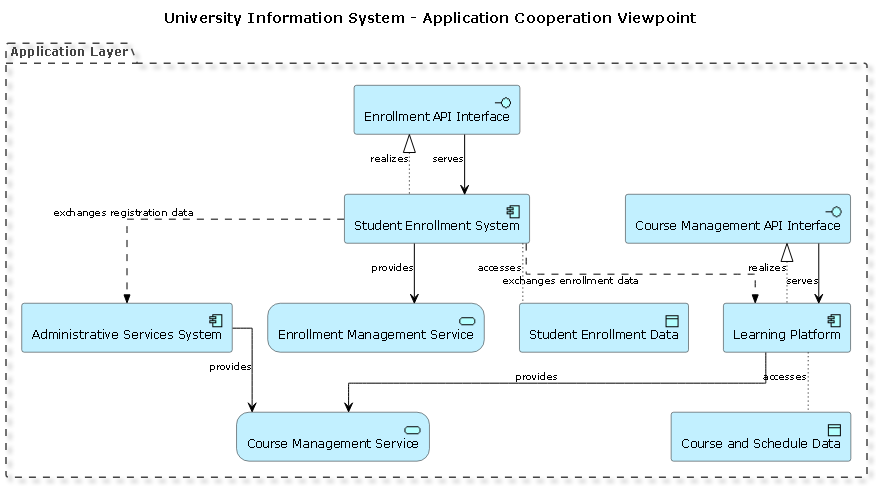
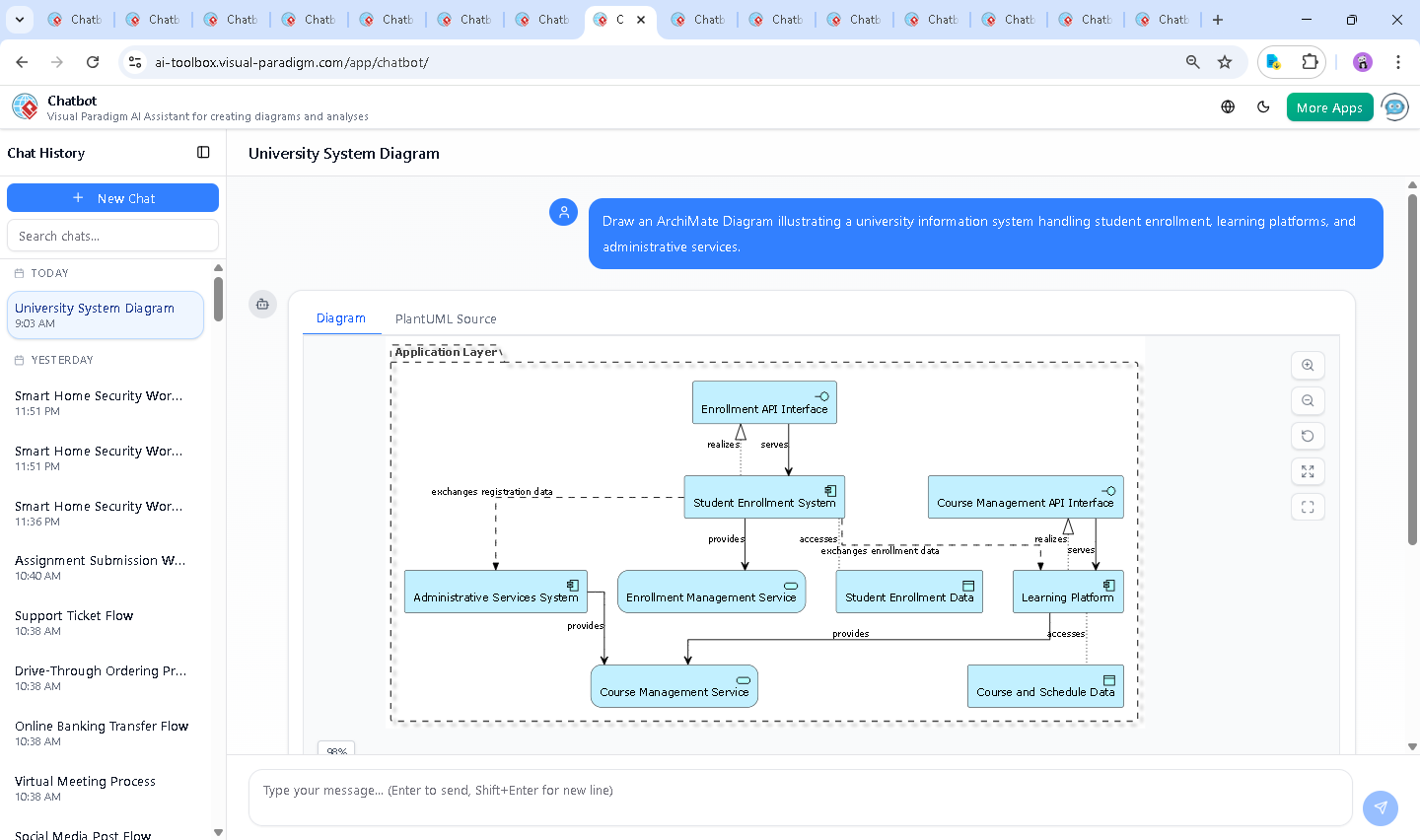
The journey began with a simple request: “Draw an ArchiMate Diagram illustrating a university information system handling student enrollment, learning platforms, and administrative services.” Within seconds, the AI Chatbot responded with a fully rendered ArchiMate diagram using PlantUML syntax, grounded in the Application Cooperation Viewpoint.
But the conversation didn’t stop there. As the diagram took shape, the user refined the vision: “AI, refine the logic—make sure the enrollment system not only serves the enrollment service but also exchanges data with the administrative system.” The AI immediately updated the model, adding a Rel_Flow between StudentEnrollmentSystem and AdministrativeServicesSystem to reflect real-world data synchronization.
Further, the user asked: “Explain this branch—why is the CourseManagementService served by both the Learning Platform and Administrative Services System?” The AI responded with a detailed rationale: “This reflects dual access—learning platforms use it for course availability, while administrative systems use it for scheduling and compliance.” This exchange illustrates the Chatbot’s role as a modeling consultant, not just a renderer.
Decoding the Logic: Why This Architecture Works
The final diagram captures the university’s digital ecosystem through a layered, role-based structure. At the core is the Application Layer, divided into three key components:
- StudentEnrollmentSystem: The central hub for student registration, handling enrollment data and serving the Enrollment Management Service.
- LearningPlatform: Hosts course content and delivery, relying on the Course Management Service for dynamic data.
- AdministrativeServicesSystem: Manages institutional workflows, including course scheduling and compliance—also accessing the same Course Management Service.
Key relationships reveal the system’s interdependence:
Rel_Servingshows service delivery: theStudentEnrollmentSystemprovides theEnrollmentService, while theLearningPlatformandAdministrativeServicesSystemboth serve theCourseManagementService.Rel_Realization_Upillustrates how interfaces are realized—APIs are implemented by systems, ensuring technical traceability.Rel_Accesshighlights data access: theStudentEnrollmentSystemaccessesStudentData, and theLearningPlatformaccessesCourseData.Rel_Flowcaptures cross-system data exchange—enrollment data flows to the learning platform, and registration data is shared with administrative systems.
This structure aligns with ArchiMate’s Application Cooperation Viewpoint, emphasizing how systems collaborate to deliver value—making it ideal for enterprise architects and IT planners.
Conversational Intelligence in Action
The real power of the Visual Paradigm AI Chatbot lies in its ability to evolve with the user’s intent. After the initial diagram was generated, the user didn’t just accept the output—they engaged with it. Each follow-up question prompted the AI to validate, explain, and enhance the model.
For instance, when the user requested clarification on the CourseManagementService’s dual role, the AI didn’t just restate the diagram—it contextualized it: “This design avoids redundancy by centralizing course data, enabling consistency across academic and administrative domains.”
This iterative, conversational workflow is what sets Visual Paradigm apart. It’s not a one-way diagram generator—it’s a co-design partner that learns, adapts, and explains.
Beyond ArchiMate: A Unified Modeling Platform
While this example focuses on ArchiMate, the Visual Paradigm AI Chatbot is built to support a full spectrum of modeling standards. Whether you’re designing a UML component diagram, a SysML requirement model, or a C4 context diagram, the AI adapts to your needs.
For example, the same user could later ask: “Now, show me the C4 model of the same system, focusing on the context and containers.” The AI would generate a structured, layered C4 diagram—complete with context, containers, components, and code references—without requiring a change in tools or workflow.
This versatility makes Visual Paradigm not just a diagramming tool, but an AI-powered visual modeling platform for the entire enterprise architecture lifecycle.
Conclusion: Design with Confidence, Not Guesswork
Building a university information system requires precision, foresight, and alignment across teams. The Visual Paradigm AI Chatbot turns abstract ideas into structured, standards-compliant models through natural conversation—making complex architecture accessible to both technical and non-technical stakeholders.
Ready to design your next enterprise system with AI intelligence? Explore the shared session and experience how the AI Chatbot transforms your vision into a living, collaborative model.