


Designing a Seamless Customer Support System with AI-Powered Precision
Building a cohesive customer support system that integrates ticketing, knowledge bases, communication channels, and reporting tools is no small task. The challenge lies not just in connecting components, but in modeling how they interact—what data flows where, who serves whom, and how insights drive improvement. This is where the Visual Paradigm AI Chatbot steps in, not as a diagram generator, but as a collaborative modeling expert.
From Idea to Architecture: A Collaborative Design Journey
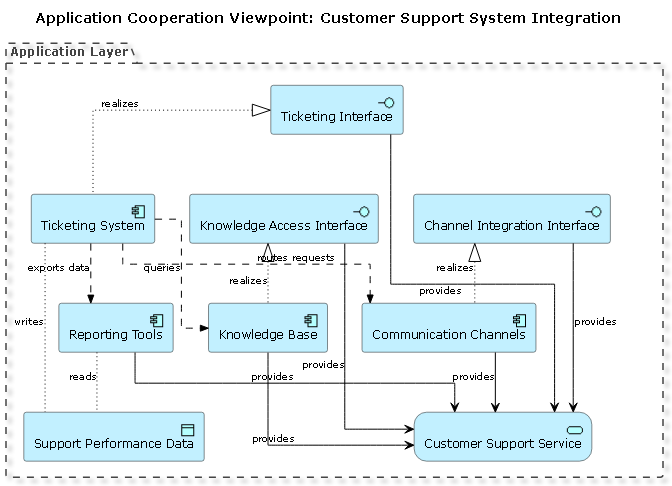
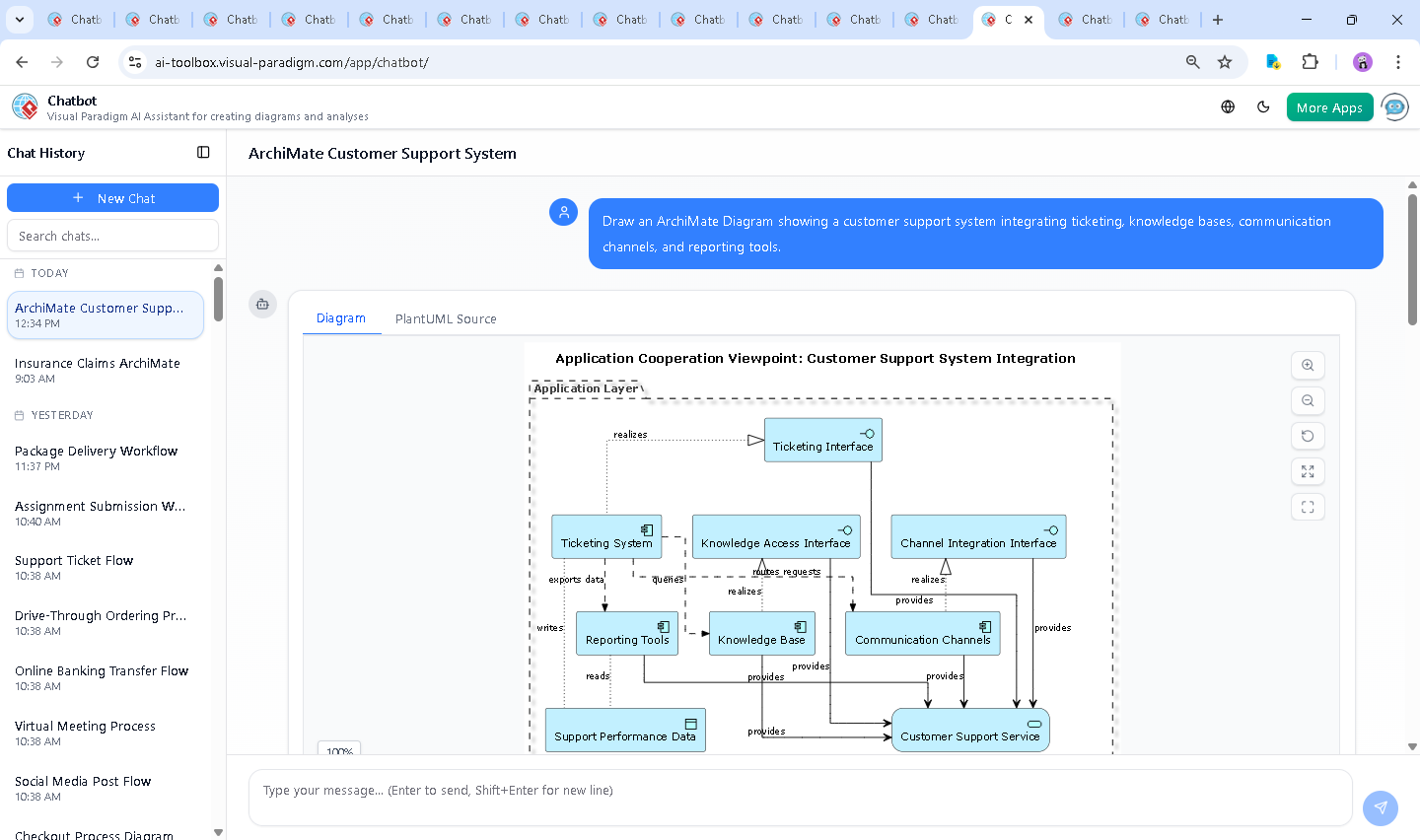
The journey began with a simple prompt: “Draw an ArchiMate Diagram showing a customer support system integrating ticketing, knowledge bases, communication channels, and reporting tools.” Within seconds, the AI Chatbot delivered a fully structured ArchiMate diagram using PlantUML syntax, grounded in the Application Cooperation Viewpoint. The initial output wasn’t just a visual—it was a living model with clear relationships, roles, and data flows.
But the conversation didn’t stop there. When the user asked, “Can you explain how the Customer Support Service uses the data from the Reporting Tools?”, the AI didn’t just repeat the diagram. It interpreted the query as a request for operational insight, delivering a layered explanation that mapped technical relationships to business outcomes.
Each follow-up—like requesting clarification on data access or service realization—was met with precise, context-aware responses. The AI didn’t just answer; it deepened the design logic, revealing how feedback loops between systems drive continuous improvement.
Decoding the Architecture: The Logic Behind the Diagram
The diagram models a modern, integrated support ecosystem through four core layers of application components, all connected via defined relationships:
1. Core Application Components
- Ticketing System: The central hub for handling incoming support requests.
- Knowledge Base: A repository of articles and solutions that agents use to resolve tickets.
- Communication Channels: Email, chat, social media—multiple entry points for customer requests.
- Reporting Tools: Systems that collect and analyze support performance data.
2. The Central Service: Customer Support Service
This component acts as the orchestrator. It provides support functions to agents and systems, and consumes data from reporting tools to inform decisions. It’s the intelligence layer that translates raw data into operational insight.
3. Key Relationships and Flows
- Flow: Ticketing → Knowledge Base – The system queries the knowledge base for relevant solutions when a ticket is created.
- Flow: Ticketing → Communication Channels – Requests are routed through the appropriate channel (e.g., chatbot to live chat).
- Flow: Ticketing → Reporting Tools – Data on ticket volume, resolution time, and agent performance is exported for analysis.
- Serving: Knowledge Base → Support Service – The knowledge base enables the service by providing content.
- Realization: Ticketing System → Ticketing Interface – The interface is the user-facing layer of the ticketing system.
- Access: Ticketing System → Report Data – The system writes data into a shared data object.
- Access: Reporting Tools → Report Data – The reporting tools read and analyze the data.
These relationships are not arbitrary. They reflect real-world dynamics: data flows from operational systems into analytical tools, and insights flow back into service delivery—creating a closed-loop improvement cycle.
Conversational Intelligence: Where AI Meets Design Expertise
What makes this interaction exceptional is the AI’s ability to function as a modeling consultant. When the user asked for an explanation of the reporting data flow, the AI didn’t just describe it—it contextualized it within business impact:
- Performance monitoring via KPIs
- Insight generation for proactive issue resolution
- Feedback loops to improve knowledge articles and automation rules
- Strategic planning based on long-term trends
Each response was tailored, precise, and aligned with enterprise architecture best practices. The AI didn’t just draw a diagram—it built a narrative of how systems work together.
More Than ArchiMate: A Full-Spectrum Modeling Platform
The Visual Paradigm AI Chatbot isn’t limited to ArchiMate. It supports a full suite of modeling standards, including UML, SysML, C4 Model, and Mind Maps. Whether you’re designing software architecture, business processes, or system behavior, the AI adapts to your needs.
For example, the same chatbot could:
- Generate a UML use case diagram for a new support feature
- Model system behavior using SysML internal blocks
- Visualize software architecture with C4 Model’s context and container views
- Map out a customer journey using mind maps
This versatility means teams can use one platform across the entire design lifecycle—no switching between tools, no context loss.
Conclusion: Design with Confidence, Powered by AI
Creating a robust customer support system requires more than just connecting tools—it demands a clear, shared understanding of how systems interact, how data flows, and how decisions are made. The Visual Paradigm AI Chatbot turns this challenge into a collaborative conversation, transforming abstract ideas into precise, actionable models.
Whether you’re an architect, developer, or product manager, the ability to refine your design through natural language queries—like “Explain this branch” or “Refine the logic”—means you’re always in control, always informed, and always ahead.
Explore the full diagram and continue the conversation at this shared session.