


Designing a Ride Booking Workflow with AI-Powered Precision
Creating a clear, accurate sequence diagram for a ride-sharing application involves more than just mapping interactions—it demands a deep understanding of real-time system behavior, dynamic pricing logic, and user-state transitions. The challenge lies in translating complex, multi-step processes into a visual format that’s both technically precise and accessible to stakeholders across engineering, product, and business teams.
With the Visual Paradigm AI Chatbot, this challenge becomes a collaborative journey. Instead of starting from scratch or wrestling with syntax, users can describe their intent in natural language—and watch the system generate a fully structured, standards-compliant diagram. The AI doesn’t just produce a diagram; it acts as a modeling partner, refining logic, explaining components, and adapting to follow-up questions with expert-level insight.
From Idea to Diagram: A Conversational Design Journey
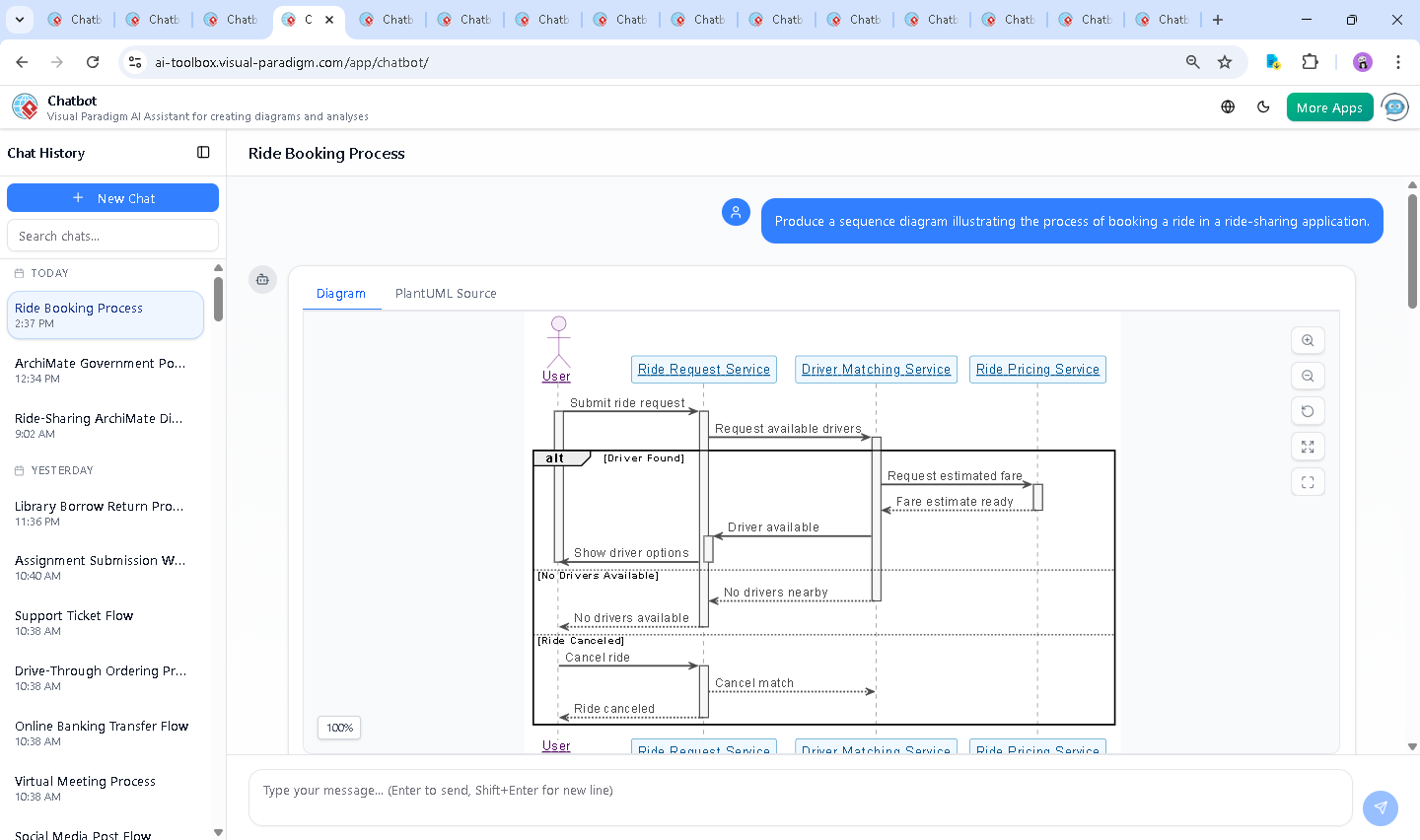
The process began with a simple request: “Produce a sequence diagram illustrating the process of booking a ride in a ride-sharing application.” Within seconds, the Visual Paradigm AI Chatbot delivered a fully rendered UML sequence diagram using PlantUML syntax, complete with lifelines, activation bars, and conditional branches.
But the real value emerged in the conversation that followed. When the user asked, “Can you explain how the ride pricing service calculates the estimated fare?”, the AI didn’t just provide a static definition—it unpacked the entire logic engine behind dynamic pricing, detailing:
- Base fare and distance-based cost
- Time-in-motion pricing
- Surge pricing during high-demand periods
- Impact of traffic and driver proximity
- Optional add-ons like tolls or night fees
Each explanation was grounded in real-world system behavior, and the AI offered to extend the model—proposing a visual representation of the pricing logic or a SWOT analysis. This level of responsiveness isn’t just helpful; it’s transformative. The AI isn’t a passive tool—it’s a collaborative expert, refining the design in real time based on user feedback.
Decoding the Sequence Diagram: Logic and Intent
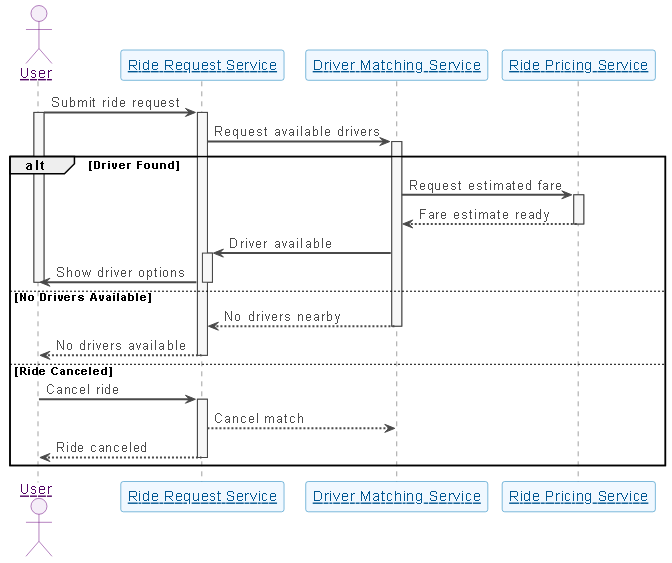
The generated sequence diagram captures the full lifecycle of a ride booking, with clear emphasis on system responsiveness, error handling, and user control. Here’s how the key elements align with real-world logic:
1. User Initiation
The user triggers the process by submitting a ride request. This is the starting point of the workflow and is represented with a clear arrow from the User to the Ride Request Service.
2. Driver Matching and Conditional Logic
The Ride Request Service forwards the request to the Driver Matching Service. Here, the diagram uses an alt block to model three distinct paths:
- Driver Found: The system successfully identifies nearby drivers. The Ride Pricing Service is then queried for fare estimation.
- No Drivers Available: The system informs the user of the absence of nearby drivers, preventing false expectations.
- Ride Canceled: A user-initiated cancellation is handled gracefully, with the system notifying both the matching service and the user.
This use of alt ensures the diagram reflects real-world uncertainty and user control—critical for system design clarity.
3. Dynamic Fare Estimation
When a driver is found, the Driver Matching Service requests a fare estimate from the Ride Pricing Service. The response is returned with the full breakdown—base fare, distance, time, and surge multiplier—before being relayed back to the user.
The diagram uses activation bars to show when each service is actively processing a request, reinforcing the temporal nature of interactions. This visual cue helps developers and architects understand system load and latency points.
4. User Feedback and Finalization
Once the fare is calculated, the Ride Request Service displays options to the user. The diagram ends with the user receiving feedback—either a confirmed ride or a notification of failure—ensuring a complete, closed-loop workflow.
Conversational Intelligence in Action
What makes this workflow truly exceptional is the depth of interaction. The AI didn’t just generate a diagram—it answered follow-up questions with technical precision, explaining how real-time data feeds into pricing decisions. This isn’t a one-way output; it’s a dialogue.
For example, when asked to clarify the pricing logic, the AI didn’t just list factors—it contextualized them: surge pricing as a demand-balancing mechanism, waiting time costs as a driver incentive, and transparency as a trust-builder. This kind of insight turns a diagram into a design narrative.
The Visual Paradigm AI Chatbot isn’t limited to sequence diagrams. It supports UML, ArchiMate, SysML, and C4 Model, making it a complete suite for enterprise architects, software designers, and business analysts. Whether you’re modeling a microservices architecture, a business process, or a system behavior, the AI adapts to your standard and your intent.
Why Visual Paradigm Stands Out
While many tools can generate diagrams from text, few do so with the depth of understanding and flexibility offered by Visual Paradigm. The AI Chatbot doesn’t just interpret keywords—it understands context, anticipates follow-up needs, and maintains consistency across iterations.
Whether you’re designing a ride-sharing system, a banking transaction flow, or a cloud-native service architecture, the platform’s ability to handle multiple modeling standards in a single conversational environment is unmatched. The AI doesn’t just generate diagrams—it helps you think through the design.
Start Building Smarter with AI-Powered Modeling
Ready to turn your ideas into precise, collaborative models? Try the Visual Paradigm AI Chatbot today and experience the future of visual design—where every interaction deepens your understanding, and every diagram is a step toward better architecture.
Explore the full shared session and see how the ride booking process evolved through conversation.