


Reimagining Password Reset: A Conversational Journey with Visual Paradigm’s AI Chatbot
Resetting a forgotten password is a common yet critical user journey—balancing security, usability, and reliability. Traditional modeling approaches often treat this as a static flow, but modern systems demand dynamic, intelligent design. That’s where the Visual Paradigm AI Chatbot steps in—not just as a diagram generator, but as a collaborative modeling partner.
When a user requested a sequence diagram for a password reset flow, the AI didn’t just render a diagram. It began a conversation—understanding intent, anticipating edge cases, and refining the logic in real time. This isn’t automation. It’s intelligent co-design.
From Request to Refinement: The Interactive Design Dialogue
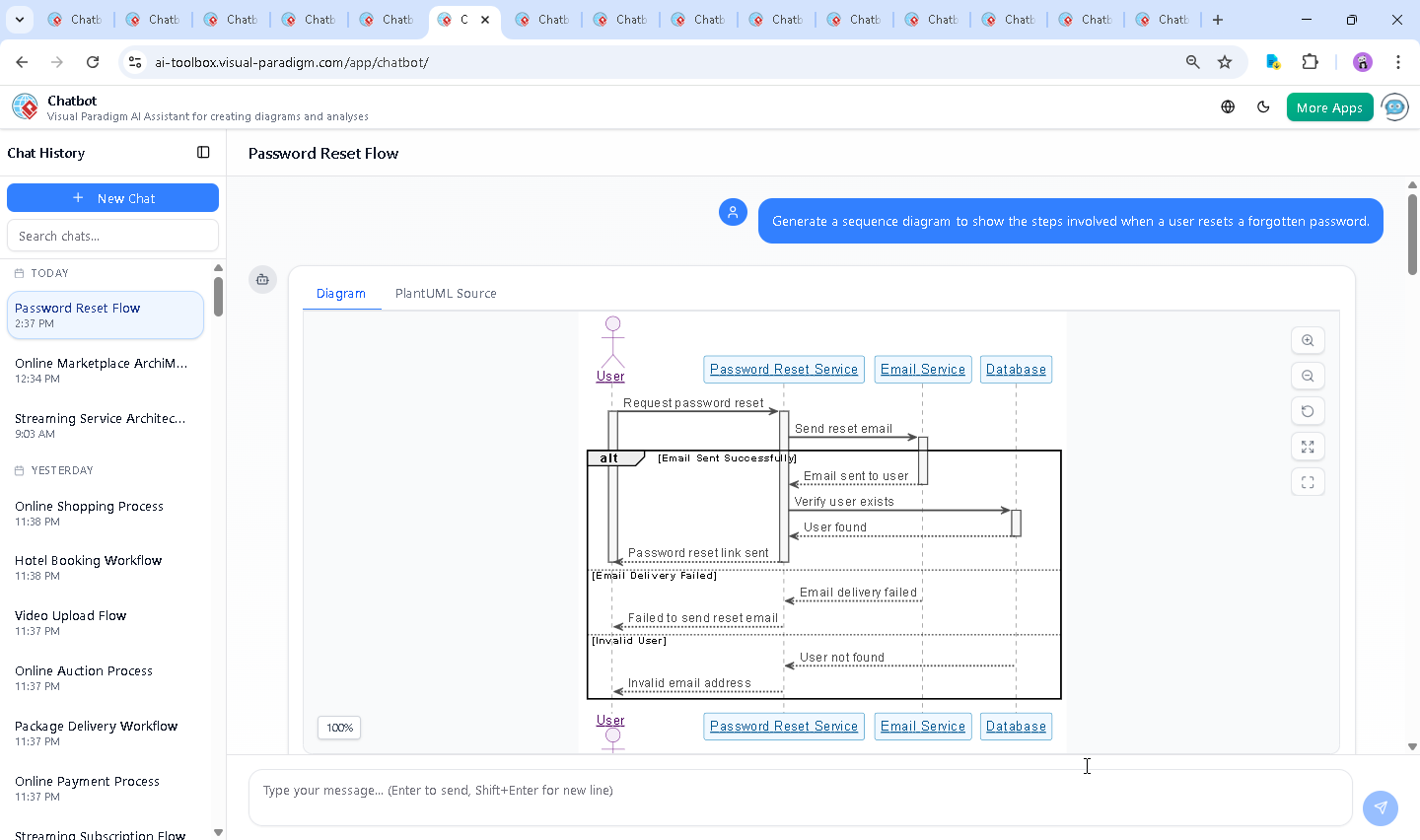
The journey started with a simple prompt: “Generate a sequence diagram to show the steps involved when a user resets a forgotten password.” Within seconds, the AI delivered a fully rendered SequenceDiagram using PlantUML syntax, complete with clear lifelines, conditional branches, and visual styling that aligns with enterprise standards.
But the real value emerged in the follow-up. The user asked: “Is there a mechanism to prevent multiple password reset requests from the same email?”
Instead of a generic answer, the AI responded with a layered technical breakdown—covering token expiration, rate limiting, one-time use tokens, and account lockout strategies—each explained with real-world context and security rationale. It didn’t stop there. The AI offered to extend the diagram to visualize these controls, demonstrating its ability to evolve a model through dialogue.
This wasn’t a one-way output. It was a collaborative design session—where the AI acted as a modeling expert, adapting to the user’s needs with precision and depth.
Decoding the Sequence Diagram: Logic & Design Intent
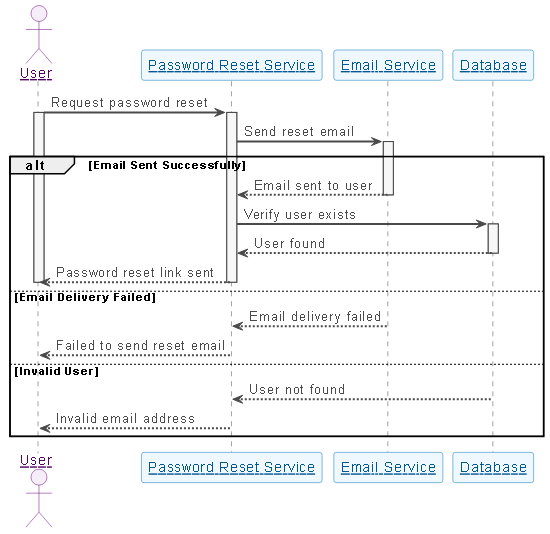
The final sequence diagram captures the full lifecycle of a password reset request with clarity and purpose. Here’s how each component contributes to a secure, scalable flow:
1. Actor: User – The Initiator
The user triggers the process by requesting a password reset. This is the starting point of the interaction, represented as a clear lifeline with a labeled message.
2. Participant: Password Reset Service – The Orchestrator
This component receives the request, validates the user’s identity, and manages the reset workflow. It acts as the central coordinator, delegating tasks to other services.
3. Participant: Email Service – The Communication Layer
Responsible for sending the reset link. The AI included an alt block to handle two outcomes: successful delivery and failure—ensuring the system accounts for real-world variability.
4. Participant: Database – The Authority
Verifies whether the user exists. The diagram shows a clear DB --> PRS: User found response, but also handles the else Invalid User branch—critical for security and user feedback.
5. Conditional Logic: The Heart of the Flow
The alt blocks are not just decorative—they reflect operational reality:
- Success Path: Email sent → user verified → reset link delivered.
- Failure Path: Email delivery fails → user notified.
- Invalid User: User not found → error returned.
The use of activate and deactivate markers ensures lifelines are visually accurate, showing active processing periods. The skinparam styling enhances readability with consistent colors, fonts, and borders—ideal for documentation and stakeholder reviews.
Conversational Intelligence in Action
What makes this interaction exceptional is how the AI didn’t just generate a diagram—it enhanced it through dialogue. When the user questioned the security of repeated requests, the AI didn’t default to a simple yes/no. Instead, it:
- Explained the technical mechanisms behind rate limiting and token expiration.
- Provided a comparative table of security practices.
- Offered to extend the diagram to show these controls in action.
This level of responsiveness turns the AI into a design consultant, not just a tool. It anticipates needs, clarifies trade-offs, and guides users toward robust architecture.
Beyond Sequence Diagrams: A Unified Modeling Platform
While this example focuses on a SequenceDiagram, the Visual Paradigm AI Chatbot is built to support a full spectrum of modeling standards:
- UML (Class, Use Case, Activity, Component Diagrams)
- ArchiMate (Enterprise Architecture, Business & IT Alignment)
- SysML (Systems Engineering, Requirements & Behavior Modeling)
- C4 Model (Software Architecture, Context & Containers)
Whether you’re modeling a microservices architecture, designing a business process, or defining system behavior, the AI Chatbot adapts to your domain—understanding context, suggesting best practices, and generating accurate diagrams in seconds.
Conclusion: Design with Intelligence, Not Just Tools
The password reset flow is more than a technical sequence—it’s a security and user experience cornerstone. By leveraging the Visual Paradigm AI Chatbot, teams don’t just create diagrams. They co-design with an intelligent partner that understands the why behind every line, branch, and condition.
Whether you’re a developer, architect, or product manager, the platform empowers you to think in models, not just syntax. The result? Faster iteration, stronger designs, and a shared understanding across teams.
Ready to turn your next idea into a precise, intelligent model? Explore the live session and experience the future of visual modeling.