


Designing the User Photo Upload Flow with AI-Powered Precision
Creating a clear, accurate sequence diagram for a user uploading a photo to a social media platform involves balancing technical accuracy with real-world edge cases. The challenge lies not just in modeling the core flow, but in anticipating failures—like oversized files or unsupported formats—and designing a system that responds intelligently. This is where the Visual Paradigm AI Chatbot becomes more than a diagram generator; it acts as a collaborative modeling consultant, guiding users through design decisions with contextual intelligence.
From Prompt to Precision: A Collaborative Design Journey
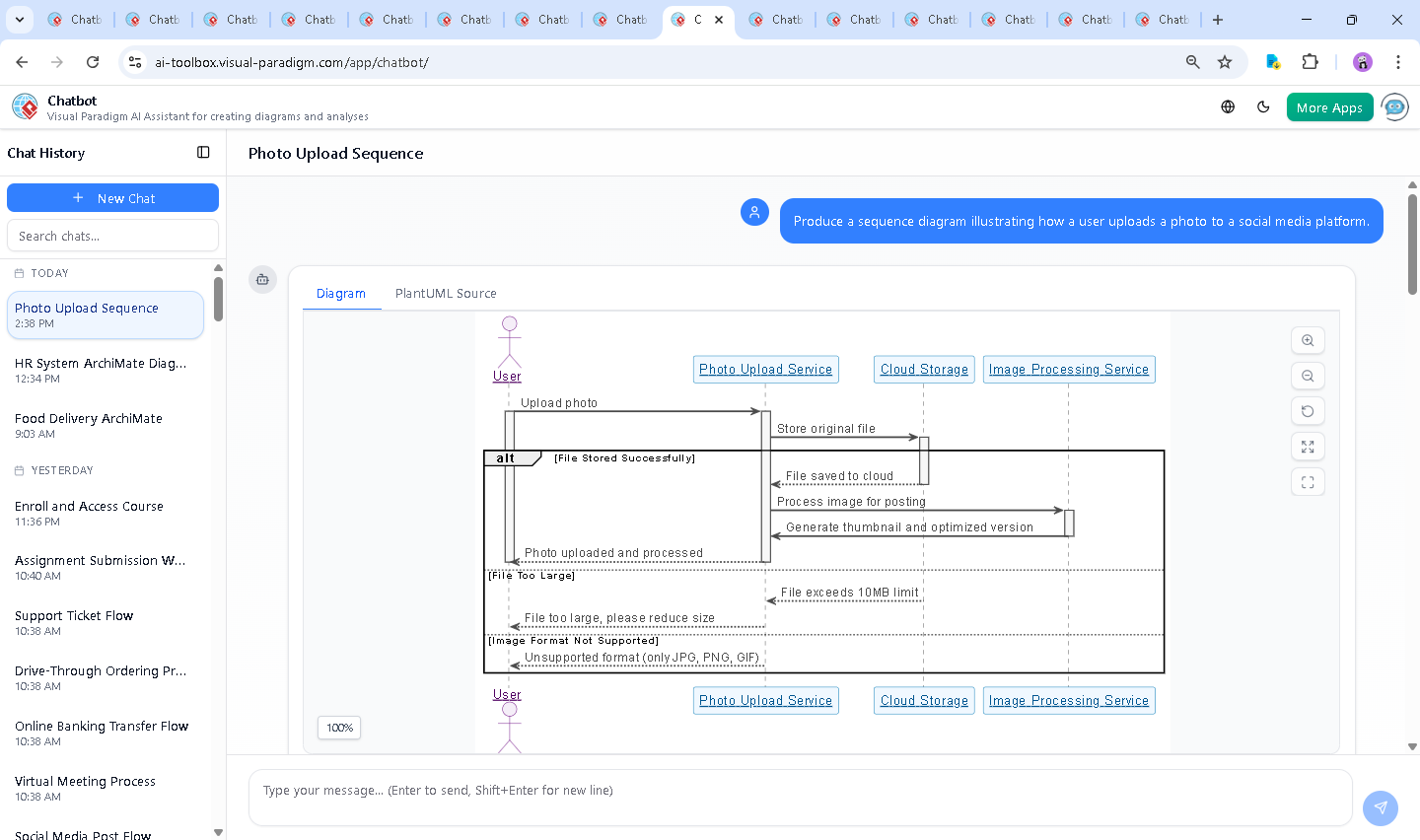
The journey began with a simple request: “Produce a sequence diagram illustrating how a user uploads a photo to a social media platform.” The AI Chatbot responded immediately with a fully rendered PlantUML-based sequence diagram, already incorporating key architectural components: the User, Photo Upload Service, Cloud Storage, and Image Processing Service.
But the real value emerged in the conversation. After the initial diagram was generated, the user asked: “Explain this diagram.” Instead of a static explanation, the AI delivered a structured breakdown—highlighting the flow, error handling, and design principles—demonstrating its ability to function as a technical educator and design peer.
When the user requested clarification on specific branches, such as “Explain this branch”, the AI didn’t just restate the diagram. It dissected the alt block logic, explaining how the system handles file size and format constraints with targeted feedback, ensuring the user understood not just what the diagram shows, but why those branches exist.
This iterative, conversational style is central to Visual Paradigm’s AI-powered visual modeling platform: it’s not about generating diagrams—it’s about co-creating them through intelligent dialogue.
Decoding the Logic: Why This Flow Works
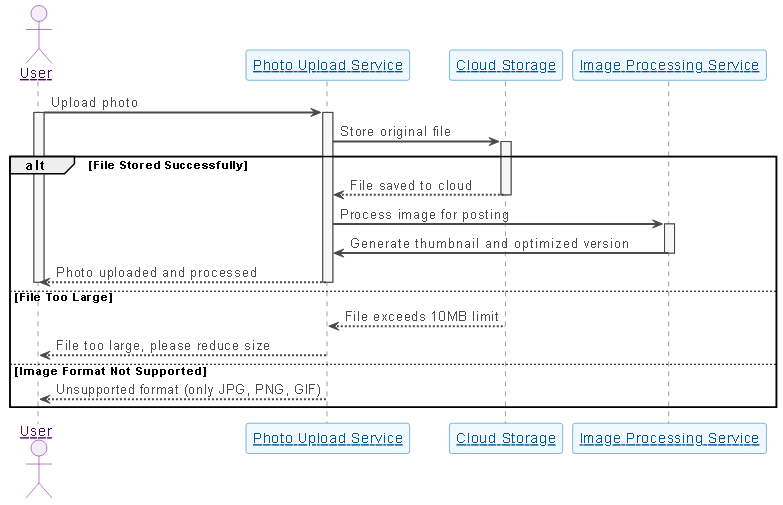
The sequence diagram is built on a foundation of modularity, resilience, and user-centric design. Here’s a detailed breakdown of the logic:
1. User Initiates Upload
The User triggers the process by selecting a photo. This action sends a message to the Photo Upload Service (PUS), which becomes the orchestrator of the entire flow.
2. File Is Sent to Cloud Storage
PUS forwards the original file to Cloud Storage (CS). This separation ensures that the storage layer is decoupled from the upload logic, enabling scalability and redundancy.
3. Success Path: File Stored, Then Processed
If the file is successfully stored, CS confirms back to PUS. PUS then sends the file to the Image Processing Service (IPS), which generates a thumbnail and optimized versions for web delivery—critical for fast loading and responsive UIs.
4. Error Handling: Proactive Feedback
The diagram includes two alt branches to handle common failure modes:
- File Too Large: If the file exceeds 10MB, CS rejects it. PUS informs the user to reduce size—preventing failed uploads and improving UX.
- Unsupported Format: If the file is not JPG, PNG, or GIF, the system blocks it early and provides a clear error message.
These branches aren’t just decorative—they reflect real-world constraints and demonstrate how the system anticipates user mistakes and guides them toward success.
5. Final Confirmation
On success, PUS sends a confirmation back to the user, completing the cycle with a clean, actionable result.
Conversational Intelligence in Action
What makes this process exceptional is the AI’s ability to respond to follow-up queries with expert-level insight. When the user asked for an explanation, the AI didn’t just list steps—it contextualized them, linking each message to architectural best practices like modularity, scalability, and user experience.
For example, the AI highlighted how the separation of storage and processing services enables independent scaling—critical for platforms handling millions of uploads. It also emphasized the importance of early validation, reducing server load and improving response times.
These insights weren’t pre-scripted. They emerged dynamically from the conversation, proving the AI Chatbot isn’t just a tool—it’s a modeling partner with deep domain knowledge.
Beyond Sequence Diagrams: A Unified Modeling Platform
While this example focused on a Sequence Diagram, the Visual Paradigm AI Chatbot is not limited to one standard. It seamlessly supports a full suite of modeling languages, including:
- UML (for software design and system behavior)
- ArchiMate (for enterprise architecture and business-IT alignment)
- SysML (for systems engineering and complex system modeling)
- C4 Model (for software architecture visualization at multiple levels)
- Mind Maps (for brainstorming)
This versatility means users can switch between modeling standards within the same session. Whether you’re designing a microservice interaction, mapping enterprise capabilities, or visualizing a user journey, the AI Chatbot adapts to your needs—always maintaining consistency, clarity, and precision.
Conclusion: A Smarter Way to Model
Creating a high-fidelity sequence diagram for a photo upload process isn’t just about drawing lines and boxes. It’s about understanding system behavior, handling edge cases, and communicating design intent clearly. The Visual Paradigm AI Chatbot transforms this process into a dynamic, conversational experience—where every question leads to deeper insight, and every refinement strengthens the model.
Whether you’re a developer, architect, or product designer, the platform empowers you to model faster, think smarter, and deliver better solutions—powered by AI, guided by expertise.
Ready to build your next diagram? Try the shared session and experience the future of visual modeling.