


Modeling API Workflows with AI: A Real-World Sequence Diagram for Payment Processing
Designing a secure, scalable API flow is more than just drawing lines between components—it’s about capturing the logic, timing, and conditional behavior that define how systems interact. In today’s distributed architectures, even a simple API request involves multiple layers: authentication, caching, data retrieval, and error handling. The challenge? Translating these complex interactions into a clear, precise visual model—without getting lost in the details.
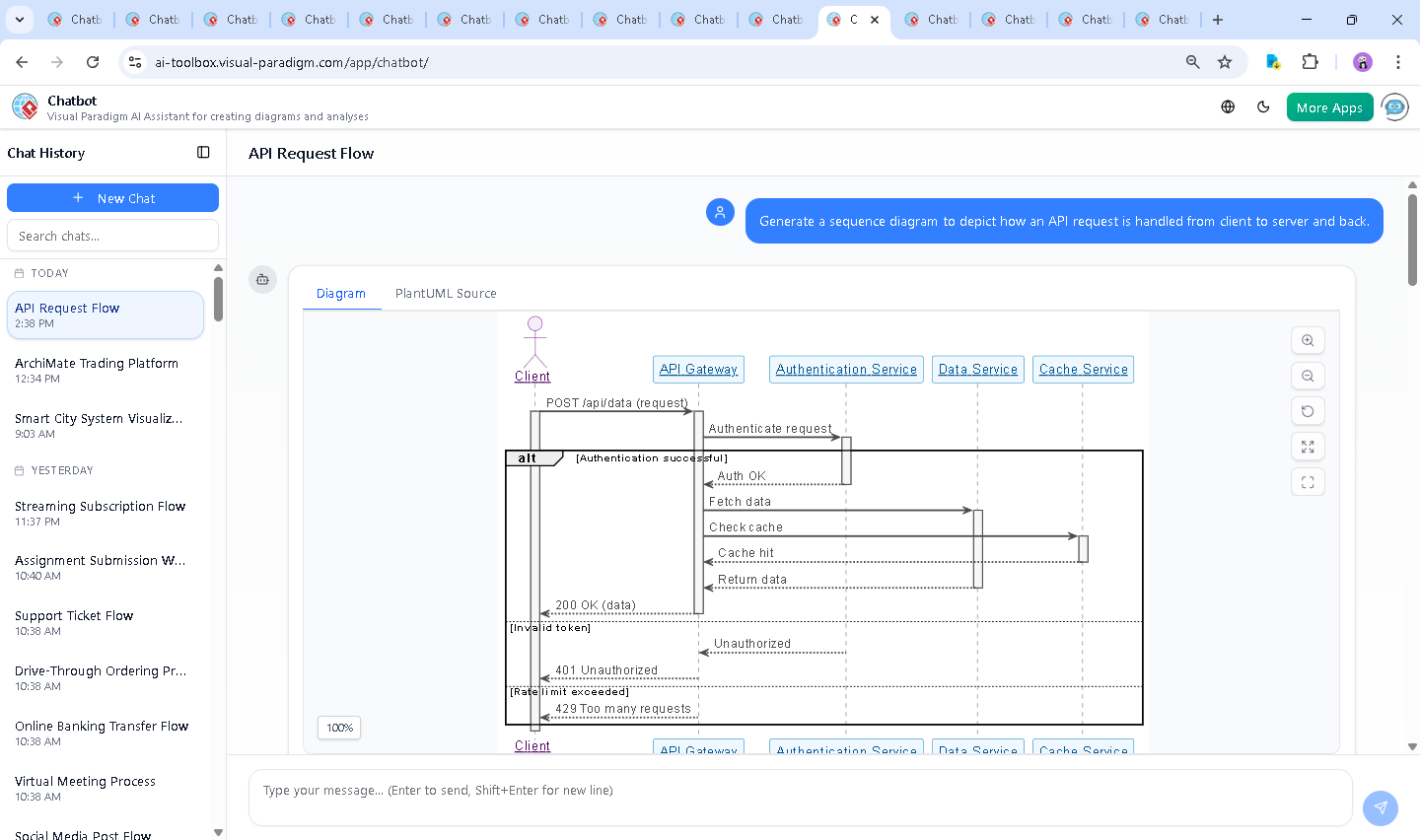
Enter the Visual Paradigm AI Chatbot. This isn’t just a diagram generator. It’s a conversational design partner that understands the intent behind your request and evolves the model through natural dialogue. When you asked to “Generate a sequence diagram to depict how an API request is handled from client to server and back,” the AI didn’t just render a static diagram. It began a collaborative journey—one that refined logic, clarified intent, and built a production-ready model step by step.
From Prompt to Precision: The Interactive Journey of Model Creation
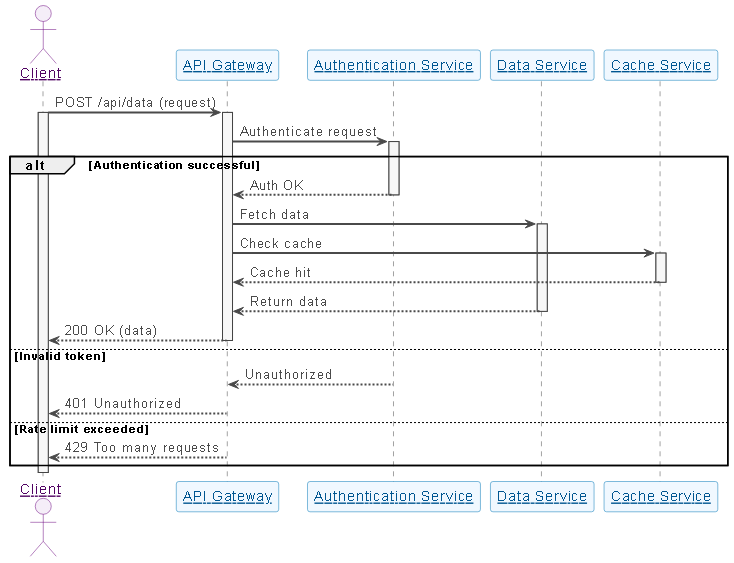
The conversation began with a simple, high-level request. But the real value emerged through iterative refinement. The AI first delivered a fully functional sequence diagram using PlantUML syntax, complete with:
- Real-world participants: Client, API Gateway, Authentication Service, Data Service, Cache Service
- Proper message flow with activation bars
- Conditional logic via
altblocks for success, unauthorized, and rate-limited scenarios - Visual styling optimized for clarity and professionalism
When you followed up with “Explain this diagram,” the AI didn’t just restate the content—it transformed the diagram into a teaching tool. It broke down each component, explained the purpose of each interaction, and highlighted design decisions like:
- Why the API Gateway acts as a central orchestrator
- How caching reduces latency and database load
- The importance of handling error cases gracefully
This wasn’t a one-way explanation. The AI responded to your curiosity with structured insights, showing how each element contributes to a robust, real-world API system. The conversation didn’t end there. You could have asked to “refine the logic,” or “add HTTPS encryption,” and the AI would have adapted—just as it would with any other modeling standard.
Decoding the Logic: Why This Sequence Diagram Works
Let’s walk through the core logic of the generated sequence diagram and the reasoning behind each design choice:
1. Client Initiation
The client sends a POST /api/data request to the API Gateway. This is the starting point of the workflow, representing a real user action—like submitting a payment form or retrieving transaction history.
2. Gateway as the Entry Point
The API Gateway acts as the first line of defense and routing layer. It’s responsible for validating the request format, managing load, and forwarding to downstream services. This is a common pattern in microservices and cloud-native systems.
3. Authentication: Security First
The gateway forwards the request to the Authentication Service to verify the user’s identity. This step ensures only authorized users can access protected data. The alt block captures the two main outcomes:
- Success: Token is valid → proceed to data retrieval
- Failure: Invalid or missing token → return
401 Unauthorized
4. Caching for Performance
Even if authentication passes, the gateway checks the Cache Service before hitting the database. A Cache hit means the data is already available—no need to query the Data Service. This reduces latency and database load, a critical optimization in high-traffic systems.
5. Data Retrieval & Response
If the cache misses, the Data Service fetches the data from the backend (e.g., a database or external API). Once retrieved, the data flows back through the gateway and is sent to the client with a 200 OK status.
6. Error Handling & Rate Limiting
The else blocks handle edge cases:
401 Unauthorizedfor invalid credentials429 Too Many Requestsfor rate limiting
These are not afterthoughts—they’re essential for building resilient, production-grade APIs.
Why Sequence Diagrams? Why This Notation?
Sequence diagrams are ideal for modeling interactions over time. They show:
- Temporal order of messages
- Activation lifetimes (when each component is active)
- Conditional flows (via
alt,opt,loop)
This makes them perfect for API workflows, where timing, state, and error handling are critical.
The AI Chatbot as a Modeling Consultant
What makes this process so powerful isn’t just the output—it’s the conversation. The Visual Paradigm AI Chatbot doesn’t just generate diagrams. It acts as a collaborative modeling expert, responding to your questions with clarity, depth, and precision.
For example:
- When you asked for an explanation, the AI didn’t just list components. It contextualized them: “This flow mirrors how modern cloud APIs operate.”
- When you wanted to dig deeper, you could have said: “AI, refine the logic to include JWT refresh tokens,” or “Show how load balancing would fit here,” and the AI would adapt.
This is the essence of an AI-powered visual modeling platform: it’s not a tool you use—it’s a partner you work with.
More Than Sequence Diagrams: A Full Modeling Suite
While this example focused on a sequence diagram, the Visual Paradigm AI Chatbot is built to support a full spectrum of modeling standards:
- UML: Class, use case, activity, state diagrams
- ArchiMate: Enterprise architecture with business, application, and technology layers
- SysML: For systems engineering and complex requirements modeling
- C4 Model: Context, containers, components, and code-level views for software architecture
Whether you’re designing a payment system, mapping enterprise workflows, or modeling a smart device’s behavior, the AI Chatbot understands your intent and delivers accurate, context-aware models—across standards.
Conclusion: Build Smarter, Faster, Together
Creating a clear, accurate sequence diagram for an API request flow used to require hours of manual design, iteration, and review. With the Visual Paradigm AI Chatbot, it’s done in minutes—through natural conversation, with expert-level insight at every step.
From the initial prompt to the final explanation, the AI didn’t just generate a diagram. It helped you think through the architecture, validate the logic, and visualize the entire system in a way that’s both technically sound and easy to communicate.
Ready to model your next system with confidence? Try it yourself: