


Designing Seamless File Sync Across Devices: An AI-Powered Journey
When users access cloud storage from multiple devices, ensuring consistent, reliable file synchronization is a core challenge. Inconsistent states, conflicting edits, and network failures can disrupt workflows and erode trust in the system. The solution lies in a well-structured, intelligent sync process—one that detects issues early and resolves them with transparency and control.
With Visual Paradigm’s AI Chatbot, this process becomes not just visualized—but co-created. The platform transforms abstract ideas into precise, professional diagrams through natural conversation. No need to memorize UML syntax or manually place lifelines. Instead, the AI acts as a modeling partner, interpreting intent and refining logic in real time.
From Prompt to Precision: The Collaborative Design Flow
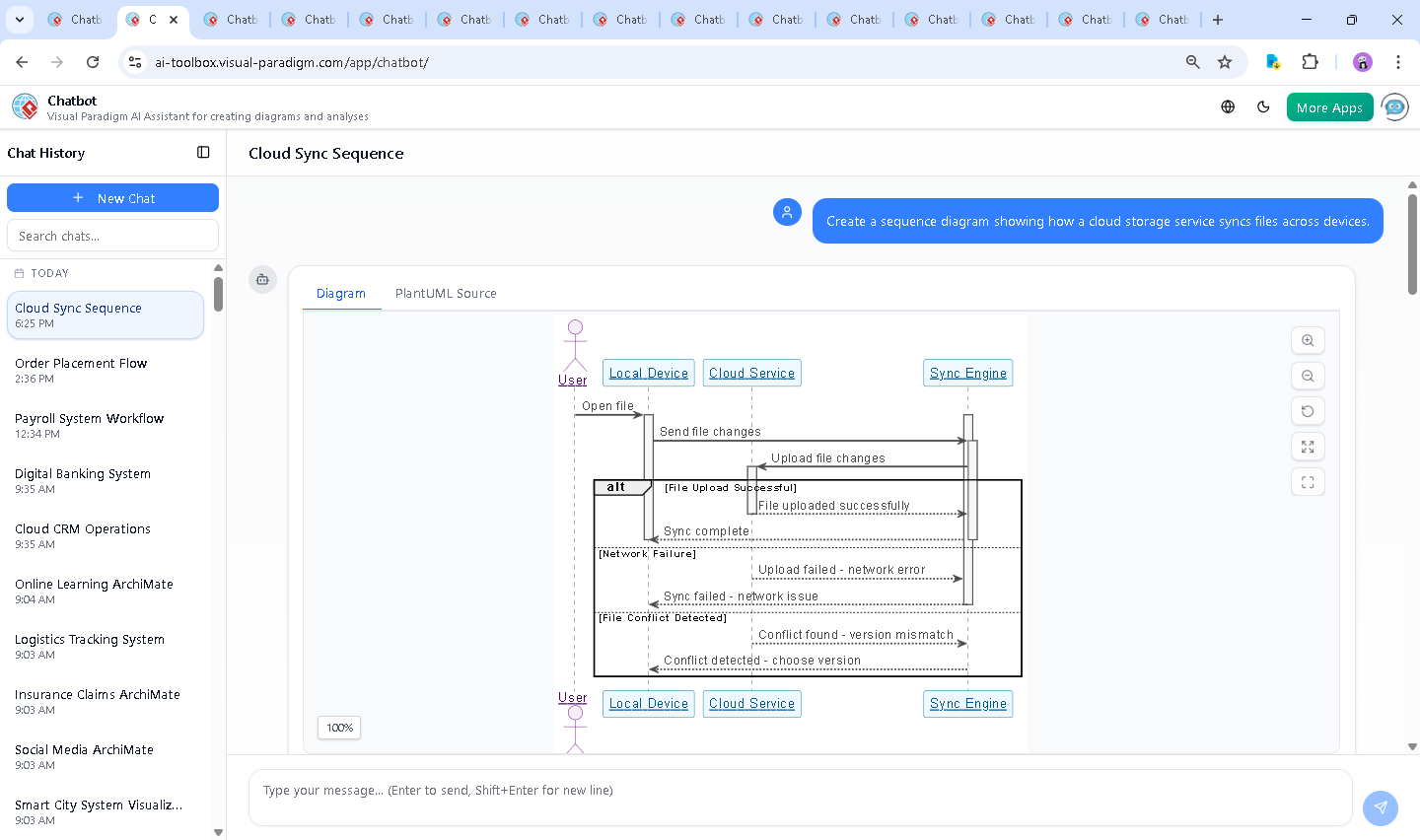
It began with a simple request: “Create a sequence diagram showing how a cloud storage service syncs files across devices.” The AI Chatbot immediately interpreted this as a need for a dynamic, multi-participant interaction—highlighting the user, local device, cloud service, and the central Sync Engine.
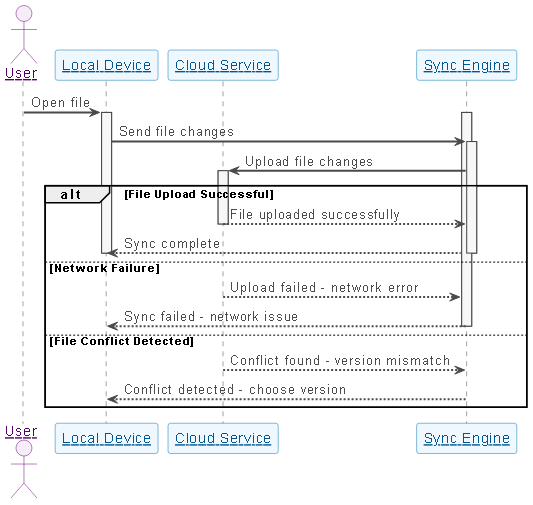
Within seconds, the AI generated a fully rendered sequence diagram using PlantUML syntax. The diagram captured key elements: the user initiating the action, the local device sending changes, the sync engine coordinating with the cloud, and branching logic for success, failure, and conflict detection. This wasn’t a static output—it was a living model, ready for refinement.
But the real power emerged in the follow-up. When the user asked, “How does the sync engine handle file conflicts between devices?”, the AI didn’t just answer with text—it expanded the model’s intelligence. It explained conflict detection, resolution strategies (timestamp-based, user-prompted, merge via diff), and emphasized user control as a design principle.
That insight wasn’t just informative—it was design guidance. The AI didn’t stop at explanation; it offered to generate a new diagram to visualize the conflict resolution flow. This iterative, conversational approach ensures that every decision is grounded in both technical accuracy and user-centric design.
Decoding the Sequence Diagram Logic
The generated sequence diagram is more than a visual aid—it’s a blueprint of operational behavior. Let’s break down its structure and the reasoning behind each element:
1. Participants and Roles
- User (USR): Initiates the file interaction, representing the human actor.
- Local Device (LD): The device where the file is opened and modified. It acts as the source of change.
- Cloud Service (CS): The central repository where file versions are stored and synchronized.
- Sync Engine (SE): The intelligent component that manages the transfer, conflict detection, and coordination between devices and cloud.
2. Core Flow: From Change to Sync
- When the user opens a file, the local device captures the change.
- The device sends the update to the Sync Engine, which validates and prepares the upload.
- The Sync Engine communicates with the Cloud Service to upload the file.
- Three distinct outcomes are modeled using
alt,else, andendblocks:- Success: The file is uploaded, and the sync engine confirms completion.
- Network Failure: The upload fails due to connectivity—user is notified.
- Conflict Detected: Version mismatch triggers a conflict resolution workflow.
3. Why Sequence Diagrams?
Sequence diagrams are ideal for this use case because they emphasize the timing and order of interactions. In a distributed system like cloud sync, the sequence of events—especially when errors or conflicts occur—is critical. The diagram makes it easy to spot bottlenecks, verify error handling, and ensure that user feedback loops are properly modeled.
4. The AI’s Design Intelligence
The AI didn’t just generate a diagram—it applied domain knowledge. For example:
- It used
activateanddeactivateto show active lifelines, ensuring the diagram reflects real-time processing. - It implemented
altblocks to model branching logic, which is essential for handling asynchronous outcomes. - It ensured that conflict resolution wasn’t automatic—instead, it required user input, reflecting best practices in secure, user-controlled sync systems.
Conversational Depth: Where AI Adds Expertise
The true value of the Visual Paradigm AI Chatbot lies in its ability to go beyond syntax. When the user asked about conflict handling, the AI didn’t just describe a process—it offered a full framework of strategies, including timestamp-based resolution, merge via diff, and user-prompted decisions. This level of depth transforms the chatbot from a tool into a modeling consultant.
Each follow-up query was treated as a design refinement. The AI didn’t just answer—it asked clarifying questions implicitly through its responses. For instance, when explaining conflict resolution, it introduced the concept of versioning and rollback, which might not have been in the original prompt but are essential in real-world implementations.
These exchanges showcase the AI’s adaptability and domain expertise. It doesn’t just generate diagrams—it builds models that are ready for real-world implementation.
More Than Sequence Diagrams: A Full Modeling Suite
While this example focused on a Sequence Diagram, the Visual Paradigm AI Chatbot is built to support a wide range of modeling standards. Whether you’re designing enterprise architecture with ArchiMate, modeling complex systems with SysML, or visualizing software architecture using the C4 Model, the AI adapts to your needs.
For example, the same conversation could have evolved into:
- A UML Use Case Diagram to map user roles and file sync features.
- An ArchiMate Architecture Diagram to show the relationship between business, application, and technology layers.
- A SysML Block Definition Diagram to model the components of the sync engine.
- A C4 Context Diagram to illustrate the system’s boundaries and external actors.
This versatility means that the AI Chatbot isn’t just a diagram generator—it’s a full-stack visual modeling assistant, capable of supporting design from concept to deployment.
Conclusion: Designing with Intelligence, Not Just Tools
Creating a robust file sync process requires more than syntax—it demands insight, foresight, and user empathy. With Visual Paradigm’s AI Chatbot, these qualities are embedded into the design process. The conversation between user and AI isn’t a one-way instruction—it’s a collaborative journey toward clarity, correctness, and completeness.
Whether you’re a developer, architect, or product designer, the ability to refine your model through natural language is transformative. The platform doesn’t just generate diagrams—it helps you think through the system.
Ready to build smarter models? Start your next design session with the Visual Paradigm AI Chatbot and experience the future of visual modeling.