


From Idea to Insight: How the AI Chatbot Designs a Smart Song Recommendation Sequence Diagram
Creating a clear, accurate sequence diagram for a music streaming app’s recommendation engine is more than just drawing lines between actors. It’s about capturing the dynamic flow of data, decision logic, and behavioral triggers that define a personalized user experience. The challenge lies in translating complex AI-driven logic into a visual narrative that developers, architects, and product teams can understand at a glance.
That’s where the Visual Paradigm AI Chatbot steps in—not as a passive diagram generator, but as a collaborative modeling partner. With its deep understanding of UML, sequence modeling, and real-world system behavior, it transforms vague prompts into precise, actionable diagrams through natural conversation.
Interactive Journey: The Evolution of a Recommendation Flow
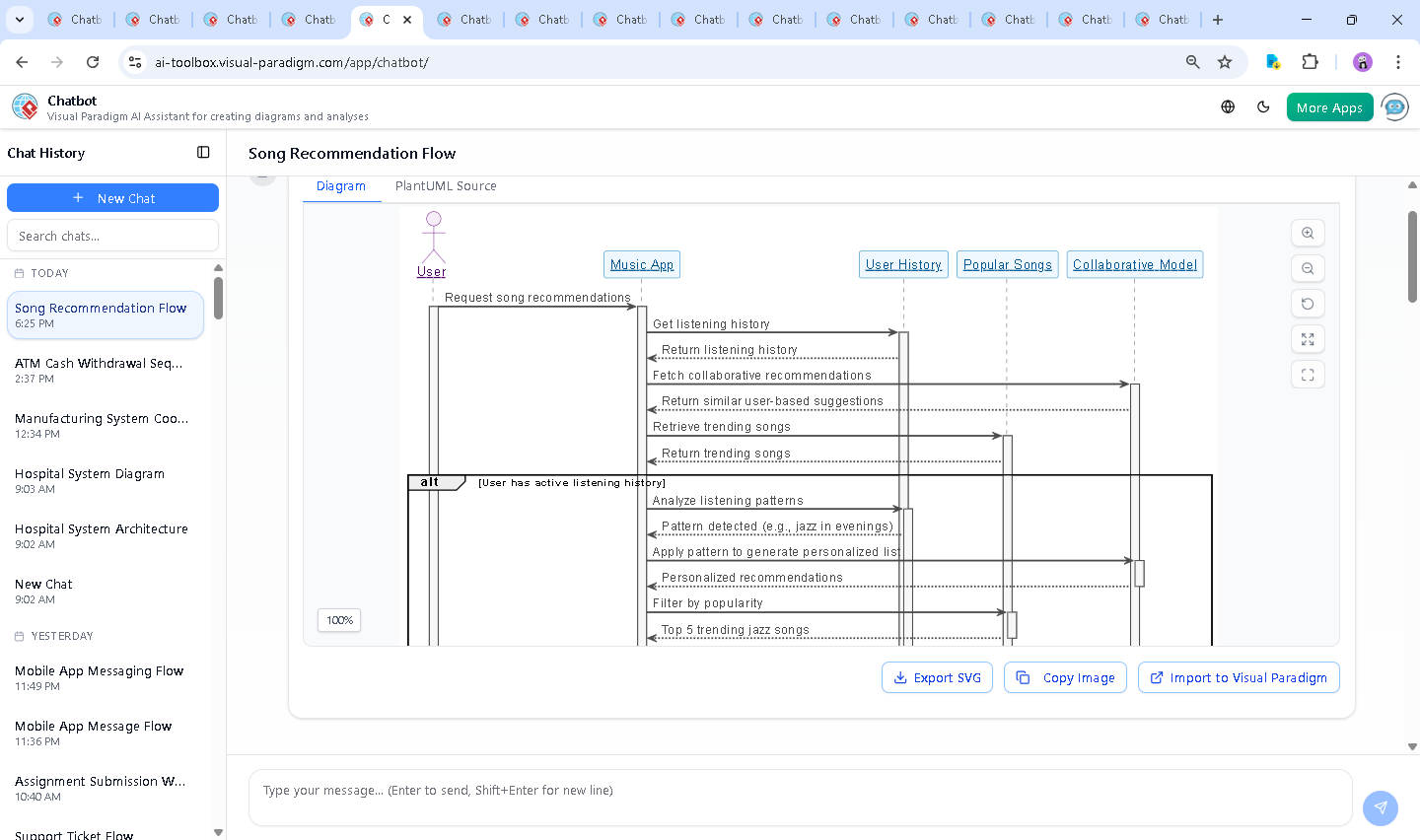
It began with a simple request: “Draw a sequence diagram explaining how a music streaming app recommends songs to a user.” The AI Chatbot didn’t just generate a static image—it initiated a dialogue to refine intent, clarify logic, and anticipate follow-up questions.
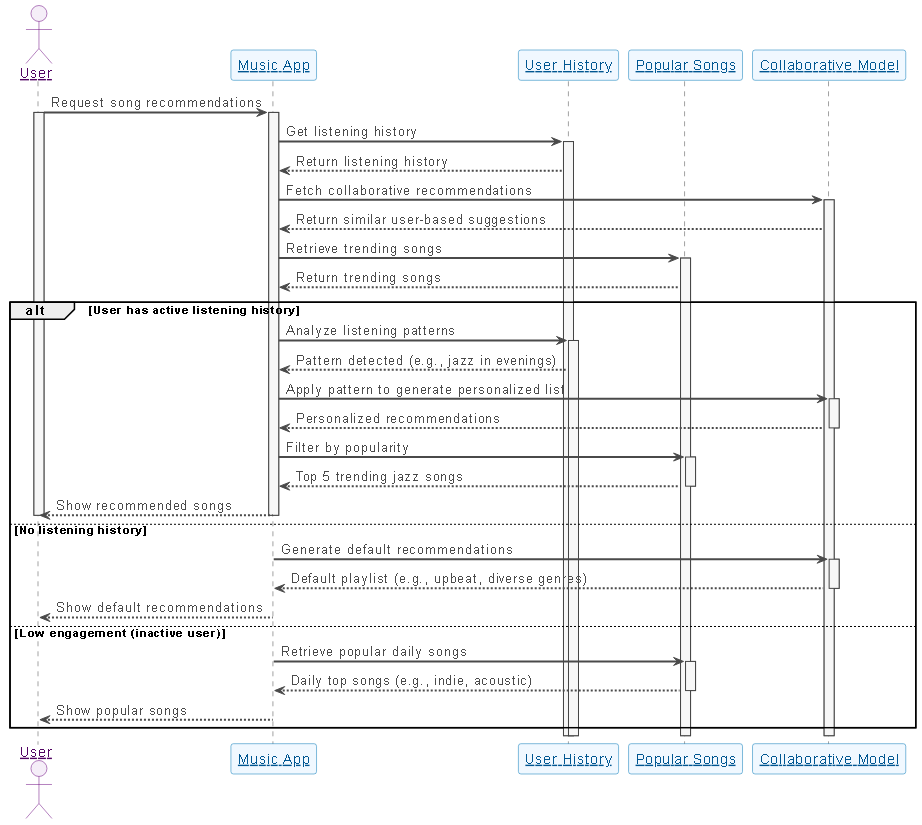
Within seconds, the AI delivered a fully structured plantUML sequence diagram, complete with:
- Participant roles:
User,Music App,User History,Popular Songs, andCollaborative Model - Conditional logic using
altblocks for different user states (active, new, inactive) - Visual cues like
activateanddeactivateto track lifelines - Color-coded styling for clarity and professional presentation
But the conversation didn’t stop there. The user asked: “Can you explain how the collaborative model identifies similar users for song recommendations?” Instead of a textbook definition, the AI responded with a layered breakdown—complete with:
- How user-item interaction matrices are built
- Techniques like Cosine Similarity and Jaccard Similarity
- Why similarity scores matter in personalization
- Edge cases like cold start and data sparsity
This wasn’t just explanation—it was modeling consultation. The AI didn’t just answer; it deepened the design’s foundation, ensuring the diagram would reflect real-world system behavior, not just theoretical flow.
Logic Breakdown: Why This Sequence Diagram Works
The diagram’s structure reflects the actual decision-making process of a modern recommendation engine. Let’s walk through the key phases:
1. User Initiation
The User triggers the recommendation flow by requesting suggestions. This starts the interaction and activates the Music App participant.
2. Data Gathering
The app fetches two critical data sources:
User History: Tracks listening patterns (e.g., jazz in evenings)Popular Songs: Provides trending tracks based on global engagementCollaborative Model: Identifies users with similar tastes using behavioral data
3. Conditional Branching Logic
The alt block introduces intelligent decision-making:
- Active User: The system analyzes listening history, applies collaborative filtering, and combines it with trending data to deliver a personalized list.
- No History: Falls back to default recommendations—diverse, upbeat, and genre-balanced.
- Low Engagement: Prioritizes popular daily tracks (e.g., indie, acoustic) to re-engage inactive users.
This branching ensures the app adapts to user context—no one-size-fits-all logic. The use of activate and deactivate lines clearly shows which components are active during each phase, preventing visual clutter and enhancing readability.
4. Final Output
Once recommendations are compiled, the app delivers them to the user—closing the loop with a clean, user-centric result.
Conversational Value: The AI as a Modeling Consultant
What sets Visual Paradigm apart isn’t just the diagram—it’s the conversation that shapes it. The AI Chatbot didn’t just produce a diagram; it acted as a modeling expert, refining logic, clarifying assumptions, and anticipating follow-up questions.
When the user asked about the collaborative model, the AI didn’t just restate the definition. It explained the underlying mechanics—how similarity is computed, why certain algorithms are used, and what limitations exist. This depth of insight transforms the diagram from a visual artifact into a design artifact that reflects real system intelligence.
And it wasn’t limited to this one diagram. The same AI Chatbot can generate Architectural Diagrams (ArchiMate), System Models (SysML), and Software Architecture (C4), and Mind Maps—all with the same level of contextual awareness and conversational support.
Platform Versatility: One AI, Many Standards
Visual Paradigm’s AI Chatbot isn’t confined to sequence diagrams. It’s a full-stack modeling assistant that understands multiple industry-standard modeling languages:
- UML: For software design, behavior modeling, and component interactions
- ArchiMate: For enterprise architecture, business-IT alignment, and value chain modeling
- SysML: For systems engineering, requirements modeling, and behavioral analysis
- C4 Model: For software architecture documentation, context and container diagrams
- Mind Maps: For brainstorming, and knowledge organization
Whether you’re building a microservice architecture, designing a user journey, or mapping a business process, the AI Chatbot adapts—using natural language to guide the design, not just generate it.
Conclusion & CTA
The journey from a simple prompt to a rich, intelligent sequence diagram shows what’s possible when AI becomes a true modeling partner. The Visual Paradigm AI Chatbot doesn’t just draw diagrams—it understands them, refines them, and explains them.
Ready to design smarter? Try the AI Chatbot now and experience how natural conversation can shape complex system designs—fast, accurate, and deeply intelligent.