


Designing an Online Exam Submission Flow with AI-Powered Precision
Creating a clear, accurate sequence diagram for an online exam system’s answer submission and evaluation process requires deep understanding of both user behavior and system architecture. Traditional diagramming tools often demand technical expertise and manual effort—especially when handling conditional logic, error states, and modular components. With Visual Paradigm’s AI Chatbot, this challenge transforms into a conversational design journey, where natural language prompts generate precise models instantly.
From Prompt to Diagram: A Collaborative Design Journey
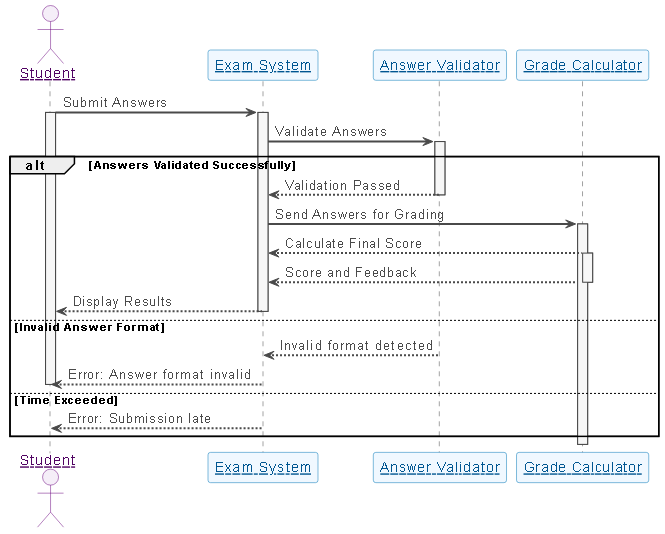
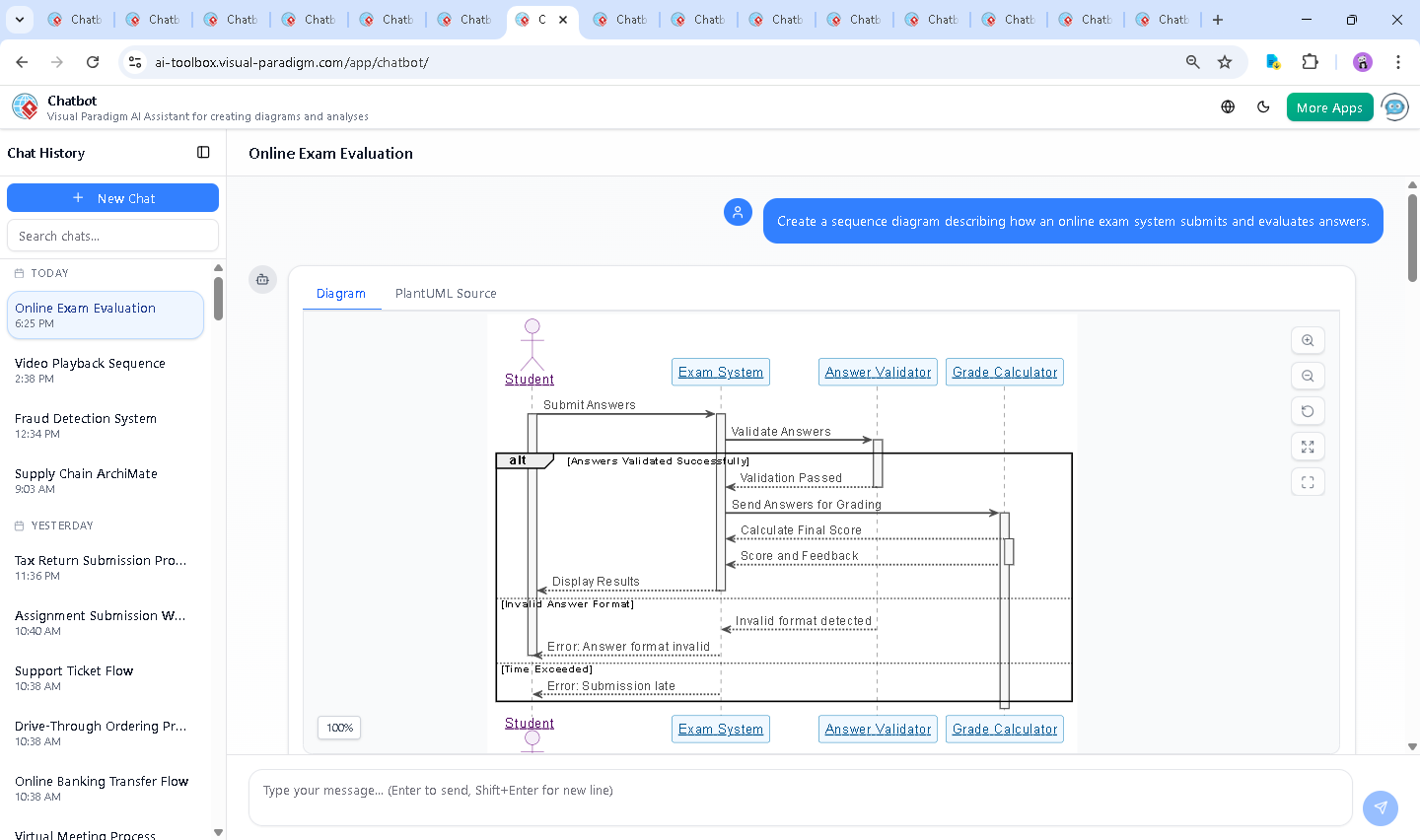
The journey began with a simple request: “Create a sequence diagram describing how an online exam system submits and evaluates answers.” Within seconds, the Visual Paradigm AI Chatbot responded with a fully rendered UML sequence diagram, complete with participant roles, activation bars, and conditional branching.
But the real power emerged in the conversation that followed. When the user asked, “Explain this diagram,” the AI didn’t just restate the elements—it broke down the logic, clarified the purpose of each participant, and contextualized the alternative flows (invalid format, late submission). This wasn’t a static output; it was a dynamic modeling consultation.
Further refinement came through follow-up prompts like “AI, refine the logic” and “Explain this branch,” which triggered deeper analysis. The AI adjusted the flow for clarity, emphasized error handling, and highlighted architectural separation—proving its ability to function as a collaborative modeling expert, not just a diagram generator.
Decoding the Logic: Why This Sequence Works
The generated sequence diagram maps a real-world exam submission scenario with precision. Here’s how each phase contributes:
1. Student Initiation
The Student triggers the process by submitting answers. This is the primary event that activates the system.
2. System Reception and Validation
The Exam System receives the submission and immediately routes it to the Answer Validator. This step ensures data integrity before any grading occurs. The validator checks for format correctness—such as proper file types, response length, or required fields—preventing invalid data from corrupting the grading process.
3. Conditional Flow Handling
The diagram uses alt blocks to represent different outcomes:
- Valid answers: Proceed to grading.
- Invalid format: Return an error message to the student.
- Late submission: Notify the student that the deadline has passed.
This ensures the system behaves predictably under edge cases—critical for fairness and usability in academic settings.
4. Grading and Feedback
If validation passes, the Grade Calculator receives the answers and computes the score based on a predefined key. It then returns the result along with feedback (e.g., correct/incorrect, explanations). The Exam System delivers this back to the student in real time, closing the loop.
5. Activation and Lifecycle Management
Activation bars (vertical lines) show the duration of each participant’s involvement. This visual cue helps identify bottlenecks—such as a slow validator or a delayed grading engine—supporting performance optimization.
Conversational Intelligence in Action
What sets Visual Paradigm apart is not just the diagram output—but the depth of insight delivered during the conversation. The AI didn’t stop at rendering the diagram; it explained the intent behind each element, justified the use of alternatives, and even offered to generate complementary diagrams (like use-case or pert charts).
For example, when asked to explain a branch, the AI didn’t just label it—it contextualized it: “This error path ensures the student knows immediately if their answer was malformed, preventing confusion and re-submissions.” This level of domain-aware explanation is what makes the AI Chatbot a true modeling partner.
More Than Just Sequence Diagrams: A Full Modeling Suite
The Visual Paradigm AI Chatbot isn’t limited to sequence diagrams. It supports a full spectrum of modeling standards, including:
- UML (Use Case, Class, Component, Activity, and State Diagrams)
- ArchiMate (Enterprise architecture modeling)
- SysML (Systems engineering and modeling)
- C4 Model (Software architecture at multiple levels)
- Mind Maps (Brainstorming)
Whether you’re designing a banking transaction flow, modeling a cloud-based exam platform, or mapping enterprise IT landscapes, the AI Chatbot adapts to your domain and standard—making Visual Paradigm the only platform that truly unifies modeling across disciplines.
Conclusion: Design with Confidence, Not Guesswork
Creating accurate, production-ready models no longer requires years of training or manual diagramming. With Visual Paradigm’s AI Chatbot, you can turn a simple idea into a fully annotated, collaborative model in minutes—complete with intelligent feedback, error handling, and cross-standard consistency.
Whether you’re an architect, developer, educator, or product designer, the platform empowers you to focus on logic and value—not syntax.
Ready to build your next model? Start your conversation now and experience the future of visual modeling.