


Mapping the Mobile App Launch Journey with AI-Powered Precision
Launching a mobile application is more than just coding and deployment—it’s a complex orchestration of strategy, design, development, testing, and go-to-market execution. Without a clear visual roadmap, teams risk delays, misaligned priorities, and overlooked dependencies. That’s where the Visual Paradigm AI Chatbot steps in—not as a passive diagram generator, but as a collaborative modeling partner that understands the rhythm of product delivery.
When the user asked to visualize the full mobile app launch process from concept to app store release, the AI didn’t just generate a static chart. It began by interpreting the intent, structuring tasks into logical phases, and embedding real-world constraints like start dates, durations, and team ownership—all while maintaining strict PERT chart conventions.
From Idea to App Store: A Collaborative Evolution
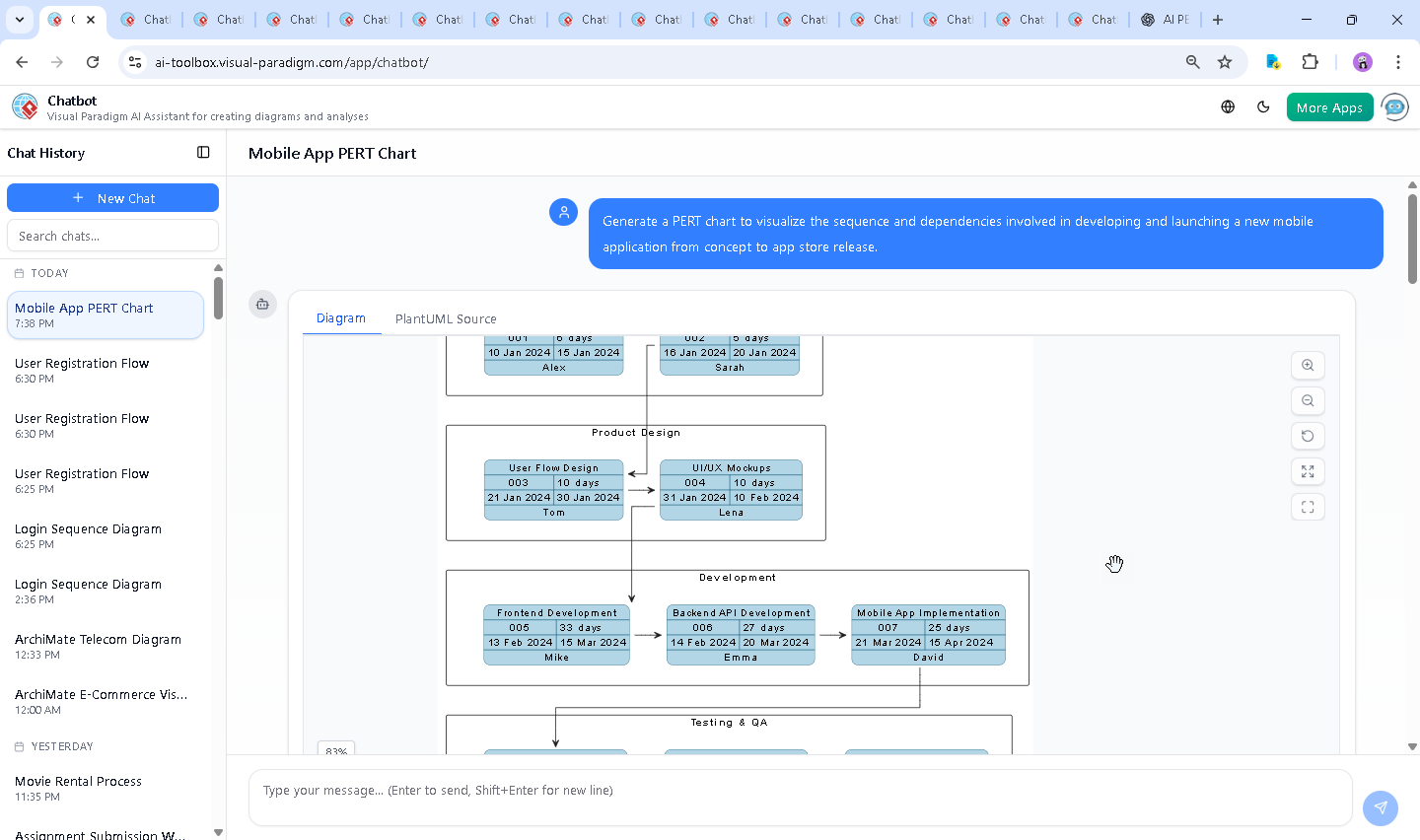
The journey began with a simple prompt: “Generate a PERT chart to visualize the sequence and dependencies involved in developing and launching a new mobile application from concept to app store release.” The AI responded with a fully structured PlantUML script, instantly transforming the request into a visual timeline with defined task sequences, dependencies, and resource assignments.
But the conversation didn’t stop there. The user followed up with a deeper inquiry: “What resources or tools would be needed to support the testing phase of the mobile app?” This wasn’t a request for a list—it was a probe into the operational feasibility of the model. The AI rose to the challenge, delivering a rich, categorized breakdown of tools, devices, and human roles essential for robust testing.
Each response was not just informative—it was strategic. The AI didn’t just answer the question; it expanded the model’s context, reinforcing the idea that a PERT chart isn’t just about timing—it’s about resource readiness, risk awareness, and cross-functional alignment.
When the user asked for a diagram of the testing phase, the AI was ready. It didn’t default to a generic flowchart. Instead, it proposed a refined PERT sub-diagram that mapped testing tasks with dependencies, timelines, and even integration points with CI/CD pipelines—proving its ability to think in systems, not just visuals.
Decoding the PERT Chart Logic
The generated PERT chart is more than a timeline—it’s a living model of execution. Here’s how it was built:
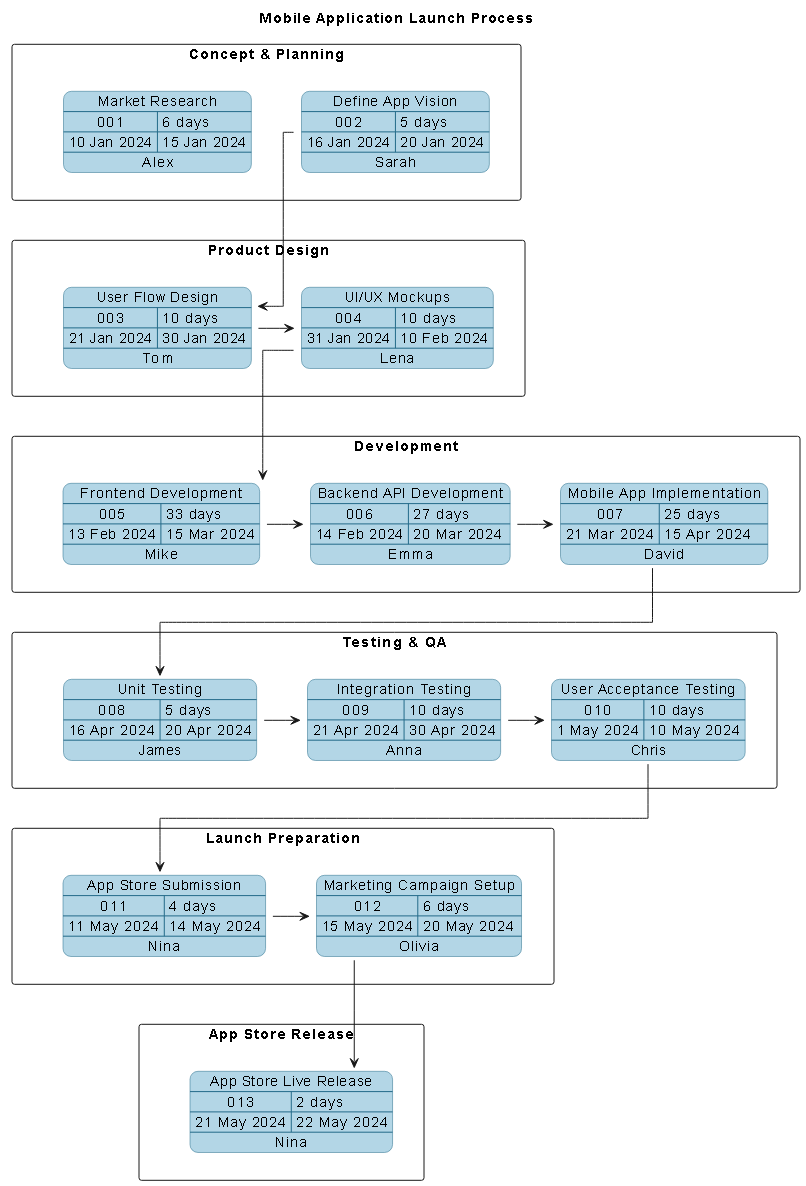
- Phased Structure: Tasks are grouped into lanes—Concept & Planning, Product Design, Development, Testing & QA, Launch Preparation, App Store Release—reflecting real-world workflow boundaries and team ownership.
- Chronological Flow: Each task has a defined start and finish date, with duration in days. For example, Frontend Development runs from February 13 to March 15, 2024 (33 days), while Backend API Development runs concurrently from February 14 to March 20 (27 days), reflecting parallel workstreams.
- Dependency Mapping: The AI used
$dependency(task02, task03)to link Define App Vision to User Flow Design, ensuring logical sequence. This continues through the chain: design → UI/UX → development → testing → submission → marketing → release. - Resource Attribution: Each task includes a responsible owner (e.g., Mike for frontend, Lena for UI/UX), adding accountability and enabling team-level tracking.
- Visual Clarity: The use of PlantUML’s
pert-chart.pumlstandard ensures compatibility with industry practices and supports export to diagrams, reports, and documentation.
The choice of PERT over Gantt or Kanban is intentional: PERT excels at revealing critical paths, identifying bottlenecks, and highlighting dependencies—crucial for managing the high-risk, high-velocity nature of app launches.
Conversational Intelligence in Action
What sets Visual Paradigm apart is how the AI Chatbot evolves with the conversation. After the initial PERT chart was delivered, the user’s follow-up question—“What tools are needed for testing?”—triggered a deep dive into operational realities. The AI didn’t just list tools; it contextualized them:
- It differentiated between automation tools (Appium, Espresso) and real-device platforms (BrowserStack, Firebase Test Lab).
- It emphasized security (OWASP ZAP, Burp Suite) and performance (Lighthouse, Firebase Monitoring).
- It included human roles—QA engineers, DevOps, UX researchers—highlighting that tools alone aren’t enough.
This wasn’t a one-way response. It was a dialogue that refined the model, turning a timeline into a strategic blueprint.
Beyond PERT: A Full Modeling Suite
While this example focuses on PERT charts, the Visual Paradigm AI Chatbot is not limited to one standard. It supports a full spectrum of modeling languages and frameworks, making it the ultimate tool for modern product and enterprise teams:
- UML: For detailed system design, class diagrams, sequence diagrams, and component models.
- ArchiMate: To model enterprise architecture, business capabilities, and IT landscapes.
- SysML: For systems engineering, requirements modeling, and behavior analysis.
- C4 Model: To visualize software architecture at different abstraction levels (context, containers, components, code).
- Mind Maps, Org Charts, SWOT, PEST: For strategic planning, stakeholder analysis, and innovation workshops.
Whether you’re building a mobile app, designing a cloud-native system, or aligning business strategy with IT, the AI Chatbot adapts—offering expert-level modeling guidance in natural language.
Conclusion: Your AI Modeling Partner
The mobile app launch process is complex, but with the Visual Paradigm AI Chatbot, it becomes manageable, transparent, and collaborative. By turning natural language into precise models—complete with dependencies, timelines, resources, and expert insights—this platform transforms how teams plan, communicate, and execute.
From the initial idea to the final app store release, the AI doesn’t just draw diagrams—it guides decisions, anticipates risks, and empowers teams to deliver with confidence.
Ready to model your next project? Explore the live session and experience how AI can elevate your visual modeling workflow.