


Designing Inclusive Education: AI-Powered Requirement Modeling for Accessible Online Learning Platforms
Creating an online learning platform that truly serves every learner—regardless of ability—demands more than just functional features. It requires a deliberate, structured approach to accessibility from the very start. The challenge lies in translating complex accessibility standards into clear, traceable system requirements that developers, testers, and stakeholders can act upon.
Enter the Visual Paradigm AI Chatbot—not just a diagram generator, but a conversational modeling expert. By engaging in a natural dialogue, users can collaboratively build precise SysML Requirement Diagrams that reflect both functional capabilities and accessibility mandates, all while maintaining compliance with global standards like WCAG 2.1 AA.
From Prompt to Precision: The Collaborative Journey of Diagram Creation
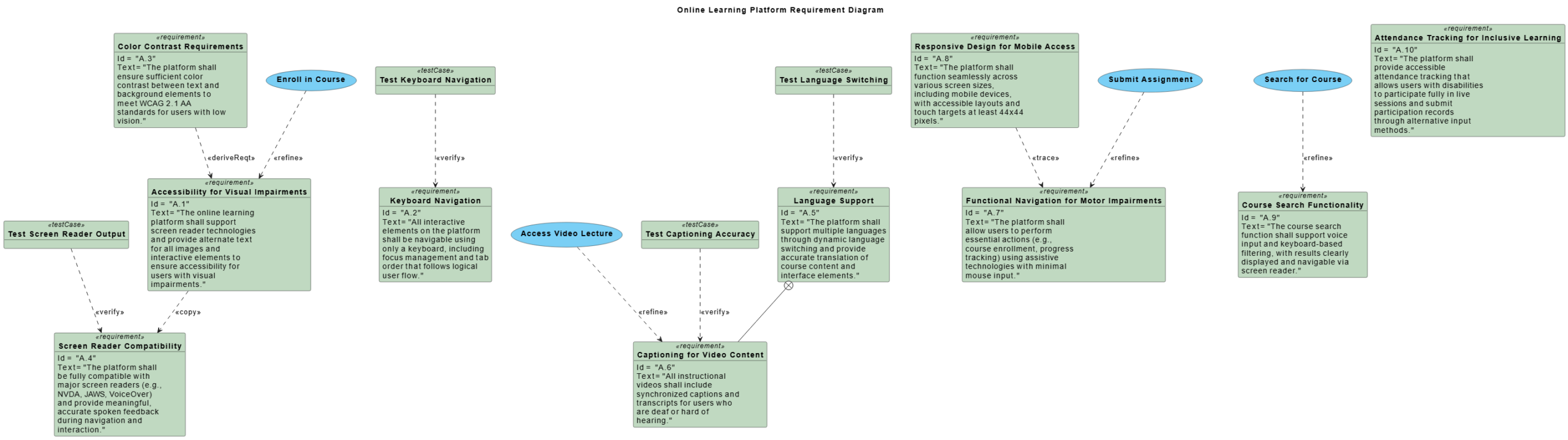
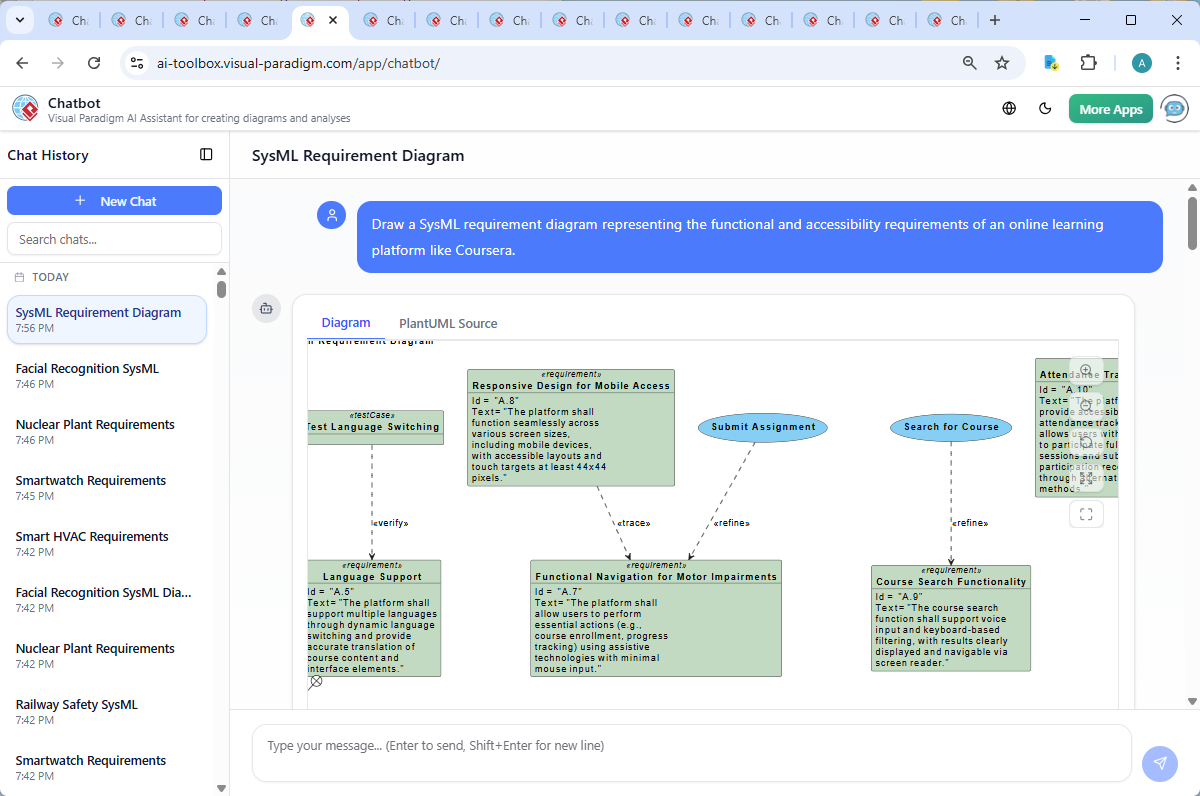
The journey began with a simple request: “Draw a SysML requirement diagram representing the functional and accessibility requirements of an online learning platform like Coursera.” Within seconds, the Visual Paradigm AI Chatbot responded with a fully structured PlantUML script, instantly generating a rich SysML Requirement Diagram that mapped out 10 core accessibility requirements—ranging from screen reader compatibility to keyboard navigation and multilingual support.
But the conversation didn’t stop there. When the user asked, “Explain this diagram,” the AI didn’t offer a static explanation. Instead, it guided the user through a layered breakdown—clarifying the purpose of each requirement, the relationships between use cases and test cases, and the logical structure underpinning the diagram.
Each follow-up query—such as “Explain this branch” or “Refine the logic”—was met with context-aware responses that deepened the model’s clarity. For example, the AI clarified how requirement A.3 (Color Contrast) is derived from A.1 (Accessibility for Visual Impairments), and how test case TC02 (Screen Reader Output) verifies A.4 (Screen Reader Compatibility). This iterative refinement demonstrates the AI’s ability to act as a modeling consultant, not just a tool.
Decoding the Logic: Why This Diagram Works
The generated SysML Requirement Diagram isn’t just visually organized—it’s semantically rich, built on the 4Cs framework (Context, Capability, Constraint, and Customer), ensuring that accessibility isn’t an afterthought but a foundational design principle.
Here’s a breakdown of the core logic:
1. Requirement Categorization
Each requirement is tagged with a unique ID (e.g., A.1, A.2) and clearly labeled as either functional or accessibility-focused. The use of the $requirement() macro ensures consistency and traceability. For example:
- A.1 – Accessibility for Visual Impairments: Ensures screen reader support and alternative text for all visuals.
- A.6 – Captioning for Video Content: Addresses the needs of users who are deaf or hard of hearing.
- A.8 – Responsive Design for Mobile Access: Ensures touch targets are at least 44x44px for users with motor impairments.
2. Use Case Refinement
Functional behaviors like Enroll in Course, Access Video Lecture, and Submit Assignment are explicitly linked to accessibility requirements via the $refine() relationship. This shows that these actions aren’t just functional—they must be accessible to all users.
3. Verification Through Test Cases
Each requirement is tied to a corresponding test case using $verify(). For instance:
$verify(testCase01, req02)links keyboard navigation testing to the requirement for keyboard-only access.$verify(testCase03, req06)ensures that video captions are accurate and synchronized.
This creates a clear traceability path from requirement → use case → test case, enabling auditable compliance and reducing the risk of oversight.
4. Relationship Intelligence
The diagram uses advanced SysML relationships to model dependencies:
$deriveReqt(req03, req01): Color contrast (A.3) is derived from the broader goal of visual accessibility (A.1).$containment(req05, req06): Language support (A.5) contains and enables captioning (A.6).$copy(req01, req04): Screen reader compatibility (A.1) is mirrored in screen reader output (A.4), reinforcing consistency.
These relationships aren’t arbitrary—they reflect real-world design logic, ensuring that the model is not just accurate, but also maintainable and scalable.
Conversational Intelligence: The AI as Your Modeling Partner
What sets Visual Paradigm apart is how the AI Chatbot evolves with the conversation. After the initial diagram was generated, the user asked for an explanation. Rather than offering a generic summary, the AI provided a structured, narrative-driven walkthrough—complete with tables, use-case mapping, and implementation recommendations.
When asked to refine or clarify, the AI didn’t re-generate the diagram blindly. Instead, it contextualized the changes: explaining why certain requirements are linked, how test cases validate them, and what compliance standards (e.g., WCAG 2.1 AA) are being met.
This level of conversational depth transforms the AI from a passive tool into a proactive collaborator—one that understands the design intent, anticipates follow-up questions, and enriches the model with expert insight.
Beyond SysML: A Unified Platform for Enterprise Modeling
While this example focused on SysML, the Visual Paradigm AI Chatbot is not limited to one standard. It seamlessly supports a full spectrum of modeling languages, including:
- UML for software design and system architecture.
- ArchiMate for enterprise architecture and business process modeling.
- C4 Model for contextualizing software systems at multiple abstraction levels.
- Mind Maps for brainstorming and idea structuring.
- Org Charts, SWOT, PEST, and Data Charts for strategic planning and analysis.
This versatility makes Visual Paradigm not just a diagramming tool, but a complete AI-Powered Visual Modeling Platform—ideal for teams across IT, product, architecture, and compliance roles.
Conclusion & Next Steps
Designing accessible online learning platforms isn’t just about compliance—it’s about equity, inclusion, and long-term sustainability. With the Visual Paradigm AI Chatbot, this vision becomes achievable through a conversational, collaborative process that turns natural language into precise, verifiable models.
Whether you’re defining accessibility requirements, mapping enterprise architecture, or validating system behavior, the AI Chatbot acts as a trusted partner—guiding you from idea to implementation with intelligence, clarity, and precision.
Ready to build your next accessible system? Join the shared session and experience how the AI Chatbot transforms your modeling journey.