


Securing the Digital Vault: How AI Designs a Realistic Online Banking Deployment Diagram
Designing a secure, scalable deployment for an online banking system demands precision. Every component—from customer devices to core databases—must be positioned with security, performance, and compliance in mind. Traditional diagramming tools often require users to manually configure components, manage relationships, and validate architectural logic. But with the Visual Paradigm AI Chatbot, this process transforms into a conversational design journey.
Instead of starting from scratch with a blank canvas, the user simply states their intent: “Visualize a deployment diagram for an online banking system illustrating how customer devices connect to secure web servers, transaction processors, and core banking databases.” Within seconds, the AI generates a fully structured, standards-compliant Deployment Diagram using PlantUML syntax, complete with nodes, components, artifacts, and clear communication paths.
From Prompt to Precision: The Interactive Design Journey
The real power of Visual Paradigm lies not just in generating diagrams—but in collaborating with the user through iterative refinement. After the initial diagram was generated, the user asked a follow-up: “Can you explain how the security certificate is used in the HTTPS connection between the customer device and the web server?”
The AI didn’t just provide a static explanation. It responded with a detailed, layered breakdown of the TLS handshake, the role of the public-private key pair, and the trust mechanism behind digital certificates. It connected the technical explanation directly to the diagram—highlighting how the Security Certificate artifact is deployed on the web server and linked to the customer device via HTTPS.
This wasn’t a one-off answer. It was a modeling consultation. The AI anticipated the user’s next question—how encryption is maintained—and offered to extend the diagram to include key management or certificate renewal workflows, demonstrating its role as a proactive design partner.
Visualizing the Architecture: The Deployment Diagram
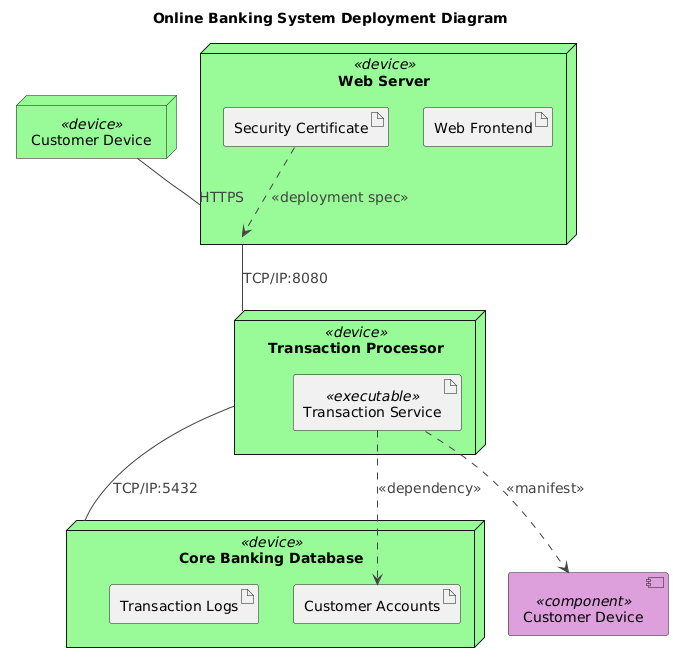
Decoding the Logic: Why This Structure Works
The generated deployment diagram follows core principles of secure system architecture. Let’s break down its key elements and the reasoning behind each:
1. Customer Device as a device node
Representing end-user devices (smartphones, laptops) as node elements in the diagram reflects their role as physical or virtual endpoints. This aligns with UML deployment semantics, where nodes represent runtime environments.
2. Web Server with Web Frontend and Security Certificate
The web server hosts both the user-facing interface and the security infrastructure. The Security Certificate artifact is explicitly deployed on the server, indicating it’s a required component for secure communication. Its link to the customer device via HTTPS reflects the TLS handshake process.
3. Transaction Processor as a dedicated node
Isolating the transaction processor ensures that high-value operations—like fund transfers—are handled in a secure, isolated environment. The use of TCP/IP:8080 as the communication port reflects standard internal service communication, often behind a reverse proxy or API gateway.
4. Core Banking Database with Customer Accounts and Transaction Logs
These artifacts represent critical data stores. The Customer Accounts artifact is a persistent data source, while Transaction Logs support auditability and compliance. The TCP/IP:5432 port is the default for PostgreSQL, commonly used in banking systems.
5. Relationship Semantics: What the Arrows Mean
HTTPSbetween customer device and web server: Indicates secure, encrypted communication.TCP/IP:8080between web server and transaction processor: Standard internal service communication.TCP/IP:5432between transaction processor and database: Secure database access...>relationships: Show deployment dependencies—e.g., theTransaction Serviceexecutable is deployed on the transaction processor node and depends on theCustomer Accountsartifact.
AI as Architect: The Conversational Intelligence Behind the Design
What makes this process truly intelligent is the interactive depth of the AI. The user didn’t just receive a diagram—they received a technical dialogue that deepened understanding. When asked to explain the security certificate, the AI didn’t just define it—it mapped it to the diagram’s structure, showing how the artifact is deployed, how it’s used in the TLS handshake, and why it’s critical for trust and confidentiality.
This level of insight isn’t possible with static diagram generators. The Visual Paradigm AI Chatbot functions as a modeling expert, offering context-aware explanations and suggesting enhancements based on architectural best practices.
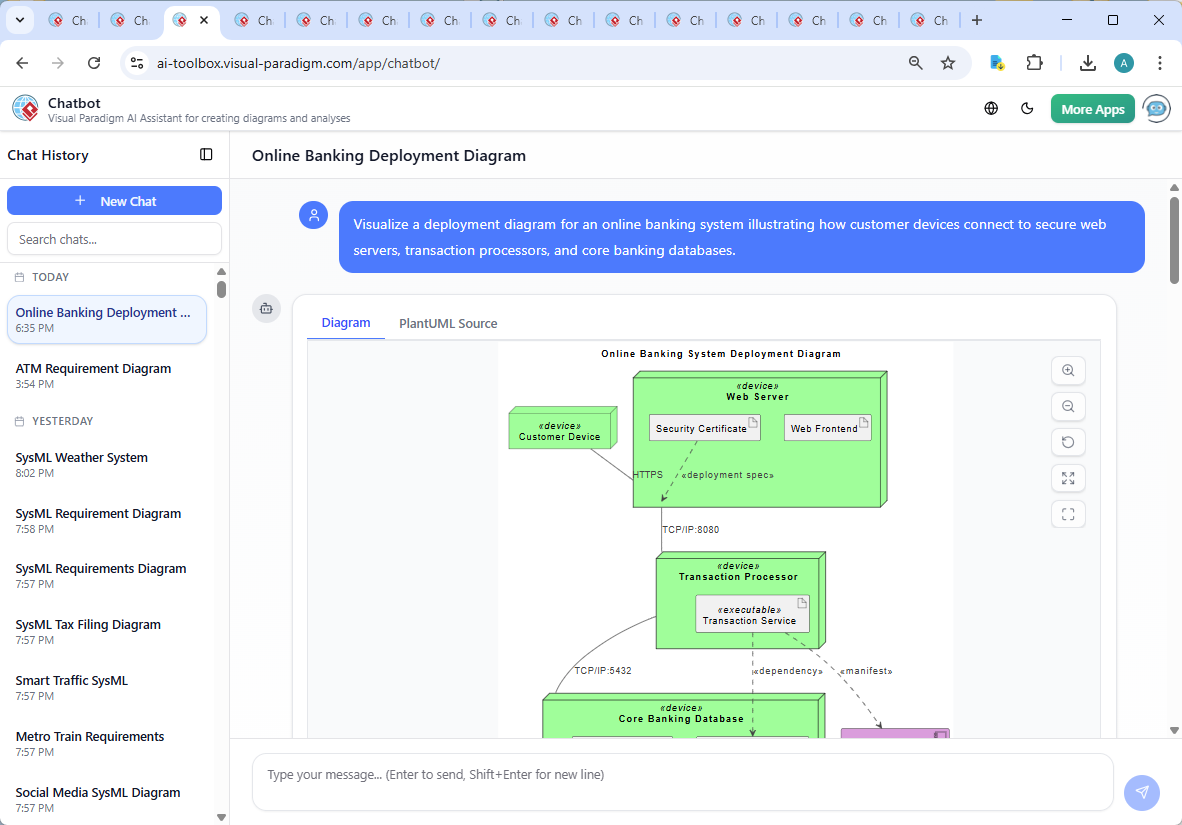
Beyond Deployment: A Unified AI-Powered Modeling Suite
While this example focused on a Deployment Diagram, the AI Chatbot is not limited to one standard. It seamlessly supports UML, ArchiMate, SysML, C4 Model, Mind Maps, PERT Charts, Organizational Charts, SWOT, PEST, and various data visualization charts (column, area, pie, line).
Whether you’re designing enterprise architecture with ArchiMate, modeling system behavior with SysML, or visualizing team structure with Org Charts, the AI Chatbot adapts to your intent. It understands the nuances of each standard and ensures consistency across diagrams—making it the ultimate tool for cross-functional teams.
Conclusion: Designing with Confidence, Not Guesswork
Creating a secure, accurate deployment diagram for an online banking system is no small task. But with Visual Paradigm’s AI Chatbot, it becomes a collaborative, intelligent process—where every question leads to deeper clarity, and every diagram is grounded in real-world architecture principles.
Whether you’re a developer, architect, or business analyst, the AI Chatbot turns abstract ideas into precise, shareable models—fast, accurate, and fully compliant with industry standards.
Ready to design your next system with AI-powered precision? Try the shared session and experience the future of visual modeling.