


Designing Real-Time Collaboration: The AI-Powered Path to a Cloud-Based Document Deployment Diagram
Creating a deployment diagram for a cloud-based document collaboration tool involves more than just placing boxes and lines. It demands a deep understanding of runtime environments, real-time synchronization, and distributed state management. The challenge lies in accurately representing how user browsers interact with application servers, how edits are processed in real time, and how versioned storage maintains history—all while ensuring clarity and precision.
Enter the Visual Paradigm AI Chatbot: not just a diagram generator, but a conversational modeling partner. With the ability to interpret natural language prompts and respond with structured, standards-compliant UML diagrams, it transforms abstract requirements into executable visual models. In this case, the user requested a deployment diagram for a cloud-based document collaboration tool—specifically highlighting browsers, application servers, and versioned storage. The AI didn’t just generate a diagram; it began a dialogue to refine intent, clarify logic, and deepen architectural insight.
From Prompt to Precision: An Interactive Journey of Design Evolution
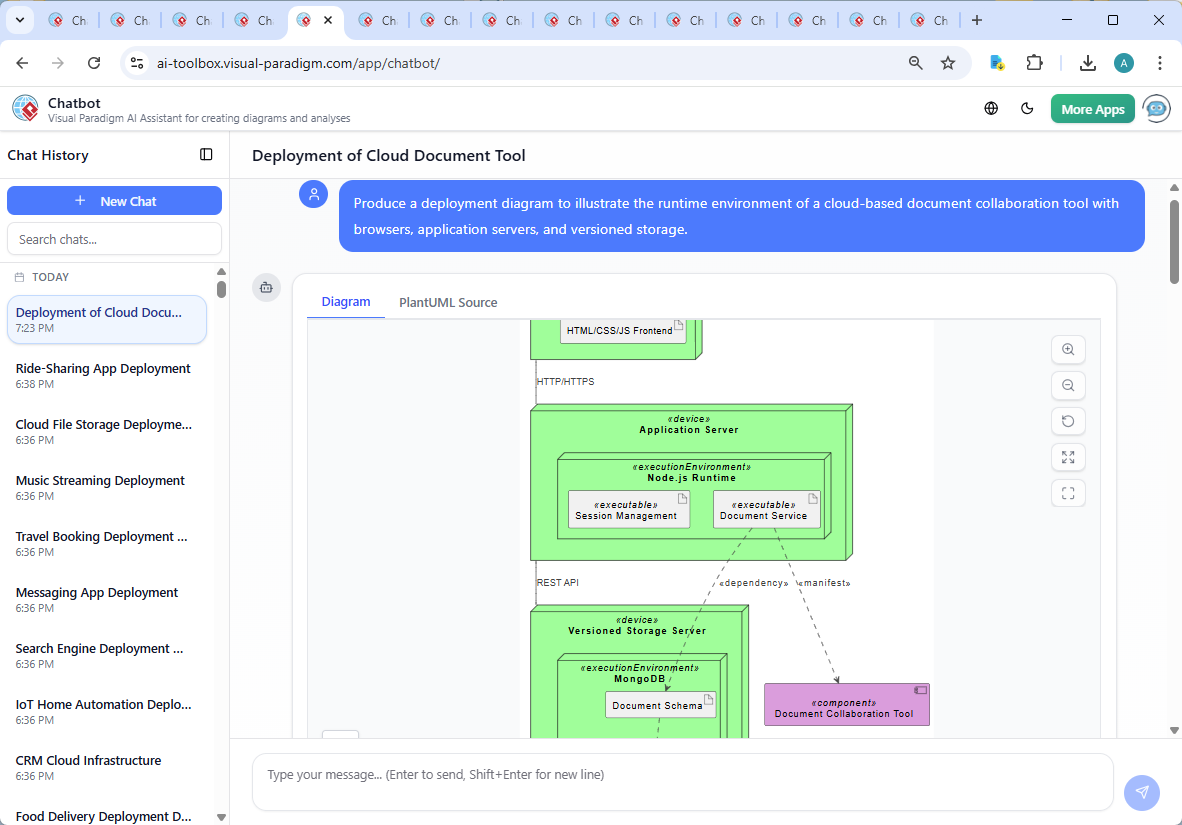
The journey began with a straightforward request: “Produce a deployment diagram to illustrate the runtime environment of a cloud-based document collaboration tool with browsers, application servers, and versioned storage.” The AI responded instantly with a fully rendered PlantUML-based deployment diagram, using node and component notation to reflect runtime artifacts.
But the real value emerged in the follow-up. When the user asked, “Can you explain how the Document Service handles concurrent edits in the application server?”, the AI didn’t just provide a text answer—it launched a technical deep dive into operational transformation (OT), conflict-free replicated data types (CRDTs), and real-time synchronization via WebSockets. This wasn’t a static explanation; it was a collaborative modeling session where the AI acted as an expert consultant, refining the conceptual model through iterative clarification.
Each response built upon the last: the AI clarified the role of the Document Service, explained how edit deltas are processed, and mapped the flow of data from client to server to storage. This conversation didn’t stop at the diagram—it extended into the underlying mechanisms that make real-time collaboration possible.
Decoding the Deployment Diagram: Logic and Intent Behind the Design
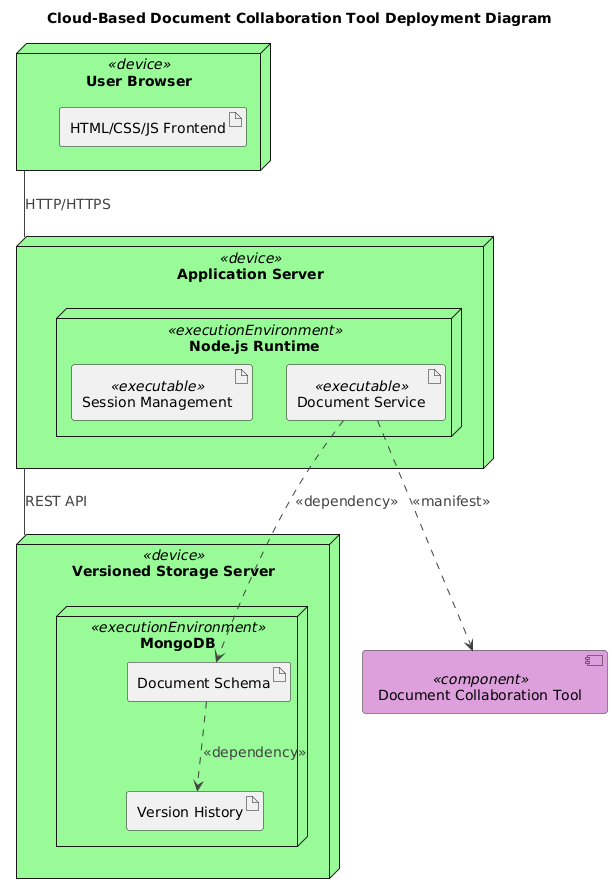
The final deployment diagram reflects a well-architected cloud environment. Let’s break down its components and the reasoning behind each notation:
1. User Browser (Node)
Represented as a node labeled “User Browser” with the <> stereotype. This emphasizes that it is a runtime execution environment—specifically, a client-side device where the user interacts with the application via HTML/CSS/JS. The frontend artifact is a direct representation of the client-side code that renders the document interface and sends edit events.
2. Application Server (Node with Embedded Execution Environment)
The application server is modeled as a node with an embedded Node.js Runtime execution environment. This is critical: it shows that the server isn’t just a container—it’s an active runtime where services execute. Inside this runtime, two key services are defined:
- Document Service – responsible for handling edit events, applying OT/CRDT logic, and broadcasting updates.
- Session Management – manages user authentication and session state, ensuring only authorized users can access documents.
3. Versioned Storage Server (Node with MongoDB Execution Environment)
Separate from the application server, the versioned storage is modeled as its own node. This reflects the architectural decision to decouple data persistence from business logic—critical for scalability and resilience. Inside, MongoDB is represented as the execution environment, housing two artifacts:
- Document Schema – defines the structure of documents in the database.
- Version History – stores a timeline of edits, enabling rollback and audit.
4. Communication and Dependencies
The diagram uses standard UML deployment notation:
userbrowser_device -- applicationserver_device : HTTP/HTTPS– shows the initial request-response flow from browser to server.applicationserver_device -- versionedstorage_server_device : REST API– illustrates how the Document Service communicates with storage to save or retrieve versions.documentservice_executable ..> documentcollaborationtool_component : <>– indicates that the Document Service is a component within the larger application.documentschema_artifact ..> versionhistory_artifact : <>– shows that version history depends on the document schema structure.
These relationships are not arbitrary. They reflect real-world architectural patterns: event-driven communication, service encapsulation, and data dependency modeling.
Conversational Intelligence: How the AI Chatbot Elevated the Design
The true strength of Visual Paradigm lies not in diagram generation—but in the ability to engage in a technical conversation. The AI didn’t just produce a diagram; it responded to follow-up questions with domain-specific expertise, explaining how concurrent edits are managed using OT or CRDTs, and how version history enables rollback and audit.
When the user asked, “Explain this branch,” the AI didn’t just repeat the diagram. It contextualized the flow: how edit events are transformed, how conflicts are resolved, and how WebSocket-based synchronization ensures real-time consistency across clients. This level of insight transforms the diagram from a static illustration into a living model of system behavior.
Such interactions are proof of the AI Chatbot’s intelligence: it understands not just syntax, but semantics. It knows that a “Document Service” isn’t just a component—it’s a real-time engine for collaboration.
More Than Just Deployment: A Full-Stack Modeling Platform
While this article focused on a deployment diagram, the Visual Paradigm AI Chatbot is not limited to a single standard. It supports a full suite of modeling languages, including:
- UML – for component, sequence, class, and activity diagrams.
- ArchiMate – for enterprise architecture modeling, aligning business, application, and technology layers.
- SysML – for systems engineering, including requirements, parametric, and internal block diagrams.
- C4 Model – for software architecture, from context to containers, components, and code.
- Mind Maps, Org Charts, PERT, SWOT, and Data Charts – for strategy, planning, and visualization.
Whether you’re designing a cloud infrastructure, modeling business processes, or visualizing team structures, the AI Chatbot adapts to your needs—offering intelligent, context-aware modeling at every step.
Conclusion: Build Smarter, Collaborate Faster
Deploying a cloud-based document collaboration tool isn’t just about technology—it’s about designing for real-time, scalable, and consistent user experiences. With Visual Paradigm’s AI Chatbot, you’re not just generating diagrams; you’re co-creating with a modeling expert who understands the why behind every node, artifact, and connection.
Start your next modeling journey today. Use the AI Chatbot to turn ideas into precise, standards-compliant models—faster, smarter, and with deeper insight.
Try it now: Explore the shared session and experience how the AI Chatbot brings your architecture to life.