


Designing a Secure, Scalable Cloud HR System with AI-Powered Precision
Building a cloud-based HR management system requires more than just coding—it demands a clear, structured vision of how components interact across devices, servers, and access roles. The challenge lies in translating business requirements into a technically sound, scalable deployment architecture that ensures security, performance, and role-based access.
Enter the Visual Paradigm AI Chatbot—a conversational modeling expert that doesn’t just generate diagrams, but collaborates with you in real time to refine, explain, and evolve your architecture. This isn’t a diagram generator; it’s a design partner that understands the intent behind every component, relationship, and deployment layer.
From Request to Refined Architecture: A Collaborative Design Journey
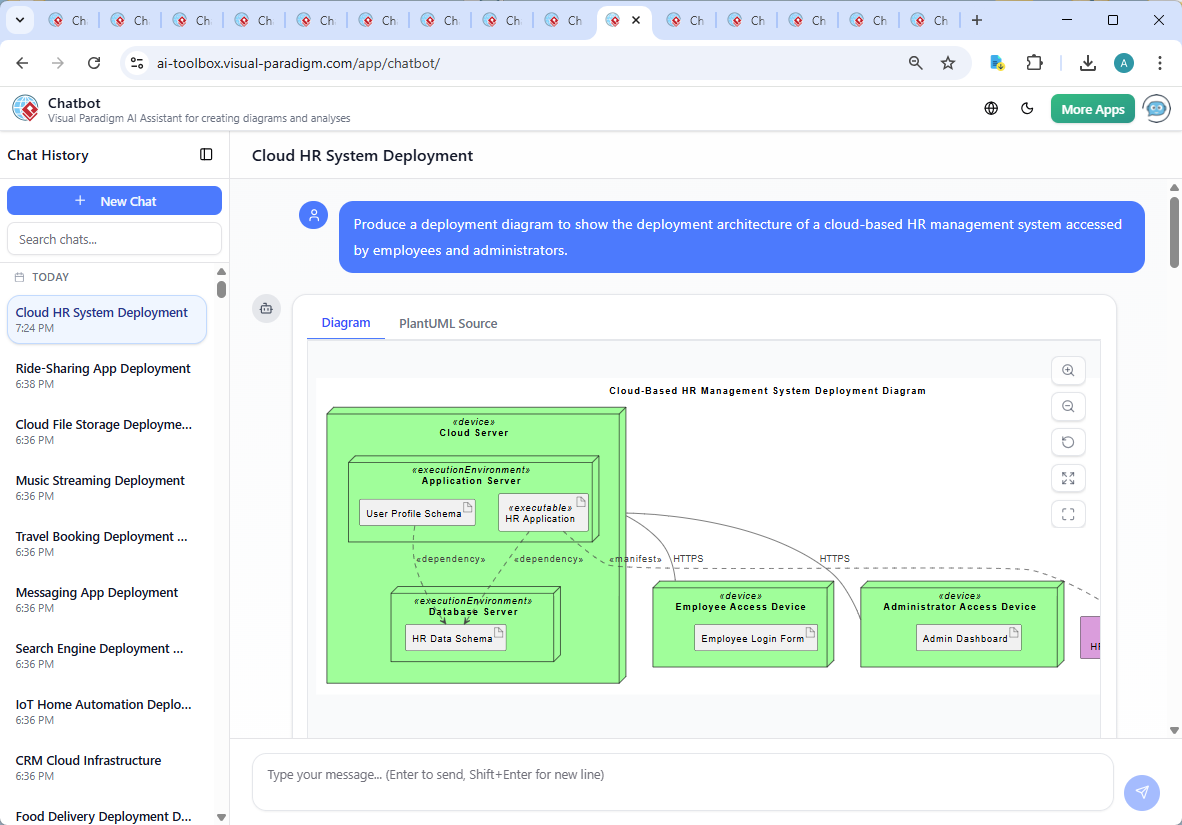
The journey began with a simple prompt: “Produce a deployment diagram to show the deployment architecture of a cloud-based HR management system accessed by employees and administrators.”
Within seconds, the Visual Paradigm AI Chatbot responded with a fully formed PlantUML-based Deployment Diagram, capturing the core structure of the system. But the real value emerged in the conversation that followed.
When the user asked, “Explain this diagram,” the AI didn’t just list components—it provided a layered breakdown of roles, dependencies, and architectural decisions. It clarified the ..> notation as a dependency between the HR application and data schema, and explained how the cloud server hosts both the application and database layers.
Further refinement came when the user requested deeper insight: “Explain this branch.” The AI didn’t default to a generic answer. Instead, it expanded on the data flow—how employee profiles are stored in the HR Data Schema, how the application retrieves data securely via HTTPS, and how role-based access is enforced at the interface level.
Each interaction wasn’t a one-way output—it was a dialogue. The AI adapted to follow-up requests, offering to add security layers, generate a C4 version, or scale for enterprise use. This is the essence of the Visual Paradigm AI Chatbot: it functions as a consultant, educator, and co-designer, not just a tool.
Decoding the Architecture: How the Diagram Works
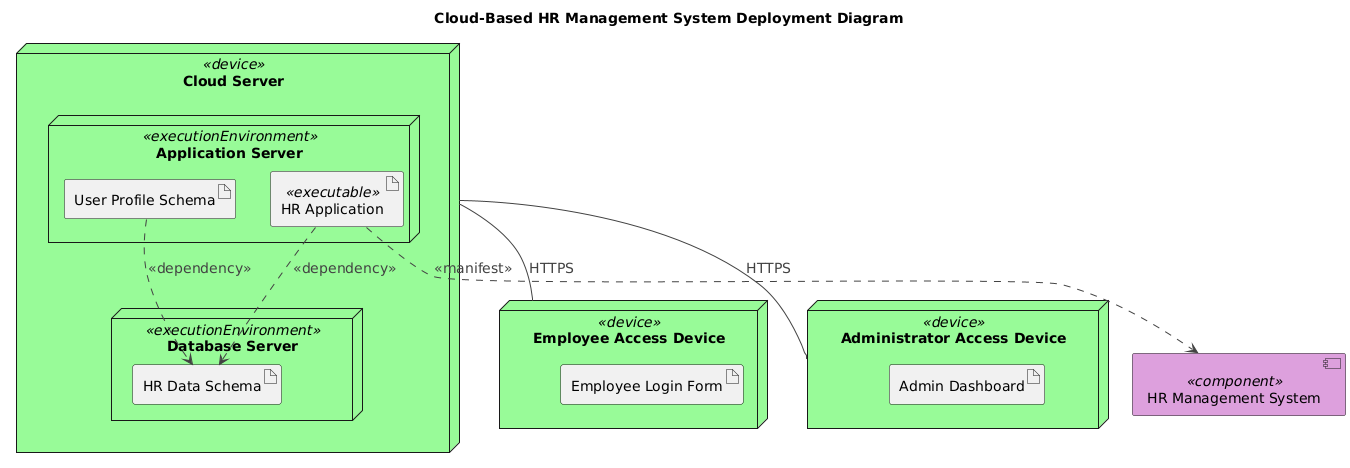
The generated Deployment Diagram is built on core UML deployment principles, with a focus on clarity and real-world accuracy. Let’s break down the key elements and the reasoning behind their placement.
1. Core Components and Their Roles
- HR Management System (Component): The central software entity that encapsulates all HR functionality—user management, payroll, leave tracking, performance reviews.
- Employee Access Device: Represents any device used by employees (laptop, tablet, phone) to access personal HR data. It hosts the Employee Login Form, a lightweight artifact for authentication.
- Administrator Access Device: Used by HR staff or managers to access the Admin Dashboard, which enables system configuration, user management, and reporting.
- Cloud Server (Execution Environment): The backbone of the system, hosting both application and database components in a secure, scalable cloud environment.
2. Layered Execution Environments
The cloud server is divided into two key execution environments:
- Application Server: Runs the HR Application executable, responsible for processing user requests, validating credentials, and orchestrating data retrieval.
- Database Server: Houses the HR Data Schema, a structured model for storing employee records, payroll history, and leave data.
3. Critical Relationships and Notation Choices
Every line and arrow in the diagram carries meaning:
cloudserver_device -- employeeaccess_device : HTTPS: Emphasizes secure, encrypted communication between users and the cloud system.hrapplication_executable ..> hrdataschema_artifact : <>: Highlights that the application relies on the data schema—without it, no data retrieval is possible.userprofileschema_artifact ..> hrdataschema_artifact : <>: Shows that employee profile data is stored within the broader HR data schema, ensuring data consistency.
These relationships are not arbitrary. They reflect real-world constraints: data must be validated before access, and the application cannot function without its data layer. The use of ..> (dependency) and -- (communication) aligns with UML standards, ensuring the diagram is both accurate and interpretable by technical teams.
4. Why This Architecture Works
- Scalability: Cloud hosting allows automatic scaling during peak loads (e.g., year-end payroll, onboarding season).
- Security: HTTPS ensures data in transit is encrypted; role-based access prevents unauthorized data exposure.
- Centralization: All data is stored in one place, simplifying backups, compliance, and audits.
- Remote Access: No local installation needed—employees and admins can access the system from anywhere.
Conversational Intelligence in Action
What truly sets Visual Paradigm apart is how the AI Chatbot transforms a static diagram into a living design conversation. After the initial diagram was generated, the user asked for an explanation. The AI didn’t just describe the diagram—it contextualized it, connecting each element to real-world use cases and technical best practices.
When the user requested clarification on a branch, the AI didn’t stop at labeling. It explained the data flow, the purpose of the schema, and how the system ensures data integrity. This level of insight isn’t just helpful—it’s essential for stakeholders who need to understand not just what the architecture is, but why it’s designed that way.
And the conversation didn’t end there. The AI proactively offered next steps: adding firewalls, IAM policies, or generating a C4 model for architectural clarity. This isn’t automation—it’s intelligent collaboration.
Beyond Deployment: A Unified Modeling Platform
While this example focused on a Deployment Diagram, the Visual Paradigm AI Chatbot is not limited to one standard. It seamlessly supports:
- UML: For detailed system design and behavioral modeling.
- ArchiMate: For enterprise architecture, enabling modeling of business, application, and technology layers.
- SysML: For complex systems engineering, including requirements, parametric, and internal block diagrams.
- C4 Model: For contextualizing software architecture at different abstraction levels—perfect for cloud systems and microservices.
- Visual Tools: Mind Maps, Org Charts, SWOT, PEST, and data visualization (column, pie, line, area charts) for strategy and planning.
Whether you’re designing a cloud HR system, a financial trading platform, or a smart city infrastructure, the AI Chatbot adapts to your domain, your language, and your level of expertise. It’s not a one-size-fits-all tool—it’s a multi-standard, AI-powered visual modeling platform that grows with your project.
Conclusion: Design with Confidence, Not Guesswork
Creating a secure, scalable, and maintainable cloud-based HR system is no small task. But with the Visual Paradigm AI Chatbot, you’re not alone. From the initial request to the final explanation, the AI acts as a modeling consultant—guiding, refining, and validating every step of the way.
Whether you’re a developer, architect, or business stakeholder, the ability to generate, explain, and evolve your architecture through natural conversation is transformative. You’re not just drawing diagrams—you’re building a shared understanding of your system’s future.
Ready to turn your next idea into a fully realized, AI-validated architecture? Try the shared session and experience the future of visual modeling.