


Designing a Smart Elevator System with AI-Powered Precision
Creating a robust, safe, and responsive elevator system demands more than basic schematics—it requires a clear, structured model of how components interact under real-world conditions. Traditional modeling tools often require deep expertise in SysML notation and manual diagramming, slowing down innovation. With Visual Paradigm’s AI Chatbot, this complexity dissolves into a conversational workflow where engineers and architects co-create with intelligent guidance.
From Request to Response: A Collaborative Modeling Journey
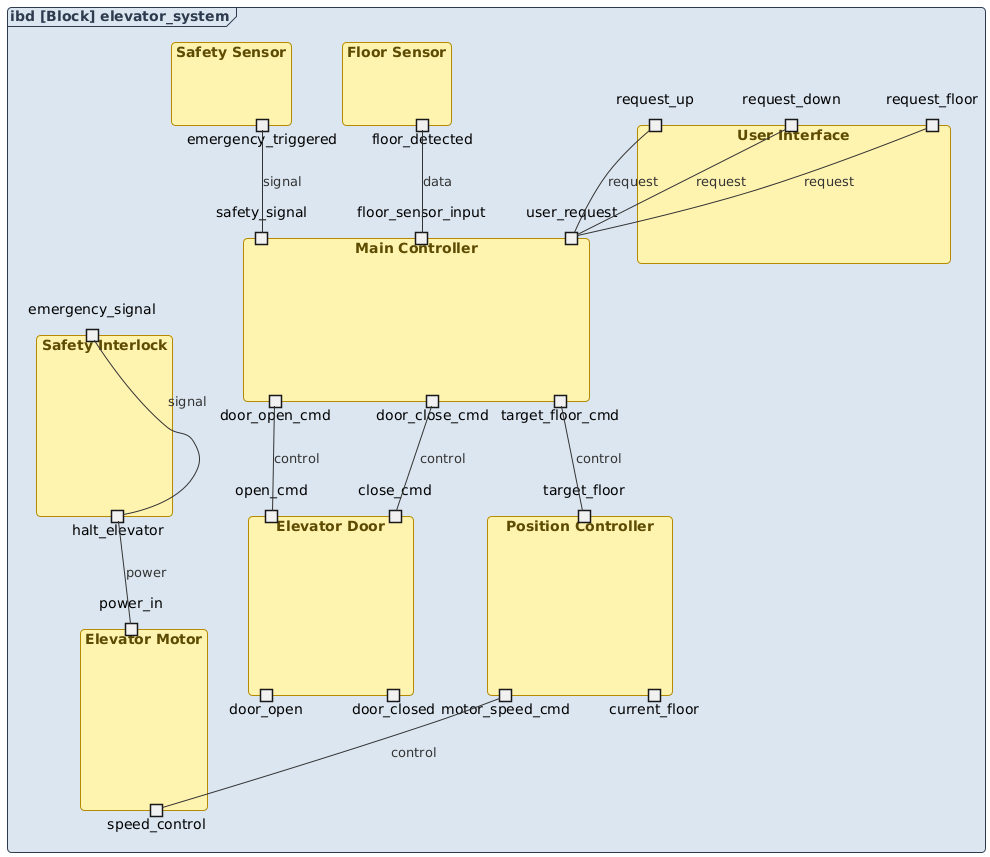
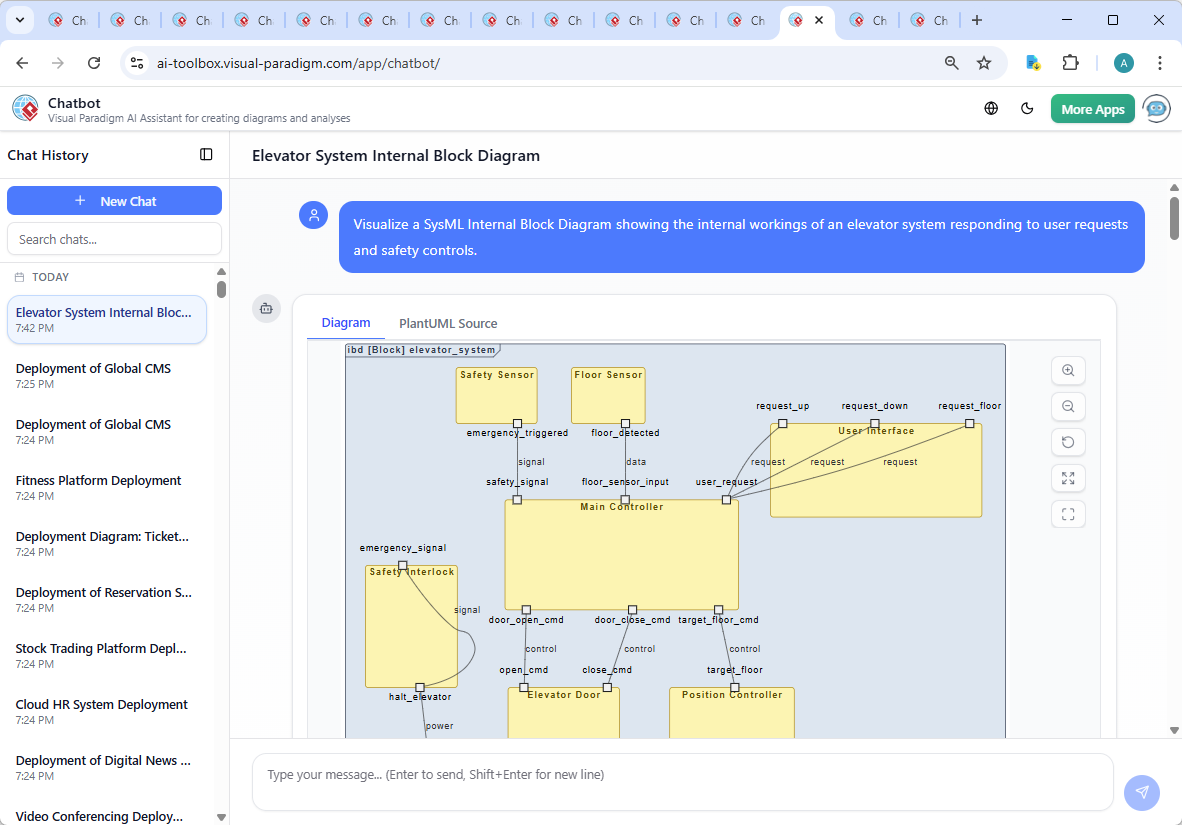
The journey began with a simple prompt: “Visualize a SysML Internal Block Diagram showing the internal workings of an elevator system responding to user requests and safety controls.” The AI Chatbot instantly interpreted this intent and generated a complete IBD using SysML notation, complete with components, ports, and connection semantics.
But the real value emerged in the conversation. After the initial output, the user asked: “Explain this diagram.” Instead of a static explanation, the AI responded with a structured, component-by-component breakdown—highlighting the flow of control, data, and safety logic. This wasn’t just documentation; it was a real-time design review.
When the user requested clarification on specific branches—like the safety interlock or the role of the position controller—the AI didn’t just repeat the diagram. It provided context: “The safety interlock sends a halt signal to the motor when an emergency is detected, ensuring the system stops immediately—critical for passenger safety.” This level of insight transforms the AI from a diagram generator into a modeling consultant.
Decoding the Internal Block Diagram: Why It Works
The generated IBD is not just visually accurate—it’s engineered for clarity and correctness in system design. Let’s walk through the logic behind each key component:
1. User Interface: The Entry Point
Ports like request_up, request_down, and request_floor serve as the primary interface for user input. These signals flow into the Main Controller, establishing the first layer of interaction.
2. Floor Sensor: Real-Time Position Feedback
The floor_detected output continuously updates the system on the elevator’s current location. This feedback loop enables accurate navigation and prevents overshooting or incorrect floor stops.
3. Safety Sensor & Interlock: The Guardian Layer
When the emergency_triggered signal is raised, the Safety Interlock responds by sending halt_elevator to the motor’s power input. This hard stop ensures that no movement occurs during a fault—critical for compliance and reliability.
4. Main Controller: Central Decision Engine
Acting as the system’s brain, the Main Controller receives user requests, floor data, and safety signals. It then issues commands to the Position Controller and Door system, ensuring synchronized behavior across subsystems.
5. Position Controller & Motor: Motion Execution
By comparing the target floor with the current floor, the Position Controller calculates the necessary speed profile and sends motor_speed_cmd to the Elevator Motor. This closed-loop control ensures smooth, efficient movement.
6. Elevator Door: User Experience at the Edge
Controlled via open_cmd and close_cmd, the door system operates only when the elevator is stationary and at the correct floor—ensuring safety and usability.
Each connection type (e.g., request, data, control, signal, power) is semantically meaningful, reflecting SysML’s ability to model both data and control flows with precision.
Conversational Intelligence: The AI as a Modeling Partner
What makes this process exceptional is the AI’s ability to evolve with the user’s intent. After the initial diagram, the conversation didn’t end—it deepened. The user asked for an explanation, and the AI delivered not just a list of components, but a narrative of how the system behaves under different conditions.
Follow-up queries like “Explain this branch” or “Refine the logic” triggered deeper analysis. The AI didn’t just label parts—it contextualized them, explaining how the safety interlock integrates with the motor, how the position controller uses feedback, and why the main controller is the central coordinator.
This isn’t automation—it’s collaborative design. The AI learns from the conversation, adapts its output, and elevates the model with each interaction.
Beyond SysML: A Full Modeling Suite
While this example focused on SysML’s Internal Block Diagram, Visual Paradigm’s AI Chatbot isn’t limited to one standard. It supports a full spectrum of modeling languages, including:
- UML: For software and system design
- ArchiMate: For enterprise architecture and business modeling
- C4 Model: For software architecture at scale
- SWOT, PEST, Org Charts, Mind Maps: For strategic planning and team collaboration
Whether you’re designing a microservice architecture, mapping enterprise capabilities, or visualizing a business strategy, the AI Chatbot adapts to your domain—making Visual Paradigm a true AI-powered visual modeling platform.
Conclusion: Build Smarter, Faster, Together
The elevator system IBD isn’t just a diagram—it’s a blueprint for intelligent, safe, and scalable system design. With Visual Paradigm’s AI Chatbot, you’re not just generating visuals; you’re engaging in a dynamic, intelligent dialogue that shapes better designs from the start.
Ready to model your next system with confidence? Try it yourself at this shared session—and experience how AI transforms modeling from a task into a conversation.