


Designing a Smartphone’s Core Intelligence: An AI-Powered SysML Internal Block Diagram
Creating a detailed and accurate representation of a smartphone’s internal architecture is no small task. With multiple hardware modules—each with distinct roles and dependencies—designing a clear, structured view of how they interact requires both technical precision and systems thinking. This is where the Visual Paradigm AI Chatbot steps in as a collaborative modeling expert, transforming high-level concepts into a fully realized SysML Internal Block Diagram (IBD) through natural conversation.
From Concept to Clarity: An Interactive Journey with the AI Chatbot
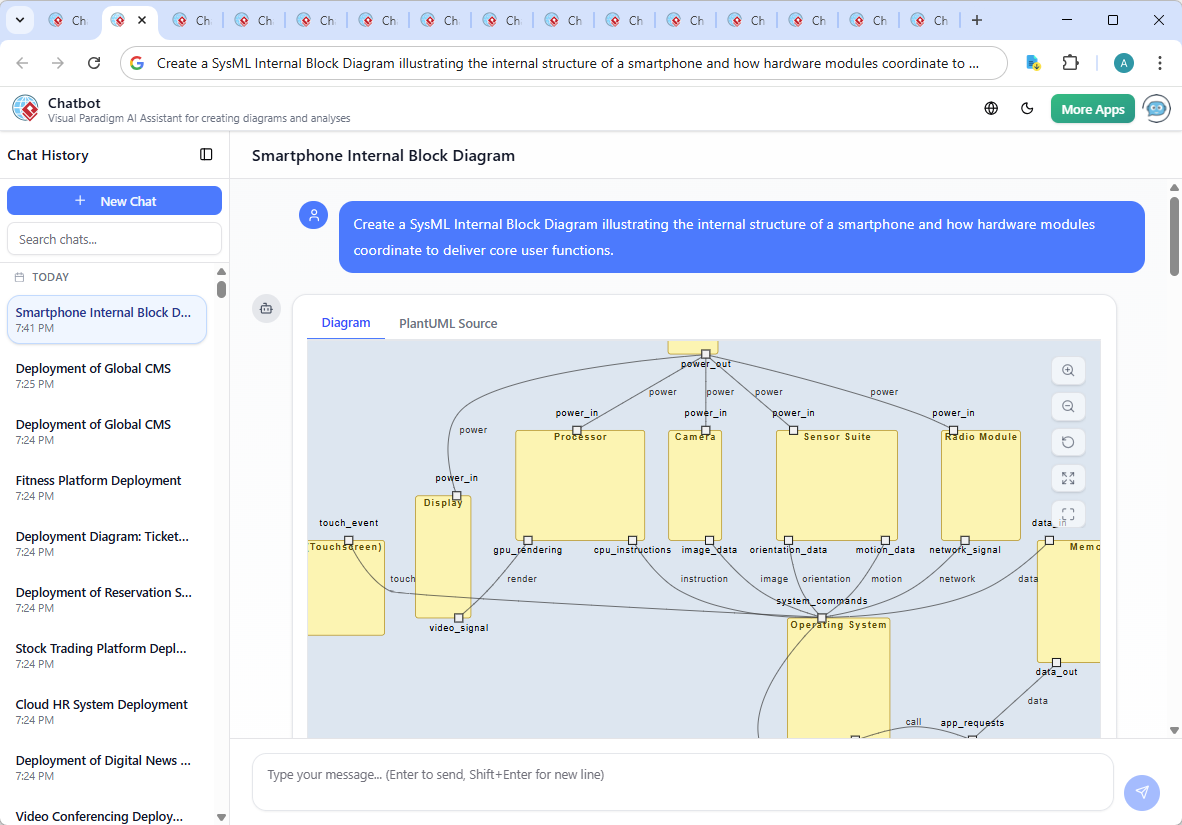
The journey began with a simple request: “Create a SysML Internal Block Diagram illustrating the internal structure of a smartphone and how hardware modules coordinate to deliver core user functions.” The AI Chatbot responded instantly with a fully formed PlantUML script, generating a structured IBD that mapped out the smartphone as a block with interconnected components.
But the conversation didn’t stop there. When the user asked, “Can you explain how the operating system coordinates between the processor and memory to handle application requests?”, the AI didn’t just provide a text explanation—it expanded the narrative into a layered technical insight, clarifying the OS’s role in memory allocation, process scheduling, and secure data handling.
What followed was a true collaboration: the AI refined the logic, highlighted key dependencies, and even offered a visual analogy—comparing the OS to a traffic controller—making complex systems behavior intuitive. This iterative dialogue wasn’t just about generating a diagram; it was about building shared understanding, with the AI acting as a modeling consultant who anticipates follow-up questions and deepens the design rationale.
Decoding the Internal Block Diagram: Structure and Logic
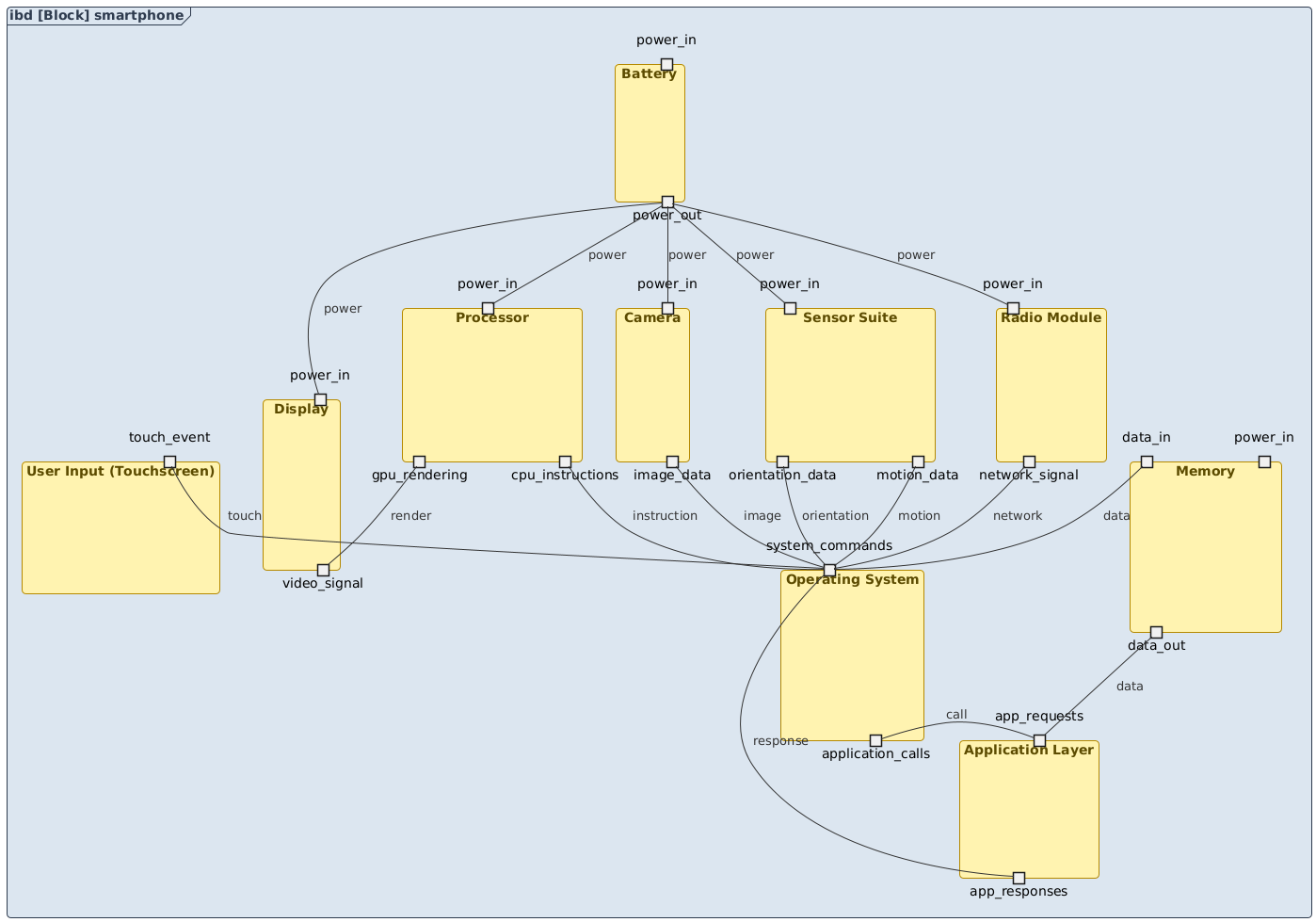
The resulting SysML Internal Block Diagram captures the smartphone as a composite system, with each hardware module represented as a component. The IBD notation is ideal here because it explicitly shows:
- Internal Structure: How components are nested and connected within the system.
- Port Interfaces: The defined entry and exit points for data and control signals (e.g.,
video_signal,power_in,touch_event). - Connectors: The physical and logical relationships between components, such as power delivery and data flow.
Let’s break down the key elements:
Core Components and Their Roles
- Processor: Acts as the central brain, executing instructions and rendering graphics via the GPU.
- Memory: Stores active application data and system state, with bidirectional data flow to the processor.
- Battery: Supplies power to all modules through dedicated power ports.
- Display: Receives rendered video signals and displays output.
- Camera & Sensor Suite: Provide image and motion data to the OS for processing.
- Radio Module: Handles network communication, feeding data to the OS.
- User Input (Touchscreen): Sends touch events to the OS for immediate response.
- Operating System (OS): The central coordinator, receiving inputs from hardware and routing them to the appropriate app or system function.
- Application Layer: Where user-facing apps execute, receiving system calls and returning results.
Key Interactions and Flow
The diagram’s connectors reveal critical coordination points:
battery_power_out -- processor_power_in: Power is distributed from the battery to all active components.processor_gpu_rendering -- display_video_signal: The GPU sends rendered visuals to the display.memory_data_out -- app_layer_app_requests: The OS retrieves data from memory to fulfill app requests.input_touch_event -- os_system_commands: User touch inputs are routed to the OS for interpretation.camera_image_data -- os_system_commands: Image data from the camera is processed by the OS before being sent to the app layer.
These connections illustrate how the OS serves as the central hub—orchestrating data flow, managing resources, and ensuring system stability.
Conversational Intelligence in Action
The true strength of the Visual Paradigm AI Chatbot lies in its ability to evolve with the user’s thinking. When asked to explain the OS’s role in coordinating the processor and memory, the AI didn’t just restate the diagram—it provided a detailed, layered explanation that included:
- Memory allocation and management
- Process scheduling and execution
- Security and performance monitoring
- A real-world analogy (traffic controller) for clarity
This depth of insight transforms the AI from a diagram generator into a design partner. The chat history proves that the AI doesn’t just follow prompts—it anticipates needs, clarifies ambiguity, and enhances the model’s accuracy through dialogue.
Beyond SysML: A Unified Platform for Visual Modeling
While this example focused on SysML’s Internal Block Diagram, the Visual Paradigm AI Chatbot is built to support a full spectrum of modeling standards. Whether you’re designing enterprise architecture with ArchiMate, modeling complex systems with UML, visualizing software architecture using the C4 Model, or analyzing business strategy with SWOT and PEST frameworks, the AI Chatbot adapts to your needs.
From mind maps to PERT charts, org charts to dynamic data visualizations (column, area, pie, line), the platform functions as a unified, AI-powered environment for all visual modeling tasks—eliminating context switching and accelerating design cycles.
Conclusion: Design with Intelligence, Not Just Tools
Visual Paradigm isn’t just a diagramming tool—it’s a collaborative intelligence layer for systems design. The AI Chatbot turns abstract ideas into precise, actionable models through natural conversation, making complex systems like smartphone architectures accessible, understandable, and scalable.
Whether you’re an architect, developer, or product designer, the ability to ask, refine, and deepen your design through dialogue is what sets Visual Paradigm apart. Try it today and experience how AI transforms visual modeling from a task into a conversation.
Ready to build smarter systems? Explore the full capabilities of the shared session and see how the AI Chatbot brings your ideas to life—naturally, precisely, and collaboratively.