


Designing a Scalable Food Delivery System with AI-Powered Precision
Building a robust food delivery application demands more than just coding—it requires a clear, structured vision of how components interact across layers. The challenge lies in modeling complex systems where customer experience, real-time tracking, payment processing, and restaurant coordination must work in harmony. This is where the Visual Paradigm AI Chatbot transforms conceptual ideas into precise, professional diagrams through natural conversation.
From Idea to Diagram: A Collaborative Design Journey
The journey began with a simple prompt: “Create a component diagram to show the structure of a food delivery application with customer app, restaurant portal, order management, delivery tracking, and payment processing.” The AI Chatbot immediately responded with a fully rendered PlantUML code for a component diagram, structured with clear layering and interface-based communication.
But the real value emerged in the follow-up. When asked, “Can you explain how the Order Management Service interacts with the Delivery Tracking Service?”, the AI didn’t just repeat the diagram—it offered a deep technical explanation, breaking down the workflow step by step:
- Order creation triggers delivery initiation.
- Order Management Service calls the Delivery Tracking Service via its interface.
- Tracking Service uses Location Service for real-time GPS data.
- Status updates flow back to the Order Management Service and are pushed to the Customer App.
This wasn’t just a diagram—it was a living design conversation. The AI acted as a modeling consultant, clarifying dependencies, suggesting interface semantics, and even offering to highlight the interaction with annotations or expand it into a sequence diagram.
Visualizing the Architecture: The Final Component Diagram
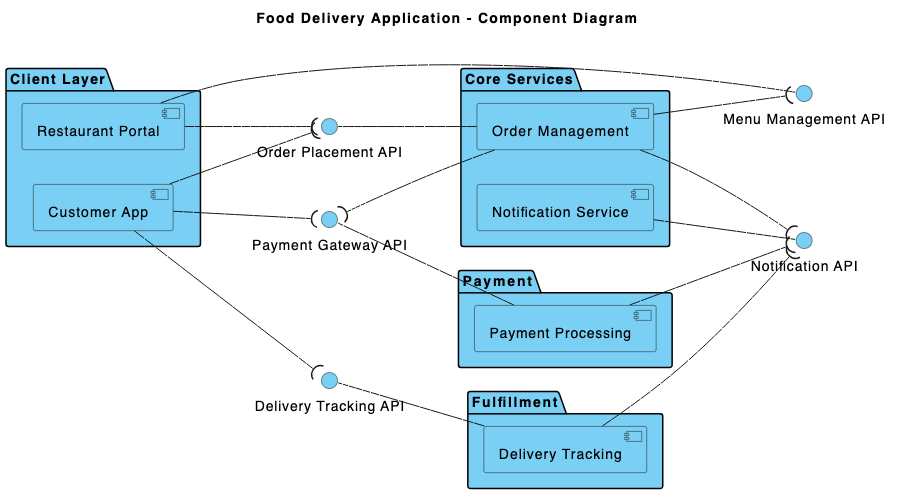
Decoding the Component Diagram: Why This Structure Works
The diagram is built on a layered architecture, reflecting modern software design principles:
1. Presentation Layer – User Interaction Points
This layer hosts user-facing components:
- Customer App: Handles order placement and status viewing via
Place OrderandView Order Statusinterfaces. - Restaurant Portal: Enables menu management and order monitoring through
Manage MenuandView Ordersinterfaces.
2. Application Layer – Core Business Logic
This is where the system’s intelligence resides:
- Order Management Service: Acts as the central orchestrator. It processes orders, validates them, and triggers downstream services.
- Payment Processing Service: Handles transaction logic and integrates with external gateways.
- Delivery Tracking Service: Manages real-time tracking using GPS and status updates.
3. Service Layer – External Integrations
These components represent external or specialized systems:
- Payment Gateway: Processes payments via secure APIs.
- Location Service: Provides geospatial data for delivery routing and tracking.
Connections between components are defined by interfaces, not direct dependencies. This ensures loose coupling and supports scalability—key for systems that must handle peak delivery loads.
Why Component Diagrams?
Component diagrams are ideal for visualizing system structure because they:
- Clarify responsibilities and boundaries.
- Expose dependencies through interfaces.
- Support modular development and team collaboration.
The choice of PlantUML syntax was deliberate—it’s readable, versionable, and integrates seamlessly with development workflows. The AI ensured the diagram was not just visually clean but technically sound.
Conversational Intelligence: The AI Chatbot as Your Design Partner
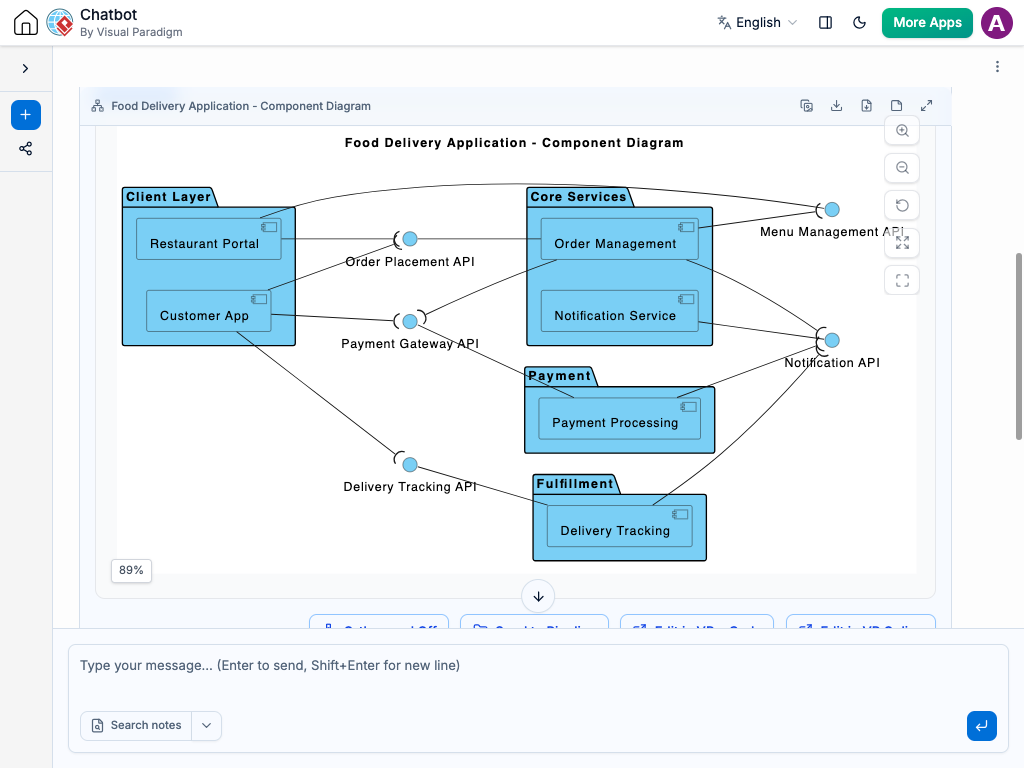
What sets Visual Paradigm apart is how the AI Chatbot doesn’t just generate diagrams—it collaborates. In this session, the user asked a follow-up question, and the AI didn’t just restate the diagram—it explained the why behind the interaction, revealing how data flows, how services coordinate, and how feedback loops maintain system integrity.
For example, the AI clarified that the Delivery Tracking Service doesn’t just receive data—it actively sends updates back to the Order Management Service, enabling dynamic order status tracking. This insight would be easy to miss without a modeling expert guiding the conversation.
Beyond Component Diagrams: A Full Modeling Suite
The Visual Paradigm AI Chatbot isn’t limited to component diagrams. It’s a multi-standard modeling assistant capable of generating:
- UML diagrams (Class, Sequence, Use Case, Activity).
- ArchiMate models for enterprise architecture and business alignment.
- SysML diagrams for complex system engineering.
- C4 Model diagrams for software architecture visualization (Context, Containers, Components, Code).
- Support for Mind Maps, PERT Charts, Org Charts, SWOT, PEST, and data visualization charts.
Whether you’re designing a microservices backend, aligning IT with business strategy, or documenting a startup’s product roadmap, the AI Chatbot adapts to your modeling needs—always with the precision of a senior architect.
Conclusion: Design with Confidence, Powered by AI
Creating a scalable food delivery system requires more than code—it demands architectural clarity. With Visual Paradigm’s AI Chatbot, you don’t need to be a modeling expert to produce professional-grade diagrams. The platform turns your ideas into structured, collaborative designs through natural conversation.
Explore the full shared session to see how the diagram evolved in real time. Try it yourself and experience how AI is redefining visual modeling.
Related Links
- Component Diagram – Wikipedia: A UML diagram that illustrates the organization and dependencies of components in a software system.
- What is a Component Diagram? – Visual Paradigm: A detailed guide on UML component diagrams, showing how components interact and are structured in software design.
- Component Diagram Tutorial: Component Diagram Tutorial. Component diagrams provide a simplified, high-order view of a large system. Classifying groups of classes into components supports the interchangeability…