


Designing the Airline Booking System: From Idea to Precise Component Diagram
Creating a scalable and maintainable airline reservation system requires more than just visualizing components—it demands a clear, structured representation of how each subsystem interacts. The challenge lies in translating business logic into a model that developers, architects, and stakeholders can align on. This is where the Visual Paradigm AI Chatbot steps in—not as a passive diagram generator, but as an intelligent collaborator that understands system design principles and guides the modeling process through natural conversation.
From Prompt to Precision: A Conversational Design Journey
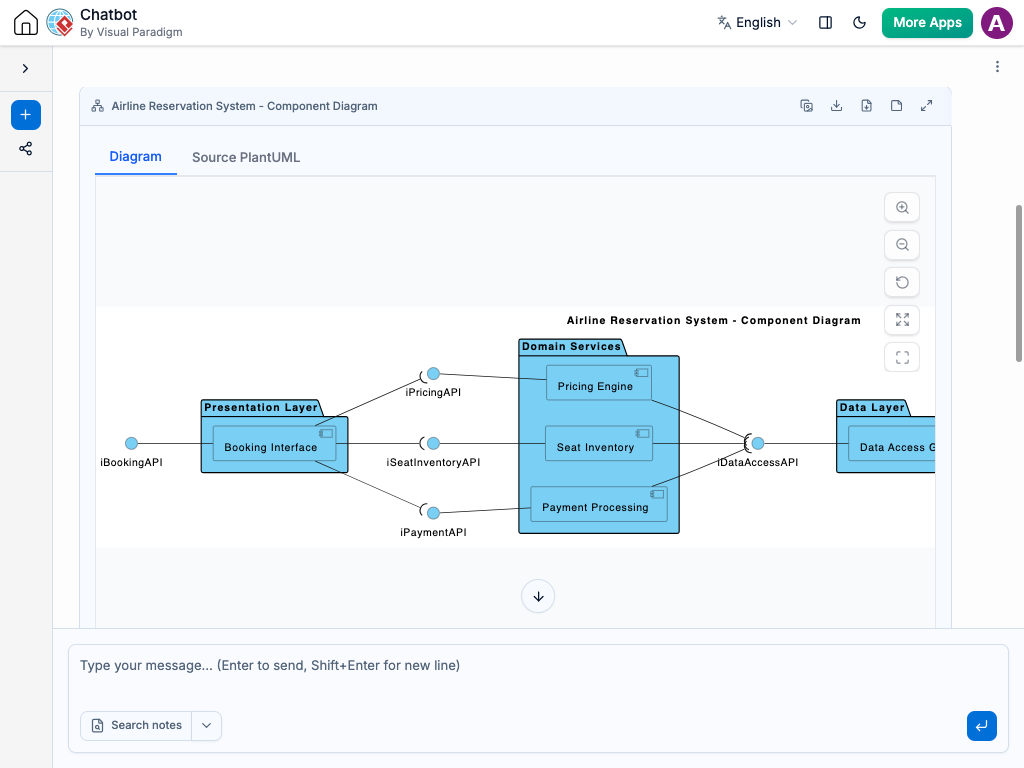
The journey began with a simple request: “Visualize a component diagram for an airline reservation system highlighting booking interface, seat inventory, pricing engine, payment processing, and reservation database.” The AI Chatbot responded instantly with a fully rendered PlantUML-based component diagram, structured using layered packages (Presentation, Service, Data) and clearly defined interfaces.
But the real value emerged in the conversation that followed. When asked to explain how the “Check Seat Availability” interface interacts with the “Seat Inventory” component, the AI didn’t just restate the diagram—it delivered a detailed, technical breakdown of the interaction flow, including:
- How the user’s input triggers the request
- The internal logic of seat validation
- What data is returned (available seats, layout, restrictions)
- Why this step is critical to prevent overbooking
Each follow-up—such as requesting clarification on interface dependencies or asking for a flow example—was met with a precise, context-aware response. The AI didn’t just answer; it refined the design logic, reinforcing architectural integrity through conversational feedback.

Decoding the Component Diagram Logic
The diagram is built on a layered architecture that mirrors real-world deployment patterns:
Layer 1: Presentation Layer
Contains the Booking Interface, the user-facing entry point. It exposes the Submit Booking interface to initiate the reservation process. This layer is responsible for collecting user input and forwarding it to backend services.
Layer 2: Service Layer
Hosts the core business logic:
- Seat Inventory: Manages real-time seat availability, validated against flight schedules and class restrictions.
- Pricing Engine: Calculates fare based on route, class, time, and demand.
- Payment Processing: Handles transaction validation, authorization, and confirmation.
Each component communicates via well-defined interfaces, ensuring loose coupling and testability. For example, the Booking Interface only knows about the Check Seat Availability interface—not the internal workings of the seat inventory system.
Layer 3: Data Layer
Encapsulates the Reservation Database, which persists all booking records. It exposes two key interfaces:
- Save Reservation: Used after successful payment to store the booking.
- Get Reservation: Retrieves existing bookings for updates or check-in.
These interfaces are used by the Payment Processing and Seat Inventory components to update or retrieve booking state, ensuring consistency across the system.
Why This Structure?
Component diagrams are ideal here because they:
- Clarify responsibility boundaries between subsystems.
- Highlight interface dependencies without revealing implementation.
- Support modular development and independent deployment of services.
By using packages to group components by layer, the diagram also reflects deployment topology—helping DevOps teams understand how services should be containerized or scaled.
Conversational Intelligence: The AI as a Modeling Consultant
What sets Visual Paradigm apart isn’t just the diagram output—it’s the ability to engage in a two-way dialogue that deepens design understanding. After the initial diagram was generated, the user asked for an explanation of the seat availability interaction. The AI didn’t default to a generic answer. Instead, it:
- Traced the flow from user input to system response
- Explained the business and technical rationale behind the interface
- Provided a real-world example of how the system prevents overbooking
- Offered to generate a sequence diagram if needed
This level of contextual intelligence transforms the AI Chatbot into a true modeling expert—one that anticipates follow-up questions and enriches the design process with architectural insight.
More Than Just Component Diagrams: A Multi-Standard Platform
While this example focused on a Component Diagram, the Visual Paradigm AI Chatbot is built to support a full spectrum of modeling standards. Whether you’re designing enterprise IT landscapes with ArchiMate, modeling complex systems with SysML, visualizing software architecture using the C4 Model, or mapping business strategies with SWOT or PEST analysis, the AI adapts to your needs.
For example, the same chat session could have evolved into:
- A System Context Diagram to show external actors (passengers, payment gateways).
- A Sequence Diagram to detail the step-by-step flow of a booking transaction.
- An Archimate View to map business capabilities, application services, and technology components.
This versatility makes Visual Paradigm not just a diagramming tool, but a unified environment for end-to-end visual modeling—where AI assists across standards, ensuring consistency and coherence in your architecture.
Conclusion: Design Smarter, Not Harder
Building an airline reservation system involves balancing performance, scalability, and user experience. The Visual Paradigm AI Chatbot turns the complexity of system design into a conversational journey—where every question refines the model, and every interaction deepens the design’s integrity.
Ready to bring your next system to life? Explore the full diagram and chat with the AI at this shared session link. Let the AI help you design with precision, clarity, and confidence.
Related Links
- Component Diagram – Wikipedia: A UML diagram that illustrates the organization and dependencies of components in a software system.
- What is a Component Diagram? – Visual Paradigm: A detailed guide on UML component diagrams, showing how components interact and are structured in software design.
- Component Diagram Tutorial: Component Diagram Tutorial. Component diagrams provide a simplified, high-order view of a large system. Classifying groups of classes into components supports the interchangeability…