


Designing a Reliable Messaging System with AI-Powered Precision
Building a scalable, real-time messaging application requires more than just coding—it demands a clear architectural blueprint. The challenge lies in modeling complex interactions between distributed components like client apps, message routing, media handling, and persistent storage. This is where the Visual Paradigm AI Chatbot steps in—not as a diagram generator, but as a collaborative modeling expert.
From Idea to Architecture: A Conversational Design Journey
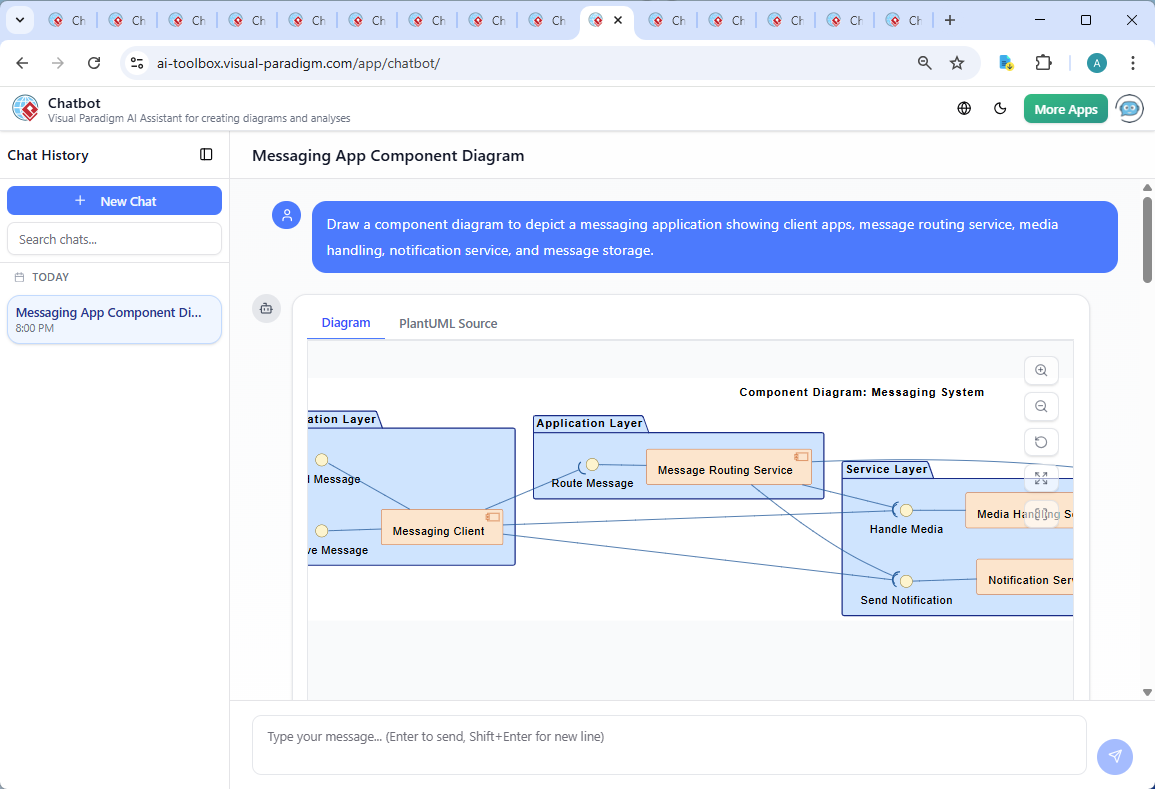
It began with a simple request: “Draw a component diagram to depict a messaging application showing client apps, message routing service, media handling, notification service, and message storage.” Within seconds, the Visual Paradigm AI Chatbot delivered a fully structured PlantUML representation, complete with layered components, interfaces, and clear data flow.
But the real value emerged in the follow-up. When asked, “Can you explain how the Message Routing Service handles message delivery when the recipient is offline?”, the AI didn’t just provide a textual answer—it enriched the design with architectural insight. It described a deferred delivery mechanism using message queuing, explained status tracking, and outlined the logic of delivery triggers upon reconnection.
This wasn’t a one-way response. The AI invited further exploration: “Let me know if you’d like a sequence diagram or SysML component diagram to visualize this flow!” This level of conversational intelligence turns the tool into a co-designer, not just a renderer.
Visualizing the Messaging System

Decoding the Component Diagram Logic
The resulting diagram is more than a visual—it’s a strategic blueprint. Here’s how each element was purposefully designed:
Layered Architecture for Clarity
The diagram uses four distinct layers—Presentation, Application, Service, and Data—to reflect the logical separation of concerns. This structure is critical in distributed systems, enabling scalability, maintainability, and independent deployment.
- Presentation Layer: Houses the Messaging Client, which interacts with users through interfaces like Send Message and Receive Message.
- Application Layer: The Message Routing Service acts as the central coordinator, ensuring messages are routed efficiently and reliably.
- Service Layer: Contains specialized services—Media Handling Service for file processing, and Notification Service for push alerts—each with its own interface.
- Data Layer: Message Storage is the persistent repository, responsible for storing and retrieving messages with integrity and security.
Interface-Driven Communication
Each component communicates via well-defined interfaces. This enforces loose coupling, allowing services to evolve independently. For example:
- Message Routing Service communicates with Message Storage through the Store and Retrieve Messages interface.
- Notification Service and Media Handling Service both interact with the routing service via their respective interfaces, ensuring clean boundaries.
Why Component Diagrams? The Strategic Choice
Component diagrams are ideal for this use case because they emphasize modularity, responsibility separation, and inter-service dependencies. Unlike class diagrams, they focus on system composition rather than internal structure—perfect for high-level architectural planning.
Conversational Intelligence in Action
What makes this design process truly exceptional is the back-and-forth dialogue. The AI didn’t just draw a diagram—it engaged in a technical conversation, refining logic and offering deeper insights. When asked about offline delivery, it didn’t default to a generic answer. Instead, it explained the queuing mechanism, status tracking, delivery triggers, and even security and expiry considerations.
This is where the AI Chatbot’s intelligence shines. It doesn’t just respond—it teaches. It anticipates follow-up questions, suggests related diagrams, and reinforces best practices in system design.
More Than a Diagram Tool: A Full-Stack Modeling Platform
While this example focused on a Component Diagram, the Visual Paradigm AI Chatbot is not limited to one standard. It supports a full suite of modeling languages, including:
- UML (for software design and system behavior)
- ArchiMate (for enterprise architecture and business alignment)
- SysML (for systems engineering and complex system modeling)
- C4 Model (for software architecture at scale)
- Mind Maps, PERT Charts, Org Charts, SWOT, PEST, and data visualizations (for strategy, planning, and presentation)
Whether you’re designing a cloud-native application, mapping enterprise workflows, or modeling a mission-critical system, the AI Chatbot adapts to your domain and modeling needs.
Conclusion: Design Smarter with AI
The Visual Paradigm AI Chatbot transforms architectural design from a solitary task into a dynamic, intelligent collaboration. It turns natural language into precise, standards-compliant models—complete with logical depth, layered structure, and real-world operational insight.
Ready to build your next system with confidence? Try the shared session and experience how the AI Chatbot can turn your ideas into architectural reality.
Related Links
- Component Diagram – Wikipedia: A UML diagram that illustrates the organization and dependencies of components in a software system.
- What is a Component Diagram? – Visual Paradigm: A detailed guide on UML component diagrams, showing how components interact and are structured in software design.
- Component Diagram Tutorial: Component Diagram Tutorial. Component diagrams provide a simplified, high-order view of a large system. Classifying groups of classes into components supports the interchangeability…