


UML Use Case Diagram
The UML Use Case Diagram illustrates system functionality from the user’s perspective, showing interactions between actors and key use cases.

Instant Use Case Diagram Generation
With this AI-powered chatbot, defining a system’s functional scope becomes far more fluid. You can simply describe how different people interact with your system, and the chatbot will turn those descriptions into a complete Use Case Diagram. Instead of manually drawing actors and use cases, the tool interprets your inputs, organizes them into clear relationships, and produces a visual model that reflects your understanding of the system.
Collaborative Refinement Through Conversation
Once the initial diagram is created, you can continue refining it naturally through conversation. Ask the chatbot to add a new actor, adjust an existing use case, or clarify whether a feature should be an include or extend relationship. You can even explore what-if scenarios or request a quick check for missing use cases. This interactive flow helps you shape requirements with higher accuracy and far less effort.
Benefits of Creating Use Case Diagrams with the AI Chatbot

Generate complete diagrams from simple descriptions or user stories.
Quickly clarify and modify relationships such as include and extend.
Validate requirement completeness by identifying missing actors or functions.
Streamline requirement workshops with instant visual updates during discussions.
Keep diagrams consistent and aligned as requirements evolve.
Examples of Generating UML Use Case Diagram
Use simple text prompts to generate this diagram in seconds. Here are a few examples to get you started:
Smart Home Automation System
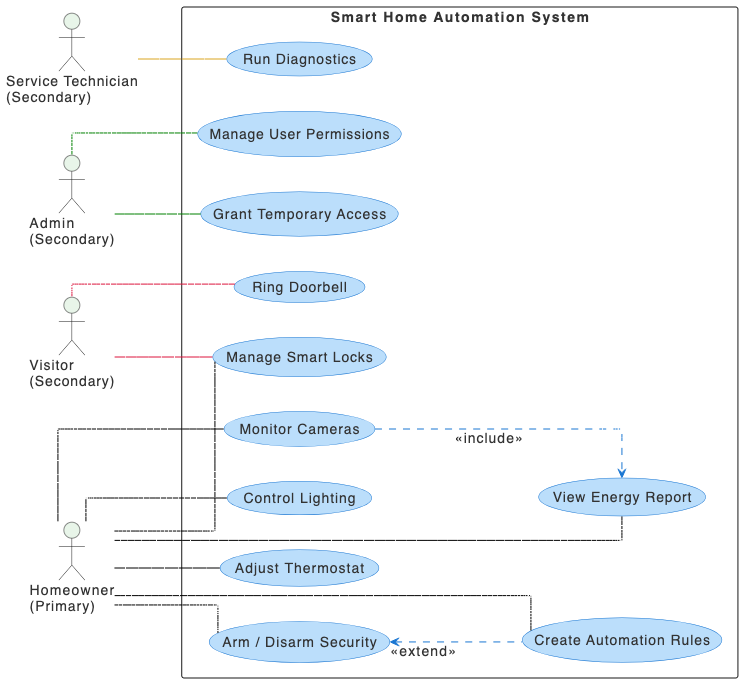
“Create a use case diagram for a Smart Home Automation System”
University Course Registration System
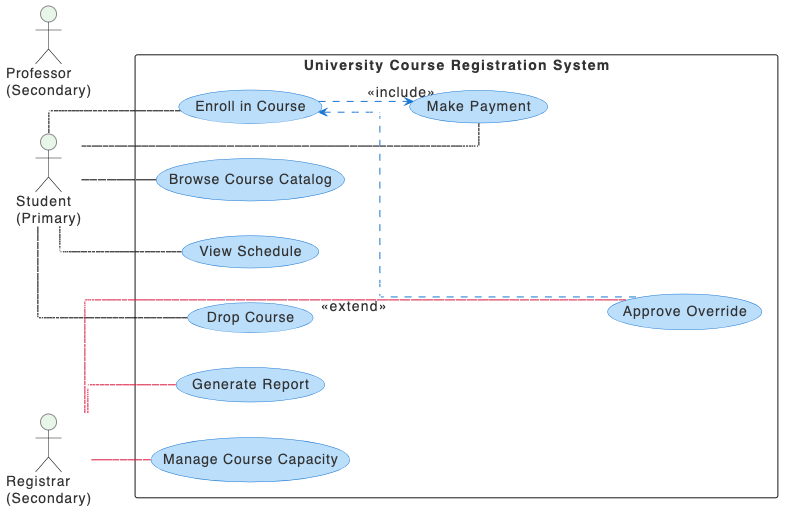
“Create a use case diagram for a University Course Registration System that allows students to enroll in courses.”
Hotel Reservation System
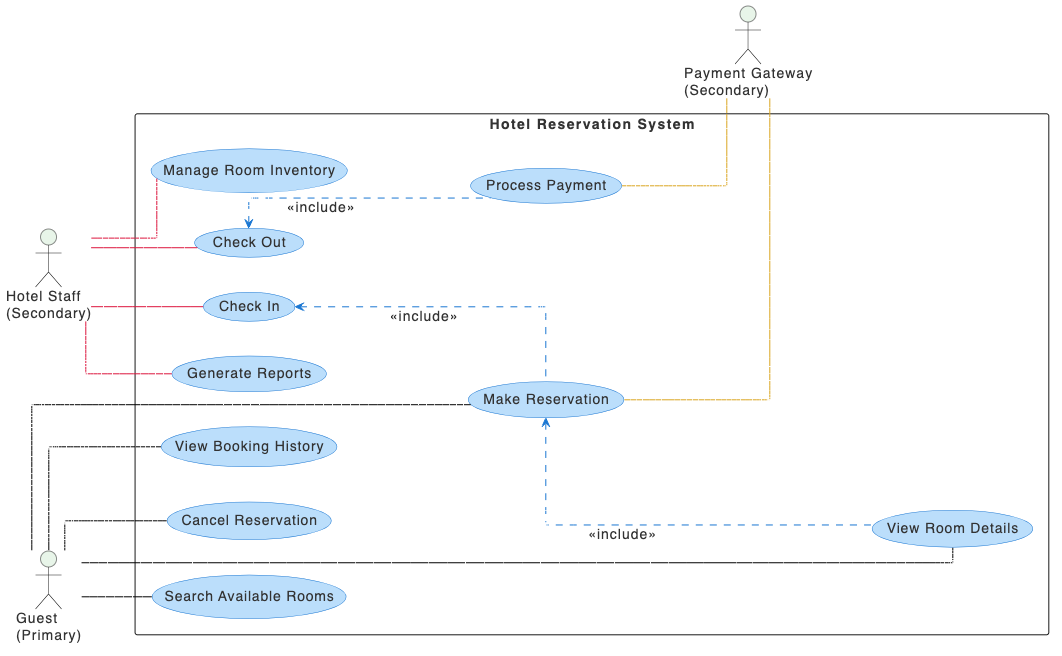
“Prepare a use case diagram for a Hotel Reservation System for booking rooms and managing stays.”
What is a UML Use Case Diagram
A UML Use Case Diagram provides a high-level view of what a system is expected to do from the user’s perspective. It focuses on the interactions between external parties and the system, helping teams understand the functions needed to deliver value.
These diagrams serve as a communication tool for aligning stakeholders, analysts, and developers. By clearly showing actors, use cases, and their relationships, they help define scope, avoid misunderstandings, and lay a solid foundation for accurate requirement gathering.
Key Concepts
Use Case Diagram
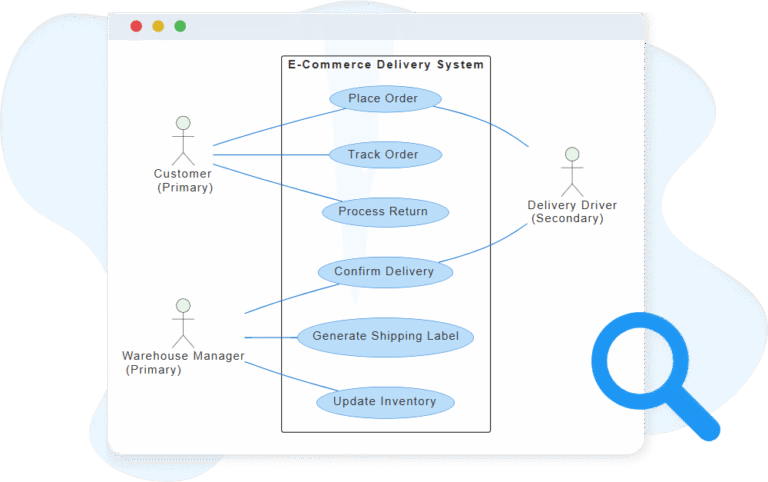
A use case diagram is a type of UML diagram that visually represents the functional requirements of a system. It shows how different users, known as actors, interact with the system by performing specific tasks or use cases. This diagram is particularly useful in the early stages of system design to provide a high-level overview of what the system does and its scope.
Actor
An actor represents a role that interacts with the system. It can be a person, another system, or an external device. Actors are shown as stick figures and they define who or what is using the system.
System Boundary
The system boundary defines the scope of the system being modeled. It is shown as a rectangle that contains all the use cases. Everything inside the rectangle belongs to the system; everything outside is external.
Use Case
A use case describes a function or service the system provides to its actors. It is represented as an oval shape and answers the question: “What can the actor do with the system?”
Include
The include relationship shows that one use case always uses the behavior of another use case. It’s a way to reuse common functionality. It is drawn as a dashed arrow pointing to the included use case, labeled with «include».
Extend
The extend relationship shows optional or conditional behavior that extends the base use case under certain conditions. It is drawn as a dashed arrow pointing to the base use case, labeled with «extend».
Association (Connector)
An association is a line that connects an actor to a use case. It shows that the actor participates in that use case — either by initiating it or by receiving a result from it.
Ready to Revolutionize Your Workflow with AI?
Stop wrestling with tools. Embrace AI-powered visual modeling. Let our AI handle the visualization so you can focus on solving the bigger problems.