


Designing an E-Commerce Architecture with AI-Powered Precision
Building a scalable and maintainable e-commerce platform requires more than just coding—it demands a clear, visual understanding of how components interact. The challenge lies in translating complex system logic into a structured, shareable blueprint that developers, architects, and stakeholders can align on. This is where the Visual Paradigm AI Chatbot steps in—not as a passive diagram generator, but as a collaborative modeling partner.
When prompted to generate a component diagram for an e-commerce system, the AI didn’t just produce a static image. It initiated a conversational design process, adapting in real time to clarify interactions, validate assumptions, and deepen architectural insight. This isn’t automation—it’s intelligent co-design.
The Interactive Journey: From Prompt to Insight
The session began with a straightforward request: “Generate a component diagram to visualize the architecture of an e-commerce platform showing how the web frontend, backend services, payment gateway, inventory system, and database interact.”
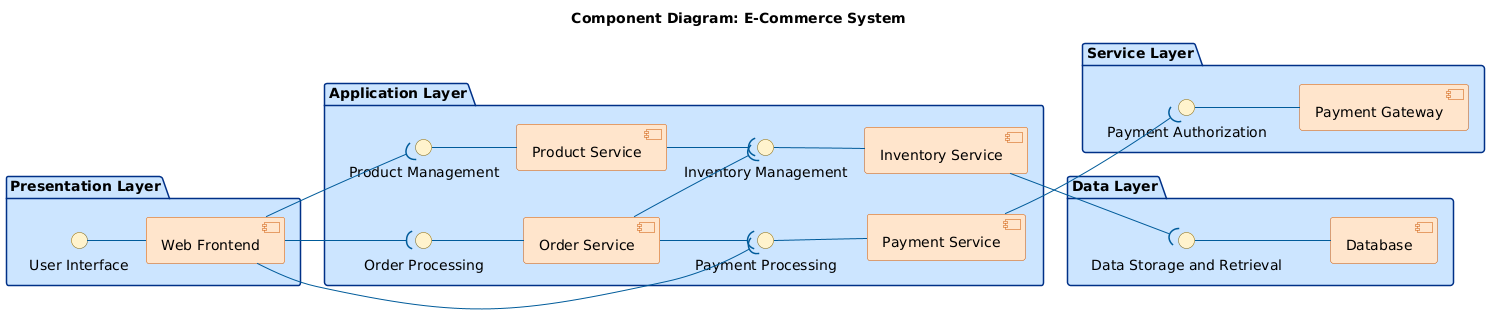
Within seconds, the Visual Paradigm AI Chatbot delivered a fully rendered PlantUML script that defined the core components and their dependencies. The diagram was structured using layered packages—Presentation, Application, Service, and Data Layers—ensuring architectural clarity and separation of concerns.
But the real value emerged in the follow-up. When the user asked, “Can you explain how the Web Frontend interacts with the Product Service to display product details?”, the AI didn’t just restate the diagram. It broke down the interaction flow step by step:
- How the frontend triggers a request
- How the Product Service validates and processes it
- How data is retrieved from the database
- How the response is structured and rendered
This wasn’t a static explanation—it was a live technical walkthrough, complete with a sample JSON response. The AI even offered to generate a sequence diagram if needed, showing its ability to pivot across modeling standards.
These iterative exchanges demonstrate the Chatbot’s role as a modeling consultant: it doesn’t just respond—it anticipates needs, clarifies logic, and enhances design maturity through conversation.
Logic Breakdown: Why This Component Diagram Works
The diagram uses a layered architecture to reflect real-world system design principles. Here’s how each layer contributes:
📌 Presentation Layer
Contains the Web Frontend, which serves as the user-facing interface. It’s isolated from backend logic to ensure maintainability and scalability. The frontend communicates with backend services via well-defined APIs, represented as interfaces in the diagram.
📌 Application Layer
This is the business logic core. Key services include:
- Product Service: Manages product catalog data and business rules (e.g., pricing, availability).
- Order Service: Handles order creation, status tracking, and lifecycle management.
- Payment Service: Coordinates with external gateways for transaction processing.
- Inventory Service: Tracks stock levels and ensures consistency across sales channels.
Each service exposes an interface (e.g., “Product Management”) to decouple the frontend from implementation details.
📌 Service Layer
Hosts the Payment Gateway, an external third-party service. The Payment Service acts as a bridge, handling authentication, authorization, and transaction status updates.
📌 Data Layer
The Database stores all persistent data—products, orders, user profiles, inventory records. It’s accessed via the Inventory Service and Product Service, ensuring data integrity and abstraction.
Dependencies are clearly visualized using interface-based arrows. For example:
- Web Frontend → Product Service (via Product Management interface)
- Order Service → Inventory Service (to check stock before processing)
- Payment Service → Payment Gateway (for transaction authorization)
This design promotes loose coupling, modularity, and independent deployment—key principles in modern microservices architecture.
Conversational Intelligence: Beyond Diagrams
What sets Visual Paradigm apart is how the AI Chatbot turns a simple request into a design dialogue. When the user asked for an explanation of the Web Frontend–Product Service interaction, the AI didn’t just describe the flow—it provided:
- A step-by-step user journey
- Sample HTTP request and response payloads
- Business logic context (e.g., price validation, stock checks)
- Future-proofing suggestions (e.g., related products, reviews)
This level of insight isn’t possible with basic AI tools. The Visual Paradigm AI Chatbot leverages deep knowledge of software architecture, API design, and system reliability to deliver expert-grade modeling support.
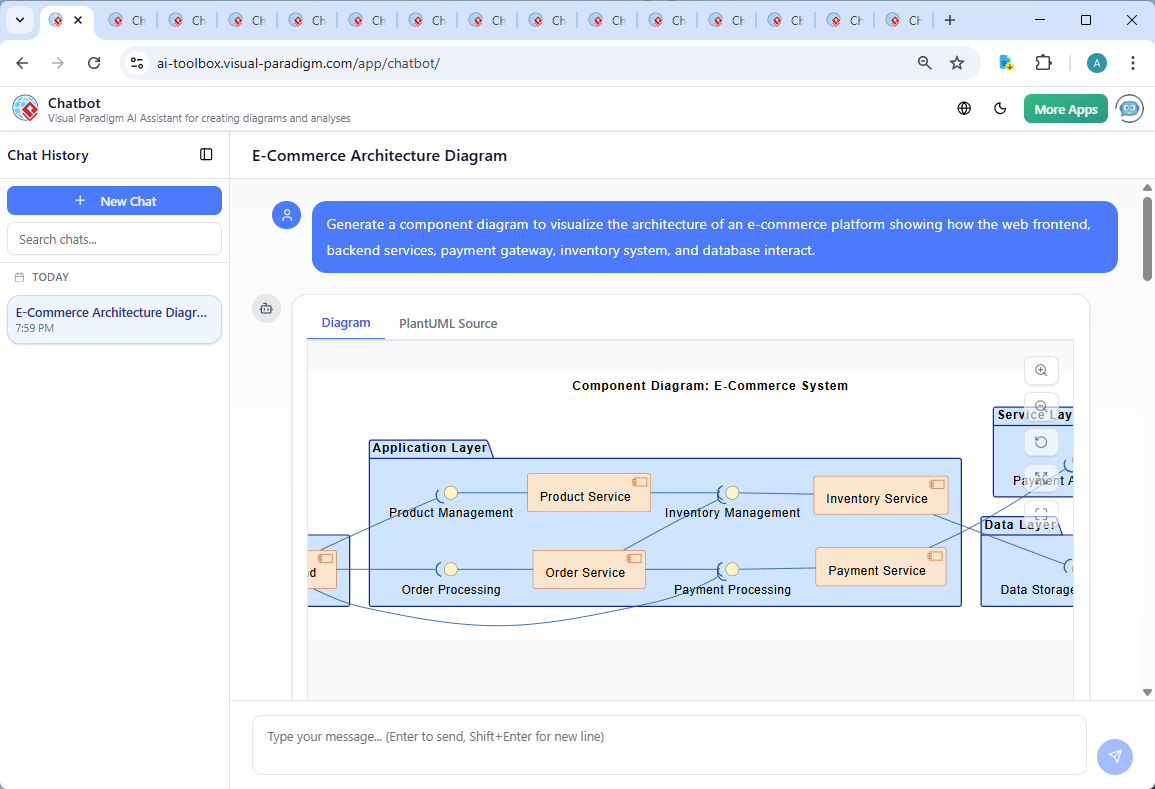
As shown in the interface screenshot, the chat history reflects a natural, iterative design process. Each message builds on the last—refining, explaining, and expanding. This isn’t a one-way output; it’s a collaborative modeling session where the AI acts as a senior architect guiding the design.
Platform Versatility: One Tool, Many Standards
The Visual Paradigm AI Chatbot isn’t limited to Component Diagrams. It seamlessly supports a full suite of modeling standards, including:
- UML: For detailed system design and behavior modeling
- ArchiMate: For enterprise architecture and business-IT alignment — Comprehensive Tutorial: AI-Powered ArchiMate Diagram Generation in Visual Paradigm Desktop
- SysML: For complex systems engineering and requirements modeling — UML Component Diagram Tutorial and Tool – Visual Paradigm
- C4 Model: For contextualizing software architecture at different abstraction levels — C4 Diagram Tool by Visual Paradigm – Visualize Software Architecture with Ease
- Mind Maps, Org Charts, SWOT, PEST, and Data Charts: For strategic planning and stakeholder communication
Whether you’re designing a cloud-native e-commerce system or mapping governance structures in a large enterprise, the AI Chatbot adapts to your modeling language and context—making it a true AI-powered visual modeling platform.
Conclusion: Design Smarter, Together
Creating a robust e-commerce architecture isn’t about drawing boxes and lines. It’s about modeling intelligent, scalable, and maintainable systems—fast and with confidence.
With Visual Paradigm’s AI Chatbot, you’re not just generating diagrams. You’re engaging in a technical conversation that elevates your design from concept to production-ready blueprint. From component interactions to full-stack architecture, the platform empowers teams to collaborate, validate, and innovate—no matter the complexity.
Ready to build smarter? Try the AI Chatbot today and see how it transforms your modeling workflow.
Related Links
- Component Diagram – Wikipedia: A UML diagram that illustrates the organization and dependencies of components in a software system.
- What is a Component Diagram? – Visual Paradigm: A detailed guide on UML component diagrams, showing how components interact and are structured in software design.
- Component Diagram Tutorial: Component Diagram Tutorial. Component diagrams provide a simplified, high-order view of a large system. Classifying groups of classes into components supports the interchangeability…