


Designing a Seamless Healthcare Appointment System with AI-Powered Precision
Creating a clear, scalable architecture for a healthcare appointment system requires more than just drawing boxes and lines. It demands a deep understanding of component interactions, data flow, and user experience—all while maintaining technical accuracy and system integrity. This is where the Visual Paradigm AI Chatbot steps in as a collaborative modeling partner, transforming high-level ideas into structured, executable diagrams through natural conversation.
From Concept to Clarity: A Conversational Journey with the AI Chatbot
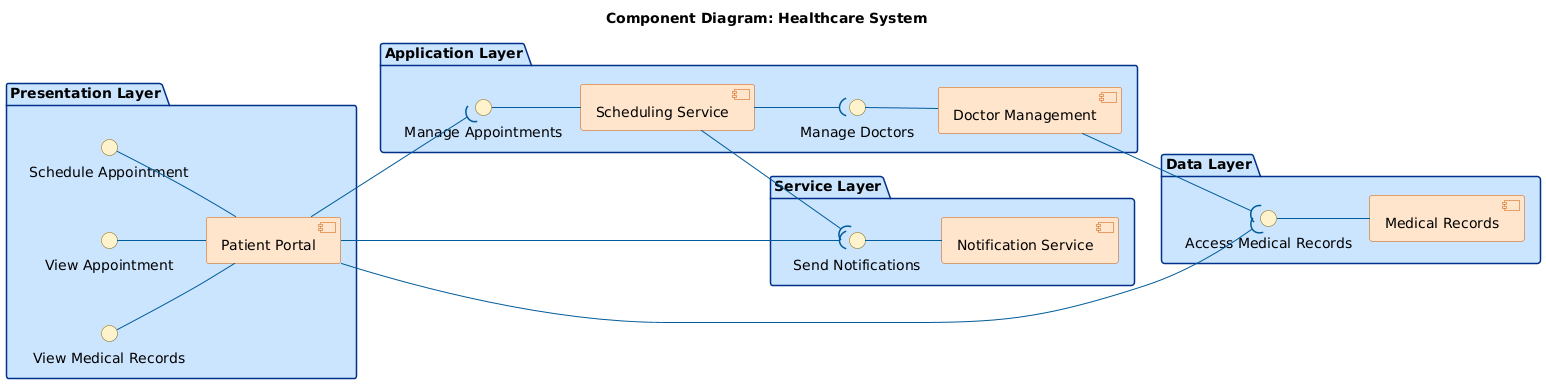
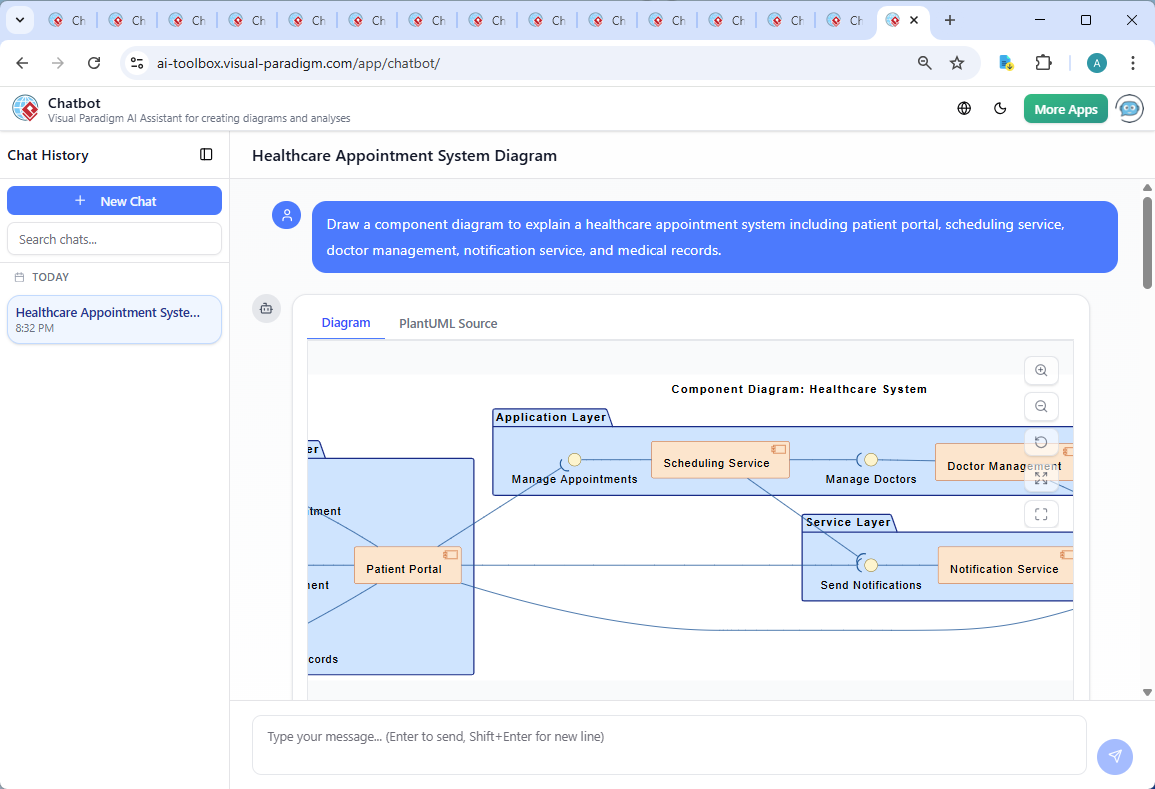
The journey began with a simple prompt: “Draw a component diagram to explain a healthcare appointment system including patient portal, scheduling service, doctor management, notification service, and medical records.” Within seconds, the AI Chatbot generated a fully formatted PlantUML script that captured the core structure of the system—complete with layered architecture, interface contracts, and interaction lines.
But the real value emerged in the follow-up dialogue. When the user asked, “Can you explain how the Patient Portal interacts with the Scheduling Service to book an appointment?”, the AI didn’t just repeat the diagram—it delivered a detailed, step-by-step breakdown of the workflow. It clarified how the patient’s request flows from the portal to the scheduling engine, how validation occurs, and how the system ensures data consistency and user awareness through notifications.
Further refinement came when the user requested a deeper dive into the logic: “Explain this branch.” The AI responded by mapping out the data flow from the Patient Portal to the Scheduling Service, highlighting the role of authentication, appointment validation, and record creation. This iterative conversation—where the AI acted as a modeling consultant—ensured that every component was not just visually placed, but functionally justified.
Decoding the Component Diagram: Structure, Logic, and Design Intent
The resulting diagram reflects a clean, layered architecture aligned with industry best practices. Here’s how each layer contributes to the system’s functionality:
1. Presentation Layer: The Patient’s Gateway
The Patent Portal serves as the primary interface, exposing three key services: Schedule Appointment, View Appointment, and View Medical Records. These interfaces are defined as contracts, ensuring that the underlying components can be developed independently while maintaining consistent behavior.
2. Application Layer: Core Business Logic
The Scheduling Service and Doctor Management components form the operational heart of the system. The Scheduling Service handles appointment creation, availability checks, and conflict resolution—key to preventing double bookings. The Doctor Management component maintains doctor profiles, availability calendars, and role-based access, ensuring that only authorized users can modify staff data.
3. Service Layer: Automation and Communication
The Notification Service is decoupled from the core logic, allowing it to be reused across other workflows (e.g., reminders, test results). It’s triggered automatically after an appointment is confirmed, sending alerts via email or SMS through a standardized interface.
4. Data Layer: Persistent, Secure Storage
The Medical Records component stores all patient data, appointment details, and clinical history. It’s designed as a secure, centralized repository with strict access controls, ensuring compliance with healthcare data regulations like HIPAA.
Why Component Diagrams?
Component diagrams are ideal for this use case because they emphasize modularity, encapsulation, and interface-based communication. Each component hides its internal implementation, exposing only well-defined interfaces. This makes the system easier to maintain, scale, and integrate with external systems—such as EHRs or third-party scheduling tools.
Conversational Intelligence in Action: The AI Chatbot’s Role
What sets Visual Paradigm apart is that the AI Chatbot isn’t just a diagram generator—it’s a design collaborator. During the session, it responded to nuanced requests with precision:
- Refinement: When the user asked to clarify the interaction between the Patient Portal and Scheduling Service, the AI provided a step-by-step narrative that mapped each action to a component.
- Contextual Expansion: After explaining the booking flow, the AI offered to generate a sequence diagram—showing the AI’s ability to anticipate next steps and guide the user toward deeper modeling.
- Validation: The AI confirmed that all components were correctly linked via interfaces, ensuring that the diagram adhered to UML standards and avoided circular dependencies.
These interactions demonstrate the AI Chatbot’s capacity to think like an enterprise architect—understanding not just what to draw, but why it’s drawn that way.
Beyond Components: A Full Modeling Suite Powered by AI
The Visual Paradigm AI Chatbot isn’t limited to component diagrams. It supports a comprehensive suite of modeling standards, including:
- UML – For detailed system design, behavior modeling, and class structures. Explore UML Component Diagram Tutorial and Tool for a hands-on guide.
- ArchiMate – For enterprise architecture, modeling business, application, and technology layers. Learn more in the C4 Diagram Tool by Visual Paradigm.
- SysML – For systems engineering, requirements, and parametric modeling. Dive into the Visual Paradigm SYSML Diagram Tool for advanced modeling capabilities.
- C4 Model – For software architecture, visualizing system context, containers, components, and code. See real-world examples in the Interactive Overview Diagram Example in Visual Paradigm.
- SWOT, PEST, Org Charts, Mind Maps, PERT Charts – For strategic planning, business analysis, and project management. Use the Package Diagram Examples & Templates to organize complex systems.
Whether you’re designing a healthcare system, a financial platform, or a smart city infrastructure, the AI Chatbot adapts to your domain and modeling language, offering intelligent suggestions, real-time validation, and contextual explanations—just like a senior architect working alongside you.
Conclusion: Building Smarter Systems with AI-Powered Modeling
Visual Paradigm’s AI Chatbot transforms the way teams design and communicate complex systems. By turning natural language into precise, standards-compliant diagrams—and by engaging in intelligent, back-and-forth dialogue—it bridges the gap between idea and implementation.
Whether you’re a developer, architect, or business analyst, the platform empowers you to design with confidence, collaborate with clarity, and deliver with speed.
Ready to build your next system with AI-guided precision? Explore the shared session and experience how the Visual Paradigm AI Chatbot brings your vision to life—step by step, conversation by conversation.
Related Links
- Component Diagram – Wikipedia: A UML diagram that illustrates the organization and dependencies of components in a software system.
- What is a Component Diagram? – Visual Paradigm: A detailed guide on UML component diagrams, showing how components interact and are structured in software design.
- Component Diagram Tutorial: Component Diagram Tutorial. Component diagrams provide a simplified, high-order view of a large system. Classifying groups of classes into components supports the interchangeability…