


Designing a Scalable Cloud Infrastructure for a Modern CRM System
Building a cloud-based CRM system that supports both web and mobile access requires a clear understanding of how components interact across physical and logical layers. The challenge lies not just in defining the architecture, but in articulating it in a way that’s precise, maintainable, and aligned with real-world deployment constraints. This is where the Visual Paradigm AI Chatbot becomes more than a diagram generator—it acts as a collaborative modeling partner.
From Idea to Deployment: A Conversational Design Journey
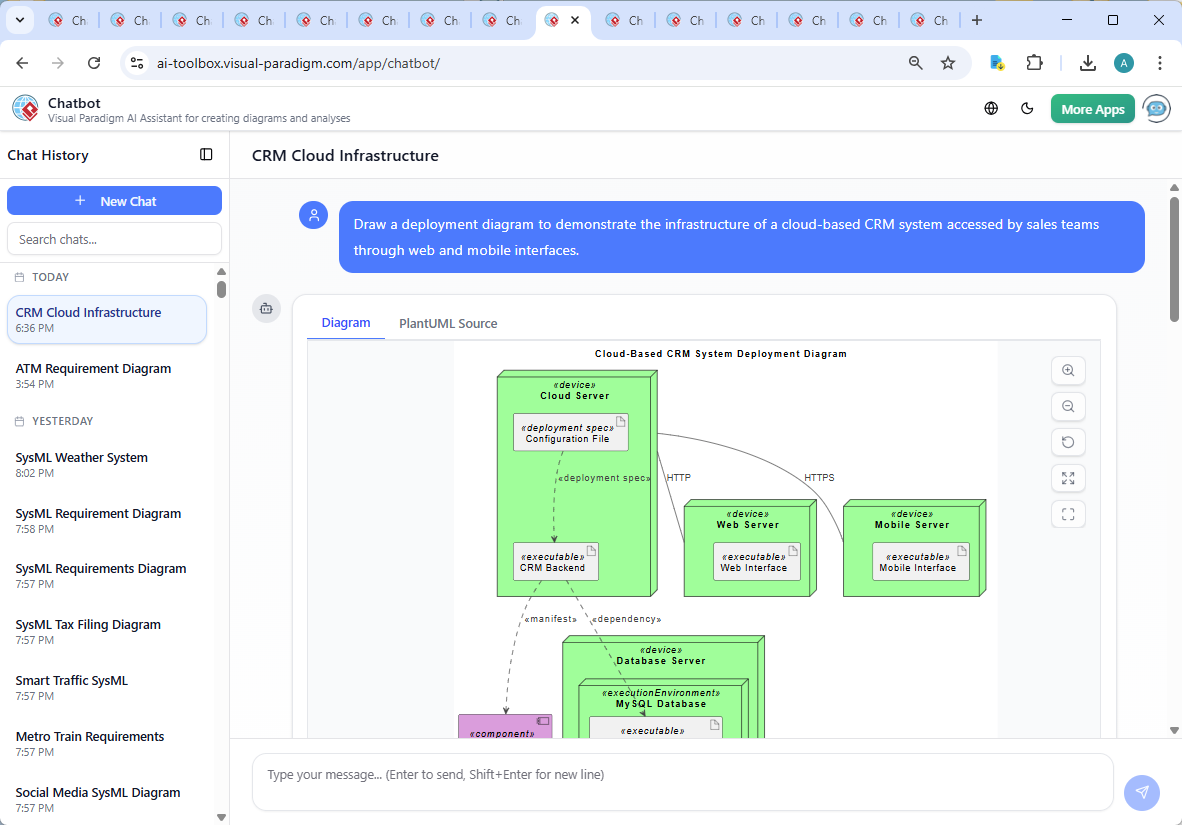
The journey began with a simple prompt: “Draw a deployment diagram to demonstrate the infrastructure of a cloud-based CRM system accessed by sales teams through web and mobile interfaces.” Within seconds, the AI Chatbot delivered a fully formed PlantUML-compatible diagram, grounded in standard deployment notation and ready for refinement.
But the real value emerged in the conversation. When the user asked, “Can you explain the role of the Configuration File artifact in the deployment of the CRM Backend?”, the AI didn’t just restate the diagram—it deepened the design understanding. It explained how the configuration file functions as a runtime instruction manual, governing database connections, security settings, and environment-specific behaviors.
This wasn’t a one-way response. The AI responded with structured insight, breaking down the configuration file’s role into five key functions: system behavior definition, environment portability, CI/CD support, scaling readiness, and consistency across client interfaces. Each point reinforced the importance of separation between code and configuration—a core principle in modern cloud architecture.
Throughout the exchange, the AI demonstrated its ability to act as a modeling consultant. When the user requested clarification on a specific dependency, the chatbot didn’t just label it—it contextualized it. For example, the ..> crm_backend_executable : <> notation wasn’t just a visual cue; it was explained as a runtime dependency, ensuring the backend starts only after the configuration is loaded.
Decoding the Deployment Diagram Logic
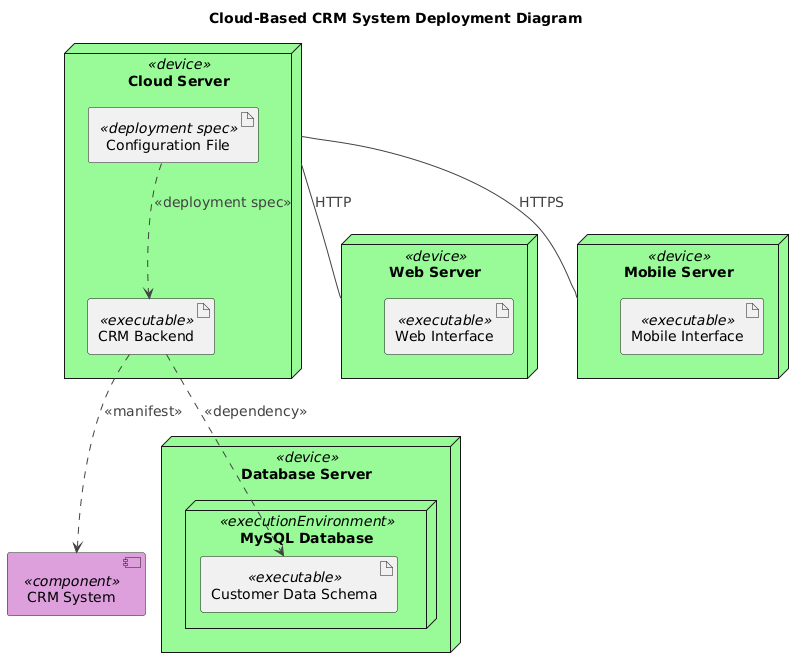
The final diagram is a precise representation of a cloud-native CRM system, structured around three core deployment nodes:
- Cloud Server: Hosts the central CRM backend and serves as the primary execution environment. It contains the CRM Backend executable and the Configuration File, which together define the system’s operational state.
- Web Server: Dedicated to serving the web interface, isolated for performance and security. It communicates with the CRM backend via HTTP.
- Mobile Server: Optimized for mobile clients, using HTTPS for secure communication and handling mobile-specific authentication and data formats.
- Database Server: Houses the MySQL database, which stores customer data. The Customer Data Schema is explicitly modeled as an executable artifact within the database execution environment, emphasizing its role in data integrity and schema management.
Notably, the diagram uses node elements to represent physical devices and artifact elements to represent deployable units. This distinction follows UML deployment standard practices—ensuring clarity between infrastructure and software components.
Communication between components is represented with labeled arrows: cloudserver_device -- webserver_device : HTTP and cloudserver_device -- mobileserver_device : HTTPS. These aren’t arbitrary lines—they reflect real-world protocols and security requirements. The use of HTTPS for mobile traffic underscores the need for encrypted data transmission, especially when handling sensitive customer information.
The ..> <> relationship between the CRM Backend and the Configuration File is particularly significant. It shows that the backend cannot function without this file, which is a best practice in cloud deployment. This dependency is not just visual—it’s operational, affecting startup sequences, CI/CD pipelines, and monitoring systems.
Conversational Intelligence in Action
What sets the Visual Paradigm AI Chatbot apart is its ability to sustain a technical dialogue. The follow-up question about the Configuration File wasn’t a dead end—it was an opportunity to deepen the design rationale. The AI responded with a structured explanation, using bullet points, icons, and real-world analogies (e.g., “instruction manual”) to make complex concepts accessible.
Moreover, the chat history shows iterative refinement: the user asked for an explanation, the AI delivered it, and the conversation naturally led to a request for annotations or expanded details—proof of the AI’s adaptability and user-centered design philosophy.
Beyond Deployment: A Full-Stack Modeling Platform
While this example focused on a Deployment Diagram, the Visual Paradigm AI Chatbot is not limited to one standard. It seamlessly supports a full spectrum of modeling languages, including:
- UML: For class, sequence, and activity diagrams.
- ArchiMate: For enterprise architecture modeling, including business, application, and technology layers.
- SysML: For systems engineering, including requirements, parametric, and internal block diagrams.
- C4 Model: For contextualizing software architecture at different levels of abstraction (Context, Containers, Components, Code).
- SWOT, PEST, Org Chart, Mind Maps, PERT Chart: For strategic planning, organizational analysis, and project scheduling.
This versatility means that teams can use a single platform for all their visual modeling needs—from initial concept to technical specification—without switching tools or relearning interfaces.
Conclusion & Next Steps
The deployment of a cloud-based CRM system is more than a technical task—it’s a strategic decision that impacts performance, security, and scalability. With Visual Paradigm’s AI Chatbot, this process becomes collaborative, intelligent, and deeply informed.
Whether you’re designing infrastructure, modeling business processes, or aligning technical systems with strategic goals, the AI Chatbot provides expert-level guidance at every step.
Explore the full diagram and chat history in the shared session: View the Live Session. Start your next modeling journey with a partner that doesn’t just draw diagrams—but understands them.