


Designing a Scalable Fitness Ecosystem: From Wearables to Cloud Intelligence
Creating a robust deployment architecture for a fitness tracking platform involves aligning hardware, mobile interfaces, and cloud-based analytics—each with distinct roles and communication patterns. The challenge lies not just in visualizing these components, but in ensuring the design reflects real-world constraints like data flow, latency, and scalability.
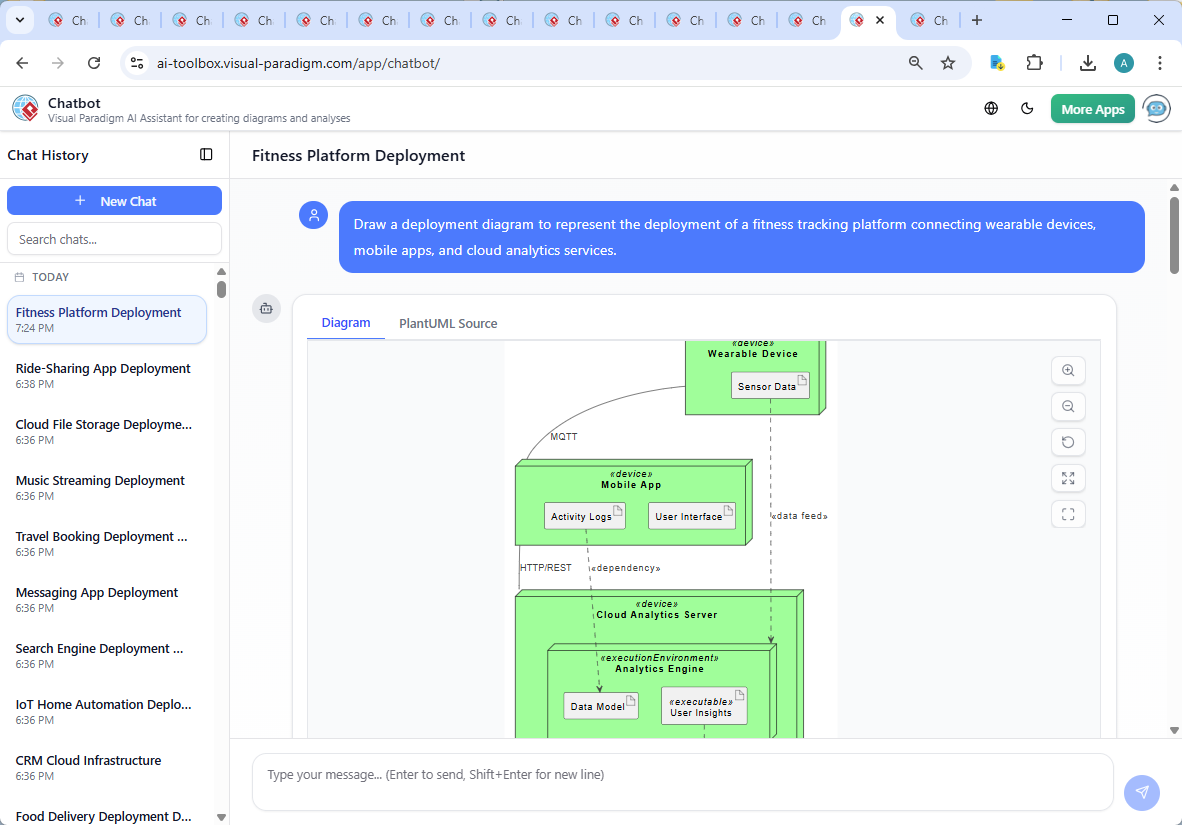
Enter the Visual Paradigm AI Chatbot—a conversational modeling expert that doesn’t just generate diagrams, but collaborates with users to refine, explain, and evolve architectural decisions. In this case, the user’s initial prompt—”Draw a deployment diagram to represent the deployment of a fitness tracking platform connecting wearable devices, mobile apps, and cloud analytics services”—was met with a fully rendered, semantically rich UML Deployment Diagram, crafted using natural language and refined through iterative dialogue.
From Prompt to Precision: The Interactive Journey
The process began with a simple request. The AI Chatbot immediately interpreted the intent and generated a complete DeploymentDiagram using PlantUML syntax, complete with node structures, component boundaries, and artifact relationships. But the real value emerged in the conversation that followed.
When the user asked, “Explain this diagram,” the AI didn’t offer a generic definition. Instead, it delivered a structured breakdown—detailing each component’s role, the purpose of every connection, and the underlying architectural philosophy. It highlighted:
- Why MQTT was chosen for wearable-to-mobile communication (low bandwidth, IoT-friendly).
- How HTTP/REST enables scalable, stateless interactions with cloud services.
- Why the Analytics Engine is isolated within the cloud server—ensuring processing autonomy and security.
These weren’t just descriptions—they were architectural justifications, demonstrating the AI’s ability to act as a modeling consultant, not just a diagram generator.
When the user requested further refinements—such as adding security layers or exploring C4-style views—the AI responded with actionable next steps, showing it understands the full lifecycle of enterprise modeling.
Decoding the Deployment Logic
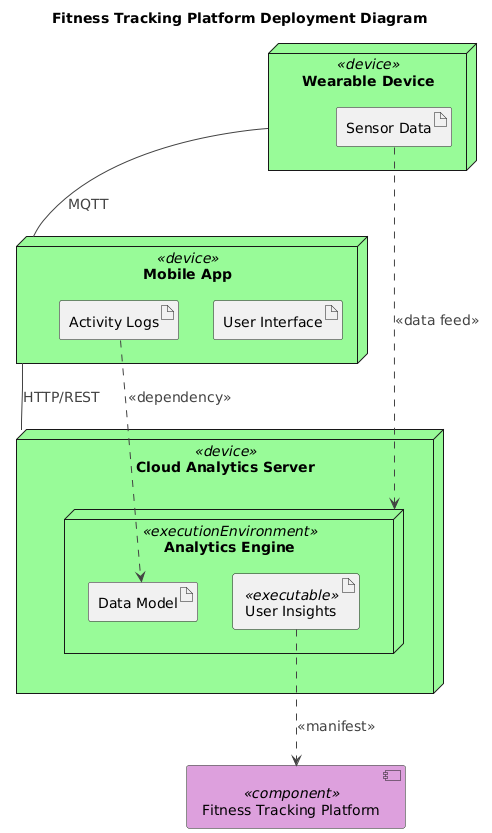
The diagram reflects a modern, distributed fitness platform built on three core pillars:
1. Wearable Device
Represents IoT sensors (e.g., smartwatches). It collects raw physiological and movement data (heart rate, steps, sleep stages) and transmits it via MQTT, a lightweight protocol ideal for constrained devices and real-time telemetry.
2. Mobile App
Acts as a user-facing interface. It receives data from the wearable, stores local activity logs, and displays real-time feedback. The UI artifact represents the interactive layer, while Activity Logs serve as a local cache before syncing with the cloud.
3. Cloud Analytics Server
Hosted in a cloud environment (e.g., AWS, Azure), this component handles large-scale data processing. It contains:
- Analytics Engine: Processes data using ML models to detect trends, anomalies, and behavioral patterns.
- Data Model: Defines the schema for storing fitness data—ensuring consistency across users and devices.
The data flow is clear: Wearable → Mobile App → Cloud Analytics Server → User Insights. This flow supports both real-time feedback (e.g., step count updates) and batch processing (e.g., weekly health reports).
Notably, the diagram uses UML Deployment Diagram notation to emphasize physical deployment, not just logical components. Nodes represent actual hardware or runtime environments, while artifacts represent data or code. The use of <<executable>> and <<dependency>> stereotypes adds semantic clarity—showing not just what connects, but how.
Conversational Intelligence in Action
What sets this process apart is the back-and-forth dialogue. The AI didn’t stop at generating the diagram—it anticipated the need for explanation and offered context that would help users make informed decisions. When the user asked for clarification, the AI didn’t re-output the same diagram. Instead, it provided a narrative breakdown, linking each visual element to real-world functionality.
This is where the Visual Paradigm AI Chatbot’s intelligence shines. It understands not only the syntax of UML, but the intent behind it. It can explain why a component is placed in a specific node, how a protocol choice impacts performance, or how to extend the model for security or scalability.
For example, after explaining the current design, the AI suggested: “Let me know if you’d like a version of this diagram in C4 style, or want to add security, APIs, or user authentication!” This proactive insight reflects the chatbot’s role as a modeling partner—always thinking ahead, always ready to evolve the design.
Beyond Deployment: A Full Modeling Suite
While this example focuses on a Deployment Diagram, the Visual Paradigm AI Chatbot is not limited to one standard. It seamlessly supports:
- UML (Class, Sequence, Use Case, Activity Diagrams)
- ArchiMate (Enterprise Architecture modeling)
- SysML (Systems Engineering, requirements, parametric modeling)
- C4 Model (Context, Containers, Components, Code)
- Visual Tools: Mind Maps, PERT Charts, Org Charts, SWOT, PEST, and various data visualization charts (column, pie, line, area).
This versatility means users can switch between modeling standards without changing tools. Whether designing a new system, documenting an existing one, or aligning IT with business goals, the AI Chatbot adapts to the user’s needs—providing accurate, context-aware outputs across the entire spectrum of visual modeling.
Conclusion: A Smarter Way to Model
The fitness tracking platform deployment diagram isn’t just a visual artifact—it’s a living blueprint shaped by intelligent conversation. With the Visual Paradigm AI Chatbot, users don’t just draw diagrams. They co-create them, refining logic, validating assumptions, and deepening their understanding through dialogue.
Whether you’re an architect designing a new system, a developer aligning on implementation, or a product manager communicating vision, the AI-powered visual modeling platform turns abstract ideas into precise, collaborative designs—fast, accurate, and ready for real-world deployment.
Ready to build your next architecture with AI guidance? Try the shared session and experience how the AI Chatbot transforms your modeling workflow.