


Designing a Global Content Management System with AI-Powered Precision
Deploying a global content management system (CMS) across diverse environments—editors’ browsers, publishing servers, and CDN nodes—requires a clear, standardized visualization. Without the right tools, teams risk misalignment, scalability issues, and deployment bottlenecks. Enter the Visual Paradigm AI Chatbot: not just a diagram generator, but a conversational modeling partner that translates intent into accurate, standards-compliant architecture.
From Prompt to Precision: An Interactive Journey
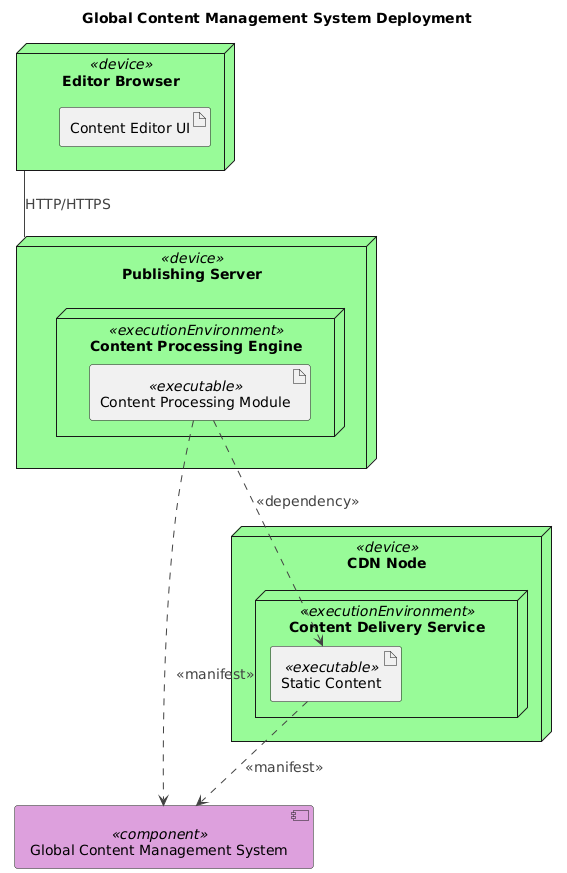
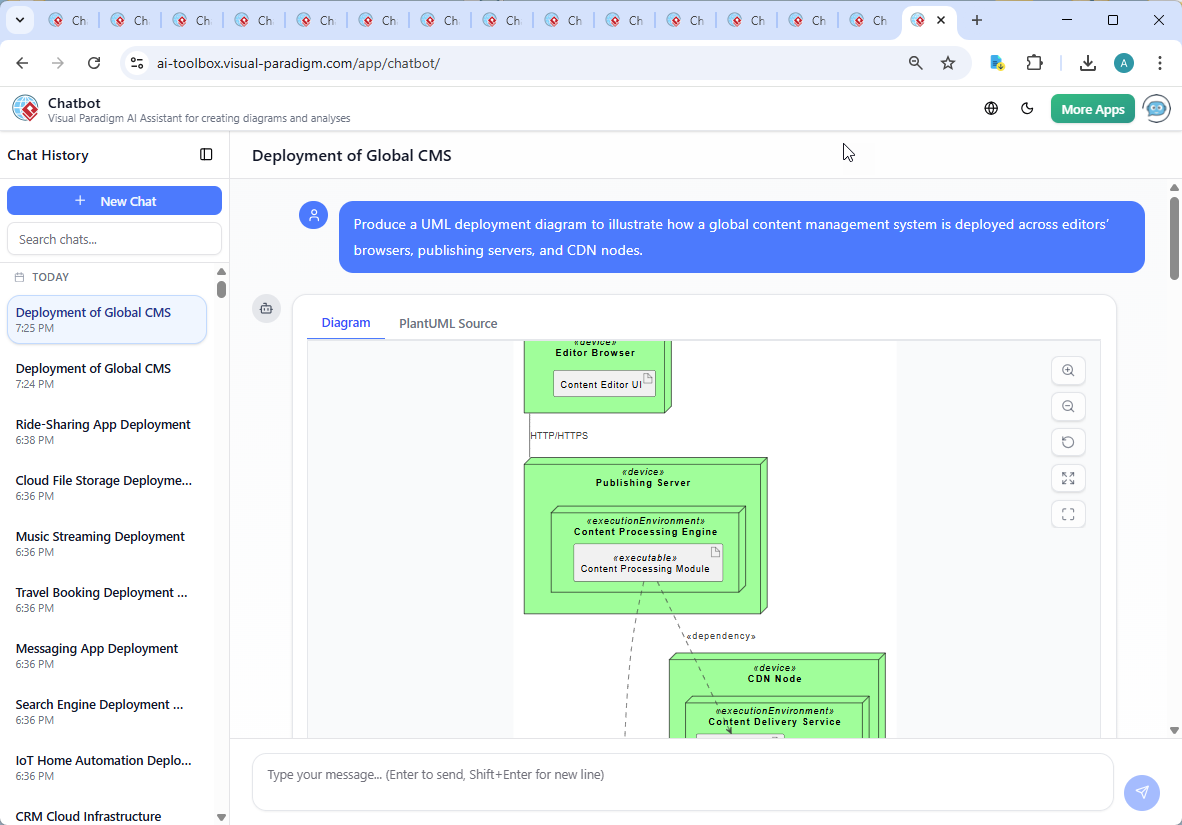
The journey began with a simple request: “Produce a UML deployment diagram to illustrate how a global content management system is deployed across editors’ browsers, publishing servers, and CDN nodes.” The AI Chatbot immediately interpreted this as a need for a structured, enterprise-grade deployment model. Within seconds, it delivered a fully rendered PlantUML code snippet that captured the core architecture.
But the real value emerged in the conversation that followed. When the user asked, “Explain this diagram,” the AI didn’t just list elements—it provided a layered breakdown of system behavior, dependencies, and design rationale. It clarified how the Content Processing Engine interacts with the central Global CMS, why the Static Content artifact is linked to both the CDN and the CMS, and how HTTP/HTTPS communication enables secure content submission from editors.
Further refinement came when the user requested, “Explain this branch,” prompting the AI to clarify the Content Processing Module → Static Content dependency—highlighting how processed content (e.g., optimized images) flows into the CDN for global delivery. This back-and-forth wasn’t just explanation; it was architectural coaching.
Decoding the Logic: Why This Deployment Model Works
The diagram is built on three foundational layers, each reflecting real-world scalability and security needs:
1. Editor Browser – The Human Interface Layer
Content editors access the system via web browsers, running the Content Editor UI. This component is isolated from backend logic, ensuring that user experience remains fast and secure. All submissions are sent over HTTPS to prevent data leakage.
2. Publishing Server – The Central Processing Hub
Behind the scenes, the Content Processing Engine on the publishing server transforms raw content into optimized, deliverable formats. It validates, converts, and tags content before storing it in the central Global CMS. This separation ensures that processing logic is centralized and auditable.
3. CDN Node – The Global Delivery Layer
CDN nodes cache and serve static assets (images, CSS, JS) from geographically distributed locations. The Content Delivery Service ensures low-latency access for end users worldwide. The Static Content artifact is not just stored—it’s versioned and synchronized from the CMS, ensuring consistency.
Notably, the <> and <> relationships reflect real system interactions: the processing engine pulls content from the CMS, and the CDN receives processed assets—ensuring a clean, traceable flow.
Conversational Intelligence in Action
What makes this process truly AI-powered isn’t just the output—it’s the ability to evolve. The user’s follow-up questions weren’t treated as interruptions; they were opportunities to deepen understanding. The AI didn’t just re-display the diagram—it explained the why behind each node, relationship, and notation.
For example, when asked to clarify a dependency, the AI didn’t default to a generic definition. Instead, it contextualized it: “The Content Processing Module depends on Static Content to ensure that optimized assets are delivered to the CDN. This is a critical flow for performance and consistency.” This level of insight transforms the AI from a tool into a modeling consultant.
More Than Deployment: A Full Modeling Suite
While this example focuses on a UML Deployment Diagram, the Visual Paradigm AI Chatbot is built to handle a full spectrum of modeling standards. Whether you’re designing enterprise architecture with ArchiMate, modeling complex systems with SysML, or visualizing software architecture using the C4 Model, the AI adapts seamlessly.
Need a C4 diagram showing the same CMS from a context, container, component, and code perspective? The AI can generate it on demand. Want to map stakeholder impacts using a PEST or SWOT analysis? It’s just a conversation away. The platform supports Mind Maps, Org Charts, PERT Charts, and multiple chart types—all through natural language interaction.
Conclusion & Next Steps
Visual Paradigm’s AI Chatbot doesn’t just create diagrams—it collaborates on design. By turning user intent into structured, accurate models, it empowers teams to align faster, document smarter, and deploy with confidence.
Ready to build your next system with AI-guided precision? Try the live session and experience how the AI transforms ideas into enterprise-ready architecture.