


Designing a Smart Home: How AI Transforms IoT Deployment Diagrams
Creating a clear, accurate deployment diagram for an IoT home automation system involves modeling complex interactions between physical devices, network gateways, cloud services, and user-facing apps. The challenge lies not just in visualizing these components, but in ensuring the communication protocols, data flows, and architectural integrity are correctly represented.
Enter the Visual Paradigm AI Chatbot — not just a diagram generator, but a collaborative modeling expert. By engaging in a natural conversation, users can articulate their vision, refine technical details, and receive intelligent, context-aware guidance. This isn’t a static tool; it’s a dynamic partner in design.
From Concept to Diagram: A Conversational Design Journey
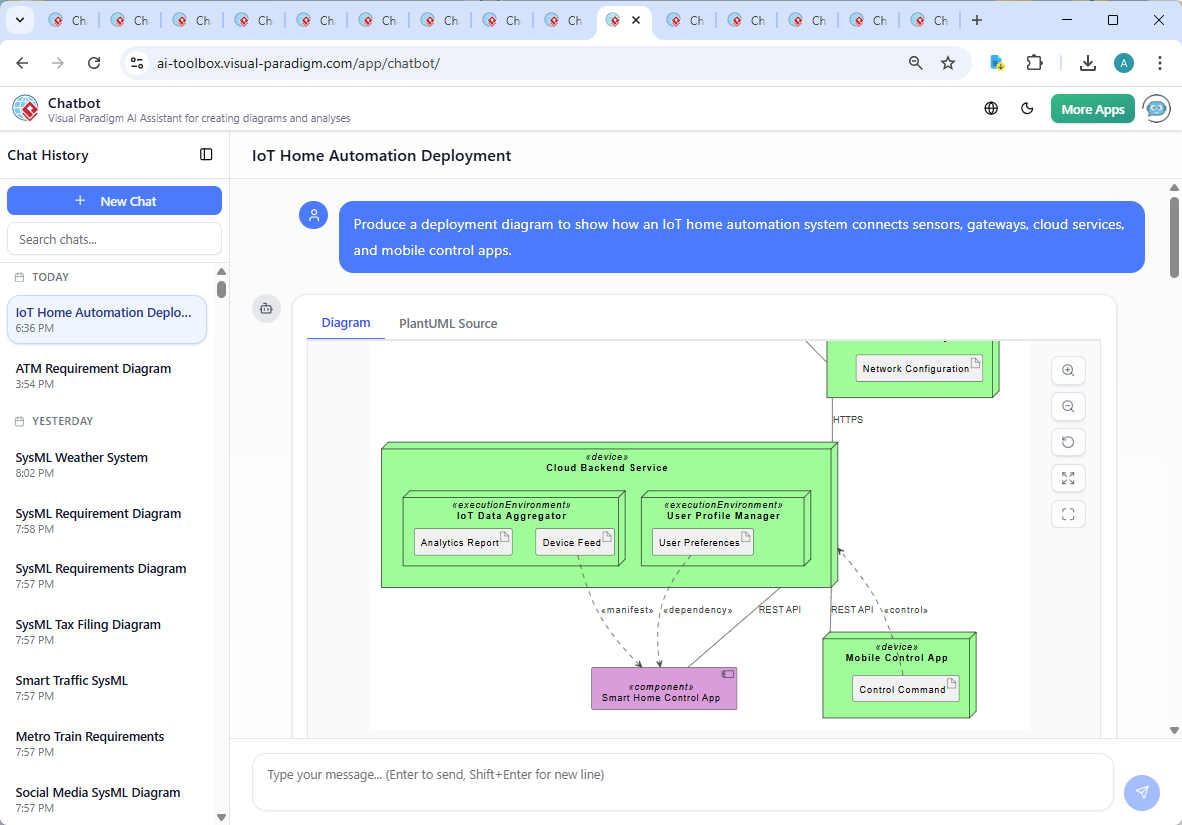
It began with a simple prompt: “Produce a deployment diagram to show how an IoT home automation system connects sensors, gateways, cloud services, and mobile control apps.”
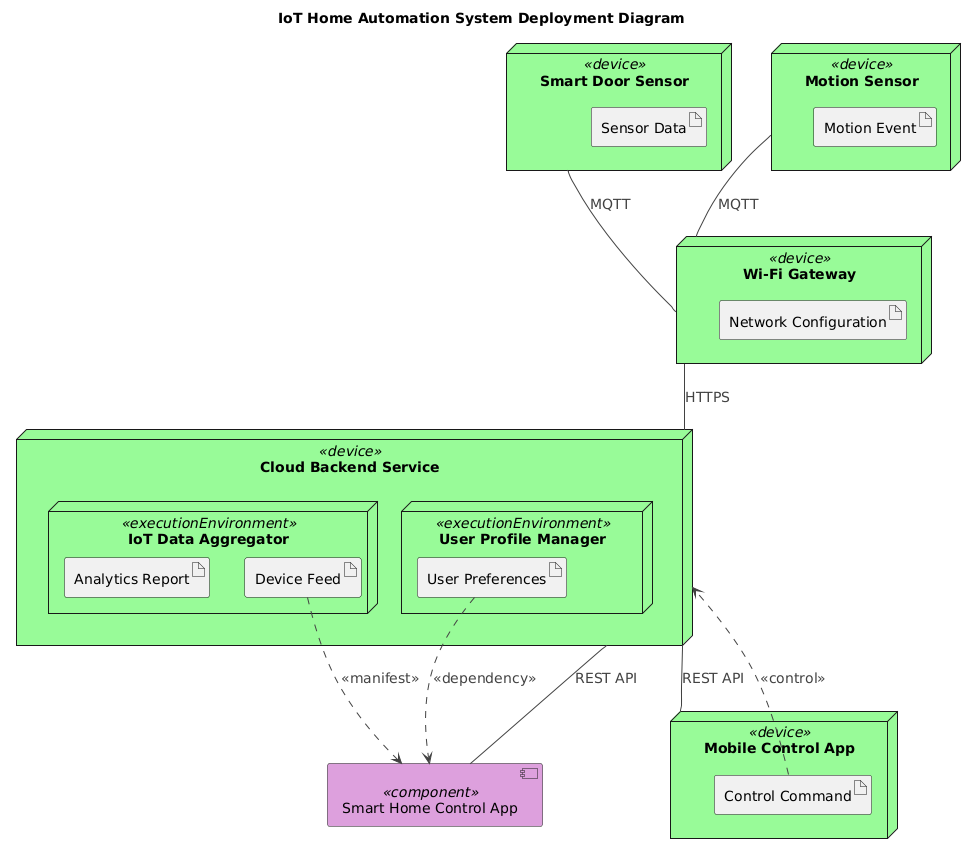
Within seconds, the Visual Paradigm AI Chatbot delivered a fully rendered PlantUML-compatible deployment diagram — complete with nodes, components, artifacts, and precise protocol annotations. The initial output wasn’t just a visual; it was a structured, semantically rich model grounded in real-world IoT architecture.
But the real power emerged in the follow-up. When the user asked, “Can you explain how the MQTT protocol is used by the sensors and Wi-Fi Gateway to transmit data in this deployment?”, the AI didn’t just define MQTT — it delivered a deep, layered explanation that clarified the why behind the design choices.
It broke down the publish-subscribe model, highlighted the efficiency of MQTT for low-power devices, and explained how the gateway acts as a broker — ensuring real-time data flow without overloading the cloud. The explanation included practical examples of topic naming, security considerations, and even a comparison with HTTP to justify protocol selection.
This wasn’t a one-way response. It was a dialogue — a back-and-forth where the user could request refinements, such as adding a broker or exploring sequence diagrams. The AI responded with precision, proving it understands not just syntax, but the engineering intent behind every line.
Decoding the Deployment Logic: Why This Architecture Works
The diagram models a realistic, scalable IoT ecosystem. Let’s walk through the core logic:
1. Sensor Layer: Real-Time Data Capture
Two key devices — the Smart Door Sensor and Motion Sensor — are modeled as <<device>> nodes. Each generates an event (e.g., door state change or motion detection) and publishes it via MQTT to a topic on the Wi-Fi Gateway.
2. Gateway as the Intelligent Hub
The Wi-Fi Gateway serves as the central relay. It:
- Subscribes to sensor topics
- Processes and validates incoming data
- Transmits it securely to the cloud using HTTPS
This design prevents direct cloud connections from every sensor, reducing bandwidth, improving security, and enabling better data aggregation.
3. Cloud Backend: Centralized Intelligence
The Cloud Backend Service hosts two critical execution environments:
- IoT Data Aggregator: Collects device feeds, runs analytics, and generates reports.
- User Profile Manager: Stores user preferences to personalize automation rules.
These components are separated to ensure scalability and maintainability — a hallmark of enterprise-grade design.
4. User Access: Mobile and App Interfaces
Two clients interact with the cloud:
- Smart Home Control App: A web-based UI that displays real-time status and allows configuration.
- Mobile Control App: A native app for on-the-go access, sending control commands via REST API.
Both apps receive data through REST APIs and send commands back — enabling bidirectional control.
5. Data Flow and Dependencies
Key relationships include:
MQTTbetween sensors and gateway — lightweight, real-time, ideal for sensor data.HTTPSbetween gateway and cloud — secure, reliable for bulk data transfer.REST APIbetween cloud and client apps — standard, scalable, stateless.<<manifest>>and<<dependency>>links showing data and configuration dependencies.
These annotations aren’t decorative — they’re part of the model’s semantic layer, enabling automated validation, documentation, and traceability.
Conversational Intelligence: How the AI Deepened the Design
What sets Visual Paradigm apart is its ability to evolve with the user. After the initial diagram, the conversation shifted from “show me the structure” to “explain the logic”. The AI didn’t just describe the diagram — it taught the user how to think like an architect.
When asked about MQTT, the AI provided:
- A comparison with HTTP to justify protocol choice
- Real-world topic naming patterns
- Security best practices (TLS, message retention)
- Scalability insights (broker-based architecture)
This level of insight transforms the tool from a diagramming utility into a design mentor — one that anticipates follow-up questions and proactively enhances understanding.
Beyond Deployment: A Full Modeling Suite Powered by AI
While this example focused on a Deployment Diagram, the Visual Paradigm AI Chatbot is built to handle a wide range of modeling standards — making it a complete platform for enterprise and software architecture.
It supports:
- UML: Class, sequence, use case, activity, and state diagrams for software design.
- ArchiMate: Enterprise architecture modeling with layers for business, application, and technology.
- SysML: Systems engineering with requirements, parametric, and internal block diagrams.
- C4 Model: Context, containers, components, and code views for software architecture.
- Mind Maps, Org Charts, SWOT, PEST, PERT, and Charts: For strategic planning, project management, and data visualization.
Whether you’re designing a smart home, a banking system, or a cloud-native microservices platform, the AI Chatbot adapts to your needs — always maintaining consistency, accuracy, and depth.
Conclusion: Design Smarter, Not Harder
Creating a deployment diagram for an IoT system isn’t just about drawing boxes and lines. It’s about capturing the right architecture, selecting the right protocols, and anticipating future scalability.
With Visual Paradigm’s AI Chatbot, that process becomes collaborative, intelligent, and deeply insightful. From the first prompt to the final refinement, the AI acts as a modeling consultant — guiding, explaining, and evolving the design in real time.
Ready to build smarter systems? Start your next diagram today — and let the AI do the heavy lifting.
Try the AI Chatbot now: Explore the IoT Home Automation Deployment Diagram Session