


Designing the Digital Classroom: A Smart Deployment Diagram for an Online Learning Platform
Building a scalable, secure, and maintainable online learning platform demands more than just coding—it requires a clear architectural blueprint. The challenge lies in visualizing how distributed components interact across environments, especially when students access content through browsers, while backend systems handle authentication, content delivery, and analytics.
With the Visual Paradigm AI Chatbot, this challenge transforms into a collaborative design journey. Instead of wrestling with syntax or diagramming tools, users engage in natural conversation to refine their vision. The AI doesn’t just generate diagrams—it acts as a modeling consultant, offering technical depth and architectural insight at every step.
From Concept to Precision: The Evolution of a Deployment Diagram
The journey began with a simple request: “Create a deployment diagram showing the deployment of an online learning platform with student browsers, application servers, content servers, and analytics services.”
Within seconds, the Visual Paradigm AI Chatbot delivered a fully rendered PlantUML-based deployment diagram—complete with nodes, components, and communication paths. But the real value emerged in the conversation that followed.
When the user asked, “Can you explain how the Student Browser interacts with the Application Server beyond HTTP, such as through specific protocols or authentication mechanisms?”, the AI didn’t default to a generic answer. Instead, it broke down the interaction into layered technical components:
- HTTPS as the foundation for secure data transfer
- WebSockets and Server-Sent Events (SSE) for real-time features
- OAuth 2.0, OpenID Connect, and JWT for secure authentication
- Session management via HTTP-only, secure cookies
These weren’t just facts—they were actionable insights. The AI even suggested adding annotations to the diagram to reflect these protocols, turning a static visualization into a living design document.
Further refinement followed: the user requested clarification on the role of each artifact. The AI responded by mapping each executable (e.g., Course Module, Video Lecture) to its deployment context and explained how manifest relationships (<>) ensure that components are correctly assembled at runtime.
This back-and-forth wasn’t just about diagramming—it was about architectural intelligence. The AI didn’t just answer questions; it anticipated them, enriching the model with real-world best practices.
Decoding the Diagram: Why This Structure Works
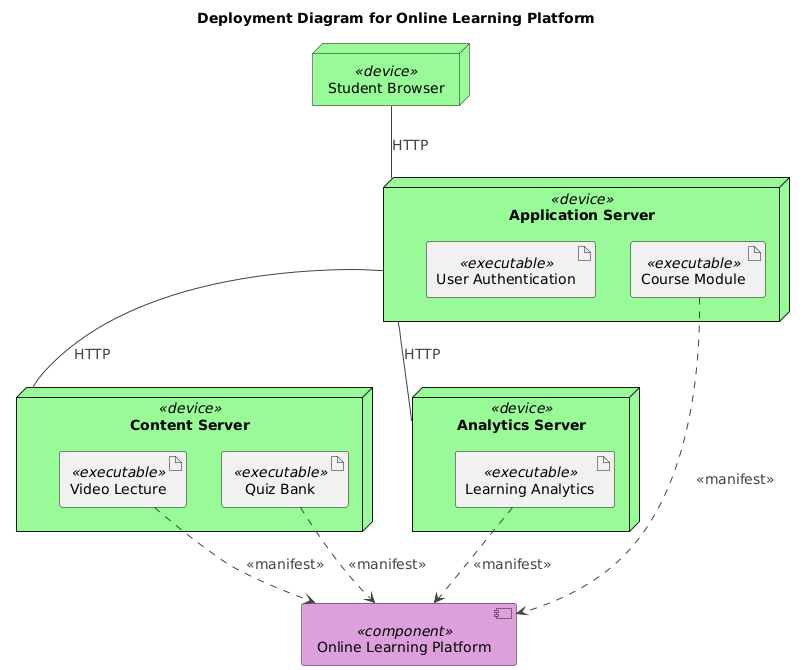
The final deployment diagram is more than a visual—it’s a technical specification. Here’s how each element contributes to a robust platform:
1. Student Browser (Device Node)
Represents end-user devices—laptops, tablets, or mobile phones. As a <<device>> in UML, it’s treated as a physical endpoint, emphasizing that user interaction begins here.
2. Application Server (Device Node with Artifacts)
Hosts the core logic: user authentication, course navigation, and session management. The artifact elements (e.g., Course Module, User Authentication) are deployed within this node, showing that these components are bundled and executed on the server.
3. Content Server (Device Node)
Specialized for media delivery—video lectures, downloadable resources, and quiz banks. Separating content from application logic improves scalability and enables CDN integration.
4. Analytics Server (Device Node)
Handles data collection and processing for learning behavior analytics. Its isolation ensures that monitoring doesn’t impact application performance.
5. Communication Paths
Each line represents a communication channel:
Student Browser → Application Server: HTTP/HTTPS for page requests and form submissions.Application Server → Content Server: HTTP for streaming or downloading course content.Application Server → Analytics Server: HTTP for sending usage data (e.g., time spent, quiz attempts).
The use of artifact and <<manifest>> relationships ensures that the deployment model reflects actual runtime dependencies—no abstract connections.
Conversational Intelligence: The AI That Thinks Like a Designer
What sets Visual Paradigm apart isn’t just the diagram—it’s the dialogue that shapes it. The AI Chatbot doesn’t just generate output; it listens, refines, and educates.
For instance, when the user asked for deeper technical insight, the AI didn’t offer a textbook definition. It delivered a structured breakdown with:
- Protocol comparison tables
- Authentication flow diagrams (in text)
- Security best practices
- Practical annotation tips for the diagram
These weren’t add-ons—they were design decisions embedded in the conversation.
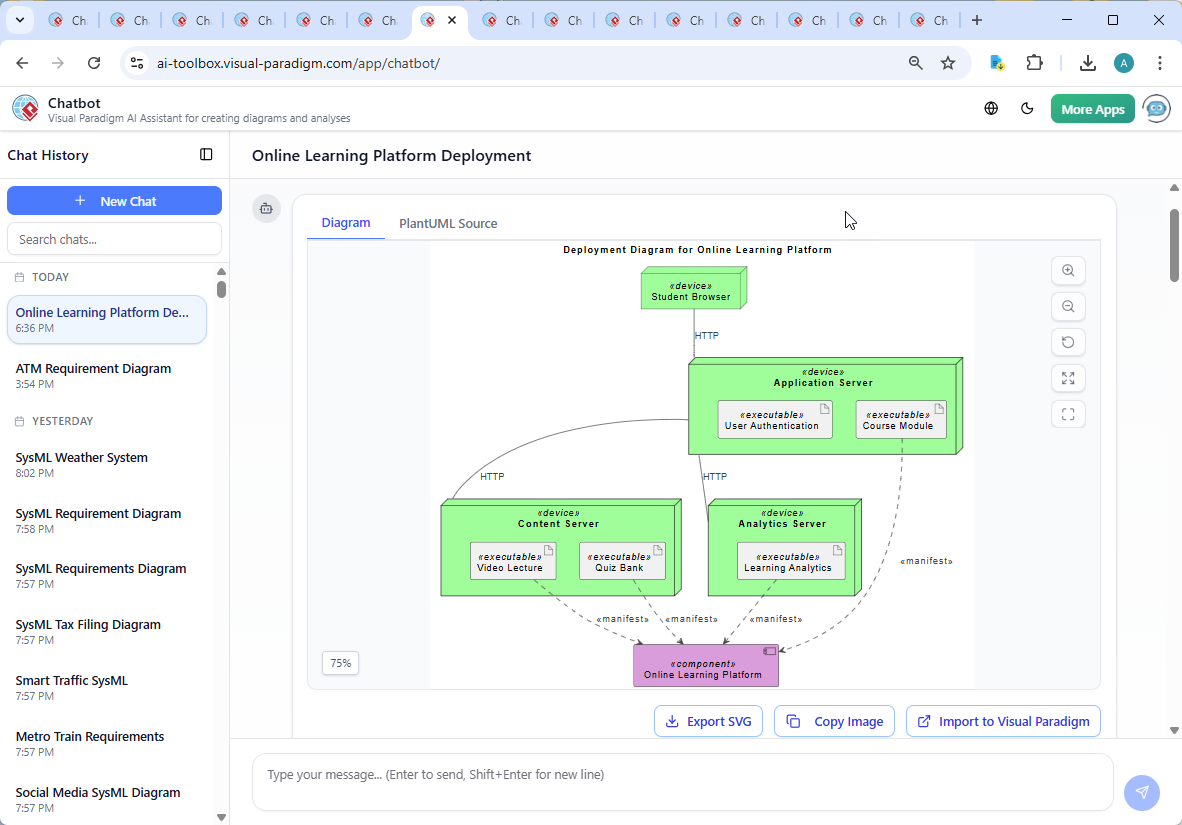
And the proof? The Visual Paradigm AI Chatbot interface captures every interaction in real time. You can see the user’s prompt, the AI’s response, and the evolving model—like a live architectural review.
Beyond Deployment: A Full-Stack Modeling Platform
While this example focused on a deployment diagram, the Visual Paradigm AI Chatbot is far more versatile. It supports a full suite of modeling standards:
- UML: For system design, use case modeling, and component architecture.
- ArchiMate: For enterprise architecture, modeling business, application, and technology layers.
- SysML: For complex systems engineering, including requirements, parametric, and internal block diagrams.
- C4 Model: For software architecture documentation, especially context, containers, components, and code.
- Business Models: Including Mind Maps, SWOT, PEST, Org Charts, and PERT Charts.
Whether you’re designing a cloud-native platform, a government service, or a microservices-based SaaS product, the AI Chatbot adapts to your modeling language and design goals.
Conclusion: Design with Intelligence, Not Guesswork
Creating a deployment diagram for an online learning platform isn’t just about drawing boxes and lines. It’s about understanding how systems interact, how data flows, and how security and scalability are built in from the start.
With Visual Paradigm’s AI Chatbot, you’re not just generating a diagram—you’re engaging in a design conversation with a modeling expert. From the initial prompt to the final annotation, every interaction adds depth, accuracy, and technical rigor.
Ready to build your next system with confidence? Try the AI Chatbot now and see how natural conversation shapes professional-grade models.