


Designing a Scalable Messaging Architecture with AI-Powered Precision
Building a real-time messaging application demands more than just coding—it requires a clear, scalable, and maintainable deployment architecture. The challenge lies in accurately representing how components like smartphones, message brokers, databases, and notification services interact under high load and failure conditions. With Visual Paradigm’s AI Chatbot, this complexity becomes manageable through natural conversation, where every clarification refines the model in real time.
From Prompt to Precision: An Interactive Modeling Journey
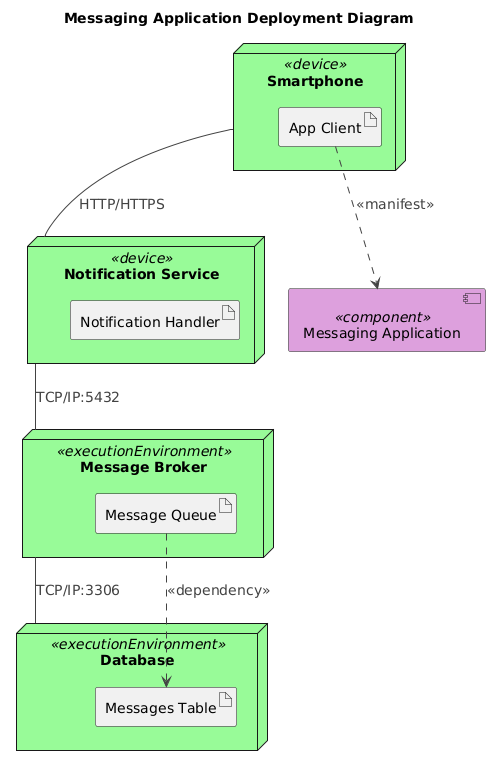
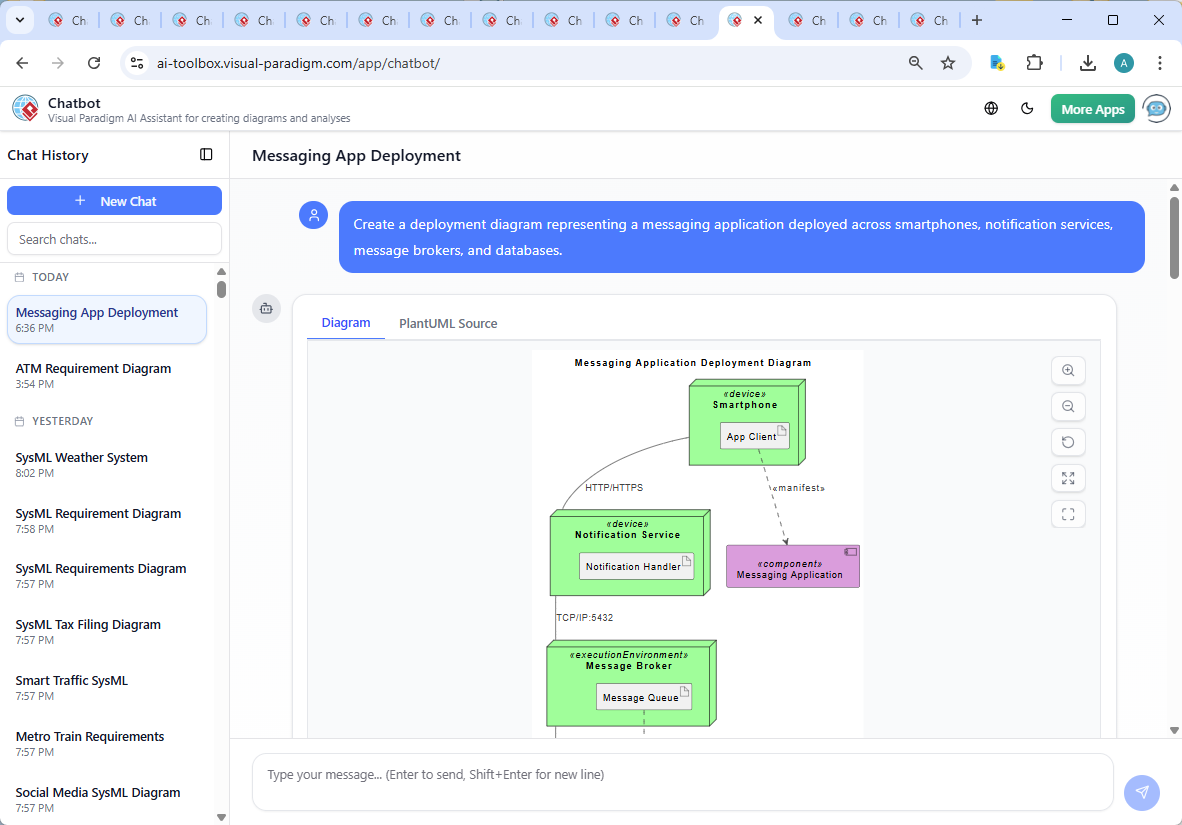
The journey began with a simple request: “Create a deployment diagram representing a messaging application deployed across smartphones, notification services, message brokers, and databases.” The AI Chatbot immediately interpreted the intent and generated a structured PlantUML-based deployment diagram, complete with appropriate nodes, components, and artifact relationships.
But the real value emerged in the follow-up. When the user asked, “Can you explain how the ‘Messages Table’ artifact interacts with the ‘Message Queue’ in terms of data flow and synchronization?”, the AI didn’t just restate the diagram—it deepened the design’s rationale. It explained that the message queue acts as a temporary buffer for delivery reliability, while the database stores persistent, searchable message history. The interaction is not direct, but event-driven: messages flow from the queue to backend services, which then write to the database after processing.
This level of insight—offering architectural reasoning, synchronization mechanisms, and even suggesting a follow-up sequence diagram—demonstrates the AI Chatbot’s role as a collaborative modeling expert. It doesn’t just generate diagrams; it educates, refines, and validates design decisions in context.
Decoding the Deployment Diagram Logic
The resulting deployment diagram reflects a modern, event-driven architecture. Let’s break down its core logic:
1. Component Hierarchy and Roles
- Smartphone (Device): Hosts the app client, responsible for message creation and display.
- Notification Service (Device): Handles push notifications via HTTP/HTTPS, ensuring users are alerted even when the app is inactive.
- Message Broker (Execution Environment): Acts as the backbone for message routing. Using TCP/IP, it ensures reliable delivery and supports scalability.
- Database (Execution Environment): Stores long-term message data, including metadata and user context, enabling search and audit.
2. Data Flow and Dependency Mapping
- App Client → Messaging Application: The client manifests the application logic, showing how the user-facing component is deployed.
- Message Queue → Messages Table: An indirect dependency via a processing service. The queue does not write to the database directly—this prevents performance bottlenecks and maintains data consistency.
- Notification Service → Message Broker: Uses TCP/IP to receive delivery confirmations or status updates, enabling real-time delivery tracking.
3. Why This Notation Works
Deployment diagrams in UML are designed to visualize physical components and their relationships. By using node for devices and execution environments, and component for logical units like the messaging application, the diagram adheres to standard modeling conventions. The use of <
Conversational Intelligence in Action
What sets Visual Paradigm apart is how the AI Chatbot evolves with the conversation. After the initial diagram was generated, the user’s follow-up question prompted a deep dive into synchronization mechanisms—something many tools would skip or oversimplify. The AI didn’t just describe the flow; it explained the why behind it:
- Message acknowledgment prevents duplicates.
- Database triggers ensure automatic updates.
- Idempotent processing maintains consistency.
- Asynchronous writes avoid blocking the message queue.
This wasn’t a static diagram—it was a living design artifact, shaped by iterative, intelligent dialogue. The user wasn’t just viewing a model; they were co-designing it with an expert.
Beyond Deployment: A Unified Modeling Platform
The Visual Paradigm AI Chatbot isn’t limited to deployment diagrams. It supports a full spectrum of modeling standards, including:
- UML: For class, sequence, and activity diagrams.
- ArchiMate: For enterprise architecture, mapping business, application, and technology layers.
- SysML: For systems engineering, including requirements, block definition, and internal block diagrams.
- C4 Model: For software architecture, visualizing context, containers, components, and code.
- Other Diagrams: Mind maps, PERT charts, organizational charts, SWOT, and various data visualization types (column, pie, line, area).
Whether you’re designing a microservices backend, modeling a business process, or visualizing stakeholder alignment, the AI Chatbot adapts to your language and domain—transforming natural requests into precise, standards-compliant models.
Conclusion: Design with Confidence, Not Guesswork
Creating a deployment diagram for a real-time messaging app isn’t just about drawing boxes and lines. It’s about understanding data flow, fault tolerance, scalability, and system resilience. With Visual Paradigm’s AI Chatbot, you’re not alone in this process. The tool acts as a modeling partner—offering expert insights, clarifying design choices, and evolving the model through conversation.
Ready to transform your ideas into precise, intelligent models? Try the shared session and see how natural conversation shapes architecture.