


Visualizing the Backbone of a Restaurant Reservation System
Designing a scalable and maintainable reservation system requires clarity on how components are deployed across physical and virtual environments. The challenge lies not just in modeling functionality, but in mapping out the real-world deployment topology—where apps run, how services communicate, and how data flows between systems. Enter the Deployment Diagram, a critical blueprint for system architects and developers.
With Visual Paradigm’s AI Chatbot, this process transforms from a manual, time-consuming task into a dynamic, conversational design session. Rather than drafting diagrams from scratch, users collaborate with an intelligent assistant that understands software architecture, communication protocols, and deployment semantics.
From Prompt to Precision: A Collaborative Design Journey
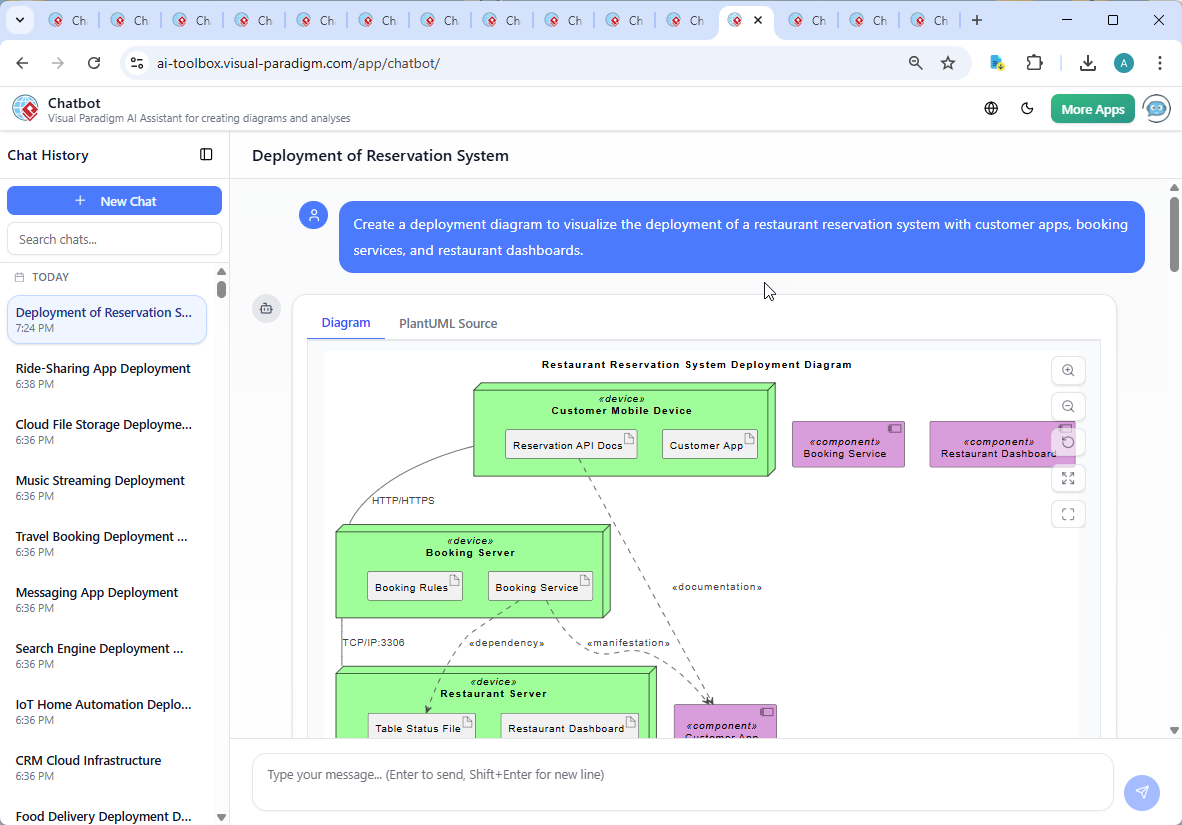
The journey began with a simple request: “Create a deployment diagram to visualize the deployment of a restaurant reservation system with customer apps, booking services, and restaurant dashboards.”
Within seconds, the AI Chatbot delivered a fully rendered PlantUML-based Deployment Diagram, complete with nodes, components, artifacts, and communication protocols. But the real value emerged in the follow-up dialogue.
When the user asked, “Explain this diagram,” the AI didn’t just describe elements—it provided a structured breakdown of the system’s architecture, including:
- Device roles (customer mobile, booking server, restaurant server)
- Component responsibilities (Customer App, Booking Service, Restaurant Dashboard)
- Communication protocols (HTTP/HTTPS, TCP/IP:3306)
- Dependency relationships (e.g., Booking Service depends on Table Status File)
This wasn’t a static output. The chatbot acted as a modeling consultant, offering real-time clarifications and enriching the design with contextual insights—such as the use of port 3306 for database communication and the distinction between runtime artifacts and documentation.
When the user requested further enhancements—like a C4 model or a SWOT analysis—the AI responded with confidence, demonstrating its versatility beyond deployment diagrams.
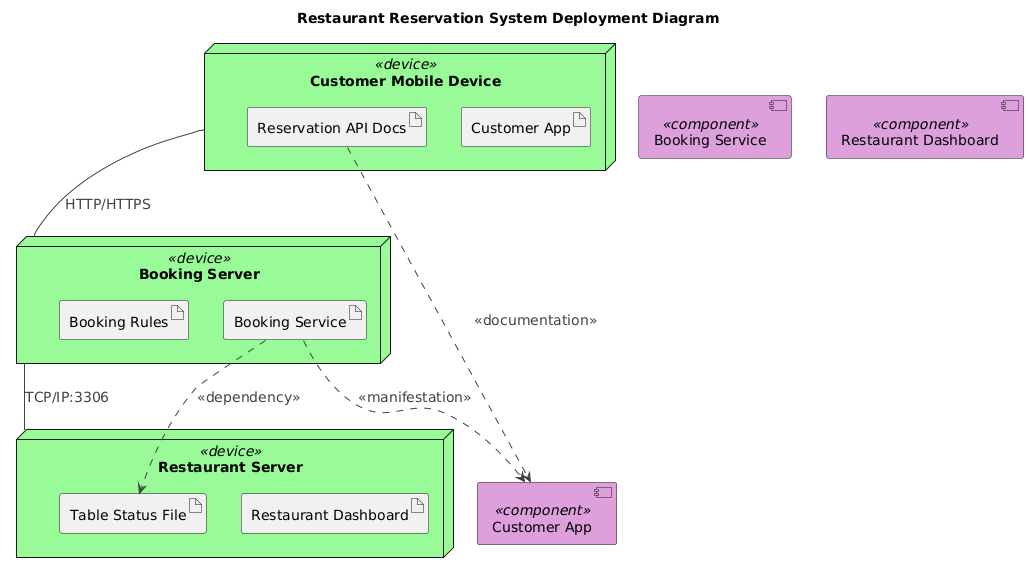
Decoding the Deployment Logic
The diagram is built on a clear architectural foundation. Let’s break down the core logic and design decisions:
Nodes: Representing Physical and Virtual Devices
- Customer Mobile Device: Hosts the Customer App and includes the API documentation as an artifact—useful for developers and onboarding.
- Booking Server: Centralized service responsible for processing reservations, validating rules, and syncing data.
- Restaurant Server: On-site server hosting the dashboard and table status file, ensuring real-time visibility for staff.
Components: Software Elements and Their Deployment
- Customer App: A mobile application that users interact with. It’s deployed on the customer’s device.
- Booking Service: A backend service deployed on the booking server. It manages all reservation logic.
- Restaurant Dashboard: A web-based interface for restaurant staff, hosted on the restaurant server.
Communication and Dependencies
- HTTP/HTTPS between customer device and booking server: Secure, stateless communication for booking requests.
- TCP/IP:3306 between booking server and restaurant server: Persistent connection for database synchronization (likely MySQL).
- Dependency on Table Status File: The Booking Service updates this file, which the Restaurant Dashboard reads—ensuring alignment between booking and physical table availability.
- Manifestation (dashed arrow): Shows that the Booking Service artifact is deployed within the booking server node.
These choices reflect industry best practices: separation of concerns, secure communication, and real-time data synchronization. The use of PlantUML syntax ensures the diagram is both human-readable and machine-processable—ideal for documentation and integration with CI/CD pipelines.
Conversational Intelligence in Action
What makes this process exceptional is the AI’s ability to respond to follow-up questions with precision and depth. The chatbot didn’t just generate a diagram—it interpreted intent, clarified assumptions, and expanded on the design with technical nuance.
For example, when asked to explain the diagram, the AI didn’t default to generic definitions. Instead, it structured the response around:
- System flow (step-by-step booking process)
- Visual design principles (color coding for nodes and components)
- Protocol selection (why HTTP/HTTPS and TCP/IP:3306 were used)
- Future extension possibilities (e.g., adding a C4 model)
This level of contextual awareness is what sets Visual Paradigm’s AI Chatbot apart—it doesn’t just generate diagrams, it collaborates on architecture.
More Than Just Deployment: A Multi-Standard AI Assistant
While this example focuses on a Deployment Diagram, the Visual Paradigm AI Chatbot is not limited to one standard. It seamlessly supports a full suite of modeling languages, including:
- UML: For class, sequence, and activity diagrams
- ArchiMate: For enterprise architecture modeling (business, application, technology layers)
- SysML: For systems engineering and requirements modeling
- C4 Model: For architectural context and container-level views
- SWOT, PEST, Org Chart, Mind Map, PERT Chart: For strategic planning and project management
Whether you’re designing a microservices architecture, documenting a business process, or analyzing market risks, the AI Chatbot adapts to your needs—delivering accurate, standardized diagrams in natural language.
Conclusion: Design with Intelligence
Building a restaurant reservation system isn’t just about features—it’s about clarity, scalability, and maintainability. Visual Paradigm’s AI Chatbot turns architectural design into a conversational process, where ideas are refined through dialogue, and diagrams are shaped by expertise.
With support for multiple modeling standards and real-time collaboration, Visual Paradigm isn’t just a diagramming tool—it’s an intelligent partner in system design.
Ready to design your next system with confidence? Try the shared session and see how the AI Chatbot brings your vision to life—step by step, conversation by conversation.