


Designing the Backbone of a Ride-Sharing App: An AI-Driven Deployment Diagram
Building a scalable, real-time ride-sharing platform demands a precise understanding of how mobile clients, backend services, and external APIs interact across distributed systems. The challenge lies not just in modeling components, but in capturing the dynamic, time-sensitive relationships—especially between the real-time matching engine and mapping services—that define user experience.
With the Visual Paradigm AI Chatbot, this complexity becomes manageable through natural conversation. Instead of wrestling with syntax or manual layout, users can describe their vision in plain language. The AI interprets intent, applies UML standards, and generates a technically accurate deployment diagram—complete with proper node hierarchies, artifact relationships, and execution environment semantics.
From Prompt to Precision: The Interactive Journey
The process began with a straightforward request: “Produce a UML deployment diagram that depicts a ride-sharing application running across mobile apps, backend services, real-time matching engines, and mapping APIs.” The AI Chatbot responded immediately by generating a fully valid PlantUML script, correctly structured with nodes for devices (mobile apps), execution environments (backend services), and artifacts (APIs, algorithms).
But the conversation didn’t stop there. When the user asked, “Can you explain how the real-time matching engine interacts with the mapping API to determine optimal ride matches?”, the AI didn’t just provide a text answer—it deepened the design context. It broke down the interaction into five clear phases: rider request, geospatial data retrieval, driver evaluation, optimal match selection, and confirmation—each enriched with real-world constraints like traffic, route feasibility, and dynamic updates.
This wasn’t a one-way response. The AI anticipated follow-up needs, offering to generate a sequence diagram to visualize the flow—showing how the matching engine queries the mapping API and processes data in real time. This level of proactive insight demonstrates the Chatbot’s role as a collaborative modeling expert, not just a diagram generator.
Deployment Diagram in Action
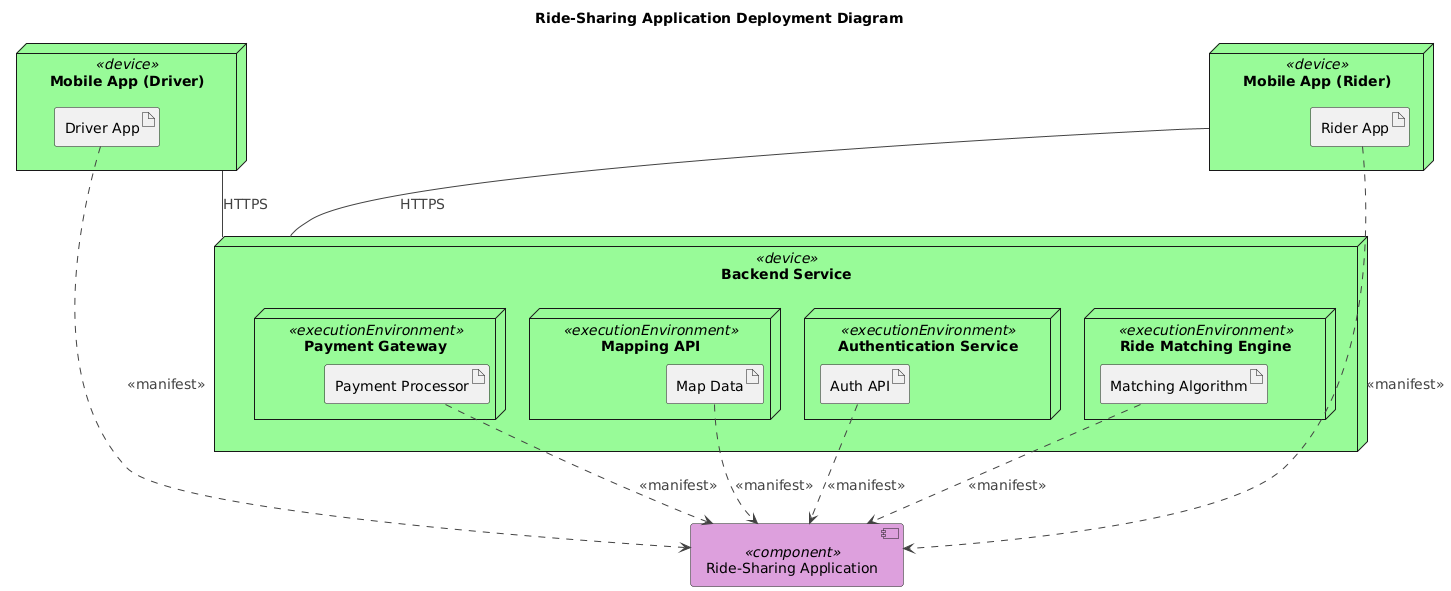
The resulting diagram captures the full deployment topology of a modern ride-sharing application:
- Mobile Devices: Separate nodes for Driver and Rider apps, each hosting an artifact (the app itself).
- Backend Services: A central
Backend Servicenode hosts execution environments for Authentication, Matching Engine, Payment Gateway, and Mapping API. - Artifact Relationships: All core services are connected via
<<manifest>>dependencies, indicating that the mobile apps depend on these backend components. - Communication Channels: Mobile apps communicate with the backend over HTTPS, shown with clear association lines.
Notably, the AI used node and component constructs in PlantUML to maintain UML compliance—ensuring that execution environments (like the matching engine) are properly nested within devices, and artifacts are linked with semantic precision.
Decoding the Logic: Why This Structure Works
The deployment diagram isn’t just a visual map—it’s a blueprint for system behavior. Here’s how each layer contributes:
1. Mobile App Layer: User Interaction
The Mobile App (Driver) and Mobile App (Rider) nodes represent physical devices where users engage with the system. Each hosts an artifact (the app), which communicates with the backend via HTTPS—ensuring secure, authenticated data transfer.
2. Backend Services: Core Processing
The Backend Service node acts as the system’s central hub. Inside it, execution environments isolate key functions:
Authentication Servicehandles user login and token validation.Ride Matching Engineis the brain of the operation, using real-time data to find optimal driver-rider pairings.Payment Gatewaymanages transaction processing.Mapping APIprovides geospatial intelligence—crucial for route calculation and traffic awareness.
3. The Role of the Mapping API
The interaction between the Matching Engine and Mapping API is where real-time intelligence emerges. The AI emphasized that this isn’t a simple data fetch—it’s a continuous feedback loop:
- Mapping API returns live traffic, distance, and route options.
- Matching Engine uses this to calculate accurate travel times and select the fastest route.
- Both rider and driver receive updated ETAs based on dynamic conditions.
This is why the Mapping API is modeled as an execution environment within the backend: it’s not a standalone service but a tightly integrated component that powers decision-making.
Conversational Intelligence in Action
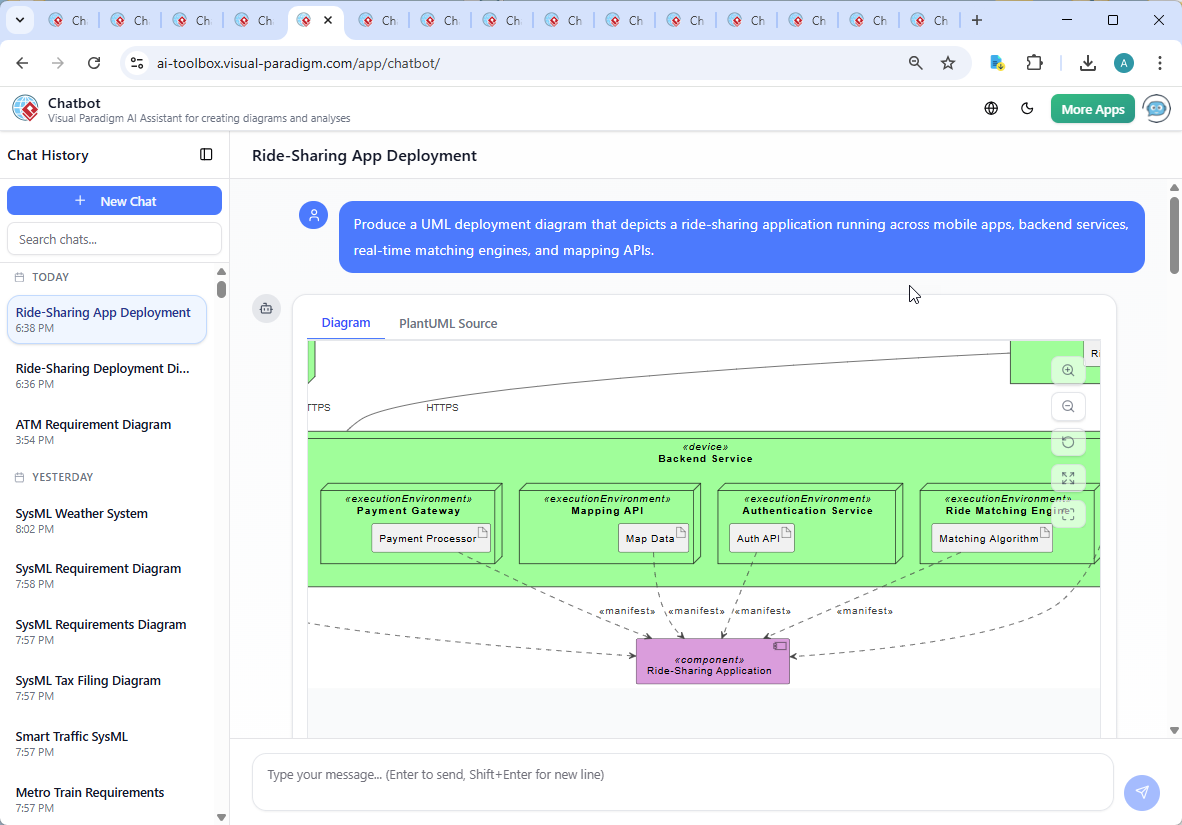
The true power of the Visual Paradigm AI Chatbot shines in the conversation flow. After the initial diagram was generated, the user asked for a deeper explanation—triggering a detailed breakdown of the matching logic. The AI responded with a structured, technical narrative that:
- Clarified the data flow between components.
- Highlighted real-world constraints (e.g., traffic, parking).
- Provided a visual flowchart of the interaction.
- Offered to extend the model with a sequence diagram.
This isn’t just a diagram generator—it’s a modeling consultant. The AI doesn’t just output code; it explains, refines, and anticipates next steps. When the user requested clarification on a branch (“Explain this branch”), the AI provided context-specific insights, reinforcing the diagram’s technical accuracy and business relevance.
More Than Just UML: A Full Modeling Suite
While this example focused on a Deployment Diagram, the Visual Paradigm AI Chatbot supports a broad range of modeling standards:
- ArchiMate: Model enterprise architecture, business processes, and IT systems.
- SysML: Capture system requirements, behavior, and structure for complex engineering projects.
- C4 Model: Create context diagrams, containers, components, and code-level views for software architecture.
- Mind Maps, SWOT, PEST, Org Charts, PERT: Support strategic planning, project management, and organizational modeling.
Whether you’re designing a microservices architecture, planning a digital transformation, or mapping a startup’s business model, the AI Chatbot adapts to your language and standard—delivering accurate, standardized output across the board.
Conclusion & Next Steps
Creating a deployment diagram for a ride-sharing app is more than a technical exercise—it’s about modeling real-time decisions, distributed systems, and user-centric design. With the Visual Paradigm AI Chatbot, this process becomes intuitive, collaborative, and highly accurate.
Try it yourself: Explore the shared session and experience how natural conversation drives precise visual modeling.