


Designing a Scalable Video Conferencing System with AI-Powered Precision
Creating a deployment diagram for a modern video conferencing system demands more than just drawing boxes and lines—it requires a deep understanding of real-time communication protocols, cloud scalability, and component responsibilities. The challenge lies in accurately representing how client apps, signaling servers, media servers, and cloud infrastructure interact under high-latency and high-availability constraints.
Enter the Visual Paradigm AI Chatbot: not just a diagram generator, but a collaborative modeling expert that turns high-level ideas into precise, standards-compliant architectures through natural conversation. With the ability to interpret technical intent and refine design logic on the fly, it acts as a virtual architect, guiding users through every layer of complexity.
The Interactive Journey: From Prompt to Production-Ready Diagram
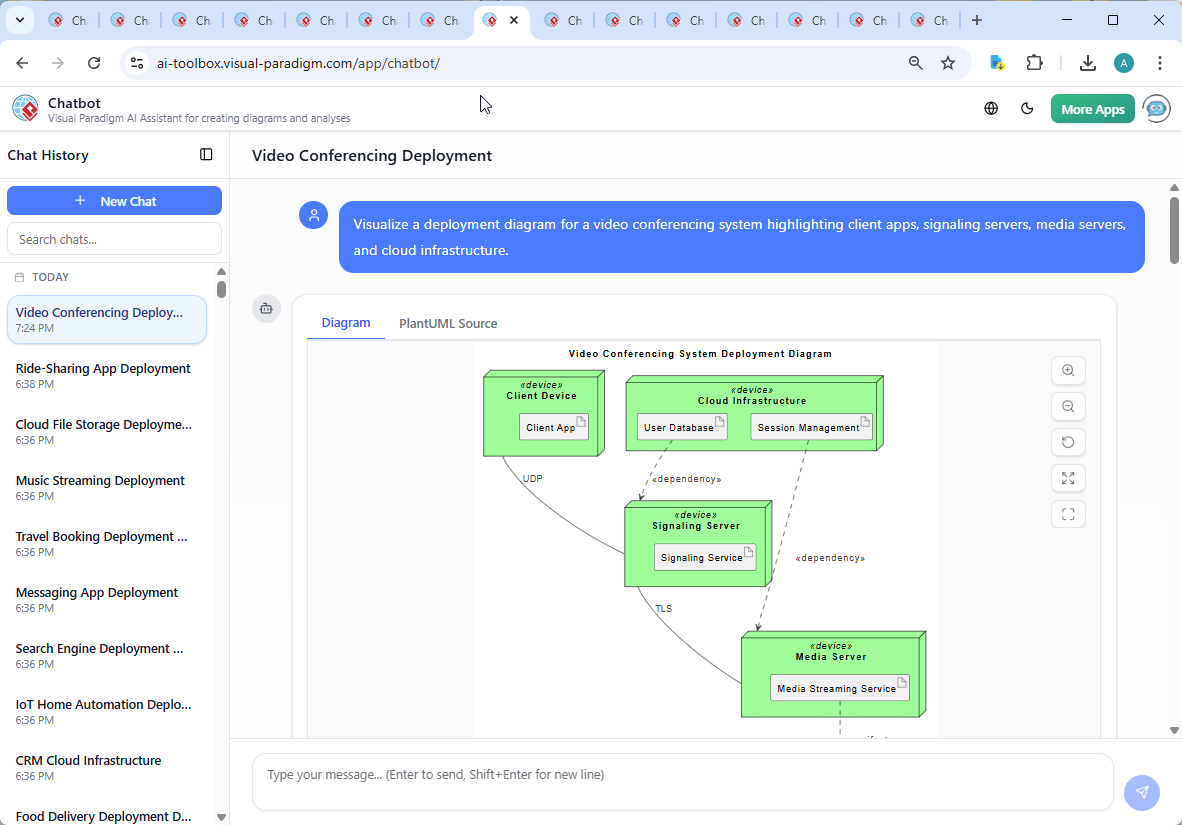
The process began with a simple request: “Visualize a deployment diagram for a video conferencing system highlighting client apps, signaling servers, media servers, and cloud infrastructure.” The AI Chatbot immediately parsed this into a structured UML deployment model using PlantUML syntax, grounding the design in industry-standard notation.
But the conversation didn’t stop there. When the user asked, “Explain this diagram,” the AI responded with a layered breakdown—clarifying the role of each component, the purpose of communication protocols, and the architectural rationale behind separating signaling from media transport.
Each follow-up—like requesting clarification on the UDP/TLS connections or asking about dependency flows—was met with expert-level insight. The AI didn’t just describe the diagram; it explained the why behind every element, such as why signaling uses UDP for speed and TLS for security, or how session management enables real-time lifecycle control.
This iterative dialogue is where the AI’s intelligence shines: it treats every query as a chance to refine, clarify, and deepen the model’s accuracy—making it a true partner in design.
Decoding the Deployment Logic: Why This Architecture Works
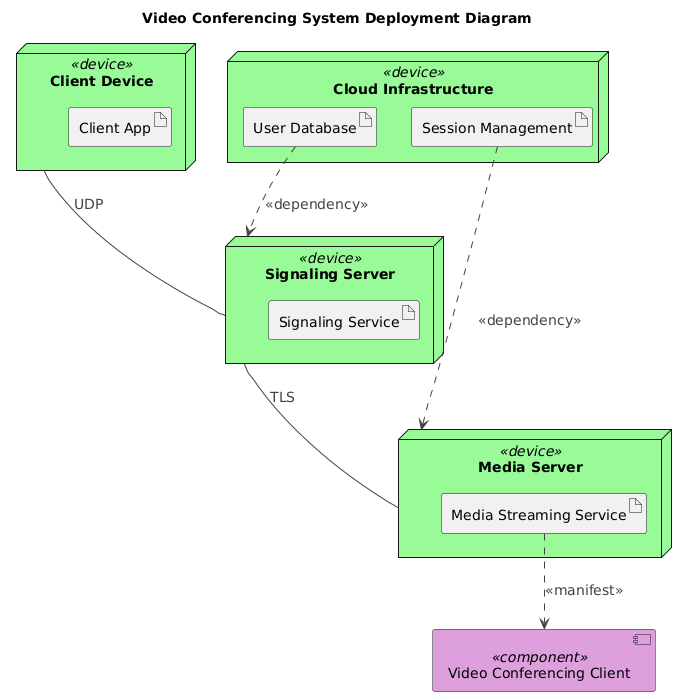
The final deployment diagram is more than a visual—it’s a blueprint for real-world implementation. Here’s how each component contributes:
Client Devices: The User Gateway
End-user devices (laptops, tablets, smartphones) run the client application. This is where the user experience begins. The client app connects to the signaling server via UDP—a protocol chosen for its low latency, essential for real-time session setup.
Signaling Server: The Session Orchestrator
Residing on cloud-hosted virtual machines, the signaling server manages session metadata. It uses WebSockets or HTTP to exchange meeting IDs, participant lists, and network configuration details. Crucially, it does not carry media—its job is to enable connection, not content delivery.
Media Server: The Real-Time Transport Engine
Specialized for high-throughput streaming, the media server handles audio and video transmission using protocols like SRTP and SCTP. It receives instructions from the signaling server via TLS-secured channels, ensuring that session setup is protected from tampering.
Cloud Infrastructure: The Persistent Backbone
Behind the scenes, the user database stores identities and access rights, while session management tracks active meetings and lifecycle states. These services are critical for authentication, scalability, and stateful operations, especially during large-scale events.
Interactions: The Flow of Intelligence
Each connection reflects a real-world constraint:
- Client → Signaling Server (UDP): Fast, real-time signaling.
- Signaling → Media Server (TLS): Secure command transmission.
- Media Server → Client (manifest): Delivers IP/port data for direct media streaming.
- Database → Signaling Server: Enables user authentication and session initiation.
- Session Management → Media Server: Ensures media streams are stopped when a meeting ends.
This architecture follows the proven WebRTC model, separating concerns for performance, security, and scalability—ideal for cloud-based conferencing systems.
Conversational Intelligence in Action
What sets Visual Paradigm apart is how seamlessly the AI Chatbot integrates into the design workflow. The user didn’t need to learn UML syntax or navigate complex tooling—just ask, and the AI delivered a clean, accurate diagram, then explained it in plain language.
When the user requested clarification, the AI didn’t default to generic responses. Instead, it provided technical depth: explaining why UDP is used for signaling (low latency), why TLS secures the signaling-to-media link (security), and how manifest dependencies enable direct peer-to-peer streaming.
These interactions aren’t just helpful—they’re educational. The AI functions as a modeling consultant, reinforcing best practices and enabling users to think like architects.
Beyond Deployment: A Unified Platform for Enterprise Modeling
While this example focuses on a deployment diagram, the Visual Paradigm AI Chatbot is built to handle a full spectrum of modeling standards. Whether you’re designing a business process with ArchiMate, modeling complex systems with SysML, or visualizing software architecture using the C4 Model, the AI adapts instantly.
Need a SWOT analysis for your video conferencing product? The AI can generate it in seconds. Want to map organizational hierarchies with an Org Chart? Done. Planning a project timeline with a PERT Chart? The AI constructs it with precision. Even simple pie charts or column graphs can be created and annotated through conversation.
This versatility means you’re not switching between tools—you’re using one intelligent platform that evolves with your needs, from concept to deployment.
Conclusion: Design Smarter, Not Harder
Building a scalable, secure video conferencing system requires clarity, precision, and a deep understanding of system interactions. The Visual Paradigm AI Chatbot delivers all three—transforming vague ideas into actionable, standards-compliant models through natural conversation.
Whether you’re a developer, architect, or product manager, you’re not just generating diagrams—you’re engaging in a design dialogue. The AI doesn’t just draw; it reasons, explains, and evolves the model with you.
Ready to bring your next architecture to life? Explore the live session and experience how AI-powered visual modeling redefines design collaboration.