


Designing a Secure Cloud File Storage System with AI-Powered Precision
Building a robust cloud-based file management system demands more than just technical components—it requires a clear, scalable, and secure architecture. The challenge lies in modeling how client apps, services, and backends interact while maintaining data integrity and access control. This is where the Visual Paradigm AI-Powered Chatbot transforms abstract ideas into structured, professional diagrams through natural conversation.
From Concept to Clarity: A Collaborative Design Journey
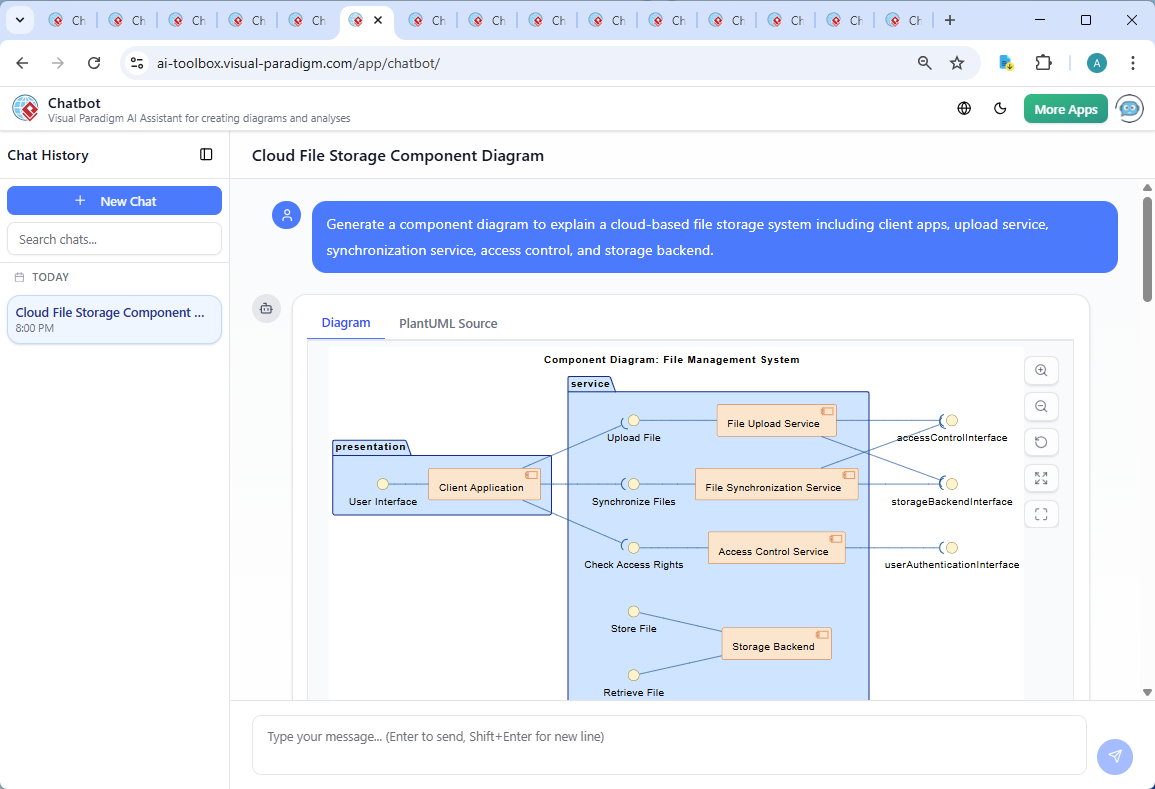
The journey began with a simple prompt: “Generate a component diagram to explain a cloud-based file storage system including client apps, upload service, synchronization service, access control, and storage backend.” Within seconds, the AI Chatbot delivered a fully formatted PlantUML script—complete with layout, styling, and interface definitions. But this wasn’t just a diagram generator. It was a modeling partner.
As the user reviewed the initial output, they asked: “Can you explain how the Access Control Service interacts with the User Authentication Service in this system?” The AI didn’t just restate the diagram—it deepened the design understanding by walking through the runtime flow:
- Authentication first: the User Authentication Service validates credentials and issues a session token.
- Access Control Service uses the token to verify user roles and permissions.
- Every file operation (upload, download, delete) is gated by access rights, not just login status.
This exchange wasn’t a one-off answer—it demonstrated the AI’s ability to act as a technical consultant, clarifying not just what the system does, but how it enforces security at every step. The user then requested a visual of this interaction, and the AI responded with a refined diagram structure, showing the dependency chain between services.
Visualizing the Architecture: The Component Diagram
Decoding the Logic: Why This Structure Works
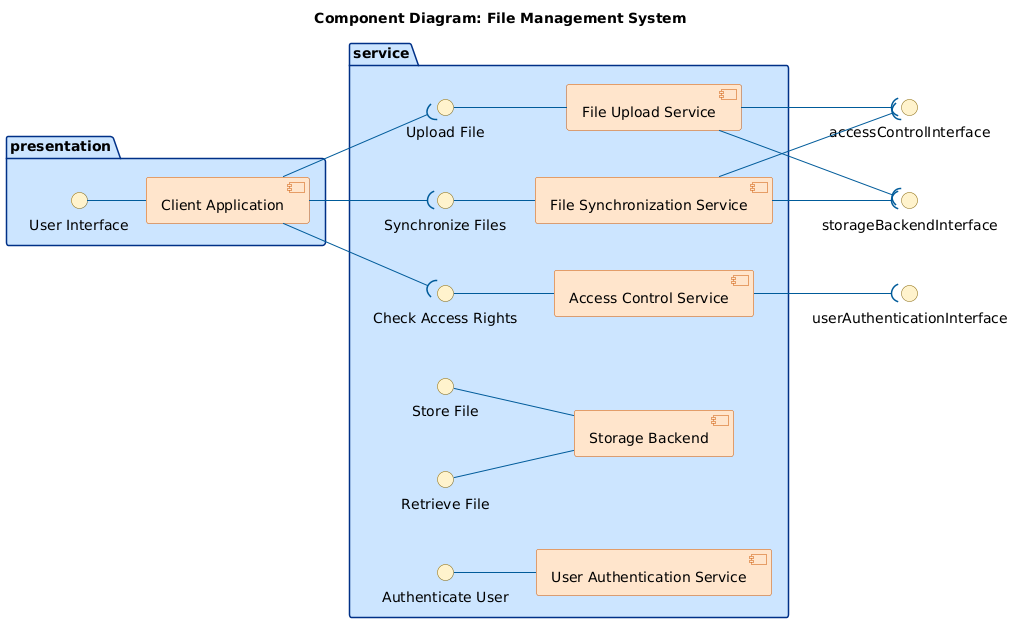
The component diagram is structured around three core layers:
- Client Application (Presentation Layer): The user-facing interface that interacts with all backend services through well-defined interfaces.
- Service Layer: Contains the core logic of the system:
- File Upload Service: Accepts file uploads and validates them before sending to storage.
- File Synchronization Service: Ensures file consistency across devices by tracking changes and syncing them.
- Access Control Service: Enforces role-based access policies using identity from the authentication service.
- Storage Backend: The persistent data store, abstracted behind interfaces for flexibility and scalability.
- User Authentication Service: Manages login, session tokens, and identity verification.
- Interface Contracts: Each component exposes interfaces (e.g., “Upload File”, “Check Access Rights”) that define how others interact with it. This decouples components and supports future changes.
The use of provided and required interfaces in the diagram ensures that dependencies are explicit. For example, the Client Application requires the Upload File interface, while the Upload Service provides it. This adherence to UML component notation makes the system easy to maintain, test, and extend.
The Intelligence Behind the Design: AI as a Modeling Partner
What sets Visual Paradigm apart is not just the diagram output—but the conversation that shapes it. The AI Chatbot doesn’t just render diagrams; it engages in a design dialogue, refining logic, explaining trade-offs, and adapting to user feedback in real time.
For instance, when the user asked for an explanation of the Access Control & Authentication interaction, the AI didn’t just describe it—it illustrated the security enforcement flow, highlighted compliance implications, and even offered to enhance the system with logging features. This level of contextual intelligence is what turns a diagram into a living design artifact.
Beyond Component Diagrams: A Unified Modeling Platform
While this example focused on a Component Diagram, Visual Paradigm Online is built to handle a full spectrum of modeling standards. Whether you’re designing enterprise architectures with ArchiMate, complex systems with SysML, or software structures using the C4 Model, the AI adapts to your needs.
For example, you can leverage the SysML Requirement Diagram Tool to model functional and non-functional requirements, or use the Visual Paradigm SYSML Diagram Tool for advanced systems engineering. The Component Diagram Software in Visual Paradigm Online supports detailed system decomposition, while the Package Diagram Examples & Templates help organize large models effectively.
For cloud-specific modeling, Visual Paradigm offers Free Google Cloud Diagram Tool and supports Google Cloud Platform Diagrams, as well as IBM Cloud Architecture Diagrams. The platform also includes Deployment Diagram Examples and Timing Diagram Examples for runtime behavior modeling.
For enterprise architects, the AI-Powered ArchiMate Diagram Generation tutorial demonstrates how to create and refine enterprise architecture models with AI. You can explore real-world examples like the AI-Generated ArchiMate Diagram for Cloud Migration Initiative, or use the Interactive ArchiMate Diagram Creation tool for collaborative modeling.
Empower Your Design with AI-Powered Clarity
Creating a secure, scalable cloud file storage system isn’t just about coding—it’s about designing with intent. The Visual Paradigm AI Chatbot enables teams to co-create architecture through conversation, turning high-level ideas into precise, standards-compliant models.
Try it yourself: Explore the shared session and experience how natural language can shape technical design.
Related Links
- Component Diagram – Wikipedia: A UML diagram that illustrates the organization and dependencies of components in a software system.
- What is a Component Diagram? – Visual Paradigm: A detailed guide on UML component diagrams, showing how components interact and are structured in software design.
- Component Diagram Tutorial: Component Diagram Tutorial. Component diagrams provide a simplified, high-order view of a large system. Classifying groups of classes into components supports the interchangeability…