


Designing a Secure Learning Platform: From Idea to Component Diagram with AI Collaboration
Creating a scalable, secure, and maintainable online learning platform requires more than just visualizing features — it demands a structured understanding of system components and their interactions. The challenge lies in translating abstract requirements into a precise, standardized model that developers, architects, and stakeholders can align on. Enter the Visual Paradigm AI Chatbot: not just a diagram generator, but a conversational design partner that guides you through the modeling process with technical precision.
From Prompt to Precision: The Interactive Journey
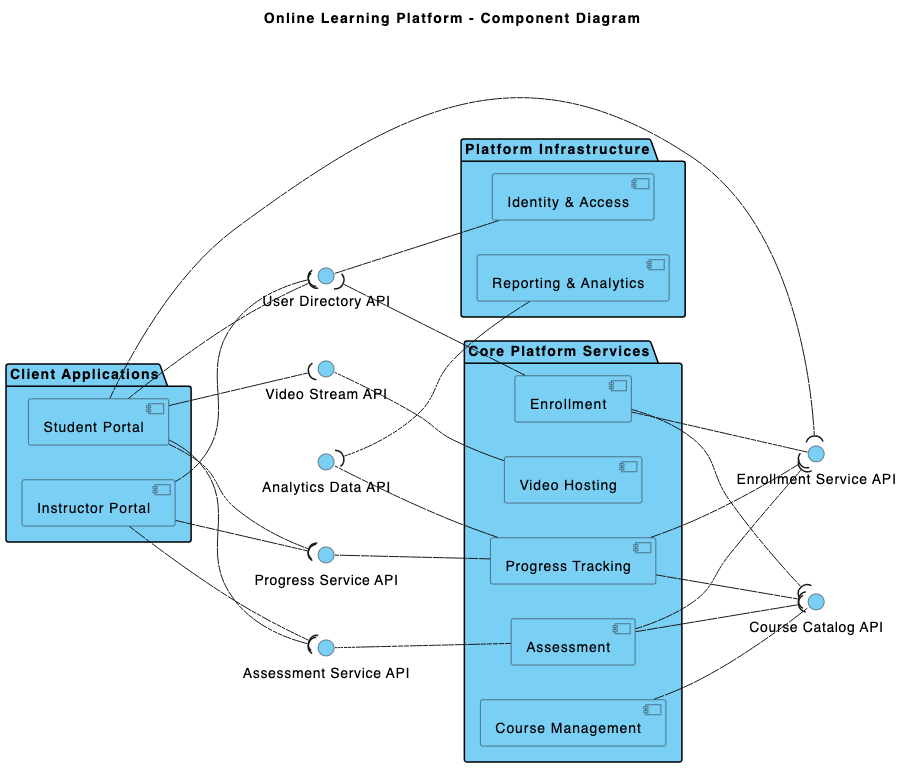
The journey began with a simple prompt: “Produce a component diagram to demonstrate an online learning platform with course management, video hosting, user enrollment, progress tracking, and assessment services.” The AI Chatbot responded not just with a UML Component Diagram in PlantUML syntax, but with a structured, layered architecture that mirrored real-world system design principles.
But the conversation didn’t stop there. When asked to explain how the User Authentication component interacts with User Enrollment, the AI didn’t just restate the diagram — it delivered a contextual breakdown of the security and workflow logic, clarifying why authentication is a prerequisite for enrollment. This wasn’t a static output; it was a dialogue with an expert.
Further refinement followed: “Can you explain this branch?” — and the AI responded with a clear flowchart of the authentication-to-enrollment process, identifying dependency points, data flow, and failure conditions. This level of detail transforms the chatbot from a tool into a modeling consultant.
Decoding the Component Diagram Logic
The resulting diagram is built on a three-layer architecture, each layer serving a distinct purpose:
1. Presentation Layer: User-Centric Interfaces
- Course Management: Handles creation, editing, and deletion of courses.
- Course Catalog: Displays available courses to users.
- Learning Dashboard: Provides a personalized view of user progress and course status.
These components are driven by interfaces that define how data is presented and updated — ensuring consistency across the user experience.
2. Service Layer: Core Business Logic
- Video Hosting: Manages video streaming and storage, relying on the Data Layer for persistent storage.
- User Enrollment: Processes course registration, but only after verifying identity via authentication.
- Progress Tracking: Monitors user activity and updates the dashboard.
- Assessment: Administers quizzes and exams, drawing questions from the central repository.
- User Authentication: Acts as the gatekeeper, validating access at every critical step.
Each service component exposes a well-defined interface, enabling loose coupling and easier maintenance.
3. Data Layer: Persistent Storage & Logging
- Storage: Holds all digital assets (videos, documents, metadata).
- User Activity Logging: Records every user interaction for analytics and compliance.
- Question Bank: Stores assessment content for reuse and versioning.
These components ensure data integrity and support audit trails — critical for educational platforms handling sensitive user information.
Why This Structure Works
The use of component diagrams is intentional. Unlike class diagrams, component diagrams emphasize modularity, dependencies, and runtime behavior. By isolating concerns into distinct layers and defining clear interface contracts, the design supports:
- Scalability: Each service can be deployed independently.
- Security: Authentication is centralized and enforced at entry points.
- Testability: Components can be validated in isolation.
- Evolution: New features (e.g., gamification or AI tutoring) can be added without disrupting core systems.
Conversational Intelligence: The AI as Modeling Expert
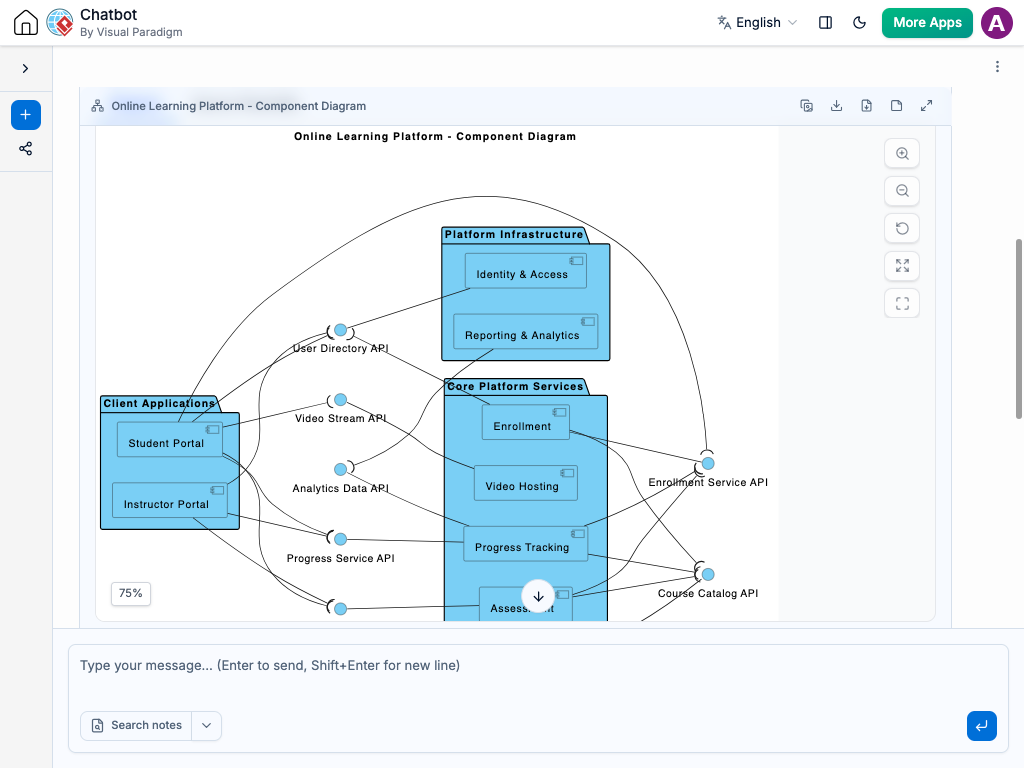
What sets Visual Paradigm apart is how the AI Chatbot doesn’t just generate diagrams — it engages in technical dialogue. When the user asked, “Explain this branch,” the AI didn’t default to generic text. Instead, it:
- Identified the dependency flow.
- Explained the security rationale.
- Highlighted the impact on user experience.
- Suggested next steps (e.g., a sequence diagram for deeper insight).
This kind of real-time collaboration ensures that the model evolves not just in form, but in function.
More Than Just Component Diagrams: A Full Modeling Suite
The Visual Paradigm AI Chatbot isn’t limited to UML. It supports a full range of enterprise modeling standards, including:
- ArchiMate: For modeling enterprise architecture, business processes, and IT systems.
- SysML: For complex systems engineering, including requirements, behavior, and parametric modeling.
- C4 Model: For architectural context and system context diagrams, ideal for software teams.
- Mind Maps, PERT Charts, Org Charts, SWOT, PEST: For strategic planning, project management, and organizational analysis.
Whether you’re designing a microservices backend, mapping a digital transformation roadmap, or visualizing a business strategy, the AI Chatbot adapts to your standard of choice — all within a single, unified platform.
Conclusion: A Smarter Way to Model
Building a robust online learning platform isn’t just about features — it’s about architecture, security, and clarity. The Visual Paradigm AI Chatbot transforms this process from a solitary task into a collaborative, intelligent dialogue. It doesn’t just draw diagrams; it helps you think through the system, anticipate edge cases, and build with confidence.
Related Links
- Component Diagram – Wikipedia: A UML diagram that illustrates the organization and dependencies of components in a software system.
- What is a Component Diagram? – Visual Paradigm: A detailed guide on UML component diagrams, showing how components interact and are structured in software design.
- Component Diagram Tutorial: Component Diagram Tutorial. Component diagrams provide a simplified, high-order view of a large system. Classifying groups of classes into components supports the interchangeability…