


Designing a Search Engine Platform: An AI-Powered Journey Through Component Diagrams
Building a scalable, high-performance search engine requires more than just code—it demands a clear architectural vision. The challenge lies in visualizing how key components like the web crawler, indexing service, and query processor interact across data flows and timing constraints. That’s where the Visual Paradigm AI-Powered Chatbot steps in—not as a passive diagram generator, but as a collaborative modeling expert.
From Prompt to Precision: The Conversational Evolution of the Diagram
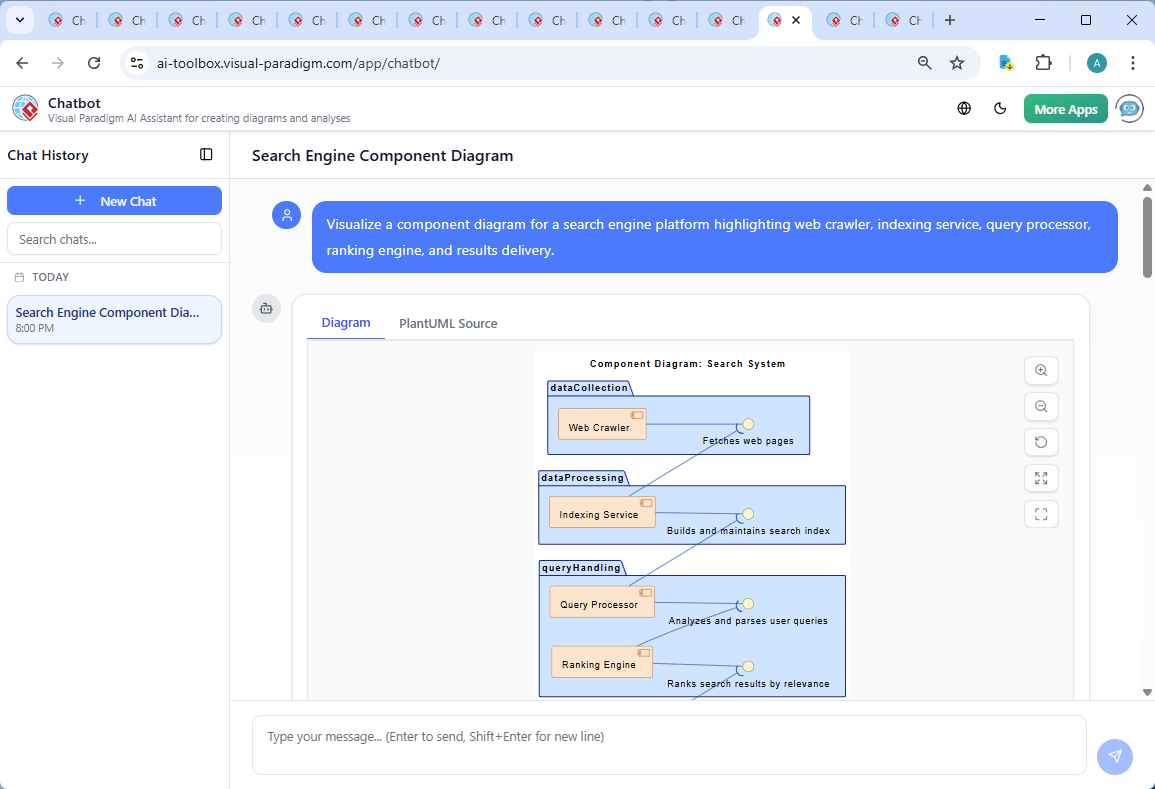
The journey began with a simple request: “Visualize a component diagram for a search engine platform highlighting web crawler, indexing service, query processor, ranking engine, and results delivery.” The AI Chatbot immediately responded with a fully rendered PlantUML-based component diagram, structured with logical grouping, clear interfaces, and a modern visual style.
But the conversation didn’t stop there. The user followed up with a deeper inquiry: “Can you explain how the Web Crawler interacts with the Indexing Service in terms of data flow and timing?” Instead of a generic answer, the AI delivered a detailed breakdown—complete with data flow stages, timing behaviors, and architectural nuances like asynchronous communication, message queues, and real-time indexing.
This back-and-forth wasn’t just about refining a diagram—it was about co-creating an intelligent system model. The AI didn’t just draw lines; it explained the why behind each connection, the latency implications, and the scalability mechanisms. When the user asked for a timeline, the AI delivered a structured visual sequence. When asked for further clarity, it offered to generate a sequence diagram—showing how the AI Chatbot acts as a dynamic modeling consultant, not just a tool.
Component Diagram: The Search System Architecture
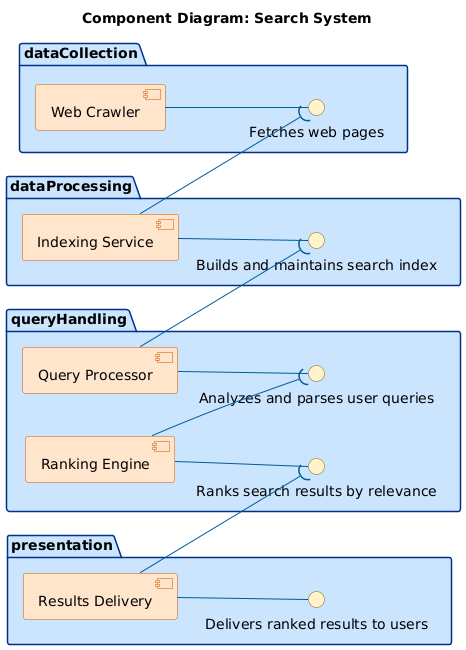
The final component diagram reflects a modular, scalable search engine architecture, with five core components grouped into functional domains:
- Web Crawler (in dataCollection): Responsible for fetching and extracting raw content.
- Indexing Service (in dataProcessing): Processes and structures content into searchable indexes.
- Query Processor and Ranking Engine (in queryHandling): Analyze queries and determine relevance.
- Results Delivery (in presentation): Presents the final output to users.
Logic Breakdown: Why This Structure Works
The component diagram uses UML Component Diagram notation intentionally, as it excels at modeling system modularity, interfaces, and dependencies. Each component is encapsulated, communicates via well-defined interfaces, and is grouped into logical packages to reflect system layers.
For example:
- Asynchronous Data Flow: The Web Crawler sends data to the Indexing Service via a message queue (implied by the dashed arrow to the interface), ensuring the crawler isn’t blocked by indexing delays.
- Interface-Driven Communication: Each component exposes a clear interface (e.g., Fetches web pages, Builds and maintains search index), enabling decoupling and independent evolution.
- Layered Architecture: The diagram follows a data flow pipeline: data collection → processing → query handling → presentation—mirroring real-world search engine behavior.
- Scalability Design: The use of queues and distributed indexing supports horizontal scaling, critical for handling billions of web pages.
Conversational Intelligence: Beyond Diagrams
What truly sets Visual Paradigm apart is how the AI Chatbot transforms a static diagram into a living design artifact. The follow-up conversation wasn’t an afterthought—it was central to the modeling process.
When the user asked about timing and data flow, the AI didn’t default to a textbook definition. Instead, it delivered a contextual, real-time analysis with:
- A timeline of the data flow process.
- A comparison table of timing behaviors (asynchronous vs. real-time).
- Architectural insights like message brokers, caching, and retry mechanisms.
This level of technical depth—delivered in natural language—proves the AI Chatbot isn’t just generating visuals. It’s acting as a senior systems architect, offering guidance that shapes the design.
Platform Versatility: One AI, Multiple Standards
While this example focused on a Component Diagram, the Visual Paradigm AI Chatbot is not limited to one modeling language. It supports a full suite of standards, including:
- UML: For detailed software architecture and behavior modeling. Explore UML Component Diagrams and Class Diagrams with AI assistance.
- ArchiMate: For enterprise architecture, mapping business, application, and technology layers.
- SysML: For complex system engineering, including requirements, behavior, and parametric modeling. Learn more in the MBSE and SysML guide.
- C4 Model: For software architecture at different abstraction levels (Context, Containers, Components, Code). Use the C4 Diagram Tool for intuitive visualization.
- Other Diagrams: Mind Maps, Org Charts, SWOT, PEST, PERT, and data visualization charts (column, pie, line, etc.).
This versatility means teams can use a single AI-powered platform to design everything from application components to enterprise strategy maps—without switching tools.
Deep Dive: From Components to Behavior and Requirements
For a complete architectural picture, consider integrating other modeling artifacts. The Visual Paradigm SYSML Diagram Tool enables advanced systems engineering, while the Requirement Diagram Guide helps define system needs. Use free requirement diagram templates to kickstart your project.
For behavioral modeling, explore Sequence Diagram Examples or dive into Interaction Overview Diagrams for complex workflows. The Timing Diagram Examples help visualize temporal behavior, while Package Diagram Examples aid in organizing large models.
For deeper system insights, examine the Composite Structure Diagram of a Car or explore Object Diagram Examples to understand runtime states.
Conclusion: Design with Intelligence, Not Just Tools
Creating a search engine architecture isn’t just about drawing boxes and lines. It’s about understanding data flow, timing, scalability, and system resilience. The Visual Paradigm AI Chatbot doesn’t just produce diagrams—it guides the design process, turning abstract ideas into precise, intelligent models through natural conversation.
Whether you’re modeling a search engine, a financial system, or a cloud-native application, the AI Chatbot is your partner in architectural clarity. Ready to start your next design conversation?
Try it now: Explore the shared session and experience AI-powered modeling in action.
Related Links
- Component Diagram – Wikipedia: A UML diagram that illustrates the organization and dependencies of components in a software system.
- What is a Component Diagram? – Visual Paradigm: A detailed guide on UML component diagrams, showing how components interact and are structured in software design.
- Component Diagram Tutorial: Component Diagram Tutorial. Component diagrams provide a simplified, high-order view of a large system. Classifying groups of classes into components supports the interchangeability…