


Designing a Secure Social Media App: How AI Transforms Concept into Precision Model
Building a modern social media application demands more than just features—it requires a clear, scalable architecture. The challenge lies in mapping complex interactions between components like authentication, post management, and data storage without falling into design ambiguity. This is where the Visual Paradigm AI Chatbot becomes an indispensable collaborator.
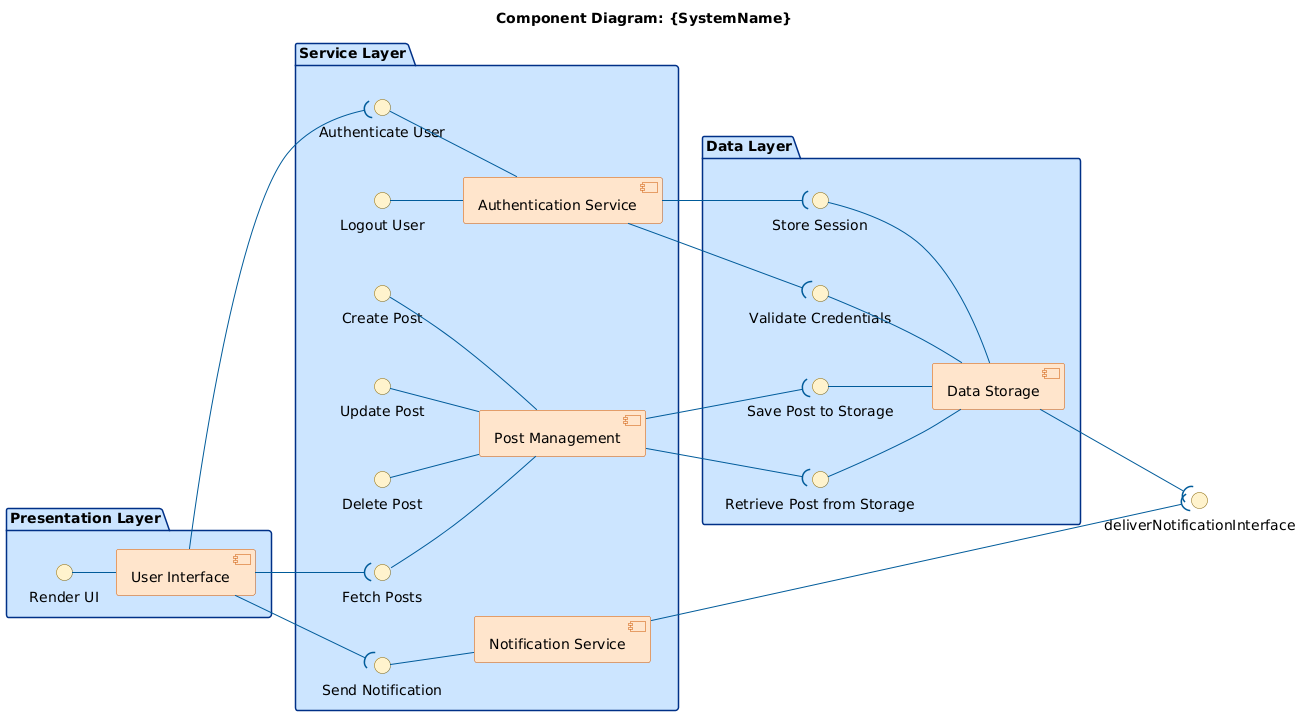
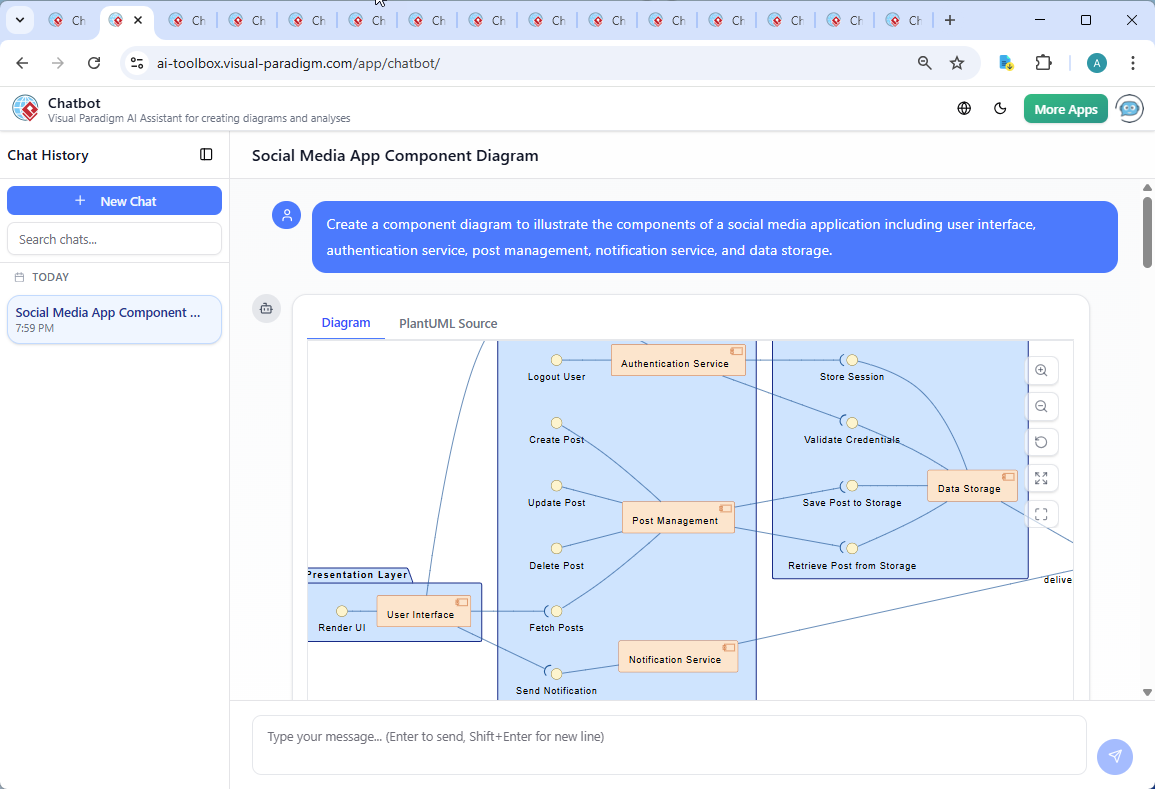
Instead of starting from scratch, the user began with a simple request: “Create a component diagram to illustrate the components of a social media application including user interface, authentication service, post management, notification service, and data storage.” Within seconds, the AI generated a fully structured PlantUML-based component diagram—complete with layered architecture, interface contracts, and dependency relationships.
From Prompt to Precision: A Collaborative Modeling Journey
The real power emerged not in the first output, but in the dialogue that followed. After receiving the initial diagram, the user asked: “Can you explain how the ‘Validate Credentials’ interface is used within the Authentication Service and Data Storage components?”
The AI didn’t just restate the diagram—it interpreted the question as a request for architectural insight. It broke down the interface’s role in a layered system, explaining how the Authentication Service acts as a coordinator, while the Data Storage component serves as the trusted source of truth. This wasn’t a static explanation; it was a dynamic consultation that deepened the model’s clarity.
As the conversation continued, the AI refined the logic, clarified responsibilities, and even suggested a step-by-step flow of the login process—demonstrating its ability to act as a modeling expert, not just a diagram generator.
Decoding the Component Diagram: Structure, Logic, and Intent
The generated diagram follows a clean, layered architecture using three key packages:
- Presentation Layer: Houses the User Interface, which interacts with users and exposes rendering capabilities via the Render UI interface.
- Service Layer: Contains core business components—Authentication Service, Post Management, and Notification Service—each exposing specific interfaces for operations like login, post creation, and notification delivery.
- Data Layer: Encapsulates Data Storage, which implements persistence interfaces such as Save Post to Storage, Retrieve Post from Storage, and Validate Credentials.
The diagram uses PlantUML syntax with custom styling for visual clarity—warm tones for components, blue for packages, and consistent arrow direction (left to right) to emphasize data flow and dependency hierarchy.
Key architectural decisions are evident:
- Separation of Concerns: Each component has a single responsibility. For example, Post Management handles CRUD operations but does not interact directly with the database.
- Interface-Driven Communication: All interactions are defined via interfaces (e.g., Authenticate User, Send Notification), enabling loose coupling and easier testing.
- Dependency Flow: The Authentication Service calls Validate Credentials on Data Storage, while Post Management depends on Save/Retrieve Post—ensuring data access is controlled and traceable.
Conversational Intelligence: AI as a Modeling Consultant
What sets Visual Paradigm apart is how the AI Chatbot functions not as a tool, but as a co-designer. The follow-up query about Validate Credentials triggered a deep dive into security, data flow, and interface contracts—proving the AI’s ability to understand not just the diagram, but the intent behind it.
After the explanation, the user could have asked for a sequence diagram of the login flow. The AI would have responded with a precise PlantUML version—showing how the UI triggers authentication, the service calls the data layer, and a session is issued.
This kind of iterative refinement is central to the platform’s value. It transforms a one-time diagram into a living design artifact shaped by real-time feedback.
Beyond Components: Full Modeling Power with AI
While this example focused on a Component Diagram, the Visual Paradigm AI Chatbot is not limited to one standard. It supports a full suite of modeling languages, including:
- UML: For system design, class diagrams, sequence diagrams, and more. Explore the UML Component Diagram Tutorial and Tool for detailed guidance.
- ArchiMate: For enterprise architecture, defining business, application, and technology layers. Learn how to generate ArchiMate diagrams using AI in the Interactive ArchiMate Diagram Creation guide.
- SysML: For systems engineering, including requirements, behavior, and parametric modeling. Use the SysML Requirement Diagram Tool or the SysML Block Definition Diagram Tool for advanced modeling.
- C4 Model: For software architecture, enabling clear context diagrams, container diagrams, and component diagrams. Try the C4 Diagram Tool by Visual Paradigm for intuitive visualization.
- Other Visual Tools: Mind maps, org charts, SWOT, PEST, and various data visualization charts (column, pie, line, area). The platform also supports Interactive Overview Diagram Examples for dynamic system modeling.
Whether you’re modeling a financial transaction system, a cloud-native microservice architecture, or a business strategy, the AI Chatbot adapts to your domain and standard—offering intelligent suggestions, validating design patterns, and generating production-ready diagrams.
Conclusion: Design with Confidence, Built by AI
The journey from a simple prompt to a fully explained, architecturally sound component diagram illustrates why Visual Paradigm is the leading AI-powered visual modeling platform. It’s not about generating diagrams—it’s about co-creating them with an intelligent partner that understands the why behind every line and interface.
Whether you’re a developer, architect, or product designer, the AI Chatbot empowers you to move faster, think deeper, and deliver models that are both precise and purposeful.
Ready to transform your next idea into a professional-grade model? Explore Visual Paradigm today and experience the future of visual modeling.
Related Links
- Component Diagram – Wikipedia: A UML diagram that illustrates the organization and dependencies of components in a software system.
- What is a Component Diagram? – Visual Paradigm: A detailed guide on UML component diagrams, showing how components interact and are structured in software design.
- Component Diagram Tutorial: Component Diagram Tutorial. Component diagrams provide a simplified, high-order view of a large system. Classifying groups of classes into components supports the interchangeability…