


Designing a Smart Ticket Booking Flow with AI-Powered Precision
Booking movie seats isn’t just about selecting a show—it’s a dynamic process involving real-time availability checks, reservation confirmations, and fallback logic. When systems fail to handle edge cases, users face frustration. The challenge? Designing a reliable, clear, and maintainable model of this flow—especially one that accounts for success, failure, and no-availability scenarios.
Enter the Visual Paradigm AI Chatbot. This isn’t just a diagram generator—it’s a collaborative modeling partner. When prompted to create a sequence diagram for a ticket booking system, it didn’t just deliver a static image. Instead, it initiated a conversation, guided the design, and adapted to follow-up requests—proving that AI can act as a technical consultant, not just a tool.
From Prompt to Precision: The Evolution of a Sequence Diagram
The journey began with a simple request: “Produce a sequence diagram illustrating how a ticket booking system reserves seats for a movie.”
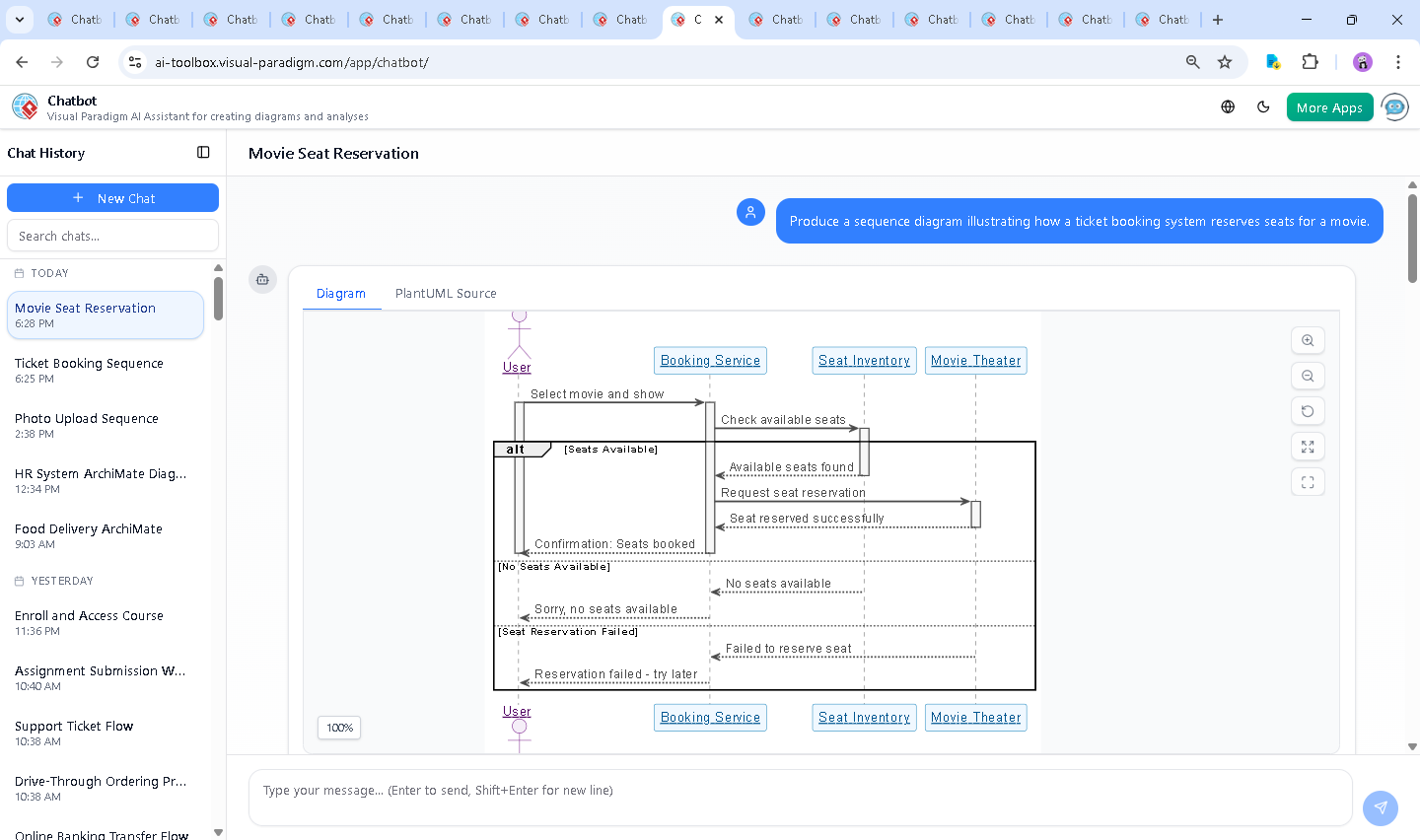
Within seconds, the AI Chatbot responded with a fully rendered PlantUML code snippet—complete with styling, activation bars, and branching logic. But instead of stopping there, it invited further dialogue. When the user asked, “Explain this diagram,” the AI didn’t just summarize—it dissected the flow, clarified each message, and highlighted the purpose of every alternative path.
This wasn’t a one-way output. The conversation evolved organically:
- Request: Generate the diagram
- Response: Deliver a complete, styled sequence diagram in PlantUML
- Follow-up: “Explain this diagram” → AI breaks down each component, message, and decision branch
- Next step: The user could now refine the logic—asking for adjustments, style changes, or even a different diagram type
This iterative exchange demonstrates how the AI Chatbot functions as a modeling expert: it doesn’t just generate—it listens, explains, and adapts. It’s like having a senior developer walk you through the architecture in real time.
Decoding the Logic: Why This Sequence Diagram Works
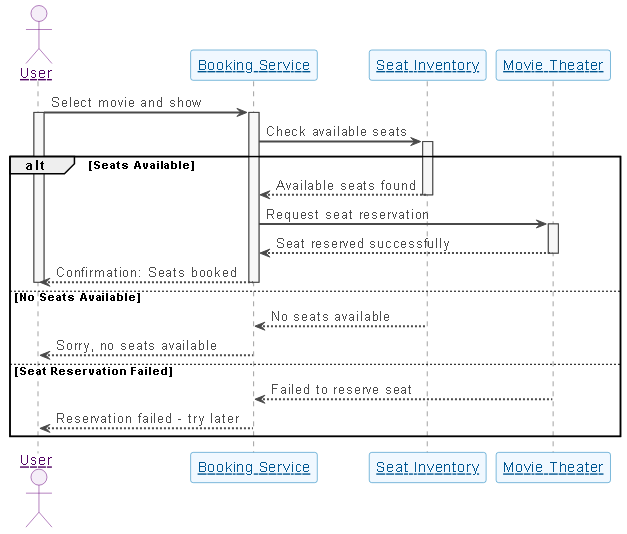
The generated sequence diagram captures the full lifecycle of a seat reservation with precision and clarity. Here’s a detailed breakdown of its core logic:
1. User Initiates Booking
The process begins with the User selecting a movie and show. This triggers the Booking Service to start processing the request. Activation bars appear to show the system is actively engaged.
2. Availability Check via Seat Inventory
The Booking Service queries the Seat Inventory to check if seats are available. This is a critical step—without it, the system might attempt to book unavailable seats.
3. Branching Logic for Real-World Scenarios
The diagram uses alt blocks to model three distinct outcomes:
- ✅ Seats Available: The Seat Inventory confirms availability. The Booking Service then requests the Movie Theater to reserve the seats. Upon confirmation, the user receives a success message.
- ❌ No Seats Available: The inventory reports no seats. The system informs the user immediately—no wasted processing.
- ⚠️ Reservation Failed: Even if seats are available, the Movie Theater might fail to reserve them (e.g., due to a timeout or database lock). The system gracefully informs the user to try again later.
These branches aren’t just cosmetic—they reflect real-world resilience. The diagram ensures developers and stakeholders don’t overlook failure paths.
4. Notation Choices That Matter
Why use a sequence diagram here? Because it shows:
- Temporal order of interactions
- Active lifelines (activation bars) to visualize when each component is working
- Message flow between actors and systems
- Conditional logic (via
alt) for robust error handling
These choices make the diagram not just readable, but actionable—perfect for development, testing, and stakeholder alignment.
Conversational Intelligence: Where AI Adds Real Value
What sets Visual Paradigm apart is that the AI doesn’t just output diagrams—it engages in design dialogue. After the initial diagram was delivered, the user asked for an explanation. The AI responded with a structured, educational breakdown—complete with analogies, feature tables, and real-world context.
Imagine this: you’re a product manager, and you need to explain the booking flow to developers and executives. The AI didn’t just give you a diagram—it gave you a teaching tool. It explained:
- Why activation bars matter (they show active processing)
- How alternatives model real-world failure modes
- What each participant represents (e.g., Movie Theater as the final authority)
This kind of insight isn’t found in basic diagram generators. It’s the result of deep modeling intelligence—built into the AI Chatbot.
More Than Just Sequence Diagrams: A Full Modeling Suite
The Visual Paradigm AI Chatbot isn’t limited to sequence diagrams. It’s a multi-standard modeling engine capable of generating:
- UML (Use Case, Class, Activity, State Diagrams)
- ArchiMate (for enterprise architecture and business-IT alignment)
- SysML (for systems engineering and requirements modeling)
- C4 Model (for software architecture visualization)
Whether you’re modeling a banking transaction, designing a microservices architecture, or mapping business processes, the AI Chatbot adapts. It understands context, responds to follow-ups, and maintains consistency across standards.
Conclusion: A Smarter Way to Model
Creating a robust seat reservation system requires more than just code—it demands clear, precise, and maintainable design. The Visual Paradigm AI Chatbot turns this challenge into a conversational design session, where every request is met with intelligent, context-aware output.
From the initial prompt to the final explanation, the AI didn’t just deliver a diagram—it guided the entire process. It’s not just a tool. It’s a modeling partner.
Ready to build your next system with confidence? Try it yourself: Explore the live session and experience how AI transforms visual modeling.