


From Idea to Insight: How AI Powers Real-World Route Calculation Modeling
Designing a clear, accurate sequence diagram for a navigation app’s route calculation process is more than just drawing lines between actors. It’s about capturing the dynamic flow of data, decisions, and system interactions—especially when real-time variables like traffic and map availability come into play. With the Visual Paradigm AI Chatbot, this becomes a collaborative journey, not a solo task.
Interactive Journey: From Request to Refinement
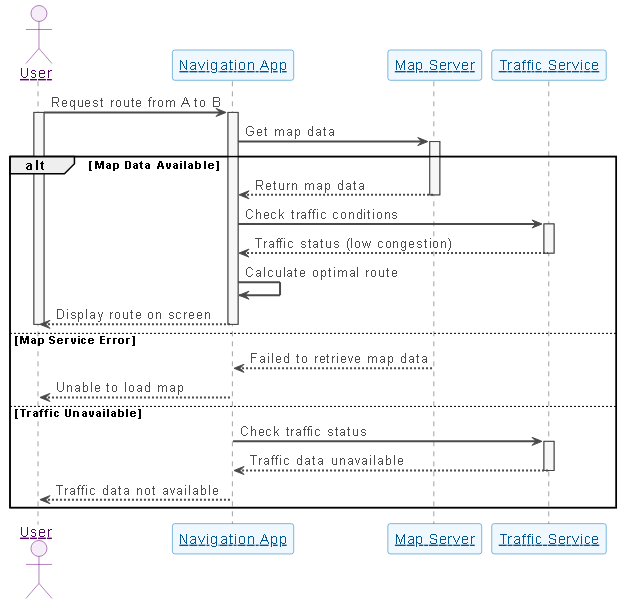
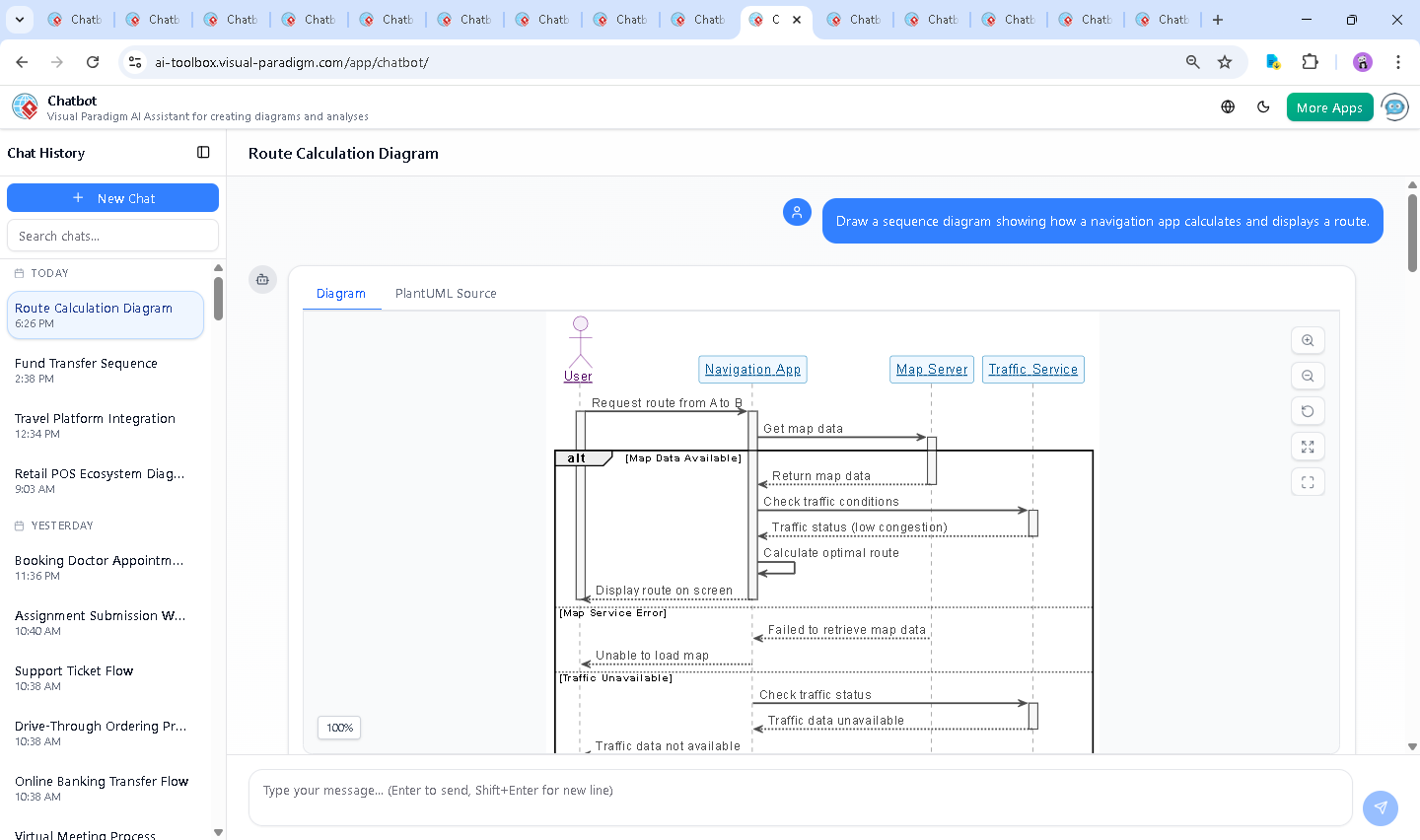
The process began with a simple prompt: “Draw a sequence diagram showing how a navigation app calculates and displays a route.” Within seconds, the AI Chatbot generated a fully formatted PlantUML sequence diagram that visualized the core interactions between the user, the navigation app, the Map Server, and the Traffic Service.
But the conversation didn’t stop there. When the user asked, “Can you explain how the map data is structured and retrieved from the Map Server?”, the AI responded not with a static answer—but with a detailed technical breakdown, complete with real-world data formats (GeoJSON, MVT), retrieval workflows, and even sample HTTP requests.
This wasn’t just documentation. It was modeling intelligence in action. The AI didn’t just generate a diagram; it acted as a consulting partner, refining logic, clarifying assumptions, and enriching the model with domain-specific insight—proving that Visual Paradigm’s AI Chatbot is more than a diagram tool. It’s a design collaborator.
Logic Breakdown: Why This Sequence Works
The sequence diagram is built around a clear, decision-driven flow:
- User initiates: The user triggers the route request, setting the process in motion.
- Map Server interaction: The app requests map data, which may succeed or fail—handled through an
altblock to show both outcomes. - Real-time traffic check: The app queries traffic conditions, which may be available or unavailable—another critical decision point.
- Route calculation: If data is available, the app computes the optimal path using internal logic.
- Result delivery: The final route is displayed on screen, or an error message is shown if any component fails.
The use of alt blocks is key here. It reflects the non-deterministic nature of real-world systems—where map servers can be down, traffic data can be delayed, and user inputs can vary. By modeling these branches explicitly, the diagram becomes a living blueprint for testing, validation, and documentation.
Furthermore, the AI chose a clean, readable layout with:
- Color-coded participants for visual distinction
- Activated lifelines to show active phases
- Proper use of
activateanddeactivateto reflect timing - Standard UML semantics for control flow
These aren’t just aesthetic choices—they’re best practices in visual modeling, and the AI applied them naturally, without prompting.
Conversational Value: Where AI Adds Expertise
When the user asked for deeper insight into map data structure, the AI didn’t just repeat the diagram. It expanded the narrative with:
- A comparison of data formats (GeoJSON vs. MVT)
- Sample code for a real API request
- Explanation of how spatial indexing enables fast queries
- Details on caching, privacy, and performance optimization
This level of depth transforms the diagram from a static artifact into a knowledge asset. The AI didn’t just respond—it guided the user through the system’s inner workings, reinforcing the diagram’s accuracy and completeness.
And when the user requested a more focused version of the map retrieval process, the AI was ready to generate a new diagram on demand—proof of its adaptability and contextual awareness.
Platform Versatility: Beyond Sequence Diagrams
While this example focused on a sequence diagram, the Visual Paradigm AI Chatbot is built to support a full spectrum of modeling standards. Whether you’re designing enterprise systems with ArchiMate, engineering complex systems with SysML, visualizing software architecture with C4 Model, or brainstorming ideas with Mind Maps, the AI adapts to your needs.
For instance, you could ask the same AI to:
- Generate a C4 context diagram of the navigation app ecosystem
- Design an ArchiMate model showing business, application, and technology layers
- Build a SysML requirement diagram for route calculation features
This versatility means you’re not switching tools—you’re using one intelligent platform to explore, validate, and communicate your system across all stages of design and development.
Conclusion & CTA
Creating a high-fidelity sequence diagram for a navigation app’s route calculation isn’t just about drawing lines—it’s about capturing the complexity, uncertainty, and intelligence behind real-world software systems. With Visual Paradigm’s AI Chatbot, that process becomes interactive, intelligent, and deeply collaborative.
Whether you’re a developer, architect, or product designer, the AI doesn’t just generate diagrams—it helps you think through the design. And with support for multiple modeling standards, it’s the only platform that truly unifies visual modeling across the entire lifecycle.
Try it today: Explore the shared session and see how the AI transforms your ideas into precise, actionable models.