


Visualizing the Digital Journey: From Order to Delivery with AI-Powered Precision
Designing a seamless online food ordering and delivery experience requires clear, dynamic modeling of complex interactions. The challenge lies not just in capturing the flow—but in anticipating edge cases like delivery delays, payment failures, or restaurant unavailability. This is where the Visual Paradigm AI Chatbot transforms conceptual ideas into structured, intelligent models through natural conversation.
From Prompt to Process: A Collaborative Modeling Journey
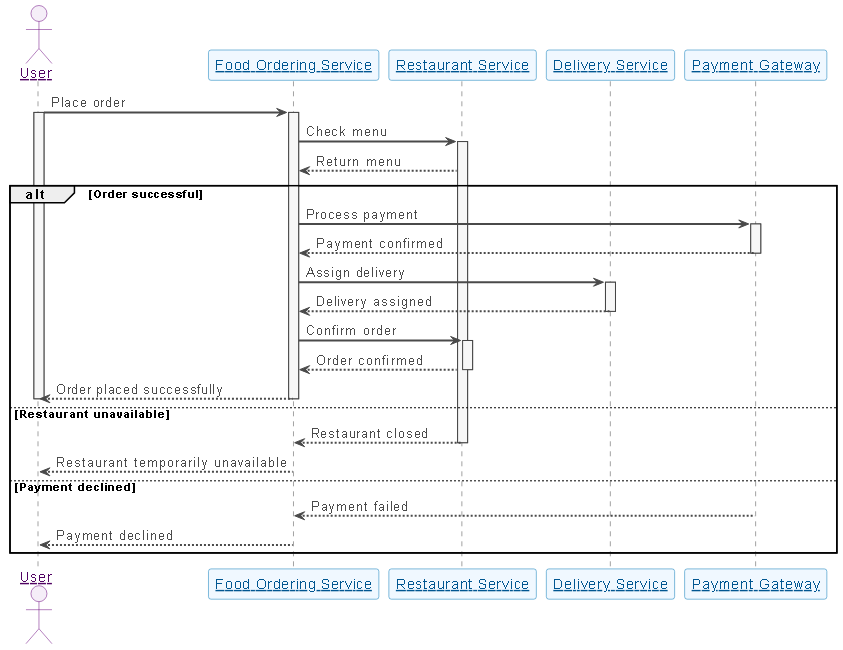
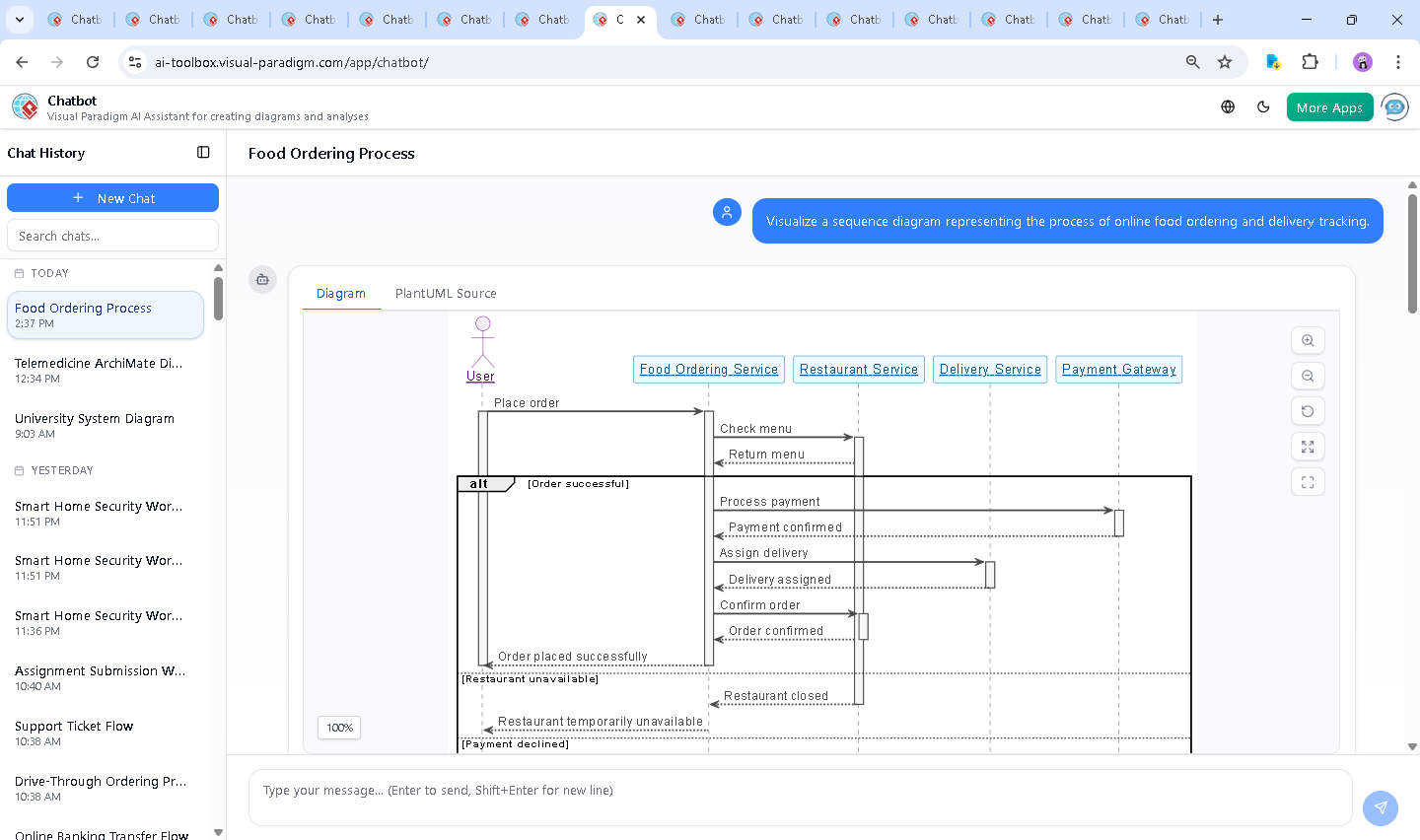
The journey began with a simple request: “Visualize a sequence diagram representing the process of online food ordering and delivery tracking.” Within seconds, the AI Chatbot generated a fully rendered UML Sequence Diagram, complete with lifelines, activation bars, and conditional logic—all in a clean, readable format.
But the real power emerged in the conversation that followed. When the user asked, “What happens if the delivery service fails to deliver the order on time?”, the AI didn’t just provide a static answer—it expanded the model. It outlined a full failure scenario, detailing real-time detection, user notifications, system re-evaluation, and customer support escalation.
That response wasn’t just descriptive—it was a design suggestion. The AI then offered to generate a new sequence diagram for the failure case, demonstrating how the platform evolves with the user’s needs. This iterative, conversational approach turns the AI into a modeling partner, not just a tool.
Decoding the Logic: How the Sequence Diagram Captures Real-World Complexity
The generated diagram reflects a robust, production-ready process. Let’s break down the key elements:
Participants and Roles
- User: Initiates the order and receives status updates.
- Food Ordering Service: Acts as the central orchestrator, coordinating with restaurant and delivery services.
- Restaurant Service: Provides menu data and confirms order fulfillment.
- Delivery Service: Handles logistics and real-time tracking.
- Payment Gateway: Processes and confirms payment.
Control Flow and Conditional Branching
The diagram uses alt blocks to model decision points:
- Order successful: Payment confirmed → Delivery assigned → Order confirmed → Success message to user.
- Restaurant unavailable: Restaurant closes → System notifies user.
- Payment declined: Payment fails → User is informed.
These branches ensure the model doesn’t assume success—critical for building resilient systems. The use of activate and deactivate signals clearly shows when each service is actively processing, avoiding ambiguity.
Failure Handling: The Hidden Layer of Resilience
When the user queried about delivery failure, the AI didn’t stop at a description. It embedded the logic into the model’s structure:
- System detects delay via real-time tracking.
- User receives notification with ETA and compensation options.
- Order status updates to “Delayed” or “Failed”.
- Optional rerouting or cancellation triggers.
- Customer support is engaged for unresolved cases.
This level of operational detail is what separates a basic diagram from a strategic design artifact.
Conversational Intelligence: Where the AI Truly Shines
The AI Chatbot doesn’t just generate diagrams—it learns from context. The user’s follow-up question wasn’t treated as a new task; it was integrated into the evolving model. The chat history shows a natural progression:
- Initial prompt → Diagram generated.
- Follow-up on delivery failure → AI provides narrative insight.
- Request for visual representation → AI prepares to extend the diagram.
This adaptability proves the AI isn’t a static generator. It functions as a collaborative modeling expert, capable of refining logic, suggesting improvements, and even anticipating user needs—like adding compensation policies or support escalation paths.
More Than Just Sequence Diagrams: A Full Visual Modeling Suite
While this example focused on Sequence Diagrams, the Visual Paradigm AI Chatbot is built to support a full spectrum of modeling standards. Whether you’re designing enterprise architecture with ArchiMate, modeling complex systems with SysML, or visualizing software structure using the C4 Model, the AI adapts to your needs.
It understands the semantics of each standard:
- UML: Supports class, sequence, activity, and component diagrams.
- ArchiMate: Models business, application, and technology layers with clear relationships.
- SysML: Handles requirements, parametric, and internal block diagrams.
- C4 Model: Visualizes context, containers, components, and code.
- Mind Maps: Ideal for brainstorming.
This versatility means the same AI assistant can guide you from idea to implementation—across domains and teams.
Building Smarter Systems, One Conversation at a Time
Visual Paradigm’s AI Chatbot isn’t just a diagram generator. It’s a conversational design environment that turns vague ideas into precise, actionable models. Whether you’re a developer, architect, or product manager, the ability to refine a model through natural language—asking, clarifying, and iterating—accelerates design and reduces errors.
Explore how the AI can help you model your next system. Try the interactive session below and see how your vision becomes reality—step by step, conversation by conversation.