


Seamless Order Flow: How AI Transforms E-Commerce Modeling
Designing a reliable order placement process for an e-commerce platform requires precision in capturing system interactions—especially around inventory checks and payment validation. Traditional diagramming tools demand manual layout, precise syntax, and deep modeling knowledge. But with the Visual Paradigm AI Chatbot, this becomes a conversational journey, not a technical chore.
When the user asked for a sequence diagram showing the flow from checkout to payment confirmation, the AI didn’t just generate a static image. It began by interpreting the intent, then built the diagram step by step—responding to clarifications, refining logic, and adapting to feedback in real time. This isn’t automation. It’s intelligent collaboration.
From Prompt to Precision: The Conversational Design Journey
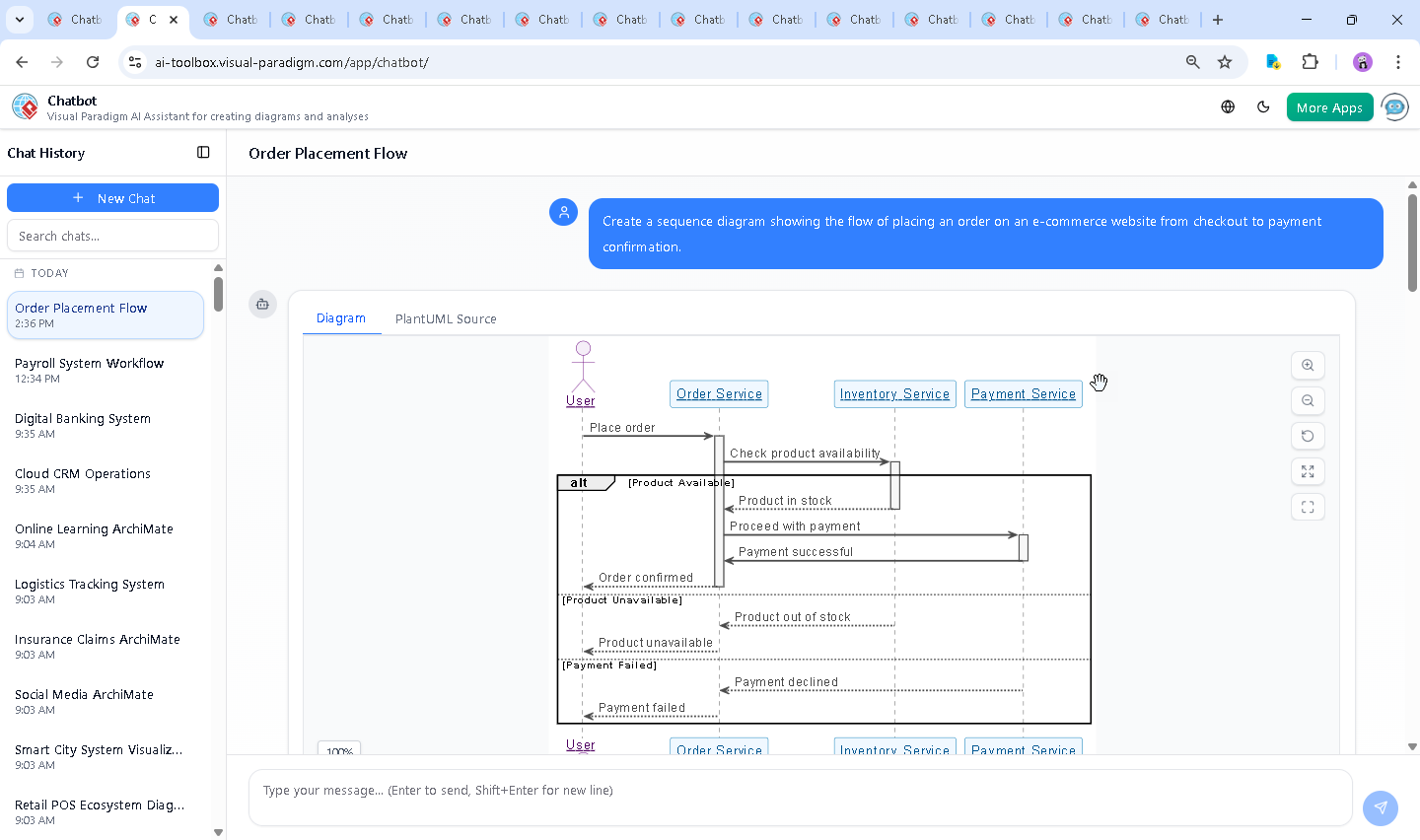
The session began with a clear request: “Create a sequence diagram showing the flow of placing an order on an e-commerce website from checkout to payment confirmation.” The AI instantly mapped this to a sequence diagram, selecting appropriate participants and lifelines.
But the real value emerged in the follow-up. When the user said, “Explain this diagram,” the AI didn’t just label parts—it unpacked the logic, clarified decision points, and highlighted error handling with actionable insights. It didn’t stop at presentation; it offered context, structure, and purpose.
For example, when the user asked for a breakdown of the alt blocks (for availability and payment failure), the AI explained each branch’s role in real-world system resilience—ensuring users aren’t misled by ambiguous status messages.
Each interaction reinforced the AI’s role as a modeling expert: it anticipated needs, clarified ambiguity, and even suggested alternative views—like converting the sequence into a C4 model —showing how the same logic can be visualized across standards.
Decoding the Logic: Why This Sequence Diagram Works
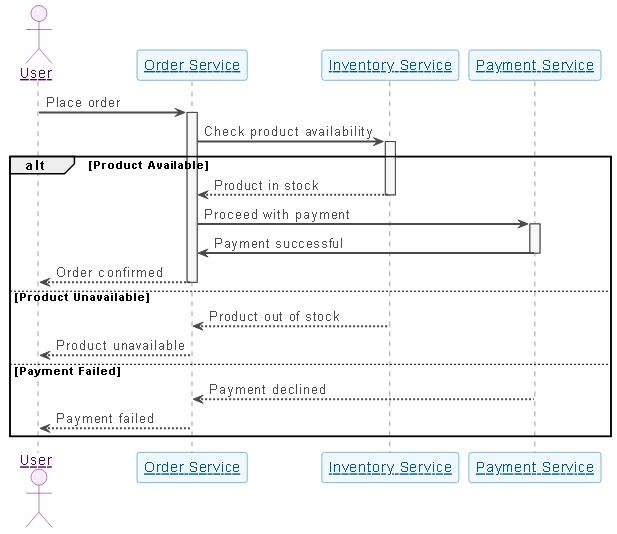
The generated diagram uses a structured, readable format based on PlantUML syntax, but the underlying logic is what makes it powerful. Let’s walk through the key elements:
1. Core Participants
- User (USR): Initiates the order.
- Order Service (OS): Orchestrates the process—validates, coordinates, and confirms.
- Inventory Service (IS): Validates stock availability—preventing over-selling.
- Payment Service (PS): Processes financial transactions securely.
2. The Flow: Step-by-Step
- Place Order: User triggers the process. The Order Service activates.
- Check Inventory: OS queries IS. This is a critical pre-payment gate.
- Decision Branches: The
altblock handles three scenarios:- Product Available: Proceeds to payment.
- Product Unavailable: Stops the flow and notifies the user.
- Payment Failed: Returns failure status—no confirmation.
- Payment Confirmation: On success, OS sends a final confirmation to the user.
3. Why Sequence Diagrams? Why This Notation?
Sequence diagrams are ideal here because they emphasize timing and interaction order. They show:
- Who initiates what.
- How long each service remains active (via activation bars).
- What happens when a response is delayed or fails.
This makes it easy for developers, testers, and architects to simulate real user experiences and spot bottlenecks—like a payment service taking too long to respond or inventory checks failing silently.
Conversational Intelligence in Action
The true strength of the Visual Paradigm AI Chatbot lies in its ability to act as a modeling consultant. After generating the initial diagram, the user asked for an explanation. The AI didn’t just restate the diagram—it contextualized it:
- It explained how the
altblocks represent real-world failure modes. - It highlighted that the diagram reflects a synchronous, user-waiting flow—critical for UX design.
- It offered to expand the model into other formats, showing the platform’s versatility.
These interactions weren’t scripted responses. They were intelligent, context-aware replies that deepened understanding and empowered the user to make informed design decisions.
Beyond Sequence Diagrams: A Full Modeling Suite
While this example focused on a sequence diagram, the Visual Paradigm AI Chatbot isn’t limited to one standard. It supports a full spectrum of modeling languages:
- UML: For detailed system design and component interaction.
- ArchiMate: For enterprise architecture, showing business, application, and technology layers.
- SysML: For complex systems engineering, including requirements and behavior modeling.
- C4 Model: For architectural visualization—context, containers, components, and code.
- Mind Maps: For brainstorming and process simplification.
Whether you’re modeling a payment flow, designing a microservices architecture, or mapping business processes, the AI Chatbot adapts—translating natural language into precise, standards-compliant diagrams across all domains.
Conclusion: Design with Confidence, Not Guesswork
Creating a sequence diagram for an e-commerce checkout isn’t just about drawing lines and boxes. It’s about modeling real-world reliability, user experience, and system resilience. With Visual Paradigm’s AI Chatbot, you’re not just generating diagrams—you’re engaging in a collaborative design process where the AI acts as a knowledgeable partner.
From the initial prompt to the final explanation, every step was guided by intent, logic, and clarity. The result? A model that’s not only accurate but also teachable, scalable, and ready for integration into development or architecture workflows.
Ready to turn your next idea into a precise, AI-crafted model? Explore the live session and experience the future of visual modeling.