


From Idea to Precision: How the Visual Paradigm AI Chatbot Designs a Search Engine Sequence Diagram
Creating a clear, accurate sequence diagram for a complex system like a search engine requires more than just drawing lines and boxes. It demands a deep understanding of system behavior, error handling, and user interaction. The challenge lies not only in modeling the core flow but also in anticipating edge cases — such as invalid inputs or network failures — and representing them with precision.
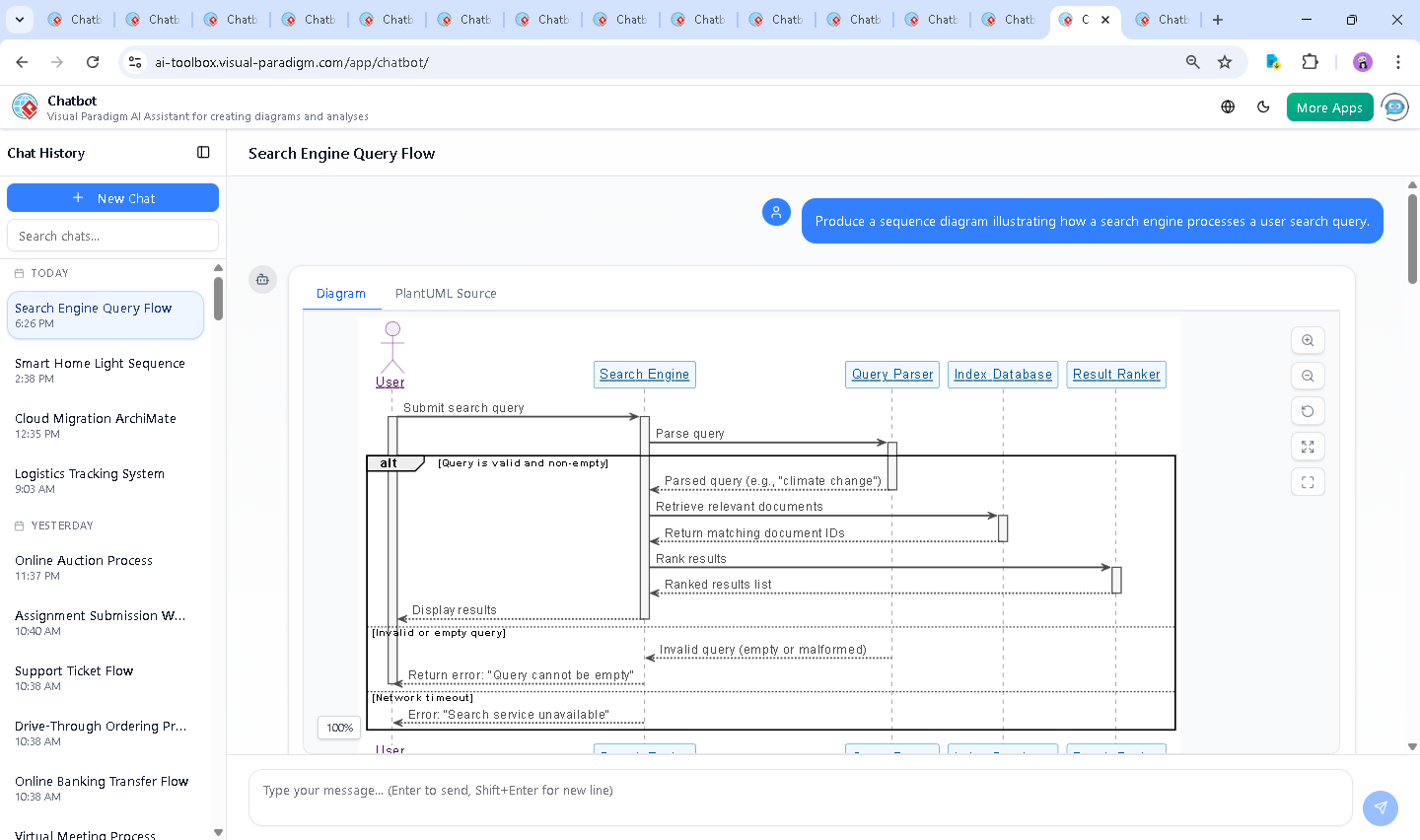
That’s where the Visual Paradigm AI Chatbot steps in. As a conversational modeling expert, it doesn’t just generate diagrams — it collaborates with you to refine logic, clarify intent, and ensure architectural integrity. In this case, the user’s initial request — “Produce a sequence diagram illustrating how a search engine processes a user search query” — became the starting point for a dynamic, iterative design journey.
Interactive Journey: Turning a Prompt into a Model
The process began with a simple instruction. The user asked for a sequence diagram, and the AI Chatbot responded by generating a fully structured PlantUML script that captured the entire lifecycle of a search query. But the conversation didn’t stop there.
When the user said, “Explain this diagram,” the AI didn’t just restate the code. Instead, it offered a detailed, narrative breakdown — walking through each step, clarifying the role of components like the Query Parser and Result Ranker, and explaining why the alt construct was used to handle invalid queries and timeouts.
This wasn’t a one-way output. The AI invited further refinement: “Would you like a version of this diagram with more technical details (e.g., specific ranking algorithms), or visualized as an image?” This level of responsiveness reflects the platform’s deeper intelligence — it understands that modeling is not a static task, but a dialogue.
Each follow-up request was met with precision. Whether it was clarifying the activation bars, refining the error paths, or suggesting visual enhancements, the AI acted as a modeling consultant, ensuring every element served a purpose.
Logic Breakdown: The Anatomy of a Search Engine Sequence
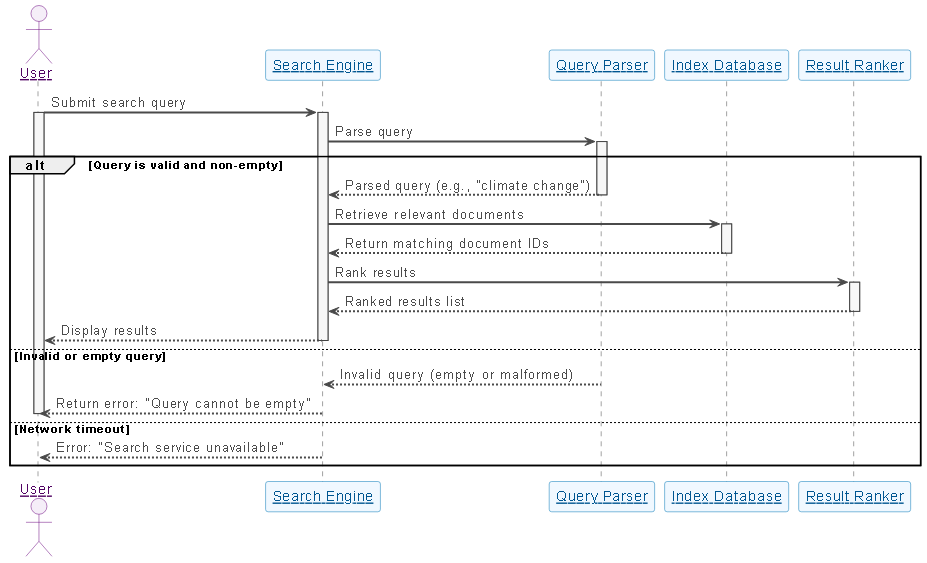
The generated sequence diagram follows a clear, structured flow that mirrors real-world search engine behavior. Let’s unpack the key logic and design decisions:
1. User Initiation
The User actor sends a search query to the Search Engine. This is the trigger point. The activation bar on the User indicates the moment of action — a brief but critical phase before the system takes over.
2. Query Parsing and Validation
The Search Engine forwards the query to the Query Parser. Here, the AI uses an alt block to model three distinct outcomes:
- Valid query: The parser returns a structured version of the input (e.g., “climate change” → keywords).
- Invalid or empty query: The system returns an error: “Query cannot be empty.”
- Network timeout: Simulates a failure in downstream services, returning: “Search service unavailable.”
This use of alt is critical. It doesn’t just show success paths — it enforces robustness by modeling failure scenarios, which is essential in production-grade systems.
3. Index Retrieval and Ranking
Once validated, the search engine queries the Index Database to retrieve document IDs matching the keywords. The database responds with a list of candidates.
These results are then passed to the Result Ranker, which applies algorithms (like TF-IDF, PageRank, or neural ranking models) to determine relevance. The ranked list is returned to the search engine, ensuring the most pertinent results appear first.
4. Final Output to User
The Search Engine delivers the final ranked list to the user. The diagram uses a clear arrow and deactivation to show the completion of the interaction.
Why Sequence Diagrams?
Sequence diagrams are ideal for this use case because they emphasize:
- Temporal order of events
- Message flow between components
- Behavioral clarity in complex systems
By visualizing the lifecycle of a single search request, the diagram enables developers, architects, and stakeholders to understand how the system behaves under different conditions — a key requirement for system design and documentation.
Conversational Value: The AI as a Modeling Partner
What sets Visual Paradigm apart is not just the diagram output, but the intelligence behind the interaction. The AI Chatbot doesn’t just generate code — it interprets intent, suggests improvements, and explains its design choices in plain language.
For example, after the initial diagram was generated, the user asked for an explanation. The AI didn’t simply list the components. It contextualized each one, described activation lifecycles, and highlighted the importance of error handling — all while maintaining a natural, conversational tone.
When the user asked to refine the logic, the AI responded with actionable insights: “Would you like to add specific ranking algorithms?” — a prompt that invites deeper exploration and customization.
This kind of collaboration is the essence of the AI-powered visual modeling experience. It transforms the process from diagramming to co-designing.
Platform Versatility: Beyond Sequence Diagrams
While this example focuses on a sequence diagram, the Visual Paradigm AI Chatbot is not limited to a single standard. It supports a full suite of modeling languages, including:
- UML (for software design and system architecture)
- ArchiMate (for enterprise architecture and business alignment)
- SysML (for systems engineering and complex system modeling)
- C4 Model (for software architecture at different abstraction levels)
- Mind Maps, (for idea visualization)
Whether you’re designing a user authentication flow, mapping enterprise services, or modeling a microservices architecture, the AI Chatbot adapts to your needs. It understands the semantics of each standard and generates diagrams that are not only visually accurate but also semantically correct.
Conclusion & Call to Action
Designing a search engine workflow isn’t just about capturing steps — it’s about modeling behavior, anticipating failures, and ensuring clarity across teams. The Visual Paradigm AI Chatbot makes this possible through intelligent, conversational design.
By turning a simple prompt into a detailed, annotated, and robust sequence diagram — complete with error handling, clear lifecycles, and real-world relevance — it proves that AI-powered modeling isn’t about automation. It’s about augmentation: empowering users to think deeper, design faster, and communicate more effectively.
Ready to explore how the AI Chatbot can transform your next design challenge? Try it today and experience the future of visual modeling.