


Designing Smart Home Interactions with AI-Powered Precision
Creating accurate, actionable sequence diagrams for smart home systems requires more than just diagramming skills—it demands a deep understanding of network behavior, device states, and user experience. When a user asks, “Produce a sequence diagram explaining how a smart home app turns on a connected light device,” the challenge isn’t just visual representation. It’s about modeling real-world complexities: network reliability, device responsiveness, and failure recovery.
Enter the Visual Paradigm AI Chatbot—not a passive diagram generator, but a conversational modeling partner. It transforms natural language into structured, standards-compliant UML diagrams while simultaneously offering expert-level insights into system behavior. This isn’t automation; it’s intelligent co-design.
From Idea to Diagram: A Collaborative Modeling Journey
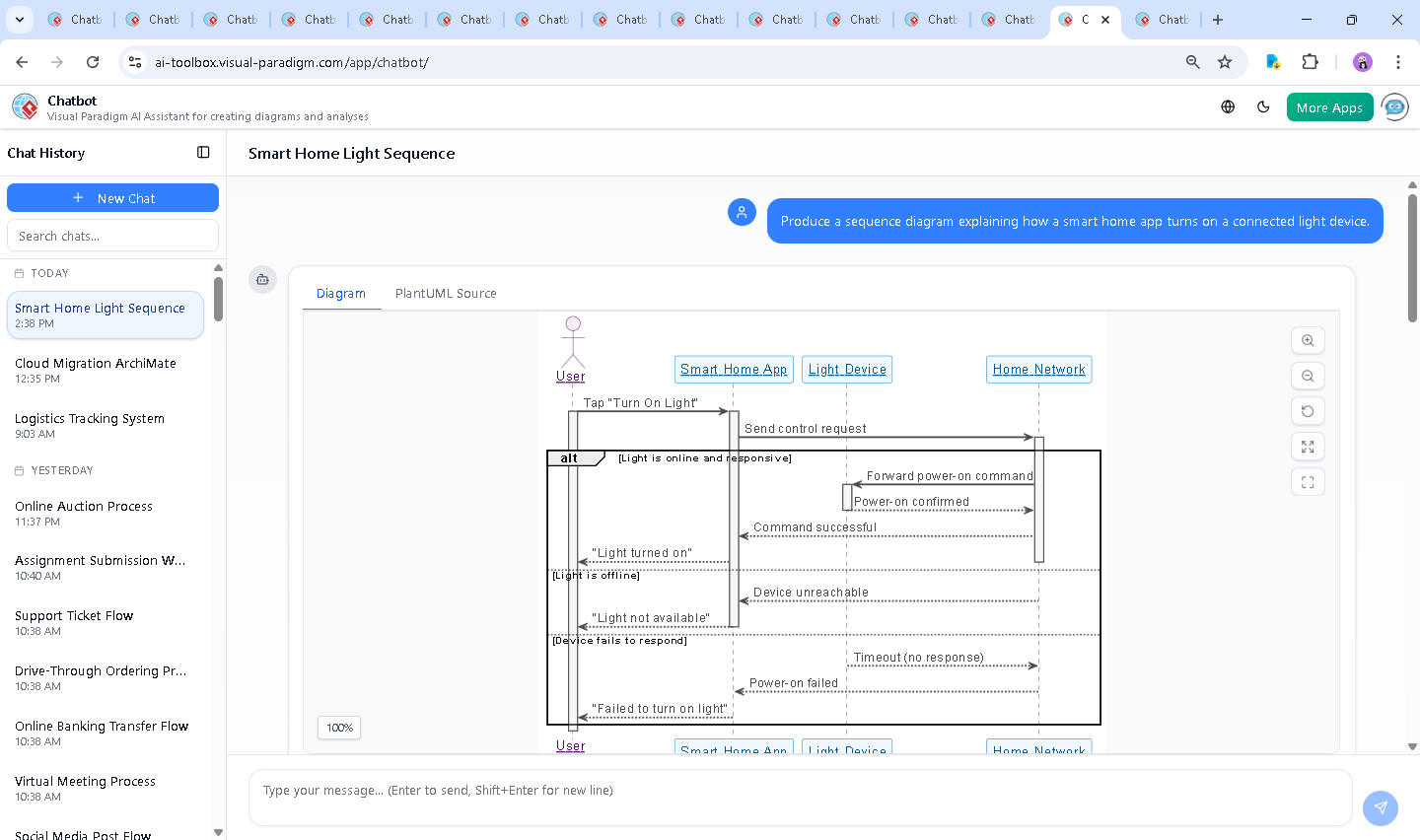
The process began with a simple request: generate a sequence diagram for a smart home app controlling a light. The AI Chatbot immediately responded with a well-structured PlantUML script, including proper lifelines, activation bars, and conditional logic (alt/else) to represent different device states.
But the conversation didn’t stop there. The user asked a follow-up: “What happens if the network connection drops during the power-on process?” Instead of a static response, the AI treated this as a design enhancement opportunity. It didn’t just describe the failure scenario—it mapped it into the diagram logic, adding a new branch that models timeout detection, network loss, and user feedback.
Each round of conversation refined the model. When the user requested clarification on how the app handles timeouts, the AI didn’t just rephrase—it explained the underlying system behavior: how the app waits for a response, detects no reply, and triggers error messaging. This level of insight isn’t random—it’s rooted in real-world architecture patterns.
Decoding the Logic: Why This Sequence Diagram Works
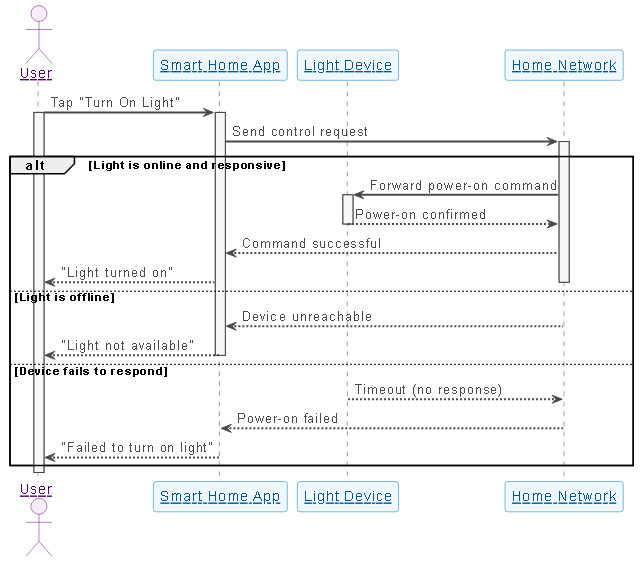
The generated sequence diagram captures the full lifecycle of a smart home command with precision. Let’s break down the key components:
1. Actor and Participants
- User: Initiates the action via a tap on the app.
- Smart Home App: Acts as the controller, routing commands and managing state.
- Light Device: The target system, which may be online, offline, or unresponsive.
- Home Network: The communication layer, central to the entire process.
2. Conditional Flow (alt/else)
The diagram uses alt blocks to model decision points:
- Light is online and responsive: The command is successfully delivered and confirmed.
- Light is offline: The network returns a device unreachable response.
- Device fails to respond: A timeout occurs—no response after a set period.
These branches ensure the diagram doesn’t assume success. They reflect real-world edge cases that developers must handle.
3. Activation Bars and Lifelines
Activation bars (thin rectangles) visually represent when each component is actively processing. For example:
- When the app sends a command, its activation bar begins.
- When the light receives the command, its bar activates and then deactivates after confirmation.
This visual cue helps identify bottlenecks and timing issues in the flow.
4. Error Handling and User Feedback
Each failure path ends with a message sent back to the user—”Light not available” or “Failed to turn on light.” This emphasizes the importance of clear communication in user experience design.
Conversational Intelligence: How the AI Elevates the Design Process
What sets Visual Paradigm apart is that the AI Chatbot isn’t just generating diagrams—it’s guiding the design with domain expertise. When the user asked about network failure, the AI didn’t just add a line. It:
- Explained the technical root cause (lost packets, no ACK)
- Described the app’s detection mechanism (timeout)
- Suggested recovery strategies (auto-retry, local control)
This depth of insight transforms the chatbot into a modeling consultant, not just a tool.
Beyond Sequence Diagrams: A Full Modeling Suite
The Visual Paradigm AI Chatbot isn’t limited to sequence diagrams. It supports a full spectrum of modeling standards:
- UML: For software design, system behavior, and component interactions.
- ArchiMate: For enterprise architecture, modeling business processes, applications, and technology layers.
- SysML: For systems engineering, modeling requirements, behavior, and structure.
- C4 Model: For software architecture, visualizing system contexts, containers, components, and code.
- Mind Maps: For brainstorming.
Whether you’re designing a smart home app, a financial transaction system, or a cloud-native architecture, the AI Chatbot adapts to your modeling language and standard—providing context-aware suggestions, syntax validation, and real-time feedback.
Conclusion: Design Smarter, Not Harder
Creating a reliable smart home system isn’t just about turning on a light—it’s about modeling the full lifecycle of control, failure, and recovery. With Visual Paradigm’s AI Chatbot, you don’t need to be an expert in UML or network protocols to build precise, professional diagrams.
By combining conversational intelligence with multi-standard modeling support, Visual Paradigm turns every idea into a clear, shareable, and technically sound design—ready for development, review, or stakeholder presentation.
Ready to explore how your next system design can be crafted using the Visual Paradigm AI Chatbot? Start your modeling session now.