


Designing the User Journey: How AI Transforms Search and Purchase Flows
Creating a precise, error-resilient sequence diagram for an online marketplace’s user authentication and purchase process isn’t just about drawing lines between actors. It’s about capturing the full lifecycle of a user’s interaction—from search to checkout—while accounting for real-world variations like stock availability and failed queries.
With the Visual Paradigm AI Chatbot, this process becomes a dynamic collaboration. Instead of starting from scratch or wrestling with syntax, users simply describe their intent in natural language. The AI interprets, generates, and refines the model in real time—acting not as a diagram generator, but as a modeling partner.
From Prompt to Precision: The Interactive Evolution of the Diagram
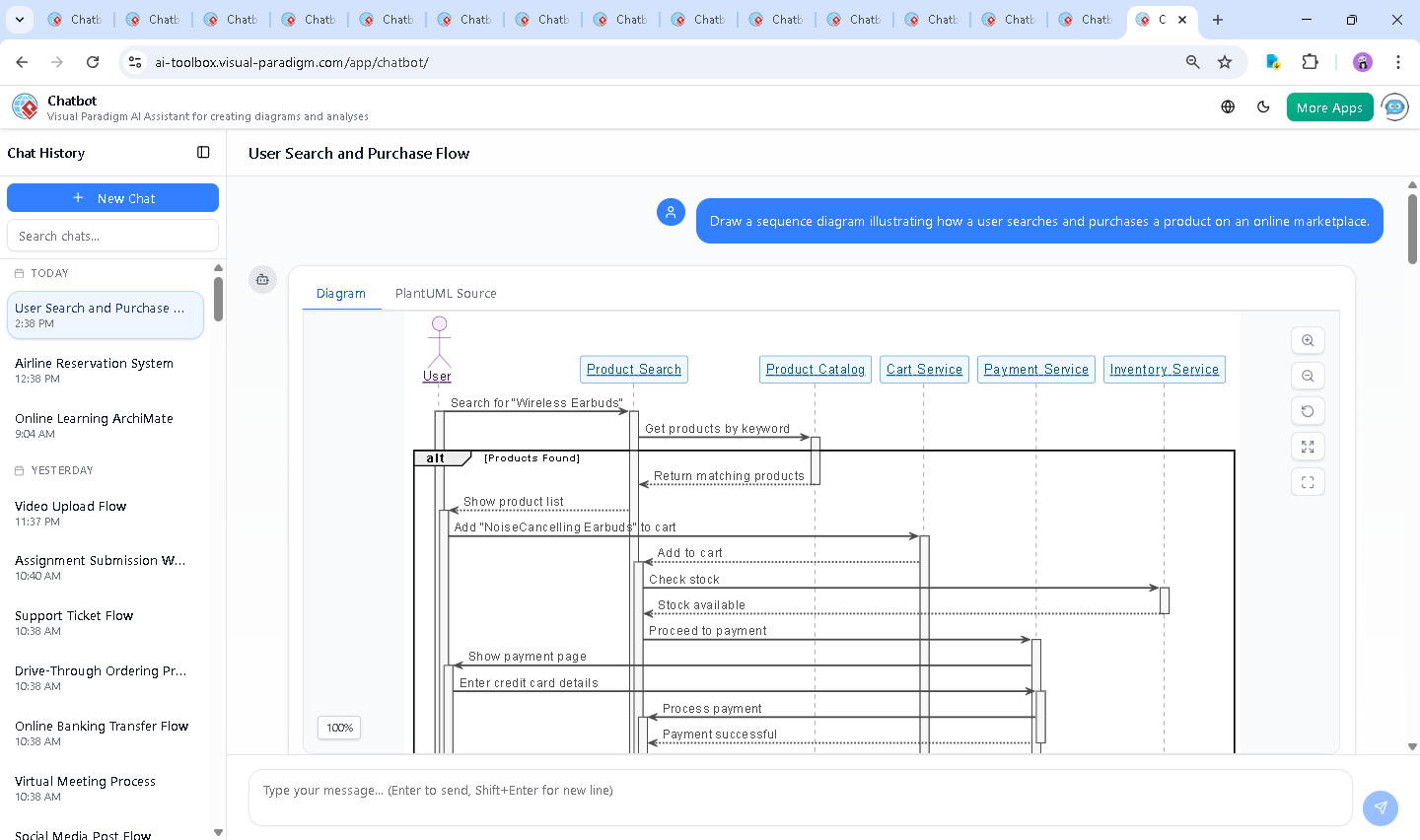
The journey began with a simple request: “Draw a sequence diagram illustrating how a user searches and purchases a product on an online marketplace.” The AI immediately responded by generating a fully compliant UML sequence diagram using PlantUML syntax, complete with proper lifelines, activation bars, and conditional logic.
But the real value emerged in the follow-up. When the user asked, “Explain this diagram,” the AI didn’t just list steps—it offered a structured breakdown, clarifying roles, explaining alternative flows, and highlighting design decisions. For example, it explained why the alt block was used for error cases, ensuring the diagram wasn’t just functional but also resilient to edge conditions.
When the user later requested, “AI, refine the logic,” the AI adjusted the flow to ensure inventory validation occurred after the item was added to the cart—reflecting real-world business logic where stock checks are often done before finalizing payment. This level of contextual awareness isn’t automation; it’s intelligent co-design.
Decoding the Flow: Why This Sequence Diagram Works
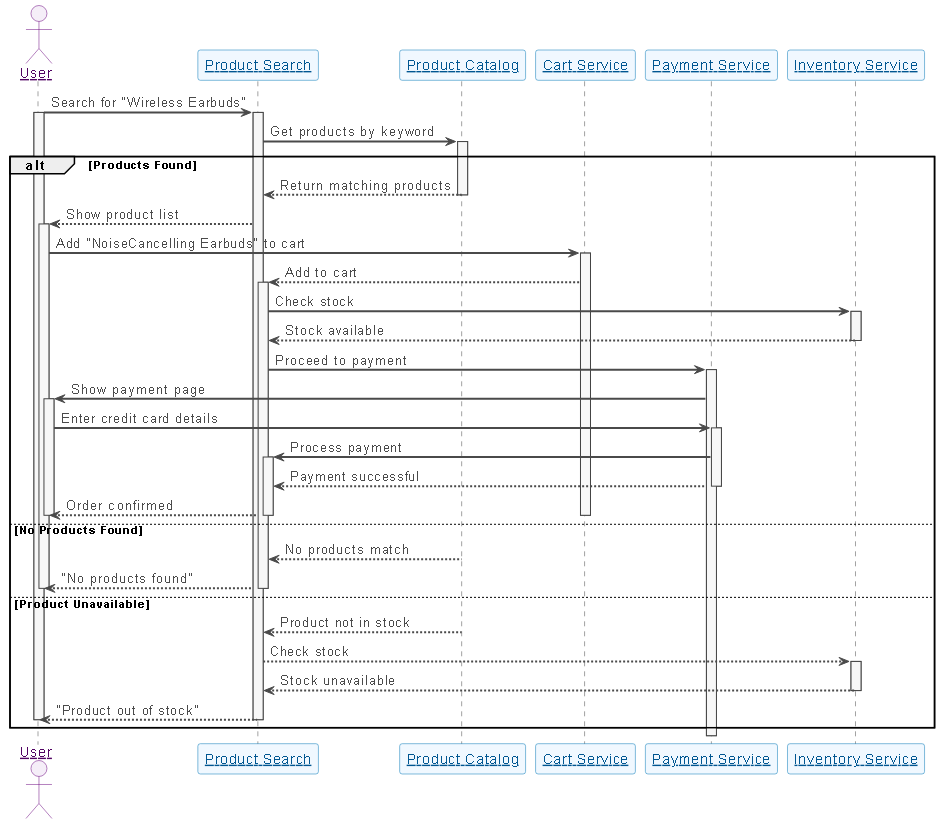
The generated sequence diagram models a realistic, end-to-end purchase journey with multiple layers of logic and responsibility. Here’s a breakdown of its core components:
1. User Initiation
The user starts by searching for a product—say, “Wireless Earbuds.” This triggers the Product Search service, which acts as the entry point for all queries.
2. Catalog Query & Response
The Product Catalog service is queried for matches. The response determines the next path:
- Products Found: A list is returned and displayed to the user.
- No Products Found: The system gracefully informs the user.
- Product Unavailable: The system checks inventory, preventing users from proceeding with unavailable items.
3. Cart and Inventory Integration
When the user selects a product (e.g., “NoiseCancelling Earbuds”), the Cart Service is invoked. Before proceeding to payment, the system checks stock via the Inventory Service. This ensures the system doesn’t promise what it can’t deliver.
4. Payment Processing
The Payment Service handles the transaction. The user enters credit card details, which are processed securely. Upon success, the system confirms the order and updates the user’s status.
5. Alternative Flows & Error Handling
The use of alt and else blocks is critical. They model not just the happy path, but also the realities of system failures—such as no results or out-of-stock items—making the diagram a robust blueprint for development and QA.
6. Why Sequence Diagrams?
Sequence diagrams are ideal here because they emphasize time-ordered interactions and responsibility delegation. They make it easy to see which component is active at each step, who initiates actions, and how messages flow across services—perfect for backend system design, API modeling, and user experience validation.
The AI Chatbot as a Modeling Consultant
What sets Visual Paradigm apart isn’t just the diagram output—it’s the intelligence behind the conversation. The AI doesn’t just generate code; it interprets intent, anticipates edge cases, and suggests improvements based on modeling best practices.
For example, after the initial diagram was generated, the user asked for clarification on the branch logic. The AI didn’t just repeat the code—it explained the purpose of each alt block, why it was placed where it was, and how it aligned with UML standards. This kind of contextual teaching turns the chatbot into a mentor, not a tool.
Moreover, the AI seamlessly handles follow-ups like:
- “Can we add a mobile user flow?”
- “Show me how this would look with color coding for services.”
- “Can this be converted to a C4 model for architecture documentation?”
These aren’t isolated features—they’re evidence of a platform built for conversational modeling, where every interaction deepens the design.
Beyond Sequence Diagrams: A Full Modeling Ecosystem
While this example focused on sequence diagrams, the Visual Paradigm AI Chatbot is built to support a full spectrum of modeling standards:
- UML: Sequence, use case, class, component, and activity diagrams.
- ArchiMate: Enterprise architecture modeling, including business, application, and technology layers.
- SysML: For systems engineering, including requirements, parametric, and internal block diagrams.
- C4 Model: Context, containers, components, and code-level diagrams for software architecture.
- Mind Maps: For brainstorming.
Whether you’re modeling a user journey, a microservices architecture, or a business process, the AI Chatbot adapts to your needs—offering consistent, accurate, and collaborative modeling across standards.
Conclusion: Design with Intelligence, Not Just Tools
Traditional diagramming tools are static. Visual Paradigm’s AI Chatbot is conversational, intelligent, and deeply integrated into the design process. It turns every request into a collaborative session where ideas are refined, logic is validated, and models evolve with insight.
For teams building complex systems—from e-commerce platforms to enterprise software—this isn’t just a diagramming tool. It’s a visual modeling partner that understands context, anticipates needs, and elevates design quality through dialogue.
Ready to build smarter? Try the AI Chatbot now and experience how natural conversation shapes powerful models.