


Mapping the User Authentication and Account Lockout Logic
Creating a clear, accurate representation of the login process is essential for designing secure and user-friendly systems. With the rise of AI-powered tools, generating professional diagrams has become faster and more intuitive. Visual Paradigm’s AI Activity Diagram generator enables users to define complex workflows through natural conversation — transforming simple prompts into structured, visually rich models.
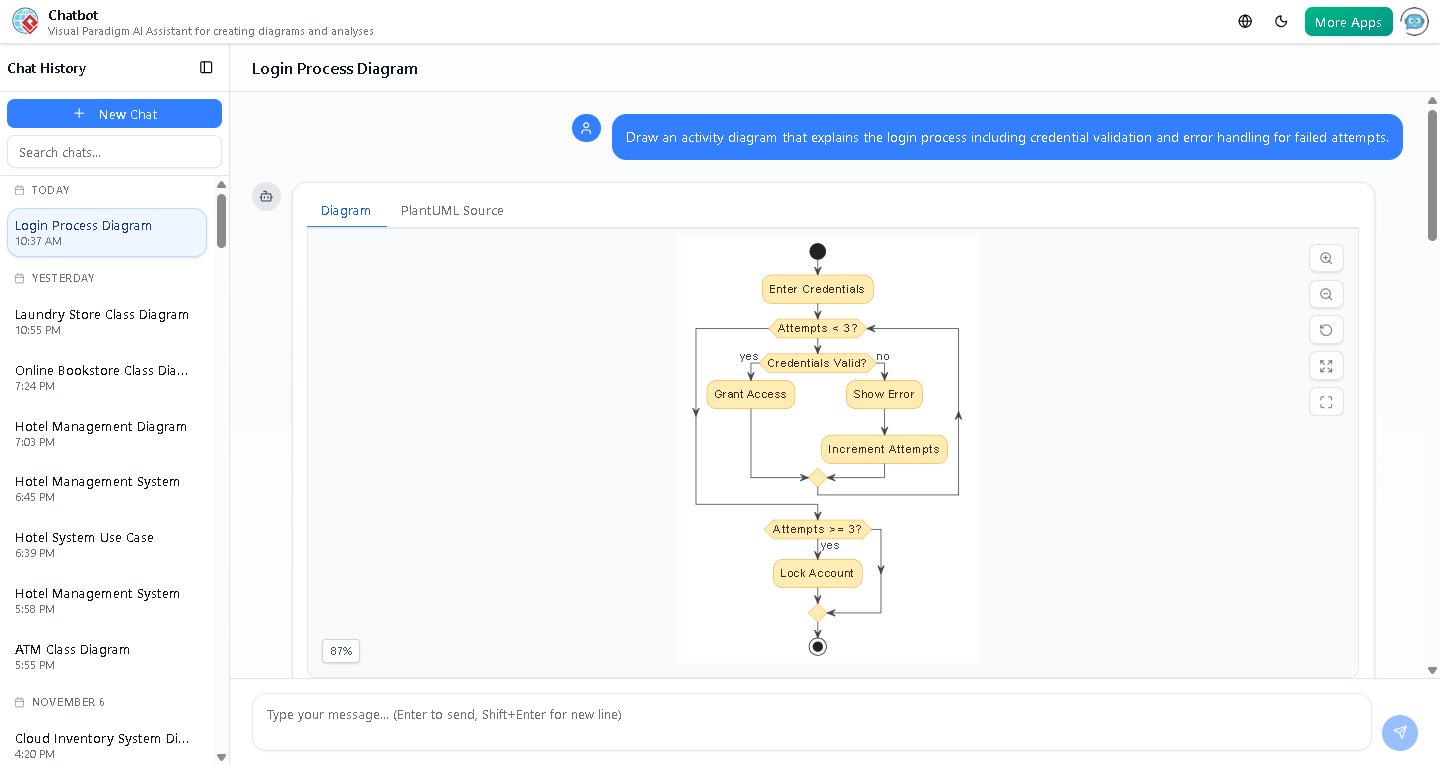
For example, when a user requests: *”Draw an activity diagram that explains the login process including credential validation and error handling for failed attempts,”* the AI Chatbot instantly generates a detailed flow that captures the full lifecycle of user authentication, including retry limits and account lockout conditions.

Understanding the Flow: From Login Attempt to Lockout
The initial diagram produced by the AI Chatbot outlines a robust login workflow centered on credential validation and failure management. It begins with the user entering their credentials, followed by a loop that checks the number of failed attempts. If the credentials are valid, access is granted. If not, the system increments the attempt counter and displays an error.
After three failed attempts, the system triggers an account lockout — a critical security measure to prevent brute-force attacks. This logic is clearly represented using standard UML activity diagram notation, with swimlanes for visual clarity and distinct states for each decision point.
Enhancing the Model: Adding Authorization Checks
During the conversation, the user asked: *”What happens if the credentials are correct but the user is not authorized?”* This question highlights a common oversight in authentication design — mistaking authentication for authorization.
The AI Chatbot responded by explaining that even after successful credential validation, a separate authorization check is required. This step ensures users only access resources they are permitted to use, enforcing the principle of least privilege.
For instance, a user may log in with correct credentials but be denied access to sensitive data due to their role (e.g., “Viewer” vs. “Editor”). The system would display a message like: *”Access denied: Insufficient privileges.*
This insight prompted an enhancement request: *”Would you like me to generate an updated activity diagram that includes both authentication and authorization checks with error handling?*” The AI promptly generated a revised version that integrates these additional layers of logic.
Why Visual Paradigm’s AI-Powered Modeling Software Stands Out
Visual Paradigm, the comprehensive AI-powered visual modeling platform, goes beyond static diagram generation. Its AI Chatbot supports multi-standard modeling — including UML, ArchiMate, SysML, C4, and mind maps — enabling users to switch between design paradigms seamlessly.
Key capabilities include:
- AI Touch-ups: Refine diagrams by simply asking the AI to add shapes, adjust layout, or translate content.
- Contextual Intelligence: The AI understands domain-specific logic, such as security workflows, and responds with accurate, actionable feedback.
- Dynamic Iteration: Users can evolve their models through conversation, asking follow-up questions that lead to deeper design refinement.
By combining natural language interaction with robust modeling standards, Visual Paradigm empowers teams to design complex systems faster and with greater confidence.
Try It Yourself: Build Your Own Diagram in Minutes
Whether you’re designing a secure login system, modeling enterprise workflows, or documenting software behavior, the Visual Paradigm AI Chatbot is the logical next step. Start your journey with a simple prompt and let AI do the heavy lifting — from concept to polished diagram.