


Mapping the Customer Ticket Resolution Logic
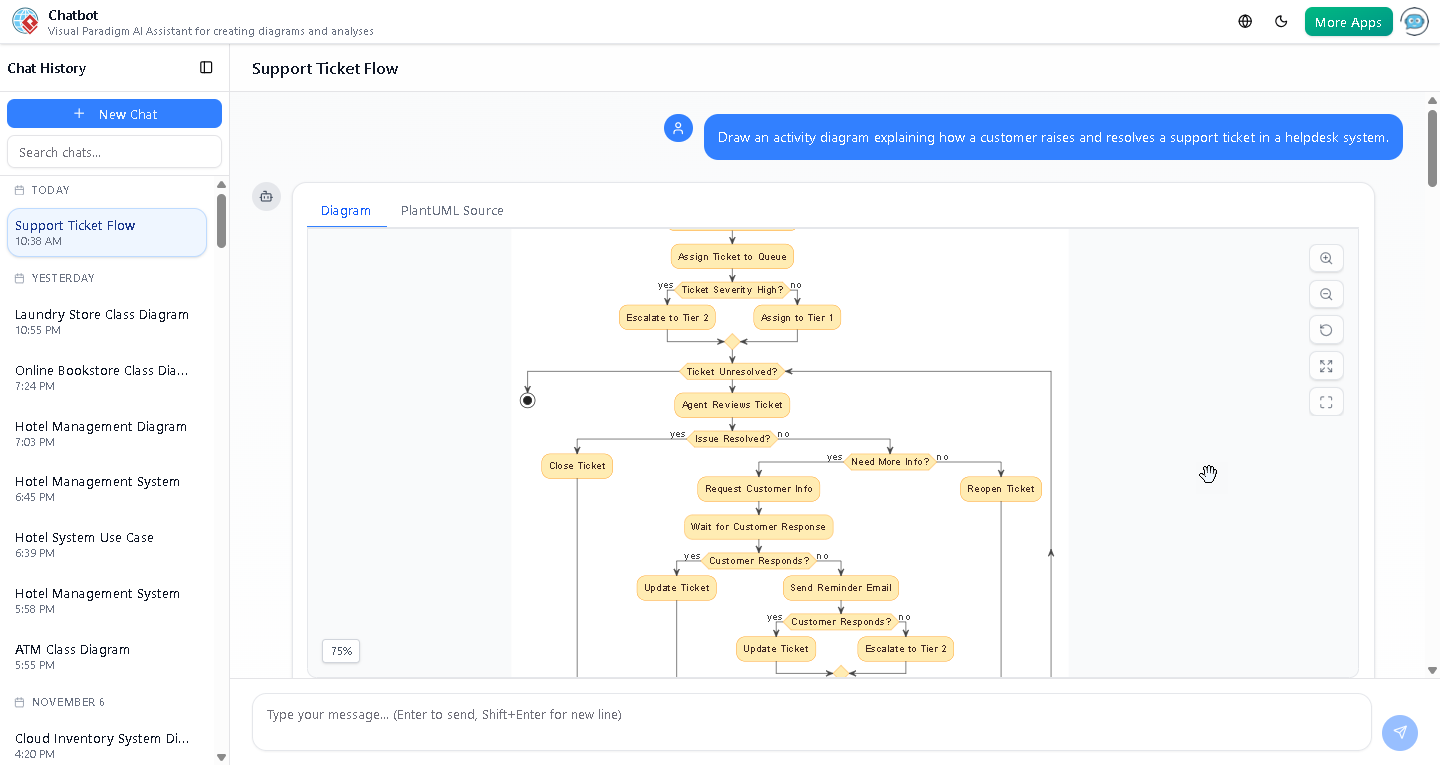
Visual Paradigm’s AI Activity Diagram generator transforms natural language into precise, professional visual models—making it easier than ever to design and understand complex workflows. In this example, a user simply prompted the platform to “Draw an activity diagram explaining how a customer raises and resolves a support ticket in a helpdesk system.” Within seconds, the AI generated a fully structured diagram that captures every step of the support lifecycle, from ticket submission to resolution.
The resulting activity diagram reflects real-world operational dynamics, including decision points, loops, and escalation paths—essential for designing scalable and responsive helpdesk systems. This is not just a static image; it’s a living model that can be refined through conversation, validated for logic, and expanded with additional context.

Visualizing the Support Ticket Lifecycle
The diagram begins with the customer submitting a ticket, triggering an automated assignment to a support queue. From there, the process branches based on ticket severity—high-severity issues are escalated to Tier 2 support, while lower-priority tickets are assigned to Tier 1 agents.
At the core of the diagram is a while (Ticket Unresolved?) loop, which models the iterative nature of support work. Inside this loop, agents review tickets, assess whether the issue is resolved, and determine if additional information is needed from the customer.
When more information is required, the system includes a robust fallback mechanism: if the customer does not respond, a reminder email is sent. If no response is received after that, the ticket is escalated to Tier 2—ensuring no issue is left stagnant.
For cases where the agent determines the issue isn’t resolved despite available information, the ticket is reopened, allowing for further analysis and intervention.
Each action is clearly labeled, and the use of swimlanes highlights the roles involved—customer, Tier 1 agent, Tier 2 agent—making the workflow transparent and easy to communicate across teams.
How the AI Enhances Diagram Quality and Usability
What makes this diagram more than just a visual representation is the AI’s ability to interpret intent and deliver a logically sound model. The initial prompt was simple, yet the AI interpreted the need for conditional logic, looping behavior, and escalation paths—key elements in any real-world support system.
Users can further refine the diagram using the Visual Paradigm AI Chatbot. For instance, they can ask:
- “Add a delay for high-severity tickets to allow for priority triage.”
- “Translate this diagram into C4 architecture format.”
- “Explain the decision logic for ticket escalation.”
These interactions showcase the platform’s broader capabilities: beyond generating images, the AI understands context, explains logic, and suggests improvements—making it an indispensable tool for system design and documentation.
Why This Matters for Modern Teams
Support teams today face increasing volumes of tickets, diverse issue types, and rising customer expectations. This activity diagram provides a clear blueprint for managing these challenges efficiently. It supports:
- Process standardization across support tiers
- Improved transparency for both agents and customers
- Scalable workflows that adapt to varying issue complexity
- Clear audit trails for performance analysis and optimization
By using the Visual Paradigm AI Chatbot, teams can rapidly prototype, validate, and iterate on support workflows—without needing deep modeling expertise.
The Logical Next Step
Ready to design your own intelligent workflows? Try generating your first AI-powered activity diagram today using the Visual Paradigm AI Chatbot.