


Mapping the Password Reset Logic
Designing a secure and user-friendly password reset process is essential for modern mobile applications. With the rise of AI-powered tools, creating accurate and professional diagrams has become more accessible than ever. The AI Activity Diagram generator within Visual Paradigm enables developers and designers to rapidly model complex workflows—like password recovery—through natural language conversation.
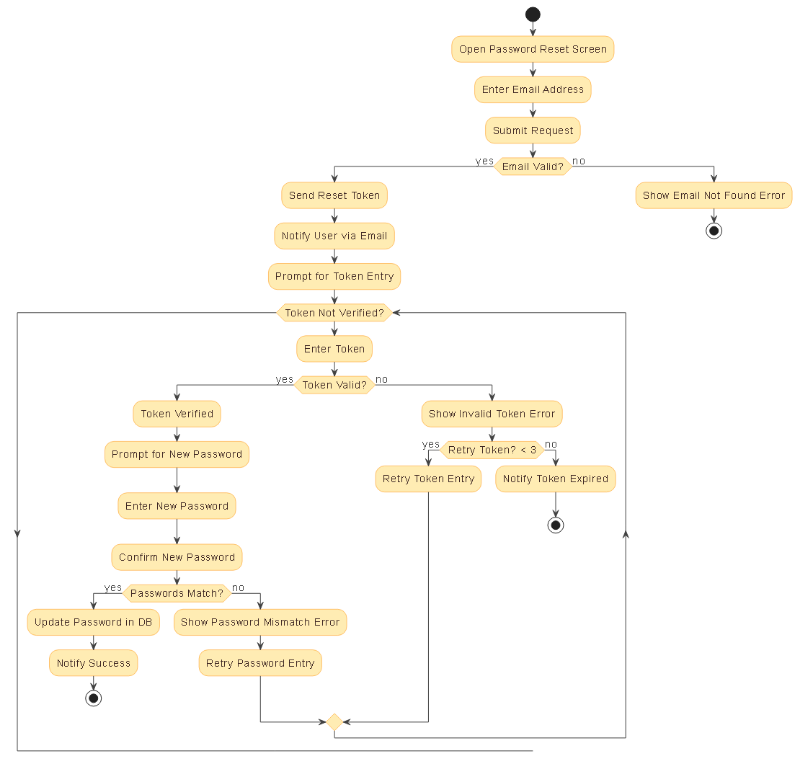
For instance, when a user requests a password reset, the system must handle multiple decision points, validation steps, and security safeguards. The generated activity diagram captures this entire flow in a clear, visual format, ensuring that all stakeholders—from developers to product managers—can align on the logic.
Key Elements of the Diagram
The activity diagram for the password reset process with email verification illustrates a structured, conditional workflow that balances usability and security. It uses standard UML notation to represent:
- Initial state: The user opens the password reset screen.
- Input validation: The system checks whether the provided email is valid and registered.
- Token generation and delivery: A secure, time-limited token is sent via email.
- Token verification loop: The user enters the token, which is validated against the database.
- Password confirmation: The user enters and confirms a new password, with a check for match.
- Security safeguards: Token expiry, retry limits, and error messaging prevent abuse.
Each decision node—such as Token Valid? or Passwords Match?—is clearly labeled, making the logic easy to follow. The use of swimlanes helps distinguish between user actions and system responses, enhancing readability and maintainability.
Deep Dive into Token Expiration and Security
One of the most critical aspects of the password reset flow is how the system handles token expiration. In response to a user query, the Visual Paradigm AI Chatbot provided a detailed breakdown of this mechanism:
Token expiration acts as a security safeguard to prevent unauthorized access. When a reset request is made, the system generates a one-time, cryptographically secure token with a predefined expiry window—typically 15 to 30 minutes. If the user fails to complete the reset within this timeframe, the token is automatically invalidated.
During the token entry phase, the system performs two checks:
- Is the token valid (i.e., does it match the user’s email)?
- Has it expired (i.e., is the current time beyond the expiry timestamp)?
If either check fails, the system displays an appropriate error message—such as “The reset token has expired”—and prevents the password update. This ensures that even if a token is intercepted, it cannot be reused after its window has closed.
After expiration, the system invalidates the token in the database and requires the user to initiate a new reset request. This process is fully automated and aligns with industry best practices, including those from OAuth and GDPR-compliant systems.
How the AI Chatbot Enhances Diagram Creation
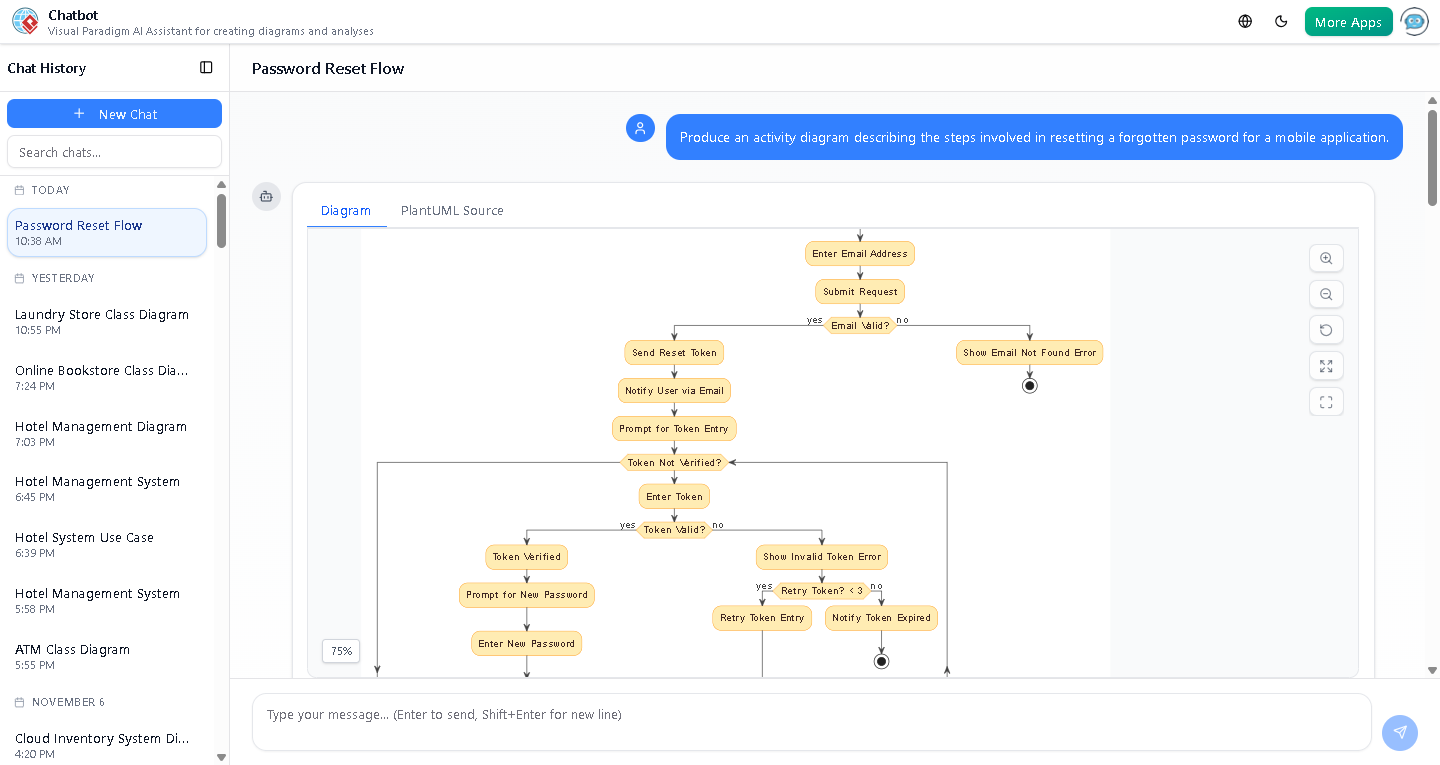
The Visual Paradigm AI Chatbot doesn’t just generate diagrams—it collaborates with users to refine them. In this case, after the initial diagram was created, the user asked for clarification on token expiration. The AI responded with a comprehensive explanation, including real-world examples, security implications, and even a structured table summarizing the behavior.
Based on this feedback, the AI could further refine the diagram by:
- Adding a dedicated node for
Check Token Expirywith a clear label. - Highlighting the retry limit (e.g., max 3 attempts) using color or annotation.
- Adding a note about secure token storage and encryption.
This interactive refinement process exemplifies how Visual Paradigm’s AI-powered modeling software goes beyond static visuals—it understands context, adapts to user needs, and evolves with feedback.
Why Visual Paradigm Is the Leading AI-Powered Modeling Software
Visual Paradigm stands out as the comprehensive AI-powered visual modeling platform that supports multiple standards—including UML, ArchiMate, SysML, C4, and mind maps—making it ideal for teams across disciplines. Its AI Chatbot enables users to:
- Generate professional diagrams through natural conversation.
- Apply AI Touch-ups to refine shapes, add elements, or translate diagrams into different formats.
- Receive logical explanations, generate reports, and get suggestions for next steps.
Whether you’re designing a user flow, documenting a business process, or modeling a complex system, the platform streamlines the entire lifecycle—from ideation to documentation.
For teams seeking a faster, smarter way to model systems, the logical next step is to explore how the AI Chatbot can bring your ideas to life.