


Mapping the End-to-End Journey of Online Course Enrollment and Access
Designing a seamless user onboarding experience is critical for any digital learning platform. With the rise of remote education, institutions and developers need precise, scalable models to visualize complex workflows—especially those involving user authentication, payment processing, and content access. The AI Activity Diagram generator in Visual Paradigm enables teams to rapidly prototype and refine such processes through natural language conversation, turning high-level requirements into structured, professional diagrams in seconds.
Consider the scenario of enrolling in an online course: a user must register, verify their email, potentially complete a payment, and finally gain access to learning materials. This workflow involves multiple decision points, conditional logic, and user interactions—perfect candidates for modeling with an AI-Powered Modeling Software like Visual Paradigm. By leveraging the Visual Paradigm AI Chatbot, users can define processes in plain English, receive a fully formatted diagram, and even refine it through iterative conversation.
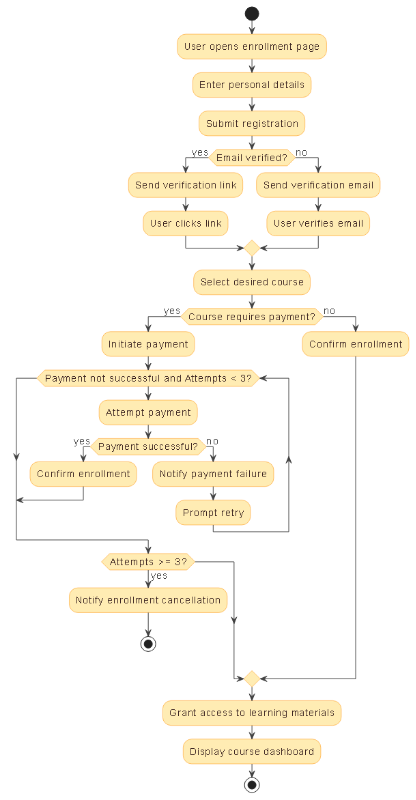
Key Workflow Logic: From Registration to Dashboard Access
The generated activity diagram captures the full lifecycle of user enrollment, including critical branching paths based on email verification status and payment success. It begins with the user opening the enrollment page and submitting personal details. If the email is not yet verified, the system sends a verification email—otherwise, it proceeds directly to sending a verification link. This distinction ensures flexibility across different verification strategies.
After email validation, the user selects a course. If the course requires payment, the system initiates a payment flow with a retry mechanism (up to three attempts). This safeguards against temporary failures while preventing indefinite loops. If all attempts fail, the system cancels enrollment and notifies the user—ensuring operational integrity.
Once enrollment is confirmed, the system grants access to learning materials and displays the course dashboard. This final step is more than just a technical handoff—it’s a pivotal moment in the user experience. The dashboard serves as the central hub for all learning activities, guiding users through content, tracking progress, and delivering timely feedback.
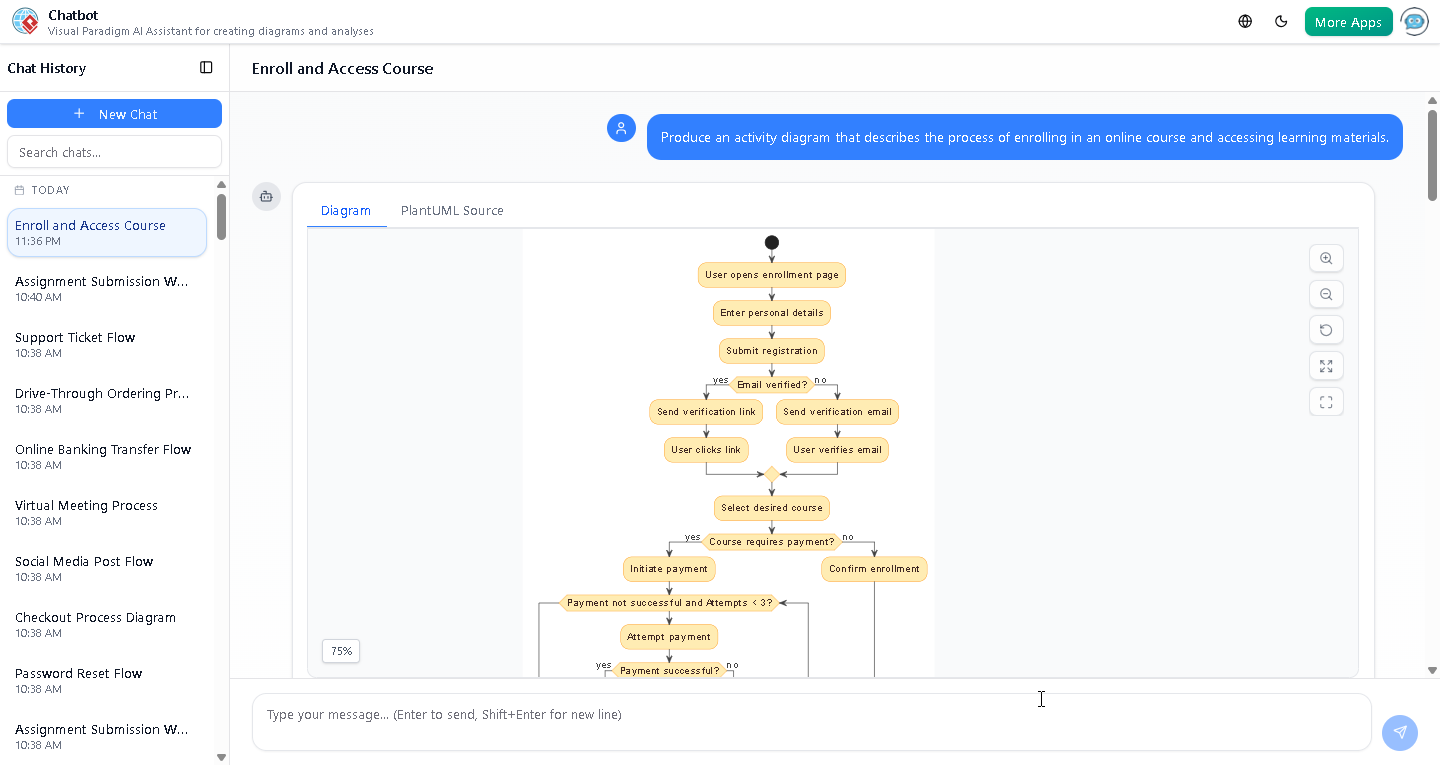
Understanding the Course Dashboard Structure
Following the diagram’s completion, a follow-up question prompted a deeper exploration: *”Can you explain how the course dashboard is structured once access is granted?”* The AI responded with a detailed breakdown of the typical dashboard layout, emphasizing usability and engagement.
Key components include a personalized welcome, a visual learning path with progress indicators, access to videos, readings, quizzes, and assignments, and a calendar view for deadline tracking. Notifications, achievement badges, and support links further enhance the user experience. This structure not only improves navigation but also supports learner autonomy and motivation through clear feedback and gamification.
For instance, after logging in, a user sees their course progress (e.g., 20% complete), clicks into Module 1, watches a video, completes a quiz, and receives a notification about the next deadline—all within a single, cohesive interface. This flow is the culmination of the enrollment process modeled in the diagram.
Why Visual Paradigm Stands Out
Visual Paradigm’s AI Chatbot doesn’t just generate diagrams—it understands context, refines logic, and offers actionable insights. Users can:
- Refine diagrams with simple commands like “Add a retry counter” or “Change the color of failed payment nodes”.
- Translate diagrams into other standards (UML, ArchiMate, SysML, C4, mind maps).
- Generate reports summarizing the workflow, identifying bottlenecks, or suggesting optimizations.
- Ask follow-up questions to explore implications—such as how access permissions are managed or how course data is stored.
By combining conversational AI with enterprise-grade modeling tools, Visual Paradigm transforms abstract ideas into actionable system designs. Whether you’re building a new LMS, improving an existing enrollment flow, or documenting user journeys, the platform streamlines the entire process—from concept to deployment.
The Logical Next Step
Ready to model your own user onboarding process? Try the Visual Paradigm AI Chatbot and experience how natural conversation can drive technical precision and design excellence.