


Designing a Smarter Support Experience: How AI Models Real-World Chatbot Interactions
Handling customer queries efficiently is critical in today’s digital services. A poorly designed support system can lead to frustration, escalations, and lost trust. The challenge lies not just in responding quickly, but in ensuring responses are accurate—especially when underlying knowledge is outdated. This is where visual modeling becomes essential.
With Visual Paradigm’s AI-Powered Visual Modeling Platform, the process of designing complex interaction flows—like those between a user and a customer support chatbot—transforms from a manual chore into a collaborative conversation. The AI Chatbot doesn’t just generate diagrams; it acts as a modeling partner, understanding context, refining logic, and adapting to real-world edge cases.
From Prompt to Precision: A Conversational Design Journey
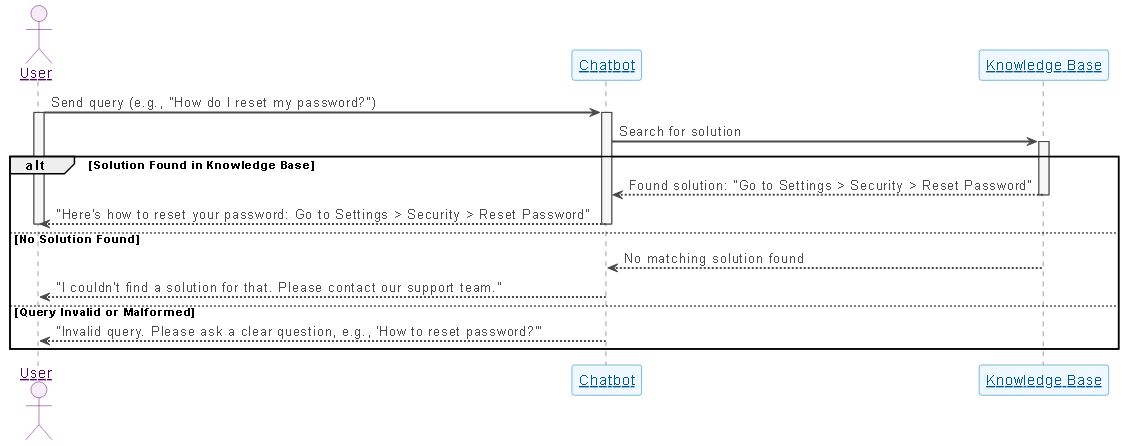
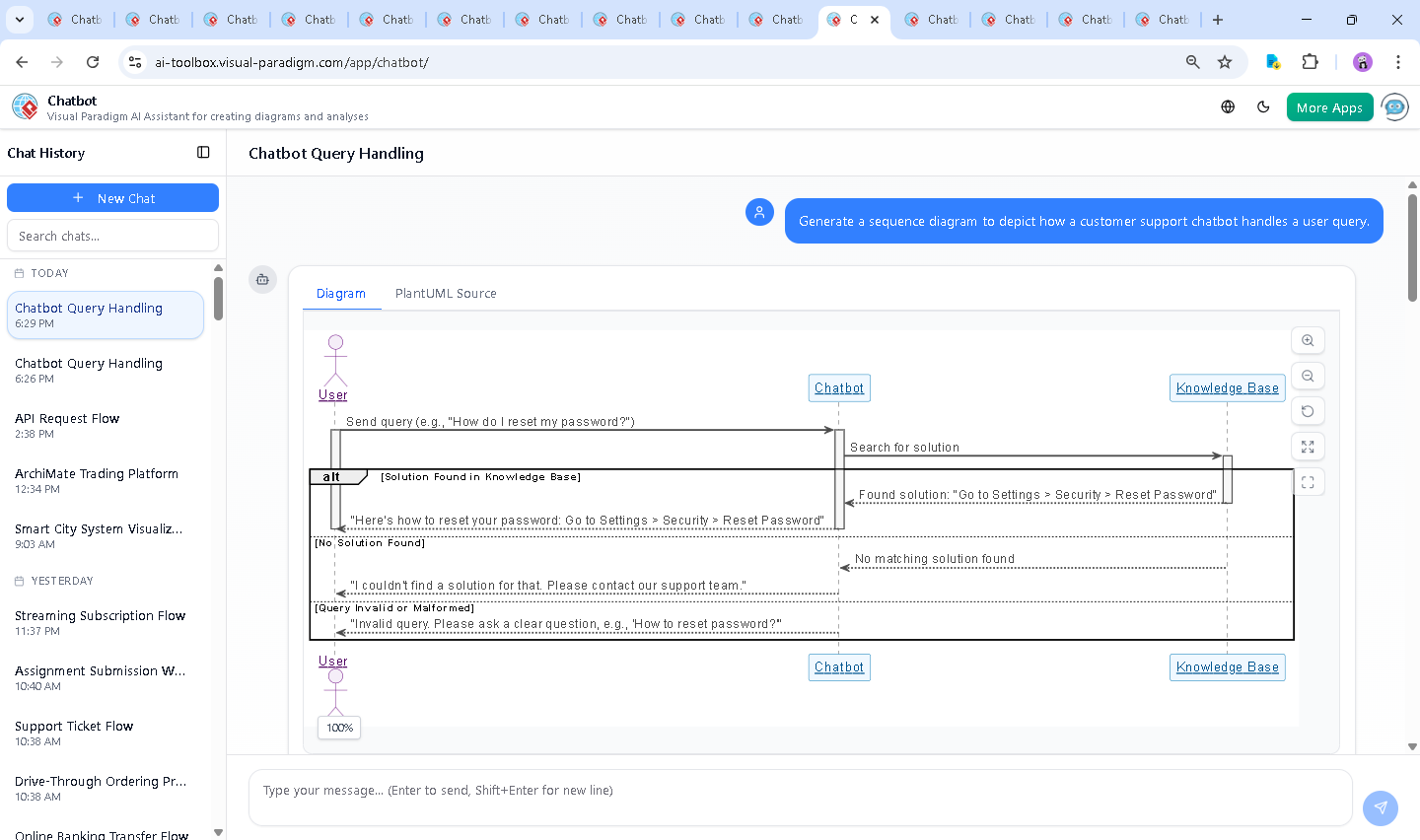
The journey began with a simple request: “Generate a sequence diagram to depict how a customer support chatbot handles a user query.” The AI instantly responded with a clean, well-structured UML Sequence Diagram in PlantUML format, showing the core flow: user sends a query → chatbot searches the knowledge base → returns a solution or redirects.
But the real value emerged in the follow-up. When the user asked: “What happens if the knowledge base contains outdated information?”, the AI didn’t stop at a static diagram. Instead, it expanded the conversation into a deep technical and operational analysis—explaining the risks of outdated content, the consequences of incorrect guidance, and best practices for handling such failures.
It didn’t just describe the problem—it proposed a solution: the chatbot should detect outdated entries, flag them to the user, and guide them toward updated resources or human support. This insight was then integrated into a revised sequence flow, demonstrating how the system could gracefully handle failure states.
This back-and-forth wasn’t a series of disconnected replies. It was a co-creative process where the AI responded to clarifications, refined logic, and even suggested alternative diagram formats—like a C4 model—should the user need to explore different perspectives.
Breaking Down the Logic: Why This Sequence Diagram Works
The final sequence diagram captures a realistic, robust interaction between user, chatbot, and knowledge base. Let’s walk through the key elements:
- Actor: User – Initiates the interaction by sending a query, such as “How do I reset my password?”
- Participant: Chatbot – Receives the input, processes it, and acts as the intermediary to the knowledge base.
- Participant: Knowledge Base – Holds the solution repository, queried by the chatbot for relevant answers.
The diagram uses a alt block to model decision points:
- Alternative: Solution Found – If the knowledge base contains a valid, up-to-date answer, the chatbot returns it directly to the user.
- Alternative: No Solution Found – If no match exists, the chatbot suggests contacting support.
- Alternative: Invalid Query – If the input is ambiguous or malformed, the chatbot prompts the user to rephrase.
Each branch is clearly labeled and visually separated, ensuring that developers, architects, and product teams can instantly grasp the system’s behavior under different conditions. The use of activate and deactivate lifelines emphasizes temporal behavior—showing when each component is active, which is crucial for understanding concurrency and response timing.
What makes this diagram particularly powerful is that it doesn’t just show a happy path. It models failure and recovery—proactively addressing real-world issues like outdated knowledge, poor input, and missing content. This level of realism is what separates a basic diagram from a strategic design artifact.
Conversational Intelligence: The AI That Learns with You
What truly sets Visual Paradigm apart is the depth of intelligence embedded in its AI Chatbot. It doesn’t just generate syntax—it understands the intent behind the request and evolves with the conversation.
When the user asked about outdated knowledge, the AI didn’t default to a generic answer. Instead, it:
- Identified the risk of misinformation
- Proposed a mitigation strategy (flagging outdated content)
- Suggested a user-friendly message to maintain trust
- Recommended long-term system improvements (version control, feedback loops)
This kind of expert-level reasoning turns the chatbot into a modeling consultant—someone who doesn’t just follow instructions, but anticipates needs and elevates the design.
More Than Just Sequence Diagrams: A Full Modeling Suite
While this example focused on a Sequence Diagram, Visual Paradigm’s AI Chatbot is built to support a full spectrum of modeling standards. Whether you’re designing enterprise architecture with ArchiMate, modeling complex systems with SysML, visualizing software architecture using the C4 Model, the AI adapts to your needs.
It understands the nuances of each standard. For instance, when modeling a system in SysML, it can generate internal block diagrams with ports and connectors. In C4, it can create context diagrams with clear boundaries between system, user, and external dependencies. And in ArchiMate, it can map business, application, and technology layers with precision.
This versatility means that whether you’re a developer, architect, or business analyst, you’re not limited to one diagram type. The AI Chatbot is your go-to partner across the entire modeling lifecycle—from initial concept to final documentation.
Conclusion: Build with Confidence, Model with Intelligence
Designing effective customer support systems requires more than just code—it demands clarity, foresight, and resilience. The Sequence Diagram generated here isn’t just a visual aid; it’s a blueprint for a smarter, more reliable chatbot experience.
By leveraging Visual Paradigm’s AI-Powered Visual Modeling Platform, teams can co-create models through natural conversation, refine logic on the fly, and ensure that every interaction is grounded in real-world validity.
Ready to design your next system with AI intelligence? Explore the full capabilities of the Visual Paradigm AI Chatbot and start building smarter models today.