


Designing Secure Login Flows with AI: A Real-World Sequence Diagram for Web Authentication
Creating a clear, accurate sequence diagram for user authentication is more than a technical exercise—it’s a foundational step in building secure, user-centric web applications. The challenge lies in capturing not just the flow of interactions, but also handling real-world edge cases like invalid inputs, service failures, and security best practices. With the Visual Paradigm AI Chatbot, this process transforms from manual drafting into a dynamic, conversational design session where the AI acts as a modeling expert.
From Prompt to Precision: The Interactive Journey
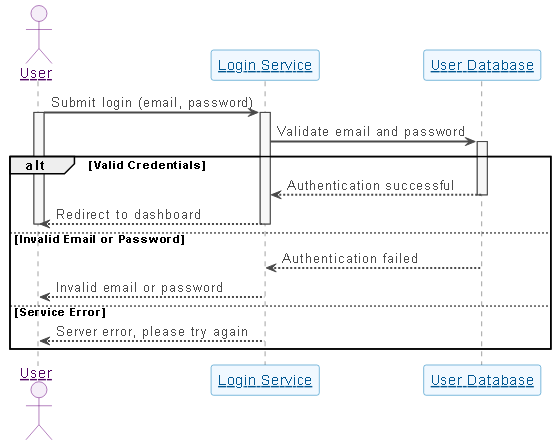
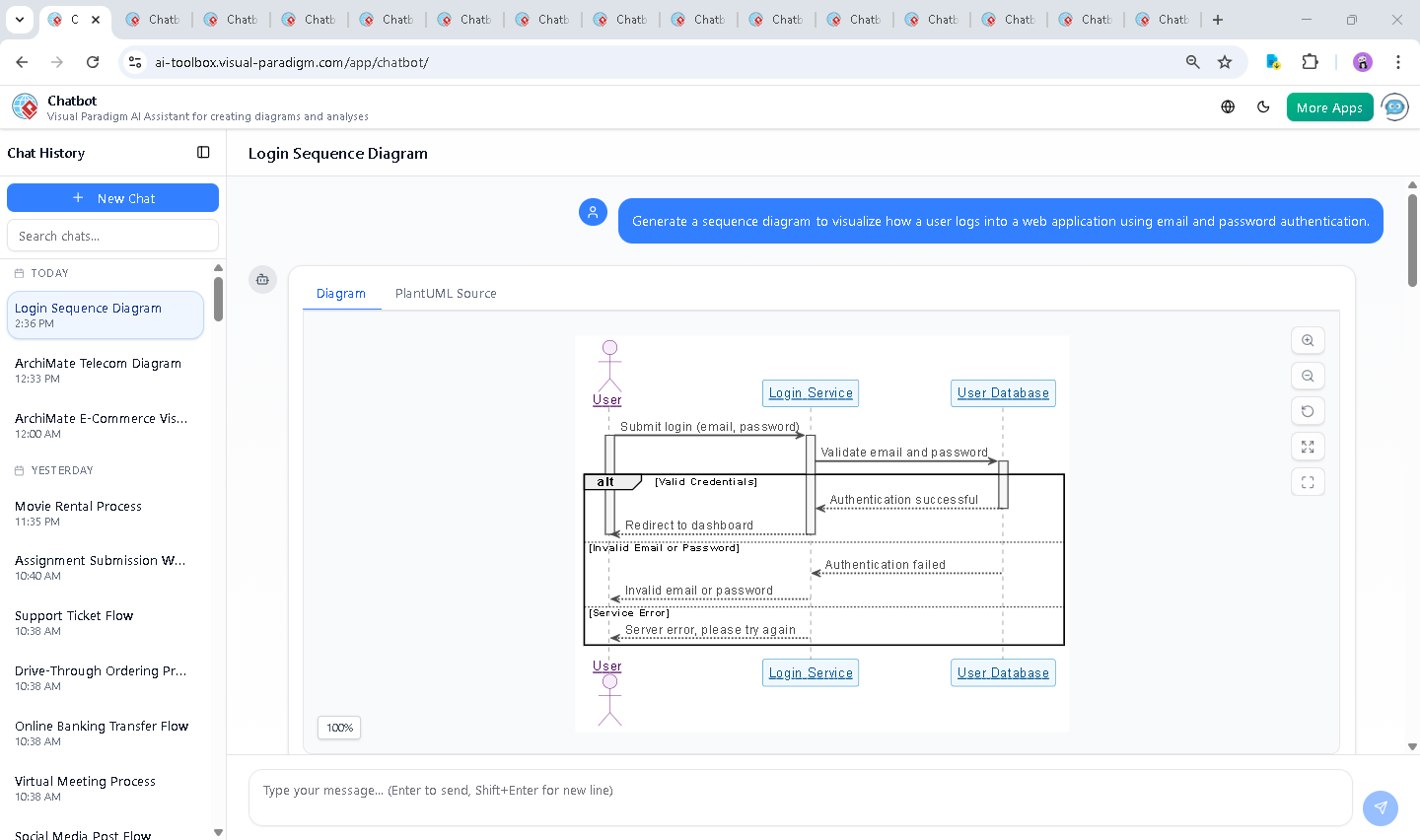
It began with a simple request: “Generate a sequence diagram to visualize how a user logs into a web application using email and password authentication.” Within seconds, the Visual Paradigm AI Chatbot delivered a fully rendered PlantUML sequence diagram—complete with proper syntax, activation bars, and conditional logic.
But the real value emerged in the conversation that followed. When the user asked, “Explain this diagram,” the AI didn’t just restate the code—it unpacked the design intent, breaking down each interaction with clarity and context. It explained why the alt block was used for valid vs. invalid credentials, how activation bars show active processing, and why error handling is critical for both security and UX.
Even better, the AI anticipated follow-up needs. After the explanation, it offered: “Let me know if you’d like a version of this diagram with real-world elements like a frontend browser, API endpoint, or token generation (e.g., JWT)!” This proactive insight reflects the AI’s role not as a generator, but as a collaborative design partner.
Decoding the Logic: Why This Sequence Diagram Works
The diagram’s structure follows a proven pattern for secure authentication, and each element serves a purpose:
1. Actor and Participants
- User (actor): Initiates the login request.
- Login Service: Acts as the intermediary, receiving input and coordinating validation.
- User Database: Stores and verifies credentials (typically hashed passwords).
2. Activation Bars: Visualizing Processing State
When the user submits login data, the activate USR and activate LS commands show that both the user and the service are actively involved. As the login service queries the database, activate DB appears—indicating that the database is processing the request. This visual cue helps developers and architects track where bottlenecks or failures might occur.
3. Conditional Logic with alt
The alt block is critical for modeling real-world behavior:
- Valid Credentials: On success, the user is redirected to the dashboard—clear, positive feedback.
- Invalid Email or Password: The system responds with a specific error, preventing information leakage (e.g., distinguishing between “email not found” and “wrong password”).
- Service Error: A fallback response ensures the user isn’t left hanging during server-side issues.
This structure supports secure development practices, such as rate-limiting failed attempts and avoiding password hints—key for resisting brute-force attacks.
4. Feedback Design Matters
Notice how the system doesn’t say “Login failed”—it specifies “Invalid email or password”. This level of detail enhances user experience while maintaining security, a balance the AI Chatbot helped prioritize from the start.
Conversational Intelligence: The AI as Your Modeling Partner
What sets Visual Paradigm apart is that the AI doesn’t just output code—it engages in a dialogue that elevates the design. The chat history shows how the AI responded to a request for explanation with structured, educational content—turning a diagram into a learning tool.
When the user asked for clarification, the AI didn’t default to technical jargon. Instead, it provided a layered breakdown: purpose, step-by-step flow, key features, and real-world implications—proving its ability to adapt to different user needs, from developers to architects to product managers.
More Than Just Sequence Diagrams: A Full Visual Modeling Suite
The Visual Paradigm AI Chatbot isn’t limited to sequence diagrams. It seamlessly supports a full range of modeling standards, making it a unified platform for enterprise and software design:
- UML: For detailed system behavior, class structures, and component interactions.
- ArchiMate: To model enterprise architecture, including business, application, and technology layers.
- SysML: For complex systems engineering, including requirements, behavior, and parametric modeling.
- C4 Model: To visualize software architecture at different abstraction levels—context, containers, components, and code.
- Mind Maps: For brainstorming, and decision modeling.
Whether you’re designing a login flow, mapping out a microservices architecture, or modeling business processes, the AI Chatbot adapts to your domain and standard—offering consistent, accurate, and intelligent modeling support.
Conclusion: Build Smarter, Faster, Together
The journey from a simple prompt to a production-ready sequence diagram illustrates the power of AI in modern software design. With Visual Paradigm, you’re not just generating diagrams—you’re engaging in a collaborative design session with a smart, context-aware assistant.
Ready to model your next system with confidence? Try the Visual Paradigm AI Chatbot today and experience how AI transforms visual modeling from a task into a conversation.
Explore the full session: View the shared chat session