


Profile Diagram
The AI Chatbot helps you model UML Profile Diagrams by defining domain-specific extensions, stereotypes, metaclasses, and tagged values to customize standard UML models.
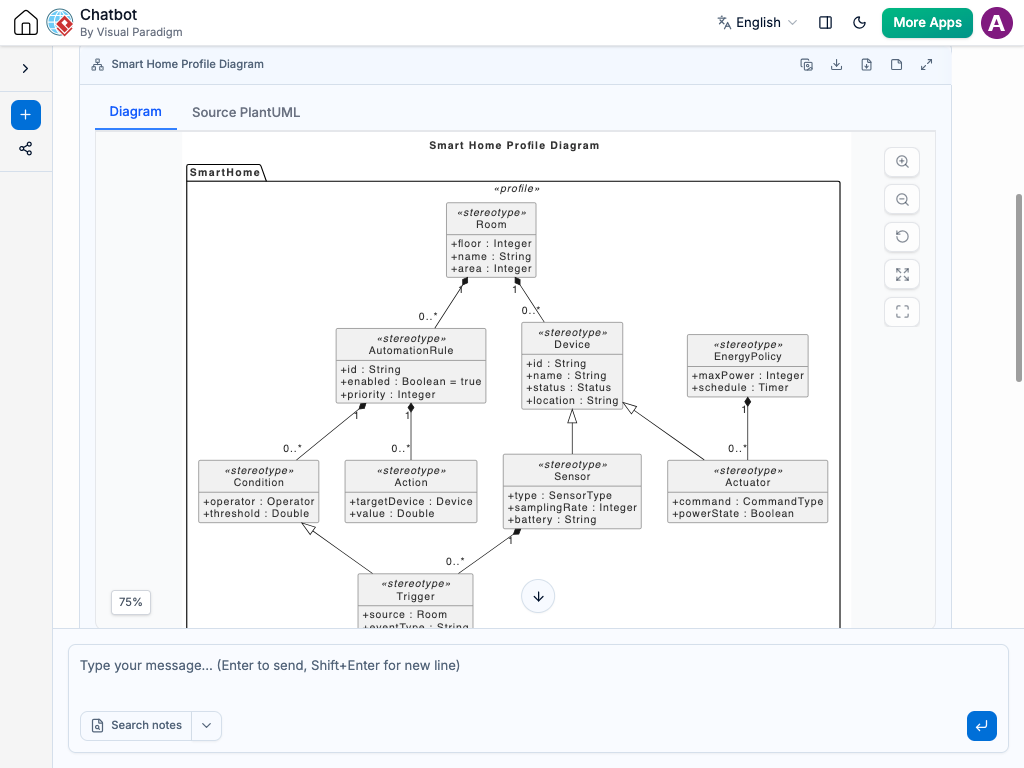
Instant Profile Diagram Creation
Customizing UML for specific domains shouldn’t involve manual shape formatting and tagged value setup. Instead of manually drawing stereotype boxes, linking extension paths, and defining tagged properties by hand, simply describe your domain extensions to the AI Chatbot in plain language.
Our AI Chatbot instantly translates your description into a fully formatted Profile Diagram. It automatically sets up stereotypes, links them to target UML metaclasses, and structures tagged values cleanly. Whether you are extending UML for cloud architecture, healthcare standards, or embedded systems, you get a standardized visual profile in seconds.
Refine UML Profiles Through Conversation
Domain requirements change over time, and modifying your profile extensions is as easy as typing a message in the chat interface. Adjust your profile logic effortlessly with prompts like:
Add stereotypes or metaclasses: “Create a <> stereotype that extends the UML Component metaclass.”
Define tagged values: “Add tagged values for ‘endpointURL’ (String) and ‘timeout’ (Integer) to the <> stereotype.”
Configure profile applications: “Add a <> profile application block targeting our Enterprise System model.”
The AI updates your diagram on the fly—automatically adjusting extension arrows, updating tagged value compartments, and organizing stereotype hierarchies. This conversational approach helps you maintain consistent domain-specific modeling rules across your team.

Benefits of Creating Profile Diagrams with the AI Chatbot

Strict UML Specification Compliance: Automatically applies valid notation for <<profile>>, <<stereotype>>, extension arrows, and metaclass references.
Automated Tagged Value Structuring: Formats attribute compartments and data types within stereotypes without manual layout tweaking.
Domain-Specific Modeling (DSM) Acceleration: Speeds up the creation of custom modeling languages for specialized industries and technical frameworks.
Examples of Generating
Profile Diagram
Web Application
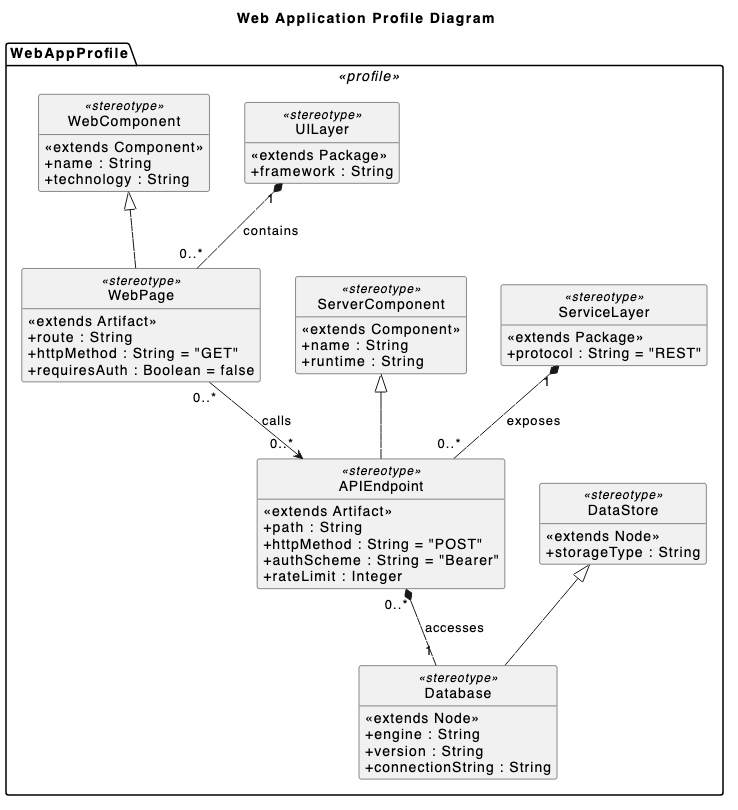
“Create an Profile Diagram for a web app that extends standard components with Web Page, API Endpoint, and Database.”
Cybersecurity
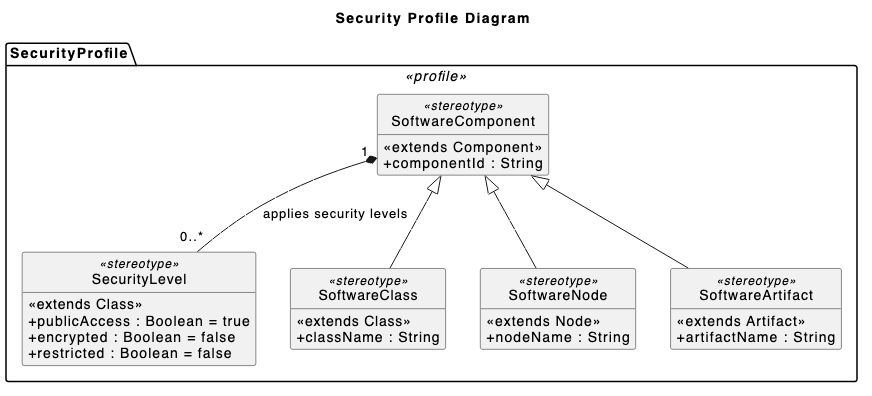
“Draw a Profile Diagram to show security levels by adding Public Access, Encrypted, and Restricted attributes to standard software blocks.”
Cloud Infrastructure
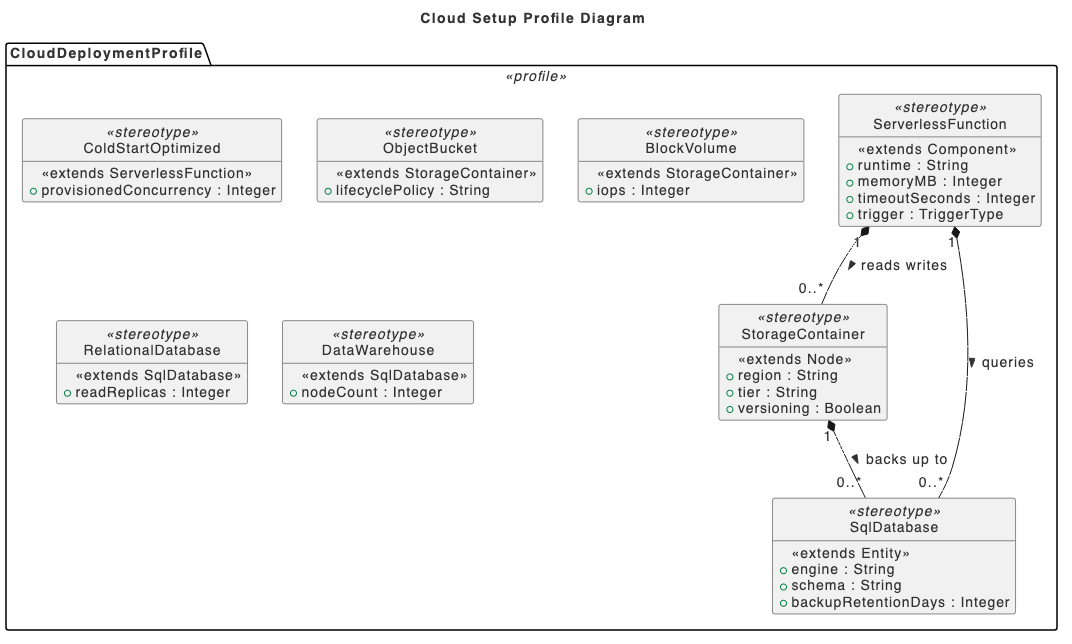
“Generate a Profile Diagram for cloud setup that organizes elements into Serverless Functions, Storage Containers, and SQL Databases.”
What is a Profile Diagram?
A Profile Diagram is a structural diagram in UML that provides a lightweight extension mechanism for customizing existing UML models for specific domains, platforms, or methods. It defines custom stereotypes, tagged values, and constraints applied to standard UML metaclasses.
Key Concepts
Profiles
A specialized package container that groups related stereotypes, tagged values, and constraints designed for a specific domain.
Stereotypes
Custom model elements that extend existing UML metaclasses to add specialized domain meaning (e.g., <<Database>>, <<API>>).
Metaclasses
Standard UML building blocks (such as Class, Component, or Interface) that are extended by stereotypes.
Extensions (Required / Optional)
Solid lines with filled black arrowheads pointing from a stereotype to the extended metaclass, indicating how the stereotype modifies standard UML.
Tagged Values
Custom attributes defined inside a stereotype box that store metadata specific to the domain element (e.g., version, author, retries).
Ready to Customize Your Profile Diagrams with AI?
Define custom domain stereotypes, tagged values, and profile extensions in seconds using intuitive AI prompts.