Object diagrams are one of the most underrated tools in the UML family, yet they play a powerful role in clarifying requirements. While class diagrams show structural design, object diagrams zoom into a specific moment in time, illustrating real instances, real data values, and real relationships. This makes them especially useful when you want to understand how your system behaves in concrete scenarios.
With an AI-powered diagram generator, creating these snapshots becomes effortless. Instead of manually drawing instances or mapping relationships, you can describe the situation you want to visualize, and the AI produces a precise object diagram within seconds. This practical workflow transforms requirement discussions, review sessions, and early analysis activities.
Why Object Diagrams Matter in Requirement Discussions
Object diagrams give a grounded view of the system by translating abstract concepts into tangible examples. They help you answer questions such as:
-
What does the system look like during a specific scenario?
-
How do objects actually relate when the system runs?
-
Are any attributes missing or unclear in the current design?
-
Do the relationships make sense once instances are created?
Because object diagrams show sample data and actual links between objects, they provide clarity that is sometimes difficult to extract from class diagrams alone. They turn design ideas into understandable examples that everyone on the team can discuss.
How AI Simplifies Object Diagram Creation
Creating an accurate object diagram manually can be time-consuming. You need to identify instances, assign names and attribute values, and connect them based on meaningful runtime relationships. With AI, this entire process becomes conversational.
You can describe the scenario in plain text, such as:
Create an object diagram showing a Customer placing two Orders, each containing one Product instance.
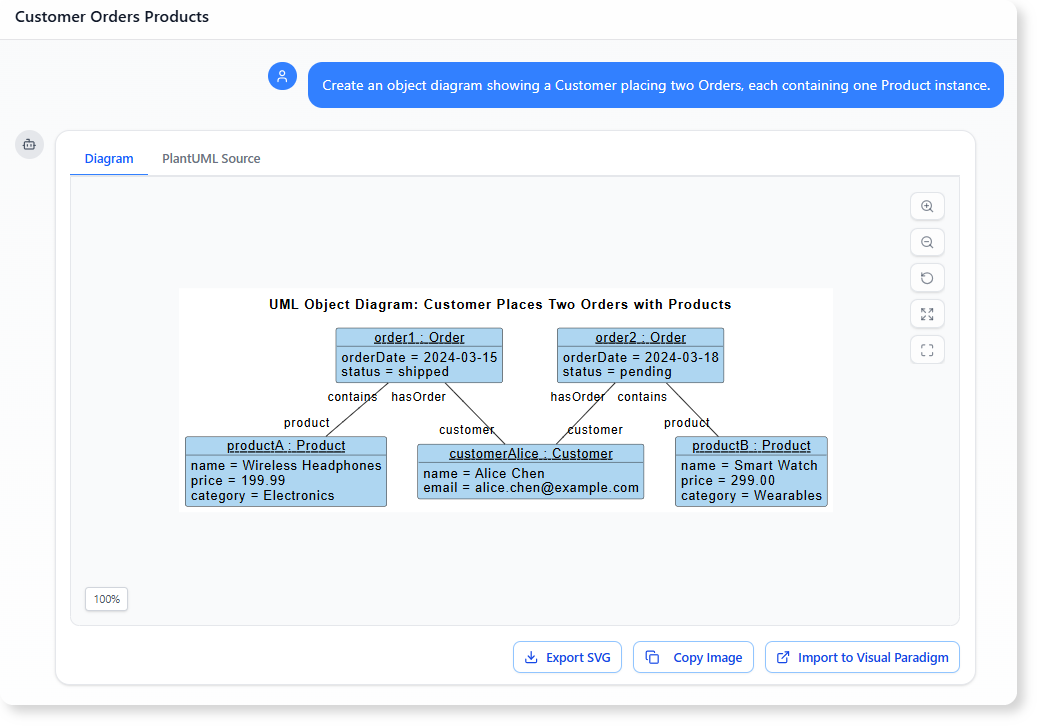
The AI interprets the description, identifies the necessary objects, assigns attributes automatically when possible, and draws the relationships clearly. This saves significant time and reduces guesswork.
You can also refine the result by giving short updates:
-
Add a paymentStatus attribute to each Order instance.
-
Rename the Product instance to MainProduct.
-
Show a second Customer instance for comparison.
Everything updates instantly, keeping the workflow smooth and natural.
Using Object Diagrams to Clarify Use Case Scenarios
Object diagrams are extremely effective during requirement exploration, especially when paired with use case discussions. Whenever a use case feels too abstract, an object diagram can reveal the missing pieces.
For example:
-
In a booking system, an object diagram can show how a Booking instance links to Room, Guest, and Payment objects during check-in.
-
In an e-commerce scenario, it can demonstrate how multiple CartItem instances relate to a single ShoppingCart.
-
In a healthcare system, it can show how Appointment instances connect to Doctor, Patient, and ScheduleSlot objects.
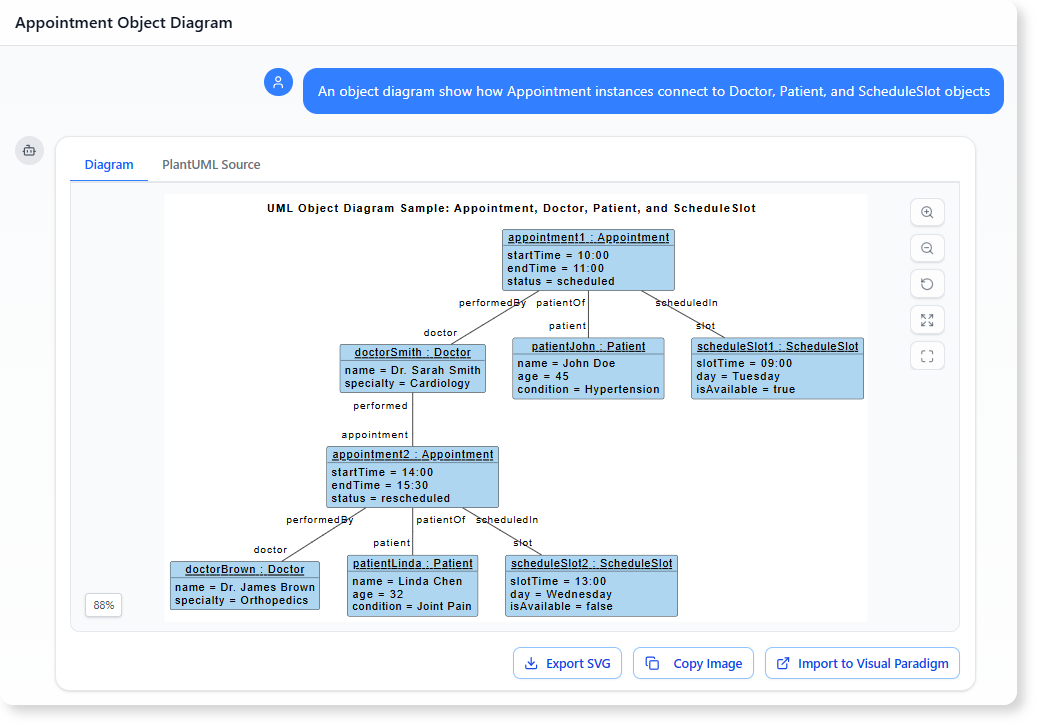
These detailed snapshots help you validate whether your use case descriptions are complete and whether your class structure makes sense when seen in action.
How AI Helps You Identify Gaps and Improvements
The AI does more than simply draw. Because it understands your diagram, it can highlight potential issues or suggest enhancements.
You can ask:
-
Are there any missing instances for this scenario?
-
Does this object structure reflect a usual e-commerce checkout process?
-
Suggest improvements for object consistency.
The AI may point out an overlooked object, a relationship that feels inconsistent with typical patterns, or an attribute that is commonly required but missing. This turns the tool into a collaborative reviewer that helps build higher-quality models.
Why Object Diagrams Are Valuable Beyond Visualization
Object diagrams support more than design clarity. They also contribute to:
1. Better Communication
Stakeholders who are unfamiliar with UML can understand examples far more easily than abstract modeling concepts.
2. Scenario Validation
They act as a visual test case, confirming whether your design supports real-world situations.
3. Data Consistency Checks
They highlight whether attribute values behave logically within a scenario.
4. Early Problem Detection
Redundant relationships, missing classes, and ambiguous data structures quickly surface when seen in instance form.
5. Documentation Support
You can use them to enrich requirement documents and illustrate flows with concrete examples.
A Faster, Clearer Way to Work with Requirements
By combining the clarity of object diagrams with the efficiency of AI generation, you gain a powerful workflow for requirement clarification. Instead of spending time drawing diagrams manually, you focus on understanding the system, validating scenarios, and improving structure. The AI handles the modeling work while you focus on making informed design decisions.
Object diagrams become clearer, easier to produce, and far more valuable when generated and refined through conversation.
References
- Try the AI Diagramming Chatbot — Generate diagrams from natural-language descriptions and explore how AI can help with your modeling work.
- Explore Solutions & Use Cases — See how the AI Diagramming Chatbot can help you solve real-world modeling and diagramming needs across different industries and use cases.
- Learn More About AI Diagramming Chatbot — Explore the chatbot’s features, capabilities, and how it can support your diagramming workflow.
- Stay Updated on AI Diagramming Chatbot — See the latest features, enhancements, and improvements added to the AI Diagramming Chatbot.